Yes! You can use AI to fill out Form MC 258, Report of Nonpayment of Restitution
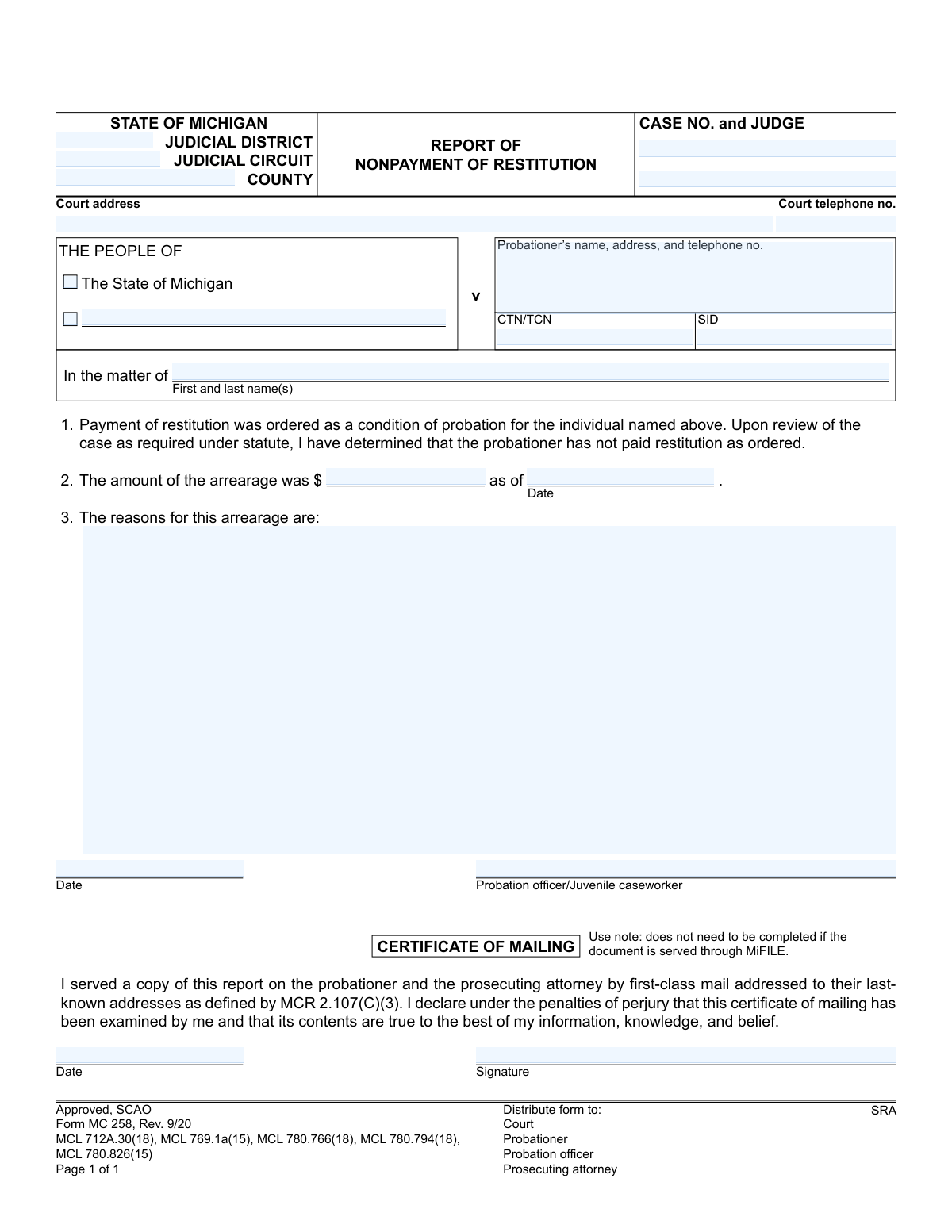
Form MC 258 is a legal document used within the Michigan judicial system by a probation officer or juvenile caseworker to report a probationer's failure to pay restitution as ordered by the court. This report initiates a review process and is a crucial step in enforcing the terms of probation and ensuring victims receive their court-ordered compensation. Today, this form can be filled out quickly and accurately using AI-powered services like Instafill.ai, which can also convert non-fillable PDF versions into interactive fillable forms.
MC 258 is part of the
Michigan court forms category on Instafill.
Our AI automatically handles information lookup, data retrieval, formatting, and form filling.
It takes less than a minute to fill out MC 258 using our AI form filling.
Securely upload your data. Information is encrypted in transit and deleted immediately after the form is filled out.
Form specifications
| Form name: | Form MC 258, Report of Nonpayment of Restitution |
| Number of fields: | 21 |
| Number of pages: | 1 |
| Language: | English |
More forms in Michigan court forms
Instafill Demo: How to fill out PDF forms in seconds with AI
How to Fill Out MC 258 Online for Free in 2026
Are you looking to fill out a MC 258 form online quickly and accurately? Instafill.ai offers the #1 AI-powered PDF filling software of 2026, allowing you to complete your MC 258 form in just 37 seconds or less.
Follow these steps to fill out your MC 258 form online using Instafill.ai:
- 1 Navigate to Instafill.ai and upload or select the 'Report of Nonpayment of Restitution' (Form MC 258).
- 2 Provide the court and case information, including the judicial district, county, case number, and judge's name.
- 3 Enter the probationer's full name, address, and other identifying numbers like CTN/TCN and SID.
- 4 Specify the total amount of the restitution arrearage and the date as of which this amount is calculated.
- 5 Describe the reasons for the arrearage in the provided section based on the case review.
- 6 Review all the information populated by the AI for accuracy, then e-sign and date the form as the reporting officer.
- 7 Download, print, or electronically file the completed MC 258 form with the court and serve copies to the required parties.
Our AI-powered system ensures each field is filled out correctly, reducing errors and saving you time.
Why Choose Instafill.ai for Your Fillable MC 258 Form?
Speed
Complete your MC 258 in as little as 37 seconds.
Up-to-Date
Always use the latest 2026 MC 258 form version.
Cost-effective
No need to hire expensive lawyers.
Accuracy
Our AI performs 10 compliance checks to ensure your form is error-free.
Security
Your personal information is protected with bank-level encryption.
Frequently Asked Questions About Form MC 258
This form is used by a probation officer or juvenile caseworker to officially notify the court that an individual on probation has failed to pay their court-ordered restitution as required.
A probation officer or juvenile caseworker is responsible for completing and signing this report after reviewing a case and determining that restitution payments are delinquent.
Receiving this form means the court has been notified that you are behind on payments. You should contact your probation officer immediately to discuss the situation, as it could lead to a court hearing or other consequences.
The 'arrearage' is the total amount of restitution that is past due as of the date specified on the form. It represents the money the probationer was ordered to pay but has not yet paid.
This section should contain a brief explanation for the nonpayment, as known by the probation officer. This could include details like unemployment, a change in circumstances, or a refusal to pay.
After the report is filed, the court may schedule a hearing to address the nonpayment of restitution. This could result in a modified payment plan, an extension of probation, or even probation revocation.
As indicated at the bottom of the form, copies are distributed to the court, the probationer, the probation officer, the prosecuting attorney, and the SRA (State Repository Agency).
These are unique identifiers used in the justice system. CTN/TCN stands for Charging/Tracking Control Number and SID is the State Identification Number, both used to accurately track the case and individual.
You only need to complete this section if you are serving the report via first-class mail. The form notes that it is not required if the document is served electronically through Michigan's e-filing system, MiFILE.
Yes, services like Instafill.ai use AI to auto-fill form fields accurately and save time, which can be particularly helpful for officers managing multiple cases.
You can use a service like Instafill.ai to upload the PDF form and fill it out digitally. The platform allows you to type directly into the fields, add signatures, and then download or share the completed document.
If you have a non-fillable or 'flat' PDF, you can upload it to a service like Instafill.ai. Their technology can convert the document into an interactive, fillable form that you can complete on your computer.
Compliance MC 258
Validation Checks by Instafill.ai
1
Case Number Presence and Format
Verifies that the 'CASE NO.' field is not empty and conforms to the standard format for Michigan judicial cases. This number is the primary identifier for the legal proceeding, and its absence or incorrect format would prevent the document from being correctly filed and associated with the proper case record. Failure would result in a rejection, requiring the user to input a valid case number.
2
Exclusive Case Type Selection
Ensures that exactly one of the two case type checkboxes ('THE PEOPLE OF' or 'In the matter of') is selected. The form's structure implies these are mutually exclusive categories for legal actions. Selecting both or neither creates ambiguity about the nature of the case, which could lead to incorrect processing. If validation fails, the user must be prompted to select only one option.
3
Conditional Case Name Population
Checks that the name field corresponding to the selected case type is populated. If 'THE PEOPLE OF' is checked, the 'v' field must contain the defendant's name. If 'In the matter of' is checked, its corresponding name field must be filled. This ensures the primary party is identified, which is fundamental for the report's validity. An error would be flagged if the wrong field is used or if the correct field is left blank.
4
Probationer's Full Contact Information
Validates that the 'Probationer’s name, address, and telephone no.' field contains sufficient information for identification and contact. The check should parse for a name, a plausible address structure, and a valid phone number format. Incomplete or malformed information in this field hinders the court's ability to notify the probationer, making the report legally deficient. The user would need to correct or complete the information.
5
Arrearage Amount is a Positive Value
Ensures the 'arrearage' amount is a positive numeric value greater than zero. A report of nonpayment is illogical if the amount owed is zero or negative. This check prevents the submission of nonsensical or erroneous reports that would waste court resources. A failed validation would require the user to enter a valid, positive monetary amount.
6
Logical Arrearage Effective Date
Verifies that the 'as of Date' for the arrearage is a valid date that occurs on or before the date the report is signed by the probation officer. An arrearage cannot be reported for a future date. This logical check ensures the data is chronologically sound and reflects a past or current state of nonpayment. An error would prompt the user to correct the date.
7
Reason for Arrearage Completeness
Checks that the 'reasons for this arrearage' text field is not empty. This explanation is a critical component of the report, providing context for the court to understand the circumstances of the nonpayment. Submitting a report without this justification would render it incomplete and likely to be rejected by the court for lack of information.
8
Probation Officer Signature Date Presence
Validates that the 'Date' field next to the probation officer's name is filled with a valid, non-future date. This date establishes when the report was officially created and attested to by the officer. Without this date, the timeliness and validity of the report are questionable. The form would be considered incomplete if the date is missing.
9
Probation Officer Name Requirement
Ensures the 'Probation officer/Juvenile caseworker' field is not blank. The report must be attributable to a specific, authorized individual. An anonymous report has no legal standing and cannot be acted upon by the court. Failure to provide a name would halt submission until the field is completed.
10
Court Telephone Number Format
Validates that the 'Court telephone no.' field contains a number in a recognized U.S. phone number format (e.g., (XXX) XXX-XXXX). This ensures that parties reviewing the document can contact the court if necessary. An invalid format could cause communication delays or failures. The user would be prompted to re-enter the number in a standard format.
11
SID Number Format Validation
Checks if the 'SID' (State ID) number, when provided, adheres to the specific format used by the State of Michigan. While not always mandatory, if an SID is entered, it must be valid to ensure correct identification of the individual in statewide databases. An incorrectly formatted SID could lead to misidentification, so the system should flag it for correction.
12
County Name Validation
Verifies that the 'COUNTY' field contains a name that matches an official county in the State of Michigan. This is crucial for establishing correct jurisdiction and ensuring the report is filed in the proper court system. An invalid county name would cause routing errors and processing delays, requiring the user to select a valid county from a list or correct the spelling.
13
Certificate of Mailing Date Logic
If the 'Certificate of Mailing' section is completed, this check validates that its 'Date' is on or after the main report's signature date. The act of mailing the report cannot logically precede the report's creation. This ensures chronological consistency in the document's timeline. An error would be raised if the mailing date is before the report date.
14
Conditional Certificate of Mailing Signature
Ensures that if the 'Certificate of Mailing' date is filled, the corresponding signature field is also filled. The signature is required to certify the mailing under penalty of perjury. This validation is conditional, as the form notes it's not required if served via MiFILE. If the section is used, a missing signature invalidates the certificate.
Common Mistakes in Completing MC 258
Officers may enter the case number with transposed digits or misspell the judge's name due to haste or clerical error. This critical mistake can cause the report to be misfiled or rejected by the court clerk, leading to significant delays in addressing the nonpayment. To prevent this, always cross-reference the case number and judge's name with the official court file before submission.
The probationer's address and phone number are often copied from old records without verification, which can result in the report being mailed to the wrong address. This leads to a failure of service and potential due process violations that could invalidate the hearing. Always confirm the probationer's current contact details in the case management system before completing the form.
This error occurs when the calculated arrearage amount does not align with the 'as of' date. For instance, the amount is calculated through today, but yesterday's date is entered, creating a flawed legal record that can be challenged and force a corrected re-filing. Ensure the calculation period for the arrearage precisely matches the effective date listed to maintain accuracy.
The 'reasons' field is often filled with generic statements like 'failed to pay' instead of specific, factual details. A legally insufficient reason weakens the report and may not give the judge proper grounds to act. To avoid this, provide objective facts, such as 'Probationer missed scheduled payments on 2023-10-01 and 2023-11-01, and has not responded to contact attempts.'
The CTN, TCN, and SID fields are crucial for linking the report to the correct individual across databases but are prone to data entry errors. Leaving them blank or entering them with transposed digits can cause significant administrative delays and data integrity issues. These numbers should be carefully copied from the official case file and double-checked for accuracy.
An unsigned or undated report is legally invalid and will be immediately rejected by the court, nullifying the entire document. This common oversight, often due to rushing, requires a complete re-submission and can cause missed deadlines. To prevent this, make it a habit to perform a final check specifically for the signature and date before filing.
When not using the electronic MiFILE system, officers sometimes forget to sign and date the 'Certificate of Mailing' section. This omission removes the legal proof of service, which is a fatal flaw if the probationer claims they were never notified. If serving via first-class mail, this section must be completed accurately to ensure the action is legally sound.
Users may fill out both 'The People of' and 'In the matter of' fields, or use the wrong one for the case type (adult criminal vs. juvenile). This error can lead to clerical rejection or create confusion about the legal nature of the case. Ensure you select the correct case style based on whether the proceeding is criminal or juvenile.
Filers sometimes provide partial court information, such as 'County Court,' which is insufficient for proper routing and can cause delays. The form requires the specific Judicial District, Circuit, County, and full address. Always use the complete and official court name and address. Since this form is a flat PDF, an AI tool like Instafill.ai can convert it to a fillable version and help auto-populate correct court details from a saved database.
Saved over 80 hours a year
“I was never sure if my IRS forms like W-9 were filled correctly. Now, I can complete the forms accurately without any external help.”
Kevin Martin Green
Your data stays secure with advanced protection from Instafill and our subprocessors
Robust compliance program
Transparent business model
You’re not the product. You always know where your data is and what it is processed for.
ISO 27001, HIPAA, and GDPR
Our subprocesses adhere to multiple compliance standards, including but not limited to ISO 27001, HIPAA, and GDPR.
Security & privacy by design
We consider security and privacy from the initial design phase of any new service or functionality. It’s not an afterthought, it’s built-in, including support for two-factor authentication (2FA) to further protect your account.
Fill out MC 258 with Instafill.ai
Worried about filling PDFs wrong? Instafill securely fills form-mc-258-report-of-nonpayment-of-restitution forms, ensuring each field is accurate.