
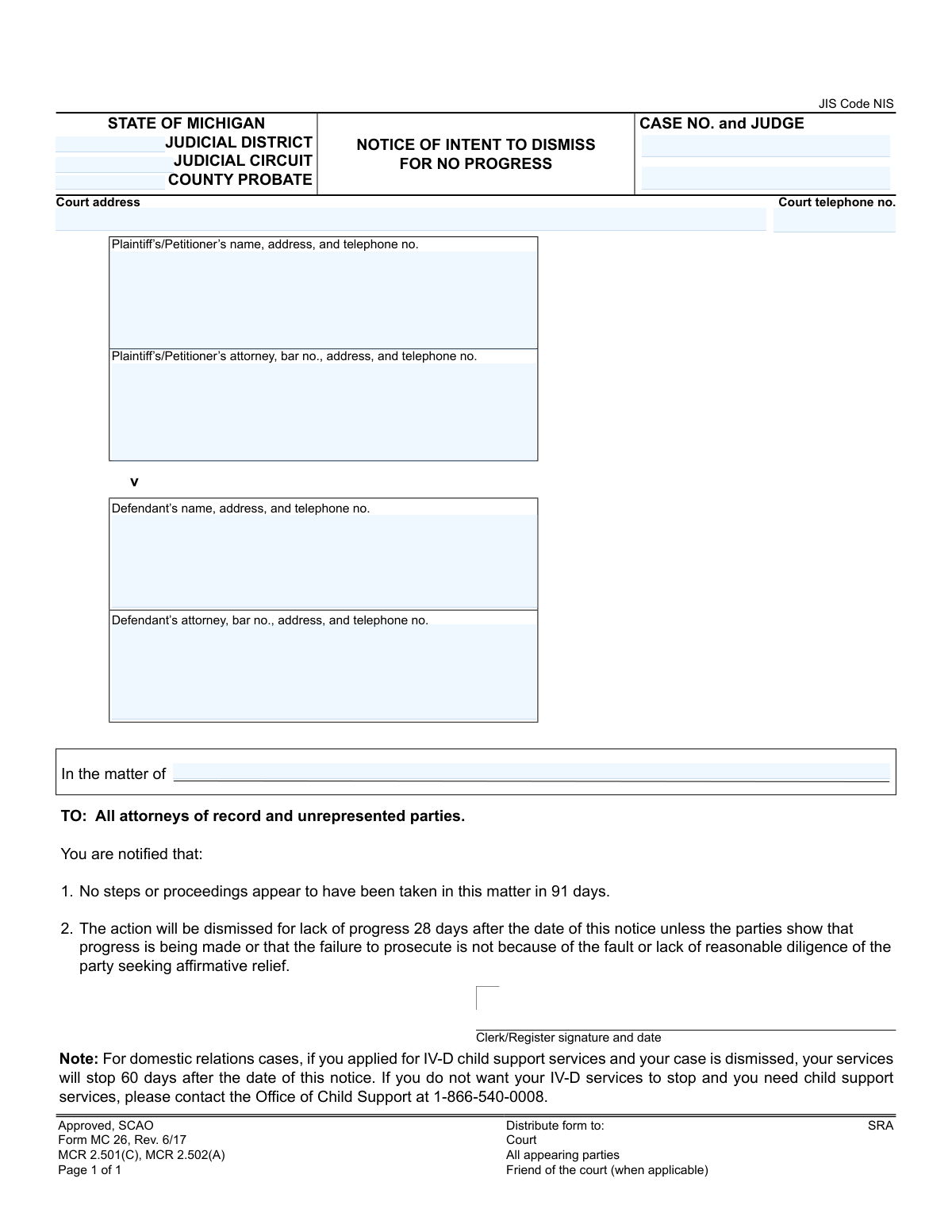
Yes! You can use AI to fill out Form MC 26, Notice of Intent to Dismiss for No Progress
Don't type 12 fields by hand. Tell our AI about yourself, or upload a document you already have, and it fills every field in seconds. You check it, then download, print or sign.
The AI does the filling. You just check it.
No typing into boxes, nothing to install.
What this form asks for
The AI fills all of it, from your answers or your documents.
The AI checks your answers before you download
12 checks built for this form, so a wrong date or a missing answer is caught before anyone else sees it.
This check ensures the 'caseno' field follows the standard Michigan court case number format (e.g., YY-######-XX). A valid case number is critical for uniquely identifying the case within the judicial information system and linking the notice to the correct file. An incorrectly formatted number could lead to processing failure, misfiling of the notice, or delays in the dismissal process.
This validation verifies that the 'judge' field is not empty when a case number is provided. The assigned judge's name is essential for internal court routing, record-keeping, and ensuring the notice is reviewed by the correct judicial officer. If the judge's name is missing, the document may be delayed or rejected by the clerk's office.
This check validates that the 'cttelno' field contains a properly formatted 10-digit phone number. A valid phone number is necessary for attorneys and unrepresented parties who may need to contact the court regarding the notice. An invalid or missing number hinders communication and reflects poorly on the document's professionalism and accuracy.
This validation ensures the 'pname' field, which identifies the plaintiff or petitioner, is not empty. Identifying the initiating party is a fundamental requirement for any legal notice to be valid. A notice without a plaintiff name is legally insufficient and would be rejected, as it's impossible to determine which case it pertains to.
This check verifies that the 'dname' field, identifying the defendant, is populated. For a legal notice to be effective, the party against whom action is being taken must be clearly named. Omitting the defendant's name renders the notice ambiguous, unenforceable, and invalid under legal due process standards.
If the 'pattorney' field is filled, this check validates that the attorney's bar number follows the Michigan State Bar format (e.g., P-#####). This confirms the attorney is a licensed member of the bar, which is required for legal representation. An invalid bar number could indicate a data entry error or, in a more serious case, unauthorized practice of law.
And 6 more checks
- Defendant's Attorney Bar Number Format
- Judicial Location Completeness
- Court Address Completeness
- Unrepresented Party Contact Information
- 'In the matter of' Field Consistency
- Logical Link Between Case Number and Judge
Let AI fill out your MC 26
No typing. Every field filled in seconds, checked, ready to sign.
How to Fill Out MC 26 Online for Free in 2026
What the AI walks you through.
- Navigate to Instafill.ai and upload or select the Michigan MC 26 form.
- Use the AI-powered tool to identify and click on the fields for court information, such as 'JUDICIAL DISTRICT', 'JUDICIAL CIRCUIT', and 'CASE NO. and JUDGE'.
- Enter the complete court address and telephone number in the appropriate sections.
- Input the full names, addresses, and telephone numbers for the plaintiff/petitioner and the defendant, along with their attorney information if applicable.
- If the case has a specific 'In the matter of' title, enter it in the corresponding section.
- Carefully review all entered data for accuracy, ensuring case numbers, names, and addresses are correct before the clerk signs and dates the notice for official distribution.
Frequently Asked Questions About MC 26
Is it really free for 7 days?
Can I fill other forms too?
How do I cancel?
How does the AI fill out MC 26?
What happens to my information?
How complex is MC 26 to fill out?
What is this 'Notice of Intent to Dismiss for No Progress' form?
Why did I receive this notice?
What do I need to do after receiving this notice?
How long do I have to respond?
I am the defendant. Do I need to do anything?
What does this notice mean for my child support case?
What counts as 'showing progress' to the court?
What happens if my case is dismissed?
Do I need to fill out this form and send it back?
Can I ask for an extension on the 28-day deadline?
Can AI tools help me respond to this notice?
How can I use Instafill.ai to prepare the necessary court forms?
The motion I need to file is a non-fillable PDF. What can I do?
Get your MC 26 filled out by AI
$0 today. Cancel before Nov 10 and you pay nothing.
Other forms like this one
Michigan court forms: Form MC 03, Answer, Civil, Form MC 02, Appearance, Form MC 6, Notice to Appear, Form MC 01, Summons, State of Michigan, Form MC 01a, Complaint, Form MC 01b, Motion for Second Summons and Order, State of Michigan Blank Court Form, Form MC 07, Default Request and Entry, Form MC 07a, Default Request, Entry, and Judgment (Sum Certain), Form MC 09, Dismissal, Form MC 09a, Dismissal, Nonservice/No Progress, Form MC 10, Judgment, Civil, Form MC 11, Subpoena, Order to Appear and/or Produce, Request and Writ for Garnishment (Periodic), Form MC 13, Request and Writ for Garnishment (Nonperiodic), Form MC 14, Garnishee Disclosure, Form MC 15, Motion and Affidavit for Installment Payments/To Amend Order for Installment Payments, Form MC 15a, Order Regarding Installment Payments, Form MC 16, Motion to Set Aside Order for Installment Payments, State of Michigan, Form MC 16a, Order on Motion to Set Aside Order for Installment Payments
Let AI fill out your MC 26
Your trial starts once a card is added. You pay nothing before Nov 10.
Our AI already knows this form, all 12 fields of it. Skip the typing: tell it about yourself, or upload what you have, and it fills the whole form in seconds.
- AI fills every field on the form, checkboxes included
- No typing into boxes: answer a few questions, or upload a document you already have, an old copy of this form, a photo of a document
- The AI checks the answers; you review and change anything before you download
- Download the finished PDF, print it, or sign it online
- Encrypted, and never used to train AI
Cancel before Nov 10 and you pay nothing.
A card is needed to start the trial. Cancel in two clicks from your account.
Terms · Privacy