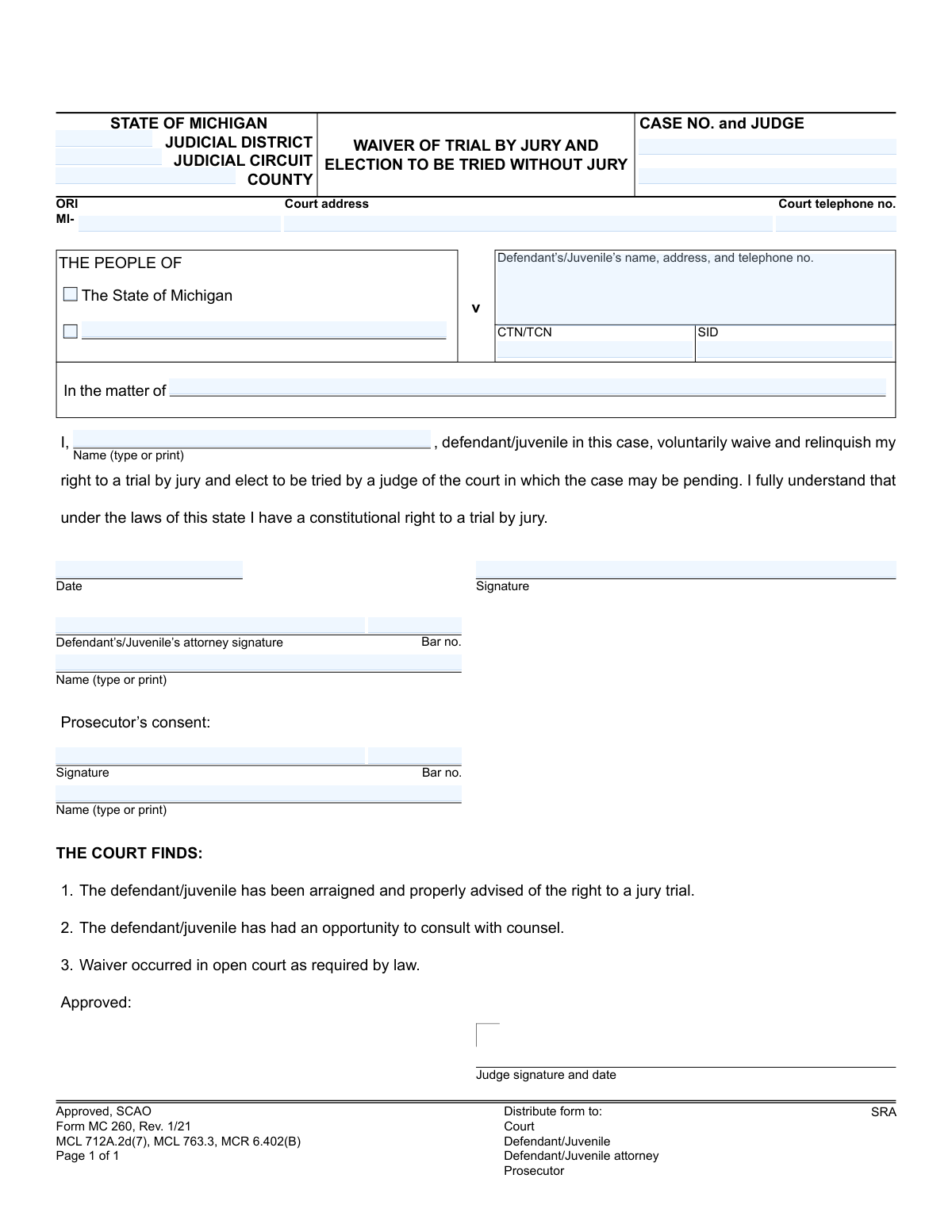
Yes! You can use AI to fill out Form MC 260, Waiver of Trial by Jury and Election to be Tried without Jury

Form MC 260, Waiver of Trial by Jury and Election to be Tried without Jury, is a legal document filed in Michigan courts. By signing this form, a defendant or juvenile formally gives up their constitutional right to have their case heard by a jury of their peers, choosing instead to have a judge decide the outcome. This is a significant decision that must be made voluntarily and with a full understanding of its implications. Today, this form can be filled out quickly and accurately using AI-powered services like Instafill.ai, which can also convert non-fillable PDF versions into interactive fillable forms.
MC 260 is part of the Michigan court forms category on Instafill.
Our AI automatically handles information lookup, data retrieval, formatting, and form filling.
It takes less than a minute to fill out MC 260 using our AI form filling.
Securely upload your data. Information is encrypted in transit and deleted immediately after the form is filled out.

Form specifications

Form name: Form MC 260, Waiver of Trial by Jury and Election to be Tried without Jury
Number of fields: 24
Number of pages: 1
Language: English
main-image

Instafill Demo: How to fill out PDF forms in seconds with AI

How to Fill Out MC 260 Online for Free in 2026

Are you looking to fill out a MC 260 form online quickly and accurately? Instafill.ai offers the #1 AI-powered PDF filling software of 2026, allowing you to complete your MC 260 form in just 37 seconds or less.
Follow these steps to fill out your MC 260 form online using Instafill.ai:
  1. 1 Navigate to Instafill.ai and upload the MC 260 form, or select it from their library of official documents.
  2. 2 Allow the AI to scan and process the form, identifying all the required fields for case information, defendant details, and signatures.
  3. 3 Enter the case details, including the court, case number, and judge's name, along with the defendant's or juvenile's personal information as prompted by the system.
  4. 4 Carefully review the pre-filled waiver statement to ensure you fully understand that you are relinquishing your right to a jury trial.
  5. 5 Electronically sign the form in the designated 'Defendant’s/Juvenile’s signature' field. The system will also prepare signature fields for the attorney and prosecutor.
  6. 6 Review the entire completed form for accuracy, ensuring all names, numbers, and dates are correct before finalizing the document.
  7. 7 Download the completed MC 260 form to save for your records and distribute it to the court, your attorney, and the prosecutor as required.

Our AI-powered system ensures each field is filled out correctly, reducing errors and saving you time.

Why Choose Instafill.ai for Your Fillable MC 260 Form?

Speed

Complete your MC 260 in as little as 37 seconds.

Up-to-Date

Always use the latest 2026 MC 260 form version.

Cost-effective

No need to hire expensive lawyers.

Accuracy

Our AI performs 10 compliance checks to ensure your form is error-free.

Security

Your personal information is protected with bank-level encryption.

Frequently Asked Questions About Form MC 260

This form is used by a defendant or juvenile in a Michigan court case to formally give up their constitutional right to a trial by jury. By signing it, you are choosing to have your case heard and decided by a judge alone, which is known as a bench trial.

The defendant or juvenile in the case must sign the form to indicate their choice. Their attorney must also sign, and the prosecutor must sign to show their consent to the waiver.

You are relinquishing your constitutional right to have a jury of your peers determine the facts of your case and decide on guilt or innocence. Instead, a single judge will fulfill this role.

Yes, it is critical to discuss this decision with your attorney. The form itself requires the judge to confirm that you have had an opportunity to consult with counsel before accepting the waiver.

A bench trial is a trial where the judge, not a jury, listens to all the evidence and legal arguments. The judge then makes the final ruling on the case.

This information is located on other official court documents related to your case, such as the complaint or information. Your attorney will have access to these details and can help you fill them in.

This waiver must be made in 'open court,' which means you will sign the form or state your waiver verbally in the courtroom in front of the judge. Your signature on the form formalizes this decision for the court record.

Withdrawing a waiver is not always possible and is subject to the court's approval, which can be difficult to obtain. You must speak with your attorney immediately if you have any second thoughts about your decision.

In Michigan, the law requires both the defense and the prosecution to agree to waive a jury trial. The prosecutor's signature confirms their agreement to proceed with a judge-only trial.

Yes, services like Instafill.ai use AI to accurately auto-fill form fields like your name, case number, and court information, which saves time and helps avoid errors. However, the legal decision to sign the form should only be made after consulting with your attorney.

Simply upload the MC 260 PDF to the Instafill.ai platform. The service will make the document fillable online, allowing you to enter your information and then download or print the completed form for submission in court.

You can use a service like Instafill.ai to solve this problem. It can convert flat, non-fillable PDFs into interactive forms that you can easily complete on your computer.

The judge's signature confirms that all legal requirements for the waiver have been met. This includes verifying that you were advised of your rights, consulted with a lawyer, and made the waiver voluntarily in open court.

Compliance MC 260
Validation Checks by Instafill.ai

1
Case Number Presence and Format
Checks that the 'case no' field is not empty and conforms to the expected format for Michigan court cases. This number is the primary identifier for the case file, and its absence or incorrect format would prevent the document from being correctly filed and associated with the proper legal proceedings. If validation fails, the submission should be rejected with an error prompting the user to enter a valid case number.
2
Jurisdiction Completeness
Validates that at least one of the jurisdictional fields ('county', 'judicial district', 'judicial circuit') is completed. This information is critical for routing the document to the correct court system and ensuring it is processed under the proper legal authority. A failure to provide jurisdiction would make the document legally ambiguous and lead to rejection.
3
ORI Format Validation
Ensures the 'ORI' (Originating Agency Identifier) field, if filled, begins with the 'MI-' prefix followed by the agency's specific code. The ORI is a unique identifier for law enforcement and court agencies, and an incorrect format can lead to misidentification and processing delays. Submissions with an invalid ORI format should be flagged for correction.
4
Defendant/Juvenile Name Consistency
Verifies that the typed or printed name in the main signature block ('name') matches the defendant/juvenile name provided in the case caption header ('dname'). This check prevents ambiguity about who is waiving their rights and ensures the legal document is internally consistent. A mismatch could invalidate the waiver and would require manual review and correction.
5
Exclusive Case Type Selection
Validates that either 'THE PEOPLE OF' ('peoplecheck') for a criminal case or 'In the matter of' ('somcheck') for a juvenile or other civil matter is selected, but not both. This selection defines the nature of the case and is mutually exclusive. An incorrect or dual selection would create legal confusion and require the user to clarify the case type before proceeding.
6
Mandatory Defendant/Juvenile Signature and Date
Confirms that the defendant/juvenile's signature ('dsig') and the signature date ('sigdate') fields are both completed. The signature and date are the fundamental components that execute the waiver, signifying the individual's voluntary action on a specific day. Without both, the waiver is legally incomplete and invalid.
7
Signature Date Logical Validity
Checks that the 'sigdate' field contains a valid date that is not in the future. A post-dated signature would invalidate the waiver, as the action must be recorded as having occurred on or before the time of filing. This validation prevents clerical errors and ensures the document's temporal accuracy.
8
Defendant's Attorney Bar Number Format
Validates that the 'dbarno' field, if provided, matches the format of a Michigan State Bar number (e.g., a 'P' followed by a series of digits). An incorrect bar number could mean the person signing is not a licensed attorney in the jurisdiction, which has serious legal implications for the defendant's right to counsel. The system should flag invalid formats for immediate correction.
9
Defendant's Attorney Information Completeness
Ensures that if any of the defendant's attorney fields ('dattysig', 'dattyname', 'dbarno') are filled, then all three are completed. This ensures a complete record of the legal counsel who advised the defendant, which is crucial for verifying that the defendant's rights were protected. Incomplete information would trigger a request to complete all related attorney fields.
10
Prosecutor's Consent Completeness
Verifies that the prosecutor's signature ('psig'), name ('pattyname'), and bar number ('pbarno') are all present. The prosecutor's consent is a required element for this waiver to be accepted by the court. Missing information indicates that consent has not been properly recorded, and the form would be considered incomplete for court approval.
11
Prosecutor's Bar Number Format
Validates that the 'pbarno' field matches the format of a Michigan State Bar number. This confirms the identity and credentials of the consenting prosecutor. An invalid number would cast doubt on the authenticity of the consent and would require correction before the form can be accepted.
12
CTN or SID Identifier Presence
Checks for the presence of a Case Tracking Number ('ctntcn') or State Identification Number ('sid'). These are critical unique identifiers used across different justice system databases to track the case and the individual. The absence of these numbers can hinder automated processing and data linkage, so the form should be flagged if they are missing.
13
Court Telephone Number Format
Ensures the 'cttelno' field is a valid 10-digit telephone number, potentially with standard formatting characters. This ensures that contact information for the court is accurate and usable if any party needs to follow up. An invalid number could hinder communication and should be corrected.
14
Defendant Name Presence in Body
This validation ensures the primary name field ('name'), where the defendant/juvenile explicitly identifies themselves, is not blank. This field is part of the core legal statement 'I, [Name], ... voluntarily waive,' and its absence would render the entire statement and thus the waiver meaningless. The form cannot be processed without this essential piece of information.

Common Mistakes in Completing MC 260

Entering Incorrect Case Number or Court Information

Mistyping or transposing digits in the 'Case No.' or selecting the wrong 'Judicial District' or 'County' is a frequent error. This happens when rushing or copying from memory. An incorrect case number can lead to the waiver being rejected or misfiled, causing significant delays and potentially invalidating the waiver for the intended case. Always double-check these details against official court documents provided to you.

Omitting or Guessing Agency Codes (ORI, CTN, SID)

Fields like ORI (Originating Agency Identifier), CTN (Complaint Tracking Number), and SID (State Identification Number) are often confusing and left blank. These codes are crucial for the court's internal data systems to link the waiver to the correct case file and individual record. Submitting the form without these numbers can cause processing delays while clerks manually search for the information. These numbers can be found on other official case paperwork or by asking your attorney.

Incorrectly Selecting the Case Type

The form requires checking a box for either 'THE PEOPLE OF The State of Michigan' (for adult criminal cases) or 'In the matter of' (typically for juvenile proceedings). Choosing the wrong one is a significant clerical error that reflects a misunderstanding of the case's nature. This can lead to administrative confusion and may require the form to be resubmitted, delaying the legal process. Confirm the correct designation with your attorney before filling out this section.

Providing Incomplete Defendant/Juvenile Contact Details

The field for the defendant's name, address, and telephone number is often filled out incompletely, with a missing zip code, apartment number, or phone number. The court uses this information to mail official notices and maintain contact. Incomplete or outdated information could cause you to miss critical updates or hearing notices, potentially leading to a warrant for failure to appear. Ensure every part of this section is complete and current.

Using Illegible Handwriting

When this form is printed and filled out by hand, poor or rushed handwriting can make names, numbers, and other critical information unreadable to court staff. If a clerk cannot decipher the case number or your name, the form will be rejected, forcing you to complete it again. To avoid this, print clearly in capital letters. Better yet, use a tool like Instafill.ai, which can convert this non-fillable PDF into a digital form you can type into for perfect clarity.

Signing the Form Prematurely

A waiver of a constitutional right, like a jury trial, is a serious legal step that must often be completed 'in open court' before a judge. Many people sign the document at home as soon as they receive it, which can invalidate the waiver. The court needs to confirm that your waiver is knowing and voluntary at the time of the hearing. Always wait for instructions from the judge or your attorney before signing and dating the form.

Missing Attorney Signature or Bar Number

If you are represented by counsel, your attorney must also sign the form and provide their bar number. This confirms they have advised you on this decision. Forgetting to have your attorney complete their section can invalidate the waiver, as it raises questions about whether you received proper legal counsel. Ensure your attorney reviews and signs the document in the appropriate section before submission.

Confusing Printed Name with Signature

The form has separate lines for a printed name ('Name (type or print)') and a legal signature. A common mistake is to sign on the printed name line or print your name on the signature line. The printed name ensures legibility, while the signature is your legal mark of consent. This simple mix-up can cause processing delays as the court may require a corrected form to ensure proper identification.

Filling in Sections Reserved for Court Officials

The lower half of the form contains sections for the 'Prosecutor's consent' and the Judge's approval ('THE COURT FINDS'). Defendants or their attorneys sometimes mistakenly write or sign in these areas. Any unauthorized marks in these reserved sections will void the form, requiring a new one to be completed and signed. Only fill in the specific sections designated for the defendant/juvenile and their attorney.

Submitting an Outdated Version of the Form

Courts periodically update their forms to comply with new laws or rules, indicated by a revision date (e.g., 'Rev. 1/21'). Using an old version found through a random internet search may result in its rejection by the clerk's office. Always obtain the most current version directly from the official court website. AI-powered form-filling tools like Instafill.ai help prevent this by using the latest official versions of documents.
Saved over 80 hours a year

“I was never sure if my IRS forms like W-9 were filled correctly. Now, I can complete the forms accurately without any external help.”

Kevin Martin Green

Your data stays secure with advanced protection from Instafill and our subprocessors

Robust compliance program

Transparent business model

You’re not the product. You always know where your data is and what it is processed for.

ISO 27001, HIPAA, and GDPR

Our subprocesses adhere to multiple compliance standards, including but not limited to ISO 27001, HIPAA, and GDPR.

Security & privacy by design

We consider security and privacy from the initial design phase of any new service or functionality. It’s not an afterthought, it’s built-in, including support for two-factor authentication (2FA) to further protect your account.

Fill out MC 260 with Instafill.ai

Worried about filling PDFs wrong? Instafill securely fills form-mc-260-waiver-of-trial-by-jury-and-election-to-be-tried-without-jury forms, ensuring each field is accurate.