Yes! You can use AI to fill out Form MC 27, Request and Notice for Film and Electronic Media Coverage of Court Proceedings

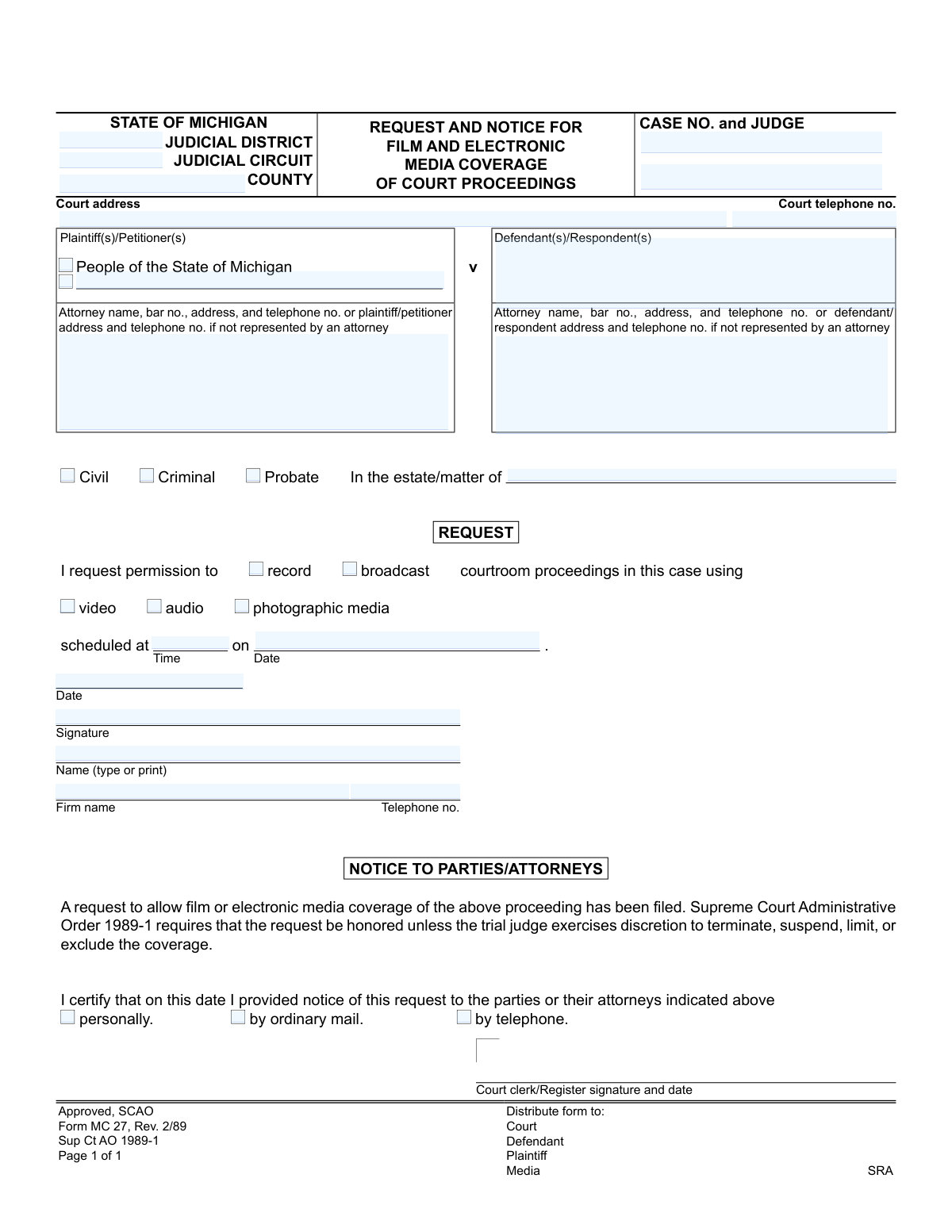
This is the State of Michigan's official form for requesting permission to use film or electronic media, such as video, audio, or photography, during court proceedings. It serves as both a formal request to the court and a notice to all parties involved in the case, as required by Supreme Court Administrative Order 1989-1. Today, this form can be filled out quickly and accurately using AI-powered services like Instafill.ai, which can also convert non-fillable PDF versions into interactive fillable forms.
MC 27 is part of the Michigan court forms category on Instafill.
Our AI automatically handles information lookup, data retrieval, formatting, and form filling.
It takes less than a minute to fill out MC 27 using our AI form filling.
Securely upload your data. Information is encrypted in transit and deleted immediately after the form is filled out.

Form specifications

Form name: Form MC 27, Request and Notice for Film and Electronic Media Coverage of Court Proceedings
Number of fields: 32
Number of pages: 1
Language: English
main-image

Instafill Demo: How to fill out PDF forms in seconds with AI

How to Fill Out MC 27 Online for Free in 2026

Are you looking to fill out a MC 27 form online quickly and accurately? Instafill.ai offers the #1 AI-powered PDF filling software of 2026, allowing you to complete your MC 27 form in just 37 seconds or less.
Follow these steps to fill out your MC 27 form online using Instafill.ai:
  1. 1 Navigate to Instafill.ai and upload or select the MC 27 form.
  2. 2 Use the AI assistant to input the court details, including the judicial district/circuit, county, case number, and judge's name.
  3. 3 Provide the names and contact information for the plaintiff(s), defendant(s), and their respective attorneys.
  4. 4 Specify the details of your request, including the date and time of the proceeding and checking the boxes for the type of media coverage (e.g., video, audio, photographic).
  5. 5 Electronically sign and date the request section, and provide your name, firm, and telephone number.
  6. 6 Complete the 'Notice to Parties/Attorneys' section, certifying how and when you notified the involved parties of your request.
  7. 7 Review all the information populated by the AI for accuracy, then download the completed form to file with the court and distribute to the parties.

Our AI-powered system ensures each field is filled out correctly, reducing errors and saving you time.

Why Choose Instafill.ai for Your Fillable MC 27 Form?

Speed

Complete your MC 27 in as little as 37 seconds.

Up-to-Date

Always use the latest 2026 MC 27 form version.

Cost-effective

No need to hire expensive lawyers.

Accuracy

Our AI performs 10 compliance checks to ensure your form is error-free.

Security

Your personal information is protected with bank-level encryption.

Frequently Asked Questions About Form MC 27

This form is used to formally request permission from a Michigan court to use video, audio, or photographic equipment to record or broadcast court proceedings. It also serves as an official notice to the parties involved in the case.

Any member of the media, or any individual or organization, who wishes to film, record, or photograph proceedings inside a Michigan courtroom must complete and file this form.

This information is part of the public court record for the case. You can typically find it by searching the court's online docket or by contacting the court clerk's office for the specific judicial district or circuit.

You should select 'record' if you plan to capture the proceedings for later use. Select 'broadcast' if you intend to transmit the proceedings live to an audience.

Yes, the form allows you to select multiple media types. You can check the boxes for 'video,' 'audio,' and/or 'photographic media' depending on the equipment you plan to use.

You should file the completed form with the court clerk for the specific court where the proceeding is scheduled. It is a good idea to check with the local court for any specific filing procedures or deadlines.

No, approval is not guaranteed. While requests are generally honored per Administrative Order 1989-1, the presiding judge has the final discretion to terminate, suspend, limit, or exclude coverage.

After you file the request, the court clerk will notify the parties in the case. The request is then reviewed by the judge, who will decide whether to approve, limit, or deny media coverage for the proceeding.

The form indicates that copies should be distributed to the Court, the Defendant, the Plaintiff, the Media (yourself), and the SRA (State Regional Administrator). The court clerk typically handles the official notification to the parties.

The form does not specify a deadline, but it is best practice to submit it as far in advance of the proceeding as possible. This allows sufficient time for the court to process the request and notify all parties involved.

Yes, services like Instafill.ai use AI to accurately auto-fill form fields with your information, which can save you significant time and help prevent errors. This is especially useful for repetitive information like your name, firm, and contact details.

If you have a non-fillable or 'flat' PDF, you can use a service like Instafill.ai. It can convert the static form into an interactive, fillable format online, making it easy to complete and sign.

You can use a platform like Instafill.ai to fill out this form online. Simply upload the form, and the tool will make the fields fillable, allowing you to type your information, select checkboxes, and save or print the completed document.

Compliance MC 27
Validation Checks by Instafill.ai

1
Validates Case Number Format and Presence
Checks that the 'CASE NO.' field is not empty and conforms to the court's standard format. This is critical for associating the media request with the correct legal proceeding. If the case number is missing or malformed, the request cannot be processed and will be rejected, requiring the user to find and enter the correct number.
2
Ensures Proceeding Date is Valid and in the Future
This validation confirms the 'Proceeding date' is a valid calendar date and occurs on or after the current date. Requesting coverage for a past event is illogical and indicates a data entry error. A failed validation will prevent submission and prompt the user to enter a future or current date for the proceeding.
3
Requires Selection of Media Action (Record or Broadcast)
Verifies that the user has selected at least one of the checkboxes for 'record' or 'broadcast'. This information is fundamental to the request, as it specifies the intended use of the media. If neither is selected, the form is considered incomplete and the user will be prompted to specify the action.
4
Requires Selection of Media Type (Video, Audio, or Photo)
This check ensures that at least one media type ('video', 'audio', or 'photographic media') has been selected. The court needs to know what kind of equipment will be in the courtroom to assess potential disruption. Failure to select a media type will result in an error, as the nature of the request is unclear.
5
Validates Completeness of Requester's Name and Firm
Confirms that the 'Name (type or print)' and 'Firm name' fields are both filled out. This information is mandatory for identifying the individual and the media organization making the request. An incomplete submission would be rejected as anonymous requests are not permissible.
6
Validates Format of Firm's Telephone Number
This check ensures the 'Telephone no.' for the firm is present and follows a standard phone number format, such as (XXX) XXX-XXXX. A valid contact number is essential for the court clerk to communicate with the requester about the status of their request. An invalid format will trigger an error message asking for correction.
7
Ensures At Least One Case Type is Selected
Verifies that one of the 'Civil', 'Criminal', or 'Probate' checkboxes has been marked. This classification is essential for the court's internal routing and record-keeping. Without a case type, the context of the proceeding is unknown, and the form submission will be blocked until a selection is made.
8
Conditional Requirement for 'In the estate/matter of' Field
This is a logical check that requires the 'In the estate/matter of' field to be completed if the 'Probate' case type is selected. This field provides the specific name of the estate or matter, which is a necessary identifier in probate cases. If 'Probate' is checked and this field is empty, the user will be prompted to provide the information.
9
Requires Selection of a Notice Method
Validates that the requester has certified how they notified the parties by selecting at least one method ('personally', 'by ordinary mail', 'by telephone'). This certification is a legal requirement stated on the form to ensure all parties are aware of the media request. The form cannot be submitted until a notification method is checked.
10
Validates Request Date is Not After Proceeding Date
This validation compares the 'request date' with the 'Proceeding date' to ensure the request date is on or before the proceeding date. A request dated after the event is illogical and indicates a user error. If the request date is later than the proceeding date, the system will flag an error and require correction.
11
Ensures Presiding Judge's Name is Provided
This check confirms that the 'JUDGE' field has been filled in. According to the form, the trial judge has the discretion to manage media coverage, making their identity a critical piece of information for processing the request. A missing judge's name will halt submission, as the request cannot be directed to the correct authority for approval.
12
Verifies Signature is Present
Checks for the presence of a value or image in the 'Signature' field. A signature is required to attest to the authenticity of the request and the certification of notice. A submission without a signature is invalid and will be rejected until it is signed.
13
Validates Michigan Attorney Bar Number Format
If an attorney's information is provided, this check validates that the 'bar no.' follows the Michigan-specific format (a 'P' followed by a series of digits). This ensures the attorney is correctly identified and can be verified in the state's registry. An incorrectly formatted bar number would trigger a warning, prompting the user to check the number.
14
Ensures Court Identifiers are Provided
This validation ensures that essential court location fields, such as 'Judicial Circuit' or 'Judicial District' and 'County', are filled out. These details are necessary to route the form to the correct courthouse and clerk's office. Without this information, the request is undeliverable and the submission will be blocked.

Common Mistakes in Completing MC 27

Using an Incorrect or Incomplete Case Number

Filers often enter the case number with typos, incorrect formatting, or omit the judge's name. Since the case number is the primary identifier for a court file, even a small error can cause the request to be misfiled, delayed, or rejected entirely. Always double-check the complete case number and judge's name against official court documents before submitting.

Incorrectly Identifying the Court Jurisdiction

The form requires specifying the Judicial District or Circuit, and the County. People frequently confuse these jurisdictions or leave them blank, especially if they are unfamiliar with the court system's structure. Submitting a request to the wrong court level (e.g., a Circuit Court matter to the District Court) will result in rejection and require refiling, causing significant delays.

Omitting the Attorney Bar Number

When listing attorney information, filers often provide the name and address but forget to include the bar number. The bar number is a unique identifier essential for the court to quickly and accurately verify the attorney of record. Omitting it can slow down the verification process and may lead to the clerk returning the form for completion.

Failing to Specify the Type of Media Coverage

The form requires the requester to check boxes to specify whether they wish to 'record' or 'broadcast' using 'video', 'audio', or 'photographic' media. A common mistake is failing to check any boxes, leaving the court guessing about the nature of the request. This ambiguity can lead to an automatic denial, as the judge cannot approve an undefined request.

Entering an Incorrect Proceeding Date or Time

Simple typos in the proceeding's date or time are frequent but have serious consequences. An incorrect date or time can lead to the request being processed for the wrong hearing or the media team missing the event entirely. It is crucial to be precise, including AM/PM for the time, to ensure the request is linked to the correct proceeding.

Forgetting to Sign the Request

An unsigned form is legally invalid and will be rejected by the court clerk upon receipt. This is one of the most common and easily avoidable mistakes, often happening when filers are in a hurry. Always perform a final review of the form to ensure the signature is present in the designated field.

Failing to Certify That Parties Were Notified

The form includes a section to certify that all parties or their attorneys have been notified of the media request. Filers must check the box indicating the method of notification (personally, mail, or telephone). Forgetting to complete this section implies that proper notice was not given, which is a violation of court rules and grounds for the judge to deny the request.

Incorrectly Filling Out the Case Caption

The form defaults to 'People of the State of Michigan' as the plaintiff, which is specific to criminal cases. Filers working on civil or probate matters may get confused and fill this section out incorrectly or leave the party fields blank. It is essential to copy the full, accurate case caption from official court documents to prevent filing errors and confusion.

Providing Illegible or Incomplete Requester Information

After signing, the requester must print their name, firm name, and telephone number. If this information is handwritten illegibly or is incomplete, the court clerk has no way to contact the requester with questions, scheduling updates, or a copy of the judge's order. Using a tool like Instafill.ai to convert the non-fillable PDF into a fillable form ensures all contact information is typed and perfectly legible.

Failing to Select the Correct Case Type

The form provides checkboxes for Civil, Criminal, and Probate cases. Overlooking this step or checking the wrong box can cause processing delays as the request may be routed to the wrong department. For Probate cases, it is also a common error to forget to write in the name of the estate on the 'In the estate/matter of' line, making it difficult to identify the specific case.
Saved over 80 hours a year

“I was never sure if my IRS forms like W-9 were filled correctly. Now, I can complete the forms accurately without any external help.”

Kevin Martin Green

Your data stays secure with advanced protection from Instafill and our subprocessors

Robust compliance program

Transparent business model

You’re not the product. You always know where your data is and what it is processed for.

ISO 27001, HIPAA, and GDPR

Our subprocesses adhere to multiple compliance standards, including but not limited to ISO 27001, HIPAA, and GDPR.

Security & privacy by design

We consider security and privacy from the initial design phase of any new service or functionality. It’s not an afterthought, it’s built-in, including support for two-factor authentication (2FA) to further protect your account.

Fill out MC 27 with Instafill.ai

Worried about filling PDFs wrong? Instafill securely fills form-mc-27-request-and-notice-for-film-and-electronic-media-coverage-of-court-proceedings forms, ensuring each field is accurate.