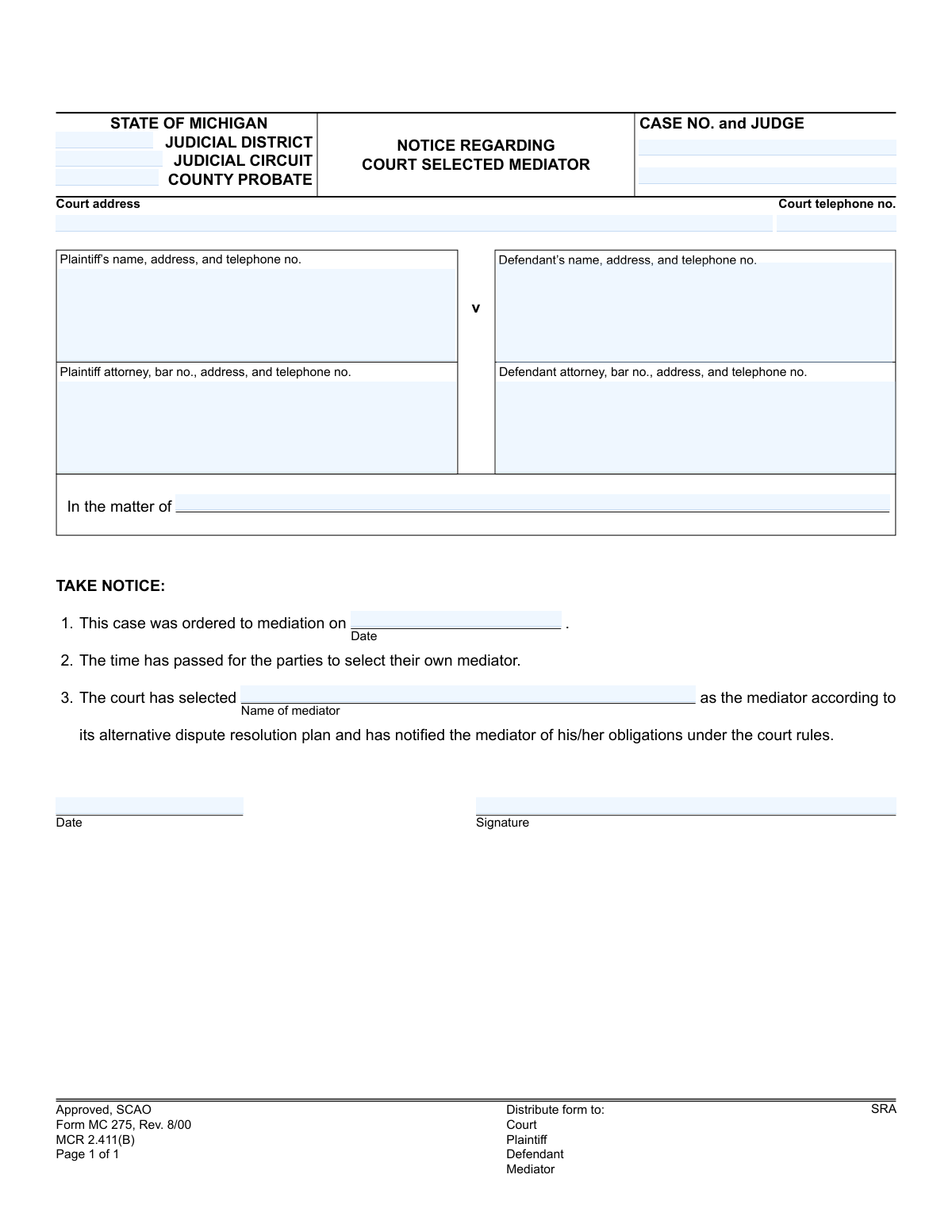
Yes! You can use AI to fill out Form MC 275, Notice Regarding Court-Selected Mediator
Form MC 275 is a legal notice issued by a Michigan court in a civil case. It officially informs the plaintiff and defendant that the court has appointed a specific mediator because the parties failed to select one themselves within the allotted time after being ordered to mediation. This document ensures all parties are aware of the appointed neutral third party who will facilitate dispute resolution. Today, this form can be filled out quickly and accurately using AI-powered services like Instafill.ai, which can also convert non-fillable PDF versions into interactive fillable forms.
MC 275 is part of the
Michigan court forms category on Instafill.
Our AI automatically handles information lookup, data retrieval, formatting, and form filling.
It takes less than a minute to fill out MC 275 using our AI form filling.
Securely upload your data. Information is encrypted in transit and deleted immediately after the form is filled out.
Form specifications
| Form name: | Form MC 275, Notice Regarding Court-Selected Mediator |
| Number of fields: | 16 |
| Number of pages: | 1 |
| Language: | English |
More forms in Michigan court forms
Instafill Demo: How to fill out PDF forms in seconds with AI
How to Fill Out MC 275 Online for Free in 2026
Are you looking to fill out a MC 275 form online quickly and accurately? Instafill.ai offers the #1 AI-powered PDF filling software of 2026, allowing you to complete your MC 275 form in just 37 seconds or less.
Follow these steps to fill out your MC 275 form online using Instafill.ai:
- 1 Navigate to Instafill.ai and upload or select the 'Notice Regarding Court-Selected Mediator' (Form MC 275).
- 2 Use the AI assistant to accurately input the court details, including the judicial district/circuit, county, case number, and judge's name.
- 3 Provide the full names, addresses, and contact information for the plaintiff, defendant, and their respective attorneys.
- 4 Enter the date on which the case was originally ordered to mediation.
- 5 Specify the full name of the mediator selected by the court.
- 6 The court official will then date and sign the form to certify the notice.
- 7 Review all entered information for accuracy before downloading, printing, and distributing the completed form to the court, plaintiff, defendant, and the selected mediator.
Our AI-powered system ensures each field is filled out correctly, reducing errors and saving you time.
Why Choose Instafill.ai for Your Fillable MC 275 Form?
Speed
Complete your MC 275 in as little as 37 seconds.
Up-to-Date
Always use the latest 2026 MC 275 form version.
Cost-effective
No need to hire expensive lawyers.
Accuracy
Our AI performs 10 compliance checks to ensure your form is error-free.
Security
Your personal information is protected with bank-level encryption.
Frequently Asked Questions About Form MC 275
This form is an official notice from the court informing you that a mediator has been appointed for your case. This happens because the parties involved did not select a mediator on their own within the time frame allowed by the court.
This form is completed and issued by the court, not by the plaintiff or defendant. You are receiving it as a notification of an action the court has taken in your case.
You received this notice because your case was ordered to mediation, but the deadline for you and the other party to agree on a mediator has passed. As a result, the court has selected one for you according to its established procedures.
You don't need to fill anything out on this form. You or your attorney should expect to be contacted by the appointed mediator to schedule the mediation session.
If you have a significant conflict of interest or another legally valid reason to object, you must do so formally through a motion to the court. You should consult with your attorney immediately to discuss your options.
The court fills in the case and party details, the date the case was ordered to mediation, and the name of the mediator it has selected. It is then signed and dated by a court representative.
As indicated at the bottom of the form, copies are distributed to the court, the plaintiff, the defendant, and the appointed mediator. This ensures all parties are officially notified.
This refers to Michigan Court Rule 2.411(B). This rule grants the court the authority to select a mediator for the parties if they fail to do so themselves within the specified time.
Ignoring a court order for mediation can lead to serious consequences, including court sanctions, fines, or having the judge rule against you on certain issues. It is mandatory to participate.
No, because this is a notice filled out by the court and sent to you. However, for other court forms that you are required to complete, AI services like Instafill.ai can save time by accurately auto-filling your information.
With Instafill.ai, you can upload any court form, and its AI will help you fill in fields like your name, address, and case number quickly and accurately. This helps reduce errors and saves significant time on paperwork.
You can upload flat or non-fillable PDFs to Instafill.ai. The service uses AI to convert them into interactive, fillable forms that you can easily complete and sign online.
Compliance MC 275
Validation Checks by Instafill.ai
1
Mandatory Case Number and Format
This check ensures the 'CASE NO.' field is not empty and conforms to the expected format for the specified court (e.g., YY-######-CZ). The case number is the primary identifier for the legal proceeding, and its absence or incorrect format would make it impossible to file the document correctly. If this validation fails, the submission should be rejected with an error prompting the user to enter a valid case number.
2
Logical Date Sequence
Validates that the signature date is on or after the date the case was ordered to mediation. A notice cannot be signed and issued before the event it is referencing (the mediation order) has occurred. This check prevents logical impossibilities and ensures the document's timeline is coherent. A failure would indicate a data entry error that must be corrected before submission.
3
Mediator Name Completeness
This check verifies that the 'Name of mediator' field is not empty. The entire purpose of this notice is to inform parties of the court-selected mediator. If the mediator's name is missing, the form fails its primary function. A failed validation should halt the submission and require the user to input the name of the selected mediator.
4
Party Identification Logic
Ensures that the case parties are properly identified. The validation checks that either the 'Plaintiff' and 'Defendant' name fields are populated OR the 'In the matter of' field is populated. This prevents ambiguity about the nature of the case (adversarial vs. in rem/probate). If both or neither are filled, the form is considered incomplete or contradictory.
5
Mediation Order Date Validity
This validation confirms that the 'Date' field for when the case was ordered to mediation contains a valid, properly formatted date (e.g., MM/DD/YYYY). It also checks that the date is not in the future, as the order must have already happened. This is critical for establishing the timeline of events and the court's authority to appoint a mediator. An invalid or future date would render the notice legally questionable.
6
Court Jurisdiction Identification
Verifies that at least one of the jurisdictional fields ('JUDICIAL DISTRICT', 'JUDICIAL CIRCUIT', or 'COUNTY PROBATE') is filled out. This information is essential for identifying which court has authority over the case. Without it, the document is not properly associated with a specific judicial body, making it legally ineffective. A failed validation would require the user to specify the correct court jurisdiction.
7
Attorney Bar Number Presence
This check confirms that if an attorney's name is provided for either the plaintiff or defendant, a corresponding bar number is also included. Bar numbers are unique identifiers for licensed attorneys and are required for official court filings. Missing a bar number can lead to rejection of the filing or delays in verifying the attorney's standing. The validation ensures the attorney's credentials are included as required.
8
Court Telephone Number Format
Validates that the 'Court telephone no.' field contains a number in a recognizable North American format (e.g., (XXX) XXX-XXXX or XXX-XXX-XXXX). A properly formatted number ensures that parties can easily contact the court if they have questions about the notice. An incorrectly formatted number can cause confusion and communication breakdowns. The system should flag entries that do not match the expected pattern.
9
Judge Name Presence
This check ensures that the 'JUDGE' field is populated if a 'CASE NO.' has been entered. In most court systems, a case is assigned to a specific judge, whose name is part of the official case identifier. Omitting the judge's name can cause filing errors and routing delays within the court clerk's office. This validation ensures the document is directed to the correct judicial officer.
10
Signature Presence
Verifies that the 'Signature' field is not empty, indicating that the form has been signed by an authorized court officer or clerk. An unsigned legal notice is invalid and has no legal effect. This check could look for a digital signature data or a non-blank image area, preventing the submission of an un-executed and therefore unenforceable document.
11
Signature Date Presence
Ensures the 'Date' field next to the signature line is filled out with a valid date. The signature date is crucial as it establishes when the notice was officially issued by the court. This date is often the starting point for other deadlines and procedural timelines. A missing signature date makes the notice's effective date ambiguous and could lead to legal challenges.
12
Court Address Completeness
This validation checks that the 'Court address' field is not empty. The physical address of the court is essential information for all parties involved, as it is the location for filings, hearings, and official correspondence. A missing address makes the form incomplete and can cause significant confusion for the plaintiff, defendant, and mediator. The submission should be blocked until a valid address is provided.
Common Mistakes in Completing MC 275
Users often enter the case number with typos or omit crucial parts like the year or case-type code (e.g., 'CV', 'DM'). An incorrect case number can lead to the notice being rejected by the clerk or misfiled, causing significant delays in the mediation process. To avoid this, meticulously double-check the case number against previous official court documents before submission.
A frequent error is entering the date the form is being filled out in the field for when the case was 'ordered to mediation.' This is incorrect and invalidates the notice's premise that the deadline for parties to select a mediator has passed. The correct date is found on the original court order for mediation and must be referenced to ensure the notice is valid.
In a rush, filers may accidentally enter the plaintiff's information in the defendant's section and vice-versa. This creates significant legal confusion, can disrupt communication, and may require the notice to be voided and re-issued. Always read each field label carefully to ensure the correct party's information is entered in the corresponding section.
The form requires the full name, bar number, address, and telephone number for both the plaintiff's and defendant's attorneys. People often forget to include the bar number, which is essential for identifying the attorney of record. Incomplete information can lead to form rejection or make it difficult for the court and mediator to contact counsel, delaying proceedings.
An unsigned or undated notice is not legally valid and will be rejected by the court. This simple oversight is a common reason for document return, which halts the appointment of the mediator and delays the entire case schedule. Always perform a final review to ensure the signature and date fields are completed by the authorized court representative before distribution.
Filers sometimes confuse the Judicial District, Judicial Circuit, and County Probate courts, entering information for the wrong jurisdiction at the top of the form. This critical error will cause the notice to be filed in the wrong court system entirely, leading to immediate rejection and lost time. The correct jurisdiction must be verified from the original case complaint.
The court clerk filling out the form may accidentally misspell the mediator's name or select an incorrect individual from an internal list. This can cause confusion for the parties trying to contact the mediator and may result in communication breakdowns. To prevent this, the clerk should verify the spelling against the official State Court Administrative Office (SCAO) list of approved mediators.
This field is intended for specific case types, such as probate or other non-adversarial matters, and is often used incorrectly. Filers may leave it blank when it's required or fill it out for a standard civil case that already has a 'Plaintiff v Defendant' caption. This can create confusion about the case structure and may require clarification, slowing down processing.
This form is often distributed as a flat, non-fillable PDF, forcing users to fill it out by hand or use clunky text box tools. This leads to illegible handwriting, misaligned text, and data entry errors, which can cause the form to be rejected. AI-powered tools like Instafill.ai can convert non-fillable PDFs into interactive forms, ensuring data is clean, legible, and accurately placed.
Saved over 80 hours a year
“I was never sure if my IRS forms like W-9 were filled correctly. Now, I can complete the forms accurately without any external help.”
Kevin Martin Green
Your data stays secure with advanced protection from Instafill and our subprocessors
Robust compliance program
Transparent business model
You’re not the product. You always know where your data is and what it is processed for.
ISO 27001, HIPAA, and GDPR
Our subprocesses adhere to multiple compliance standards, including but not limited to ISO 27001, HIPAA, and GDPR.
Security & privacy by design
We consider security and privacy from the initial design phase of any new service or functionality. It’s not an afterthought, it’s built-in, including support for two-factor authentication (2FA) to further protect your account.
Fill out MC 275 with Instafill.ai
Worried about filling PDFs wrong? Instafill securely fills form-mc-275-notice-regarding-court-selected-mediator forms, ensuring each field is accurate.