
Instafill.ai
7 days free
AI form filling · 31 fields · 2 pages · done in seconds

Yes! You can use AI to fill out Form MC 276, Motion to Remove Case from Mediation

Don't type 31 fields by hand. Tell our AI about yourself, or upload a document you already have, and it fills every field in seconds. You check it, then download, print or sign.
7 days free, then $19.99/month · Cancel anytime
AI fills it, no typingEncrypted, never used to train AICancel in two clicks
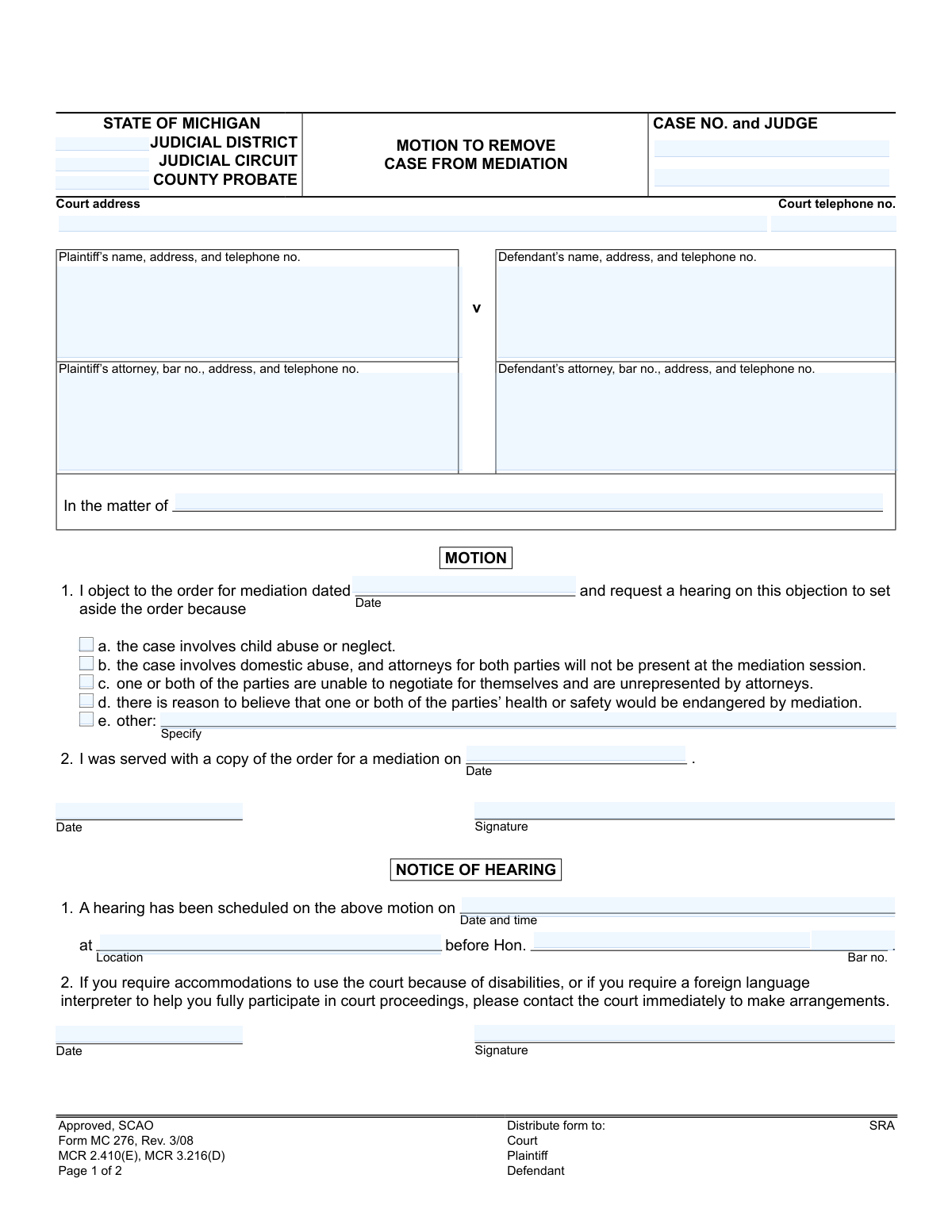
Form MC 276, Motion to Remove Case from Mediation, page 1
Basic · 34/100Form Complexity Index

The AI does the filling. You just check it.

No typing into boxes, nothing to install.

Tell the AI about youAnswer a few questions in plain words, or upload a document you already have. That is all the typing there is.
AI fills every field in secondsIt puts each answer in the right box on every page, checkboxes included.
Check it and downloadReview every field, change anything, then download, print or sign the PDF.

What this form asks for

The AI fills all of it, from your answers or your documents.

Form MC 276 is a legal document filed in a Michigan court to object to a previously issued order for mediation. A party would file this motion if they believe the case is unsuitable for mediation due to reasons such as child or domestic abuse, safety concerns, or the inability of a party to negotiate. Today, this form can be filled out quickly and accurately using AI-powered services like Instafill.ai, which can also convert non-fillable PDF versions into interactive fillable forms.
Fillable fields31
Pages2
Form Complexity IndexBasic, 34/100

The AI checks your answers before you download

12 checks built for this form, so a wrong date or a missing answer is caught before anyone else sees it.

Case Number Consistency Across Pages

Validates that the case number entered on the first page matches the case number on the second page's 'Certificate of Mailing' section. This is a critical consistency check to ensure all pages of the document are correctly associated with the same legal case. If the numbers do not match, the filing could be rejected or inadvertently applied to the wrong case file, causing significant administrative and legal problems.

Mandatory Reason for Motion

Ensures that at least one of the checkboxes (a, b, c, d, or e) under section 1 of the 'MOTION' is selected to provide a reason for objecting to mediation. A motion without a stated legal or factual basis is incomplete and cannot be adjudicated by the court. The form should be flagged for correction if no reason is provided, as it is a fundamental requirement for the motion's validity.

Conditional 'Other' Reason Specification

Checks that if the 'other' reason checkbox (e) is marked, the associated text field for specifying the reason is filled out. This is critical for the court to understand the basis of the motion when it does not fall into the predefined categories. An empty 'other' field makes the selection meaningless and requires clarification, delaying the legal process until the information is provided.

Logical Date Chronology

Confirms the logical sequence of key dates: the date of the original mediation order must precede or be the same as the date the filer was served with the order. This chronological check ensures the events described in the motion are plausible and occurred in a logical order. An illogical sequence, such as being served before the order was issued, could indicate a data entry error and undermine the credibility of the filing.

Future Hearing Date

Validates that the scheduled hearing date and time are set for a future point in time relative to when the motion is filed. Scheduling a hearing for a past date is a logical impossibility and a clear data entry error. This check prevents the issuance of invalid notices and avoids confusion for all parties involved, ensuring the notice of hearing is actionable.

Mandatory Case Number

Ensures that the 'CASE NO.' field is not empty, as it is the primary identifier for the legal proceeding in the court's system. Without a case number, the document cannot be correctly filed, docketed, or associated with the existing case file. A missing case number would lead to an immediate rejection of the submission by the court clerk.

And 6 more checks
  • Signature and Date Association
  • Attorney Bar Number Format
  • Mandatory Certificate of Mailing Attestation
  • Complete Hearing Notice Information
  • Valid Date Format
  • Essential Court Identifiers

Let AI fill out your MC 276

No typing. Every field filled in seconds, checked, ready to sign.

7 days free, then $19.99/month · Cancel anytime

How to Fill Out MC 276 Online for Free in 2026

What the AI walks you through.

  1. Navigate to Instafill.ai and upload the MC 276 form or select it from the template library.
  2. Provide the court and case information, including the judicial district/circuit, county, case number, and judge's name.
  3. Enter the full names, addresses, and contact information for the plaintiff, defendant, and their respective attorneys.
  4. Indicate the date of the original mediation order and the date you were served with it.
  5. Select the appropriate checkbox indicating the reason for the objection, such as child abuse, domestic abuse, safety concerns, or specify another reason if applicable.
  6. Review all the auto-filled information for accuracy, then electronically sign and date the motion section.
  7. Download the completed form to file with the court and serve on the opposing party as required by court rules.

Common Mistakes in Completing MC 276

The ones the AI is built to catch.

Incorrect or Incomplete Case Information
Filers often enter the wrong case number, judge's name, or court details at the top of the form. This usually happens when referencing from memory or an old document. An incorrect case number can cause the motion to be filed in the wrong case or rejected outright, leading to significant delays. To avoid this, meticulously copy all information from the most recent official court document, such as the Order for Mediation.
Misunderstanding the 'In the matter of' Field
People frequently fill out the 'In the matter of' line for standard civil or divorce cases, when it is typically reserved for probate matters (e.g., estates, guardianships). This mistake occurs because filers feel compelled to fill every blank space on the form. While not always a fatal error, it creates confusion for court staff and can misrepresent the nature of the case. Unless it is a probate case, this line should be left blank.
Providing a Vague 'Other' Reason
When checking box 'e' (other), filers often provide a weak or legally insufficient explanation for why the case should be removed from mediation. Reasons like 'we don't get along' are not enough to overcome the court's preference for mediation. This almost guarantees the motion will be denied, wasting the filer's time and money. To be successful, the specified reason must be compelling, factual, and legally sound, often requiring an attorney's assistance to draft correctly.
Confusing Critical Dates
The form requires two key dates: the date the mediation was ordered and the date the order was served. Filers often confuse these two dates or guess if they don't have the documents handy. This is a critical error, as an incorrect service date could make the motion appear untimely and lead to its dismissal. Always refer to the original court order for the signature date and the certificate of service or postmarked envelope for the date you received it.
Missing Signatures or Dates
This form has multiple signature lines across two pages (for the motion, notice of hearing, and certificate of mailing), making it easy to miss one. An unsigned motion is invalid and will be immediately rejected by the court clerk, halting the entire process. Before filing, perform a final check of every page specifically to find and complete all required signature and date fields. AI-powered tools like Instafill.ai can help by highlighting all required fields to ensure none are missed.
Improperly Filling the 'Notice of Hearing' Section
A common mistake is for the filer to invent a hearing date and time in the 'Notice of Hearing' section. Filers see the blank lines and assume they are responsible for scheduling the hearing themselves. In reality, the court clerk assigns the hearing date after the motion is filed. Filling this section in yourself creates confusion and will be disregarded by the court, so it should be left blank upon initial filing.
Failing to Properly Serve the Motion
Filers sometimes sign the 'Certificate of Mailing' on page two without actually mailing a copy of the motion to the opposing party or their attorney. This can happen due to oversight or a misunderstanding of the legal requirement for service. Signing this certificate falsely is a serious offense that can lead to the motion being dismissed and potential court sanctions. Always mail the copy first, then sign the certificate on the original that you will file with the court.
Omitting the Case Number on the Second Page
It is very easy to overlook the 'Case No.' field at the top of the second page after having already filled it in on the first. This is a risky oversight. If the pages become separated at the courthouse, the second page, containing the crucial Certificate of Mailing, becomes an 'orphan' document that cannot be linked to your file, potentially invalidating your proof of service. Always fill in the case number on every page where it is requested.
Selecting an Inappropriate Reason for Removal
A filer might check a box for a serious issue like child abuse or domestic violence (options a-d) without having the specific evidence required by the court. While the filer's feelings are valid, the court operates on a strict legal standard of proof. Checking a box without being able to substantiate the claim at a hearing will damage your credibility with the judge and result in the motion being denied. Only check a box if you can provide factual evidence to support it.
Using an Outdated Version of the Form
This form is marked 'Rev. 3/08', indicating its revision date. A filer might inadvertently use an even older version found on an unofficial website. Courts require the use of current, approved forms, and filing an obsolete version can lead to immediate rejection by the clerk. This forces you to start over, potentially missing critical deadlines. Always download forms directly from the official state court (SCAO in Michigan) website to ensure you have the correct version.
Incomplete Party or Attorney Information
Leaving out addresses, phone numbers, or attorney bar numbers is a frequent error. This often happens when a filer is in a hurry or doesn't have the opposing party's information readily available. Incomplete forms may be rejected by the clerk and can cause delays in communication from the court and other parties. Using a tool like Instafill.ai can help prevent this by saving contact information and automatically populating it correctly every time, ensuring completeness.

Frequently Asked Questions About MC 276


Is it really free for 7 days?
Yes. You pay $0 today. Cancel before Nov 11 and you are never charged. Keep it, and it is $19.99 a month for 5 fills of your MC 276.
Can I fill other forms too?
This plan is for your MC 276: your own AI agent fills it as often as 5 times a month. To fill other forms and upload your own, choose a Professional plan from your account.
How do I cancel?
From your account, in two clicks, any time. No email, no call.
How does the AI fill out MC 276?
You answer a few questions in plain words, or upload a document you already have. The AI reads what you give it and puts each answer into the right field of MC 276, on every page, in seconds. It checks the answers against the form's own rules, and you review and change anything before you download, print or sign.
What happens to my information?
It is encrypted in transit and at rest, and it is never used to train AI.
How complex is MC 276 to fill out?
MC 276 has a Form Complexity Index of 34 out of 100, in the basic tier: 31 fillable fields across 2 pages. Instafill.ai's AI fills it in under a minute, with every field there for you to review before you download.
What is the purpose of the 'Motion to Remove Case from Mediation' form?
This form is used to formally object to a court order for mediation and ask a judge to cancel it. You would file this if you believe mediation is unsuitable for your case for one of the legally specified reasons.
Who can file this motion?
Either the plaintiff or the defendant in a legal case can complete and file this form to request that their case be removed from the mediation process.
What are considered valid reasons to remove a case from mediation?
The form lists several valid reasons, including cases that involve child abuse, domestic abuse, a party's inability to negotiate for themselves, or a risk to a party's health or safety. You can also specify a different reason under the 'other' category.
What information do I need to have before filling out this form?
You will need your court case number, the judge's name, the full names and addresses for all parties, and the date of the original court order for mediation.
What happens after I file this motion with the court?
After you file the motion, the court will schedule a hearing where a judge will consider your request. The judge will then decide whether to grant the motion and cancel the mediation.
My reason for objecting isn't listed as a checkbox option. What should I do?
If your specific reason is not listed, you should check the box next to 'e. other:' and write a clear, concise explanation for your objection in the space provided.
What is the 'Certificate of Mailing' section for?
This section is your sworn declaration to the court that you have sent a copy of the motion to the opposing party or their attorney. This is a required step to ensure all parties are properly notified of your motion.
Who fills out the 'Notice of Hearing' section?
You, the filer, are responsible for contacting the court clerk to get a hearing date, time, and location. You must then fill in this information in the 'Notice of Hearing' section before serving the form on the other party.
I am concerned for my safety if I have to attend mediation. Which option should I choose?
You should check box 'd', which states 'there is reason to believe that one or both of the parties’ health or safety would be endangered by mediation.' Be prepared to explain your concerns to the judge at the hearing.
Do I still have to go to mediation after I file this motion?
Generally, filing the motion will pause the requirement to attend mediation until the judge rules on your request at the scheduled hearing.
Can AI tools help me fill out this form?
Yes, services like Instafill.ai use AI to accurately auto-fill form fields with your information, which can save you time and help prevent common errors.
How can I fill out the Motion to Remove Case from Mediation form online?
You can use a service like Instafill.ai to upload the form, fill it out interactively on your computer, and then download the completed document for printing and filing.
The PDF version of this form I have is not fillable. What can I do?
If you have a non-fillable or 'flat' PDF, you can upload it to Instafill.ai. The platform's technology can convert it into an interactive, fillable form that you can easily complete online.
Encrypted in transit and at restNever used to train AIDelete your forms any time

Get your MC 276 filled out by AI

$0 today. Cancel before Nov 11 and you pay nothing.

7 days free, then $19.99/month · Cancel anytime