Yes! You can use AI to fill out Form MC 279, Stipulation for Mediation

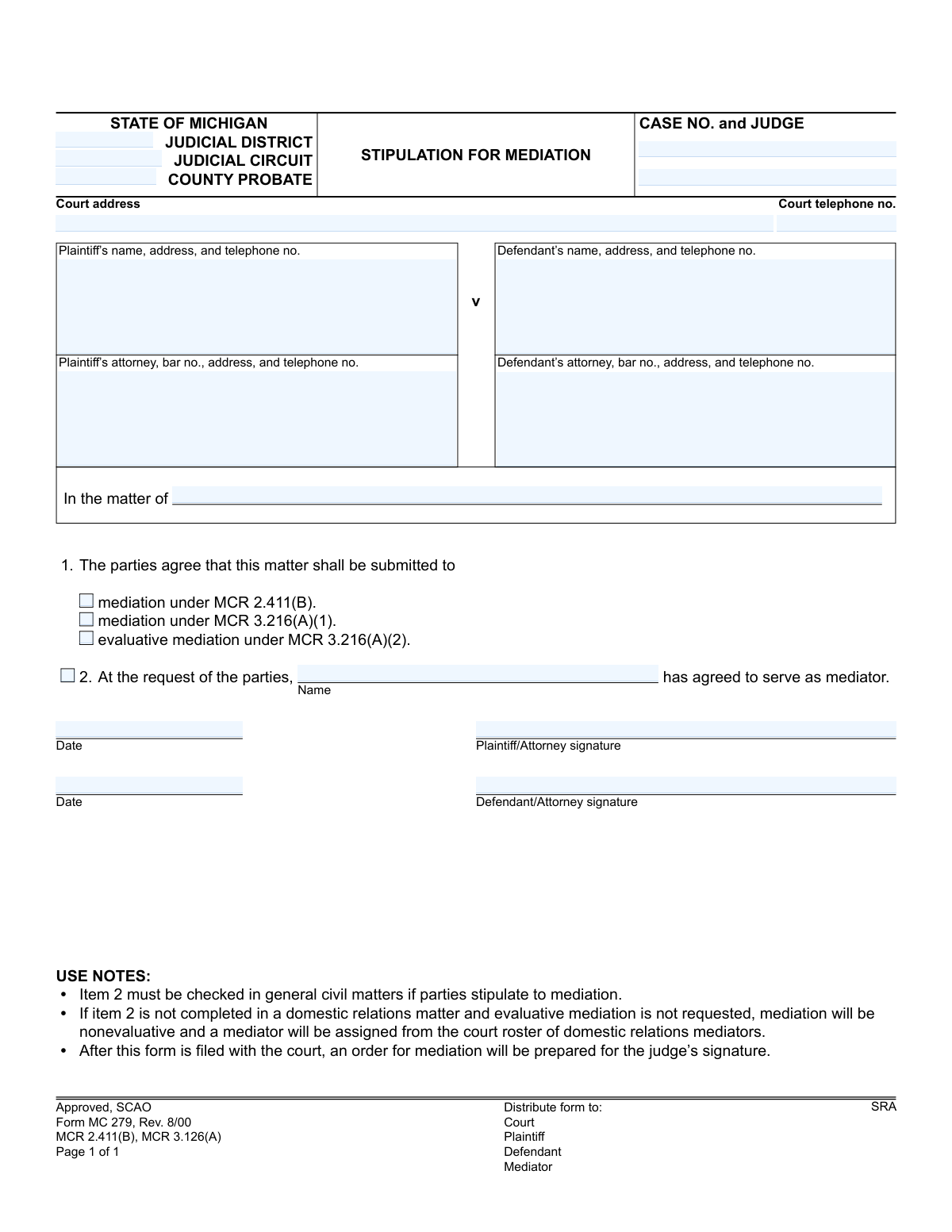
The Michigan Form MC 279, Stipulation for Mediation, is a legal document filed with the court to show that all parties in a case have agreed to enter mediation to attempt to resolve their dispute. It specifies the type of mediation (general civil or domestic relations) and can be used to name a specific mediator agreed upon by the parties. Today, this form can be filled out quickly and accurately using AI-powered services like Instafill.ai, which can also convert non-fillable PDF versions into interactive fillable forms.
MC 279 is part of the Michigan court forms category on Instafill.
Our AI automatically handles information lookup, data retrieval, formatting, and form filling.
It takes less than a minute to fill out MC 279 using our AI form filling.
Securely upload your data. Information is encrypted in transit and deleted immediately after the form is filled out.

Form specifications

Form name: Form MC 279, Stipulation for Mediation
Number of fields: 21
Number of pages: 1
Language: English
main-image

Instafill Demo: How to fill out PDF forms in seconds with AI

How to Fill Out MC 279 Online for Free in 2026

Are you looking to fill out a MC 279 form online quickly and accurately? Instafill.ai offers the #1 AI-powered PDF filling software of 2026, allowing you to complete your MC 279 form in just 37 seconds or less.
Follow these steps to fill out your MC 279 form online using Instafill.ai:
  1. 1 Navigate to Instafill.ai and upload or select the Form MC 279, Stipulation for Mediation.
  2. 2 Provide the court and case information, including the judicial district/circuit, case number, and judge's name.
  3. 3 Enter the full names, addresses, and contact information for the plaintiff, defendant, and their respective attorneys.
  4. 4 Indicate the specific type of mediation the parties are stipulating to by checking the appropriate box (e.g., under MCR 2.411(B) or MCR 3.216).
  5. 5 If a mediator has been pre-selected by the parties, check the corresponding box and enter the mediator's name.
  6. 6 Review all the information populated by the AI for accuracy and completeness.
  7. 7 Apply digital signatures and dates for the plaintiff/attorney and defendant/attorney, then download the completed form for filing with the court.

Our AI-powered system ensures each field is filled out correctly, reducing errors and saving you time.

Why Choose Instafill.ai for Your Fillable MC 279 Form?

Speed

Complete your MC 279 in as little as 37 seconds.

Up-to-Date

Always use the latest 2026 MC 279 form version.

Cost-effective

No need to hire expensive lawyers.

Accuracy

Our AI performs 10 compliance checks to ensure your form is error-free.

Security

Your personal information is protected with bank-level encryption.

Frequently Asked Questions About Form MC 279

This form is a legal agreement used by both parties in a Michigan court case to voluntarily submit their dispute to mediation, which is a process to resolve the case outside of a trial.

Both the plaintiff and the defendant, or their respective attorneys, must agree to the terms and sign the form to show their mutual consent to enter mediation.

After the form is filed, a judge will review it and, if approved, will issue a formal court order for mediation to proceed as agreed.

For general civil cases, you must agree on and name a mediator. For domestic relations cases, if you do not name a mediator, the court will assign one from its approved roster.

MCR 2.411(B) applies to general civil cases, while MCR 3.216 options are for domestic relations cases. Evaluative mediation (MCR 3.216(A)(2)) involves the mediator providing an opinion on the likely outcome in court, whereas standard mediation does not.

You will need your case number, judge's name, court information, and the names and addresses for both the plaintiff and defendant, as well as their attorneys if applicable.

The completed and signed form should be filed with the court where your case is being heard. Copies must also be distributed to the plaintiff, the defendant, and the chosen mediator.

Yes, this form is used for domestic relations cases like divorce. You would select one of the options under MCR 3.216 for standard or evaluative mediation.

Evaluative mediation is an option in domestic relations cases where the mediator may offer an assessment of the case's strengths and weaknesses and predict the likely court outcome to help guide settlement discussions.

If your PDF is not fillable, you can use a service like Instafill.ai to convert the flat PDF into an interactive form that you can easily fill out online.

Yes, services like Instafill.ai use AI to accurately auto-fill form fields from your saved information, which can save you time and help prevent errors.

You can use a service like Instafill.ai to upload the form, fill it out interactively on your computer or mobile device, and then download the completed document for filing.

Compliance MC 279
Validation Checks by Instafill.ai

1
Case Number Presence and Format
This check ensures the 'CASE NO.' field is not empty and conforms to the expected format for the specified court. The case number is the primary identifier for the legal action and is essential for associating the stipulation with the correct file. If the case number is missing or malformed, the document cannot be correctly filed and will be rejected.
2
Exclusive Mediation Type Selection
This validation verifies that exactly one of the three mediation type checkboxes (MCR 2.411(B), MCR 3.216(A)(1), MCR 3.216(A)(2)) is selected. Selecting multiple or no options creates ambiguity regarding the legal basis and rules governing the mediation process. A failed validation would require the user to clarify the single, specific type of mediation being stipulated.
3
Conditional Mediator Name Requirement
This check ensures that if the checkbox indicating the parties have requested a specific mediator is selected, the 'Name' field for the mediator is filled in. It is illogical to state a mediator has been requested without identifying who that person is. Failure to provide the name would halt processing until the mediator's identity is clarified.
4
General Civil Mediation Stipulation Logic
Based on the form's use notes, this validation enforces that if general civil mediation (MCR 2.411(B)) is chosen, the parties must have selected and named a mediator. This is a mandatory requirement for this type of mediation as noted on the form. If this rule is violated, the filing is non-compliant and the parties must either choose a mediator or select a different mediation type.
5
Plaintiff Signature and Date Co-occurrence
This check validates that if a plaintiff or their attorney's signature is present, the corresponding signature date is also filled in, and vice-versa. A signature requires a date to establish when the agreement was made. An incomplete pair would render the signature's timing ambiguous and could invalidate the stipulation.
6
Defendant Signature and Date Co-occurrence
This validation ensures that if a defendant or their attorney provides a signature, the signature date field is also completed. Similar to the plaintiff's signature, the date is crucial for establishing the timeline of the agreement. A missing date for a present signature would be flagged for correction.
7
Signature Date Validity
This check verifies that both the Plaintiff's and Defendant's signature dates are in a valid format (e.g., MM/DD/YYYY) and are not set to a future date. A future date is logically impossible and indicates a data entry error that must be corrected. This ensures the integrity and chronological sense of the legal document.
8
Stipulation Completeness Check
This validation confirms that both the plaintiff/attorney and the defendant/attorney have provided signatures. A stipulation is a mutual agreement, and its legal validity depends on the consent of all involved parties. A missing signature from either side means no agreement has been reached, making the form invalid.
9
Party Identification Completeness
This check ensures that the name fields for both the plaintiff and the defendant are filled out. The form is meaningless without clearly identifying the parties to the dispute. A failure would occur if either the plaintiff or defendant name block is empty, as the stipulation would not be tied to specific individuals or entities.
10
Court Telephone Number Format
This validation checks that the 'Court telephone no.' field contains a value that conforms to a standard phone number format (e.g., (XXX) XXX-XXXX). A properly formatted number is essential for ensuring that parties or attorneys can contact the court without issue. An invalid format could lead to communication delays or failures.
11
Attorney Bar Number Presence
This check verifies that if an attorney's name is listed for either the plaintiff or defendant, a bar number is also included in the corresponding text block. The bar number is the official identifier for an attorney and is required for court filings to verify their credentials and good standing. A missing bar number for a listed attorney would trigger a request for more information.
12
Judge Name Presence
This validation ensures the 'JUDGE' field is populated. The judge's name is critical for routing the document to the correct judicial officer responsible for the case. Submitting the form without this information would cause processing delays as court clerks would have to manually determine the correct judge.
13
Court Jurisdiction Identification
This check ensures that at least one of the court jurisdiction fields ('JUDICIAL DISTRICT', 'JUDICIAL CIRCUIT', 'COUNTY PROBATE') is filled in. This information is fundamental to identifying the correct court system and location where the case is being heard. Without it, the document cannot be routed or filed correctly.

Common Mistakes in Completing MC 279

Incorrectly Identifying the Court

Users often get confused between the 'JUDICIAL DISTRICT,' 'JUDICIAL CIRCUIT,' and 'COUNTY PROBATE' fields, either filling in the wrong one or leaving them all blank. This happens because a case typically belongs to only one specific court jurisdiction. The consequence is the form being misrouted or rejected, causing significant delays in the mediation process. To avoid this, carefully check previous court filings for the exact court name and jurisdiction, and only fill in the relevant fields.

Omitting or Mistyping the Case Number and Judge

The 'CASE NO. and JUDGE' field is the primary identifier linking the stipulation to the correct court file. People frequently forget to include this information, or they transcribe it with typos. Without the correct case number, the court clerk cannot process the document, leading to its immediate rejection and requiring the parties to refile. Always double-check the case number and judge's name against official court documents before submitting.

Confusing 'Plaintiff/Defendant' with 'In the matter of'

This form provides two different ways to style the case caption, which can be confusing. The 'Plaintiff v Defendant' format is for adversarial civil lawsuits, while 'In the matter of' is typically used for probate, family, or other non-adversarial cases. Using the wrong format can cause confusion in the clerk's office and may not accurately reflect the nature of the proceeding. Parties should use the same caption style that appears on all other official documents for their case.

Forgetting the Attorney Bar Number

When an attorney is filling out the form, they are required to include their state bar number ('bar no.') along with their name and address. This is a small but crucial detail that is very commonly missed, especially when a paralegal or assistant prepares the form. A missing bar number renders the filing incomplete and can lead to rejection or processing delays while the clerk verifies the attorney's credentials. AI-powered form-filling tools like Instafill.ai can store an attorney's profile, including their bar number, to prevent this omission.

Selecting the Incorrect Type of Mediation

The form presents three distinct mediation options under item 1, each governed by a different Michigan Court Rule (MCR). Parties often check the wrong box or no box at all, not understanding the legal differences between general civil mediation (MCR 2.411) and the two types of domestic relations mediation (MCR 3.216). This mistake can lead to the court ordering the wrong type of proceeding, which has different rules and outcomes, potentially requiring the parties to start over. It is crucial to understand which rule applies to your case before making a selection.

Improperly Stipulating a Private Mediator

Item 2 allows parties to name their own mediator, but the instructions are nuanced and often missed. A common error is to write in a mediator's name without checking the box, or checking the box but failing to provide a name. As the 'USE NOTES' indicate, this can result in the court assigning a mediator from its own roster, defeating the purpose of the parties' agreement. To avoid this, ensure the box is checked AND the agreed-upon mediator's name is clearly written on the line.

Missing Signatures or Dates

A stipulation is a formal agreement, and it is not legally valid without the signatures of both parties or their attorneys. Forgetting to sign or date the form is a frequent and critical error. An unsigned or undated form will be rejected by the court, rendering the agreement unenforceable and halting the mediation process. Always perform a final review to ensure all signature and date lines are properly completed before filing.

Failure to Distribute the Form to All Parties

The bottom of the form clearly lists who must receive a copy: the Court, Plaintiff, Defendant, and Mediator. Filers often assume submitting it to the court is sufficient and neglect to serve the other parties. This failure of service means other parties are not officially aware that the stipulation has been filed, which can cause serious procedural delays and confusion. After filing with the court, always send copies to everyone listed.

Using Outdated Party or Attorney Contact Information

People move and change phone numbers, and law firm addresses can change. Using old, outdated contact information on a legal form is a common mistake. This can lead to critical notices from the court or the mediator being sent to the wrong address or number, causing missed deadlines and communications. It is essential to verify that all names, addresses, and phone numbers are current. Using a tool like Instafill.ai can help by maintaining a central profile of correct information that can be used across all forms.

Submitting a Poorly Scanned or Non-Fillable PDF

Often, parties only have access to a flat, non-fillable PDF scan of the form. They may print it, fill it out by hand, and then re-scan it, resulting in a document that is difficult to read for the court clerk and other parties. Handwritten entries can be illegible, leading to data entry errors by the court. To ensure clarity and professionalism, it's best to use a fillable version. If one is not available, a service like Instafill.ai can convert a flat PDF into a fillable format, ensuring all entries are typed, clear, and correctly placed.
Saved over 80 hours a year

“I was never sure if my IRS forms like W-9 were filled correctly. Now, I can complete the forms accurately without any external help.”

Kevin Martin Green

Your data stays secure with advanced protection from Instafill and our subprocessors

Robust compliance program

Transparent business model

You’re not the product. You always know where your data is and what it is processed for.

ISO 27001, HIPAA, and GDPR

Our subprocesses adhere to multiple compliance standards, including but not limited to ISO 27001, HIPAA, and GDPR.

Security & privacy by design

We consider security and privacy from the initial design phase of any new service or functionality. It’s not an afterthought, it’s built-in, including support for two-factor authentication (2FA) to further protect your account.

Fill out MC 279 with Instafill.ai

Worried about filling PDFs wrong? Instafill securely fills form-mc-279-stipulation-for-mediation forms, ensuring each field is accurate.