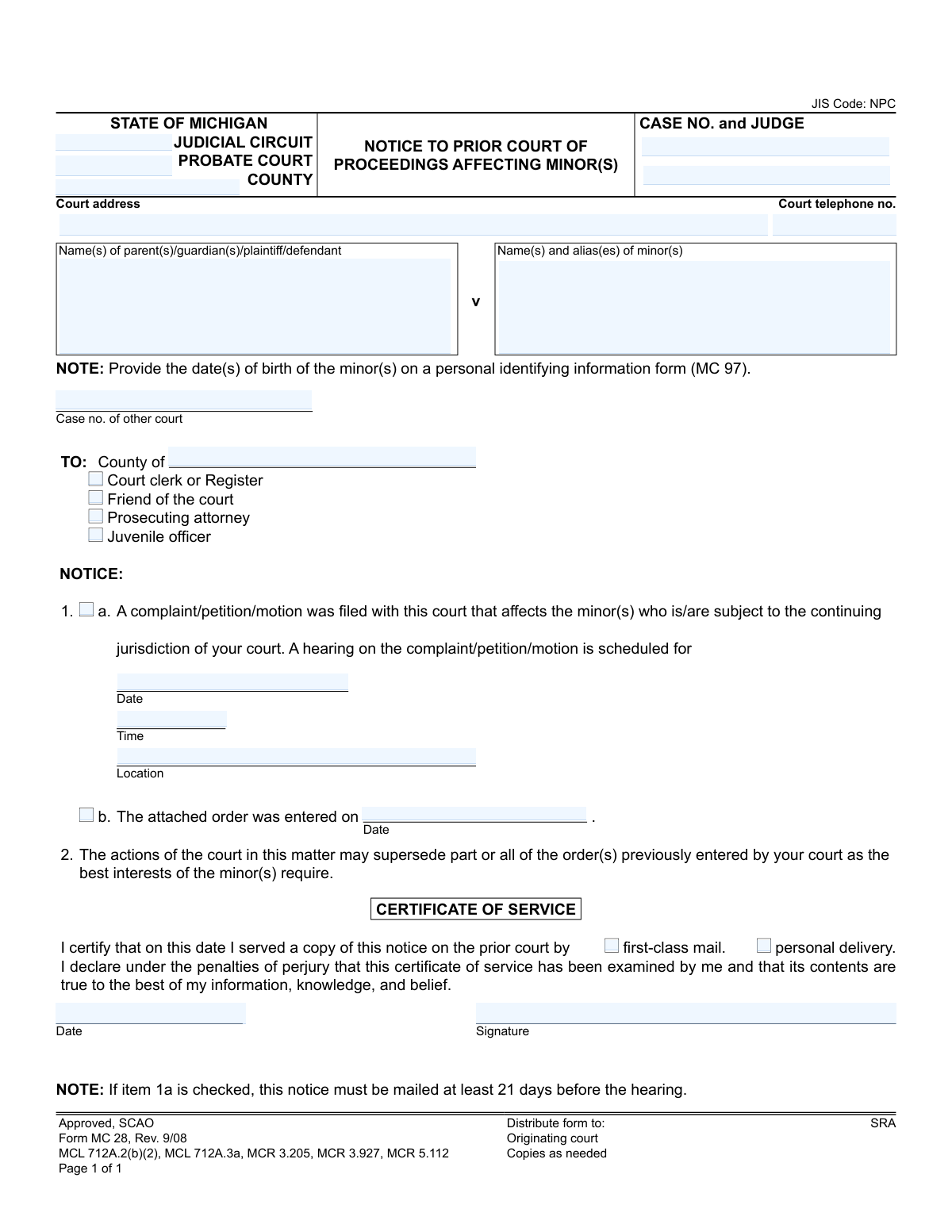
Yes! You can use AI to fill out Form MC 28, Notice to Prior Court of Proceedings Affecting Minor(s)

Form MC 28 is a legal document used in the State of Michigan to notify a court that a new proceeding has been initiated in another court concerning a minor who is already under the prior court's jurisdiction. This ensures communication between courts and that decisions are made in the best interest of the minor. Today, this form can be filled out quickly and accurately using AI-powered services like Instafill.ai, which can also convert non-fillable PDF versions into interactive fillable forms.
MC 28 is part of the Michigan court forms category on Instafill.
Our AI automatically handles information lookup, data retrieval, formatting, and form filling.
It takes less than a minute to fill out MC 28 using our AI form filling.
Securely upload your data. Information is encrypted in transit and deleted immediately after the form is filled out.

Form specifications

Form name: Form MC 28, Notice to Prior Court of Proceedings Affecting Minor(s)
Number of fields: 25
Number of pages: 1
Language: English
main-image

Instafill Demo: How to fill out PDF forms in seconds with AI

How to Fill Out MC 28 Online for Free in 2026

Are you looking to fill out a MC 28 form online quickly and accurately? Instafill.ai offers the #1 AI-powered PDF filling software of 2026, allowing you to complete your MC 28 form in just 37 seconds or less.
Follow these steps to fill out your MC 28 form online using Instafill.ai:
  1. 1 Navigate to Instafill.ai and upload or select the Michigan Form MC 28.
  2. 2 Provide the current court's information, including the judicial circuit, probate court, county, case number, and judge's name.
  3. 3 Enter the names of the parties involved, including the parents/guardians and the minor(s) affected by the proceedings.
  4. 4 Indicate the nature of the notice: either a new complaint/petition/motion has been filed (with hearing details) or a new order has been entered (with the date).
  5. 5 Specify the prior court being notified by entering its county and checking the appropriate recipients (e.g., court clerk, friend of the court).
  6. 6 Complete the Certificate of Service section, indicating the date and method of service (mail or personal delivery), and sign the declaration.
  7. 7 Review all the information auto-filled by the AI for accuracy before downloading, printing, and distributing the completed Form MC 28 as required.

Our AI-powered system ensures each field is filled out correctly, reducing errors and saving you time.

Why Choose Instafill.ai for Your Fillable MC 28 Form?

Speed

Complete your MC 28 in as little as 37 seconds.

Up-to-Date

Always use the latest 2026 MC 28 form version.

Cost-effective

No need to hire expensive lawyers.

Accuracy

Our AI performs 10 compliance checks to ensure your form is error-free.

Security

Your personal information is protected with bank-level encryption.

Frequently Asked Questions About Form MC 28

This form is used to officially notify a court that previously handled a case involving a minor that a new case has been started in a different court concerning the same minor. It ensures the prior court is aware of new proceedings that might affect its existing orders.

The party who filed the new complaint, petition, or motion (or their attorney) in the new court is responsible for sending this notice. This ensures all relevant parties in the prior case are properly informed of the new proceedings.

You will need the case numbers for both the new and prior court proceedings, the full names of the parents and minors, and the date, time, and location of any scheduled hearings. You will also need the county and contact information for the prior court.

Check box 1a if you are notifying the prior court about a new filing and a future hearing date. Check box 1b if you are notifying them that a new order has already been entered by the current court.

Yes, the form states that if you are giving notice of a future hearing (box 1a is checked), the notice must be mailed at least 21 days before the scheduled hearing date.

The MC 97 is a separate 'Personal Identifying Information' form used to keep sensitive data like dates of birth confidential from the main public record. You must complete and attach the MC 97 to provide the minor's birthdate as required.

This means the new court's decisions and orders can legally override or replace the orders that were previously put in place by the first court. This is done when the new court determines it is in the best interests of the minor.

This section is your sworn statement confirming when and how you sent a copy of the notice to the prior court. You must sign and date it to certify that you have properly notified the required parties.

You must send a copy of the notice to the officials listed in the 'TO' section for the prior court's county. This includes the Court Clerk, Friend of the Court, Prosecuting Attorney, and Juvenile Officer.

Failing to provide proper notice could result in delays in your case, potential dismissal of your motion, or other legal sanctions from the court. It is a required step to ensure the legal process is followed correctly.

Yes, services like Instafill.ai use AI to accurately auto-fill form fields with your information. This can save you time and help reduce errors when completing legal documents.

Simply upload the MC 28 form to the Instafill.ai platform. The AI will identify the fields, allowing you to quickly fill them in, save your progress, and download the completed document for printing and submission.

You can use a service like Instafill.ai, which can convert flat, non-fillable PDFs into interactive, fillable forms. This allows you to type your information directly onto the form before printing.

Compliance MC 28
Validation Checks by Instafill.ai

1
Exclusive Selection for Notice Type
This check ensures that the user selects either item 1a (notice of a future hearing) or item 1b (notice of an entered order), but not both. These options are mutually exclusive and define the core purpose of the notice. If neither or both are selected, the form is ambiguous and cannot be correctly processed by the receiving court.
2
Conditional Requirement for Hearing Details
Validates that if item 1a ('A complaint/petition/motion was filed...') is selected, then the 'Date', 'Time', and 'Location' fields for the hearing must be filled. This information is essential for the prior court to be aware of and potentially attend the scheduled proceeding. Failure to provide these details makes the notice for a hearing incomplete and ineffective.
3
Conditional Requirement for Order Date
Ensures that if item 1b ('The attached order was entered...') is selected, the corresponding 'Date' field for the order must be populated. This date is a critical piece of information, as it establishes the timeline of judicial actions affecting the minor. Without this date, the notice lacks the necessary context about the order being referenced.
4
21-Day Advance Notice for Hearings
This validation enforces the legal requirement stated in the form's notes: if item 1a is checked, the 'Certificate of Service' date must be at least 21 days before the scheduled hearing date. This is a crucial due process rule to ensure the prior court has adequate time to review the matter and respond. A failure would invalidate the notice and could lead to the hearing being postponed.
5
Future Hearing Date Logic
This check verifies that the hearing date entered in field 1a is a future date. A hearing, by definition, is a future event, so a past or current date would be a logical error. This prevents data entry mistakes and ensures the notice pertains to an upcoming, actionable event.
6
Past or Present Order Date Logic
Validates that the order date entered in field 1b is a date in the past or the current date. The form states the order 'was entered,' implying the action has already occurred. Entering a future date would be a contradiction and would be rejected to maintain the logical integrity of the legal notice.
7
Core Case Identification Completeness
Ensures that the 'CASE NO.', 'JUDGE', and 'COUNTY' fields at the top of the form are all filled out. This information is fundamental for identifying the current case that is generating the notice. Without a complete case number and jurisdiction, the notice cannot be properly filed or referenced by either the originating or receiving court.
8
Prior Court Identification Completeness
This check verifies that the 'Case no. of other court' and the 'County of' fields in the 'TO:' section are populated. The entire purpose of this form is to notify a specific prior court about new proceedings. If the prior court's case number and county are missing, the notice has no destination and is completely ineffective.
9
Party Identification Completeness
Validates that the names of the parents/guardians and the minor(s) are provided in their respective fields. These parties are the subject of the legal action, and their clear identification is necessary for legal validity and for the prior court to locate its own relevant records. An omission could lead to rejection of the notice due to ambiguity.
10
Court Telephone Number Format
This check ensures the 'Court telephone no.' field contains a validly formatted 10-digit phone number (e.g., XXX-XXX-XXXX or (XXX) XXX-XXXX). A valid contact number is crucial for inter-court communication if questions or clarifications are needed regarding the notice. An invalid format could hinder communication and delay proceedings.
11
Recipient Selection Check
Ensures that at least one recipient checkbox ('Court clerk', 'Friend of the court', 'Prosecuting attorney', or 'Juvenile officer') is checked. The notice must be directed to a specific person or office within the prior court's system to be acted upon. Failure to select a recipient means the notice has no specific addressee and may be ignored or lost.
12
Service Method Selection
Validates that exactly one method of service ('first-class mail' or 'personal delivery') is selected in the 'CERTIFICATE OF SERVICE' section. This certification explains how the notice was legally delivered, which is a required element for the certificate to be valid. Selecting none or both methods makes the certification ambiguous and legally insufficient.
13
Certificate of Service Date and Signature
This check confirms that both the date and signature fields within the 'CERTIFICATE OF SERVICE' section are completed. The date and signature together certify, under penalty of perjury, that the notice was served as described. Missing either of these elements renders the certificate invalid and fails to provide legal proof of service.
14
Logical Certificate of Service Date
Verifies that the 'Certificate of Service' date is not in the future and, if an order date is provided (item 1b), is not before the order date. Service cannot be certified before it has happened, and a notice about an order cannot be served before the order exists. This check prevents logical impossibilities and ensures the timeline of events is accurate.
15
Universal Date Format Validation
This validation applies to all date fields on the form ('nhdate', 'order date', 'COS date') to ensure they are entered in a valid, consistent format (e.g., MM/DD/YYYY). Standardizing the date format prevents ambiguity and data processing errors. An invalid date format could cause the form to be rejected or misinterpreted by the court's case management system.

Common Mistakes in Completing MC 28

Entering the Wrong Case Number for the Prior Court

Users often mistakenly enter the new, current case number in the 'Case no. of other court' field instead of the one from the previous proceeding. This error prevents the receiving court from locating the correct file, rendering the notice ineffective and causing significant delays. To avoid this, carefully distinguish between the two cases and double-check that the prior case number is entered in its designated field.

Omitting the Required Personal Identifying Information Form (MC 97)

The form explicitly states that the minor's date of birth must be provided on a separate form, MC 97. Filers frequently overlook this note, leading to an incomplete submission. Without the minor's date of birth, the prior court cannot reliably identify the correct individual in their system, which can cause the notice to be rejected or ignored. Always review all notes on a form for instructions about required supplementary documents.

Violating the 21-Day Service Requirement

A critical note specifies that if a hearing is scheduled (box 1a is checked), the notice must be mailed at least 21 days before the hearing date. Filers often miss this requirement or miscalculate the timeline, serving the notice too late. This procedural error can force the court to adjourn the hearing, causing unnecessary delays and frustration for all parties. Use a calendar to count backwards from the hearing date to ensure compliance.

Submitting an Unsigned Certificate of Service

The signature on the Certificate of Service validates, under penalty of perjury, that the notice was sent as described. An unsigned certificate is legally invalid and provides no proof of service, which can lead to the court rejecting the filing or an opposing party challenging the notice's validity. Always perform a final review to ensure all required signature lines are completed before submission.

Failing to Include the Minor's Aliases

The form requests the minor's name(s) and alias(es), but filers often provide only the primary name. Omitting aliases, such as different spellings or previous surnames, can make it difficult for the prior court to cross-reference records and find the correct case file. This can lead to significant delays or the assumption that no prior case exists. To ensure accurate record matching, list all known names the minor has used.

Mixing Up Current and Prior Court Details

This form requires details for both the court issuing the notice (at the top) and the court receiving it (in the 'TO:' section). Users can easily get confused and transpose information, such as putting the prior court's address at the top. This creates confusion and can cause the notice to be misdirected or improperly processed. AI-powered form-filling tools like Instafill.ai can help prevent this by mapping data to the correct fields based on context.

Incorrectly Checking the Reason for Notice in Section 1

Filers must choose between option 1a (notice of a future hearing) and 1b (notice of an order already entered). A common mistake is checking both boxes, or neither, which creates ambiguity about the notice's purpose. This forces the receiving court to guess the document's intent, potentially leading to incorrect docketing or no action being taken. You must select only the one option that accurately reflects the current status of your case.

Omitting the Date on the Certificate of Service

The date on the Certificate of Service is legally significant, as it establishes when the service period (e.g., the 21-day rule) begins. Forgetting to enter this date makes it impossible to verify timely service and can invalidate the certificate. This oversight often happens in a rush to sign and file. Always fill in the date of mailing or personal delivery on the same day the service is actually performed.

Manually Filling a Non-Fillable PDF

Many court forms are distributed as flat, non-fillable PDFs, forcing users to fill them out by hand. This often results in illegible handwriting, mistakes, and an unprofessional appearance that can cause processing delays or rejection by court clerks. To avoid this, you can use a tool like Instafill.ai, which can convert a flat PDF into a fillable version, allowing for clean, typed entries and reducing the chance of data entry errors.

Providing Vague or Incorrect Hearing Details

When filling out section 1a, individuals may enter an incomplete or incorrect date, time, or location for the scheduled hearing. This can happen due to simple data entry errors or relying on memory instead of the official court notice. Inaccurate details make the notice useless, as the prior court's representatives cannot attend or properly note the hearing, defeating the purpose of the notice. Always verify hearing information against the official scheduling document.
Saved over 80 hours a year

“I was never sure if my IRS forms like W-9 were filled correctly. Now, I can complete the forms accurately without any external help.”

Kevin Martin Green

Your data stays secure with advanced protection from Instafill and our subprocessors

Robust compliance program

Transparent business model

You’re not the product. You always know where your data is and what it is processed for.

ISO 27001, HIPAA, and GDPR

Our subprocesses adhere to multiple compliance standards, including but not limited to ISO 27001, HIPAA, and GDPR.

Security & privacy by design

We consider security and privacy from the initial design phase of any new service or functionality. It’s not an afterthought, it’s built-in, including support for two-factor authentication (2FA) to further protect your account.

Fill out MC 28 with Instafill.ai

Worried about filling PDFs wrong? Instafill securely fills form-mc-28-notice-to-prior-court-of-proceedings-affecting-minors forms, ensuring each field is accurate.