Yes! You can use AI to fill out Form MC 280, Mediation Status Report
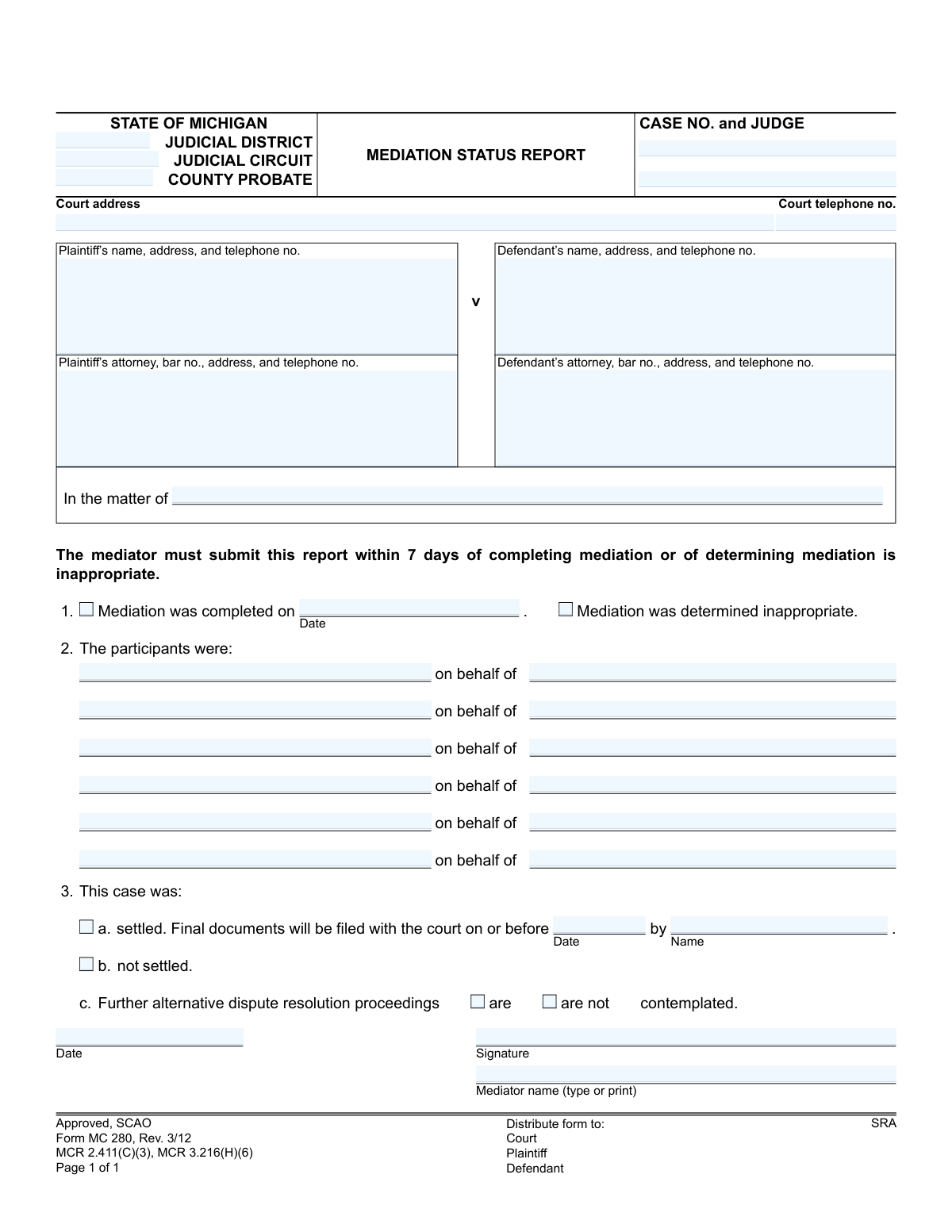
The MC 280, Mediation Status Report, is a legal document used in the State of Michigan judicial system. Mediators file this form with the court to report the status of a mediation, indicating whether the case was settled, not settled, or if mediation was deemed inappropriate. Completing this form accurately is crucial for the court's record-keeping and for determining the next steps in the legal process. Today, this form can be filled out quickly and accurately using AI-powered services like Instafill.ai, which can also convert non-fillable PDF versions into interactive fillable forms.
MC 280 is part of the
Michigan court forms category on Instafill.
Our AI automatically handles information lookup, data retrieval, formatting, and form filling.
It takes less than a minute to fill out MC 280 using our AI form filling.
Securely upload your data. Information is encrypted in transit and deleted immediately after the form is filled out.
Form specifications
| Form name: | Form MC 280, Mediation Status Report |
| Number of fields: | 36 |
| Number of pages: | 1 |
| Language: | English |
More forms in Michigan court forms
Instafill Demo: How to fill out PDF forms in seconds with AI
How to Fill Out MC 280 Online for Free in 2026
Are you looking to fill out a MC 280 form online quickly and accurately? Instafill.ai offers the #1 AI-powered PDF filling software of 2026, allowing you to complete your MC 280 form in just 37 seconds or less.
Follow these steps to fill out your MC 280 form online using Instafill.ai:
- 1 Navigate to Instafill.ai and upload or select the MC 280 Mediation Status Report form.
- 2 Provide the court and case information, including the judicial district/circuit, case number, and judge's name.
- 3 Enter the full details for the plaintiff and defendant, along with their respective attorneys' information.
- 4 Indicate the status of the mediation by checking the appropriate boxes for 'completed' or 'inappropriate'.
- 5 List the names of all participants who attended the mediation and specify whom they represented.
- 6 Report the outcome of the case by selecting 'settled' or 'not settled', and if settled, provide the date and name of the person responsible for filing final documents.
- 7 Review all entered information for accuracy, then electronically sign and date the report before downloading it for submission to the court and all parties.
Our AI-powered system ensures each field is filled out correctly, reducing errors and saving you time.
Why Choose Instafill.ai for Your Fillable MC 280 Form?
Speed
Complete your MC 280 in as little as 37 seconds.
Up-to-Date
Always use the latest 2026 MC 280 form version.
Cost-effective
No need to hire expensive lawyers.
Accuracy
Our AI performs 10 compliance checks to ensure your form is error-free.
Security
Your personal information is protected with bank-level encryption.
Frequently Asked Questions About Form MC 280
This form is used by the mediator to officially report the outcome of a court-ordered mediation to the court. It indicates whether the case was settled, not settled, or if mediation was deemed inappropriate.
The mediator assigned to the case is responsible for completing and submitting this report. It must be submitted within 7 days of the mediation's completion or the determination that it is inappropriate.
The completed form must be distributed to the Court, the Plaintiff, and the Defendant. The court's address should be filled in at the top of the form.
Select 'mediation was completed' if the parties met for the mediation session. Choose 'mediation was determined inappropriate' if the mediator concluded, for any reason, that the case was not suitable for mediation to proceed.
You must provide the deadline date by which the final settlement documents will be filed with the court. You also need to list the name of the person responsible for filing those documents.
This indicates that even if the case did not fully settle, the parties are considering or have agreed to participate in additional dispute resolution methods, such as another mediation session or arbitration.
List all individuals who were present and participated in the mediation, such as the plaintiff, defendant, their respective attorneys, and any insurance representatives. Be sure to note who they were representing.
This information is located on the official court documents for the case, such as the complaint or the order for mediation. It is essential to copy this information accurately onto the form.
If you need an extension, the responsible party should file a motion with the court requesting more time. The Mediation Status Report simply states the initial agreement.
Yes, services like Instafill.ai use AI to accurately auto-fill form fields, which can save time and reduce errors. This is especially helpful for repetitive case information like names, addresses, and the case number.
You can use a service like Instafill.ai to complete your form online. Simply upload the MC 280 form, and the platform will allow you to type directly into the fields, save your progress, and download the completed document.
If you have a non-fillable or 'flat' PDF, you can upload it to a service like Instafill.ai. The tool can convert the static form into an interactive, fillable one that you can complete on your computer.
Yes, the mediator must sign and date the form to certify that the reported information is accurate. An unsigned form may be rejected by the court.
Compliance MC 280
Validation Checks by Instafill.ai
1
Exclusive Mediation Status Selection
This check ensures that either 'Mediation was completed' or 'Mediation was determined inappropriate' is selected, but not both. It is critical to have a single, unambiguous status for the mediation attempt. If neither or both are selected, the form submission should be rejected with an error message prompting the user to select exactly one option.
2
Conditional Mediation Date Requirement
Validates that if the 'Mediation was completed' checkbox is selected, the corresponding 'Date' field (meddate) must be filled. This date is essential for the official case record and timeline. A failure to provide this date when required would result in an incomplete report, so the submission should be blocked until the date is entered.
3
Valid Past or Present Mediation Date
This check verifies that the 'Mediation was completed on' date is not in the future. A mediation status report can only be filed for an event that has already occurred. Submitting a future date is a logical impossibility and would invalidate the report, so the system should reject any date later than the current day.
4
Exclusive Settlement Outcome Selection
Ensures that for the case outcome, either 'settled' or 'not settled' is selected, but not both. This is the primary result of the mediation and must be clearly and singularly stated for the court's record. The form cannot be submitted until exactly one of these options is chosen.
5
Conditional Settlement Filing Details
If the 'settled' checkbox is selected, this validation confirms that both the 'Final documents will be filed with the court on or before' date (filedate) and the 'by' name (filename) are provided. This information is crucial for the court to track case closure and hold the responsible party accountable. The submission will fail if the case is marked as settled but these details are missing.
6
Logical Filing Date
This check ensures the 'filedate' for final documents is on or after the mediator's signature date ('sigdate'). It is logically inconsistent to plan to file documents before the report itself is even signed. This validation prevents data entry errors and ensures the timeline presented to the court is coherent.
7
Conditional Further Proceedings Status
If the 'not settled' checkbox is selected, this validation requires that one of the 'Further alternative dispute resolution proceedings' options ('are' or 'are not' contemplated) must be chosen. This informs the court about the potential next steps for an unresolved case. The submission should be blocked if the case is not settled and this status is left unanswered.
8
Case Number and Judge Identification
Verifies that the 'CASE NO.' and 'JUDGE' fields are not empty. These are the primary identifiers that link the mediation report to the correct case file and presiding judge within the court system. Without this information, the document cannot be correctly filed, so the submission must be rejected if they are missing.
9
Mediator Name and Signature Date Requirement
This check ensures that the 'Mediator name' and the 'Date' of signature are both completed. These fields are essential for authenticating the report, identifying the responsible mediator, and establishing when the report was finalized. An anonymous or undated report is invalid and should not be accepted.
10
Participant and Representative Consistency
For each participant listed, this validation ensures the corresponding 'on behalf of' field is also filled out. This clarifies each participant's role and who they represent (e.g., plaintiff, defendant, themselves). An incomplete pairing makes the participant list ambiguous, so the system should prompt the user to complete the information for each entered participant.
11
Chronological Integrity of Dates
This validation ensures the mediator's signature date ('sigdate') is on or after the mediation completion date ('meddate'). A mediator cannot logically sign a report about a completed mediation before the event has occurred. This check prevents data entry errors and maintains a logical sequence of events.
12
Court Telephone Number Format
Validates that the 'Court telephone no.' field, if filled, adheres to a standard US phone number format (e.g., XXX-XXX-XXXX or (XXX) XXX-XXXX). Proper formatting ensures the data is clean, consistent, and usable for any automated systems or for individuals needing to contact the court. An invalid format should trigger a warning to correct the entry.
13
Presence of Primary Parties
This check verifies that both the 'Plaintiff's name' and 'Defendant's name' fields are filled out. These are the primary parties to the dispute, and their identification is fundamental to the case record. A report missing this core information is incomplete and should be rejected until the parties are identified.
14
Minimum Participant Requirement
Ensures that at least one participant is listed in the participants section. A mediation report implies that a meeting or interaction occurred, which requires at least one person to be present besides the mediator. This check prevents the submission of a logically incomplete form where no participants are listed for a completed mediation.
Common Mistakes in Completing MC 280
Users often enter the case number in an incorrect format, omitting dashes, using the wrong year, or leaving it partially blank. Since the case number is the primary identifier for the court's filing system, any error can lead to significant delays, misfiling of the report, or rejection by the clerk. To avoid this, double-check the case number against other court documents and ensure the full, correct format (e.g., YY-######-CZ) is used. AI-powered tools like Instafill.ai can help by saving and correctly formatting previously used case numbers to prevent re-entry errors.
The form provides fields for District, Circuit, and County Probate courts, but a case belongs to only one. A common mistake is filling in the wrong court type or entering information in multiple fields, creating confusion about the case's jurisdiction. This can cause the document to be routed to the wrong department or court entirely. Before filling, confirm the exact court and judge assigned to the case and enter the information only in the appropriate fields.
The form requires the name, address, and telephone number for all parties and their attorneys, but filers frequently provide only a name. This incomplete information hinders communication, making it difficult for the court or opposing counsel to follow up if questions arise. It is essential to fill out all contact details completely and accurately for every individual listed. Using a tool like Instafill.ai can help by securely storing and auto-populating contact information for recurring parties and attorneys, ensuring completeness every time.
A frequent error is checking mutually exclusive boxes, such as selecting both "Mediation was completed" and "Mediation was determined inappropriate" in section 1, or both "settled" and "not settled" in section 3. This logical contradiction invalidates the report's core purpose and requires clarification, causing delays. Carefully read each option and select only one choice per section that accurately reflects the outcome. AI-powered form fillers can be designed with rules to flag or prevent such contradictory selections.
When a mediator checks the box for "Mediation was completed," they often forget to fill in the corresponding date in section 1. This date is a critical piece of information that establishes the timeline for the report's submission (within 7 days) and other potential deadlines. An absent date makes the report technically incomplete and can raise questions about compliance with court rules. Always ensure a date is entered whenever you indicate that the mediation was completed.
In section 2, which lists the participants, mediators sometimes write generic titles like "Plaintiff" or "Defense Counsel" instead of the actual names of the individuals who attended. The purpose of this section is to create a formal record of who was physically or virtually present during the proceedings. Using specific names is crucial for accountability and record-keeping. Always list the full name of each attendee and the party they were representing in the "on behalf of" column.
If a case is marked as "settled" (section 3a), the form requires the mediator to specify the date by which final documents will be filed and the name of the person responsible for filing them. It is a very common oversight to leave these fields blank. Without this information, the court has no way of tracking compliance or knowing who to contact about the final settlement paperwork, which can jeopardize the resolution.
After checking "not settled" in section 3b, many filers miss the final required selection in section 3c, which asks if "Further alternative dispute resolution proceedings" are or are not contemplated. This information is important for the court and parties to understand the potential next steps in the case. Leaving it blank creates ambiguity and may require a follow-up inquiry. Always make a selection in 3c if the case did not settle.
The mediator's signature and the date of signing are what make the report an official, valid document. Forgetting to sign or date the form is a simple but critical error that renders it invalid upon submission, leading to immediate rejection by the court clerk. This mistake often happens when rushing to meet the 7-day deadline. Always perform a final review to ensure the signature and date fields are completed before distributing the form.
The form explicitly asks for the mediator's name to be typed or printed next to the signature line, yet many filers simply scribble an illegible signature and a similarly unreadable printed name. If the court cannot clearly identify the mediator, it becomes difficult to verify their credentials or contact them for clarification. To avoid this, always type or print your name clearly. If you receive the form as a non-fillable PDF, a tool like Instafill.ai can convert it into a fillable version, allowing you to type your name for perfect clarity.
Saved over 80 hours a year
“I was never sure if my IRS forms like W-9 were filled correctly. Now, I can complete the forms accurately without any external help.”
Kevin Martin Green
Your data stays secure with advanced protection from Instafill and our subprocessors
Robust compliance program
Transparent business model
You’re not the product. You always know where your data is and what it is processed for.
ISO 27001, HIPAA, and GDPR
Our subprocesses adhere to multiple compliance standards, including but not limited to ISO 27001, HIPAA, and GDPR.
Security & privacy by design
We consider security and privacy from the initial design phase of any new service or functionality. It’s not an afterthought, it’s built-in, including support for two-factor authentication (2FA) to further protect your account.
Fill out MC 280 with Instafill.ai
Worried about filling PDFs wrong? Instafill securely fills form-mc-280-mediation-status-report forms, ensuring each field is accurate.