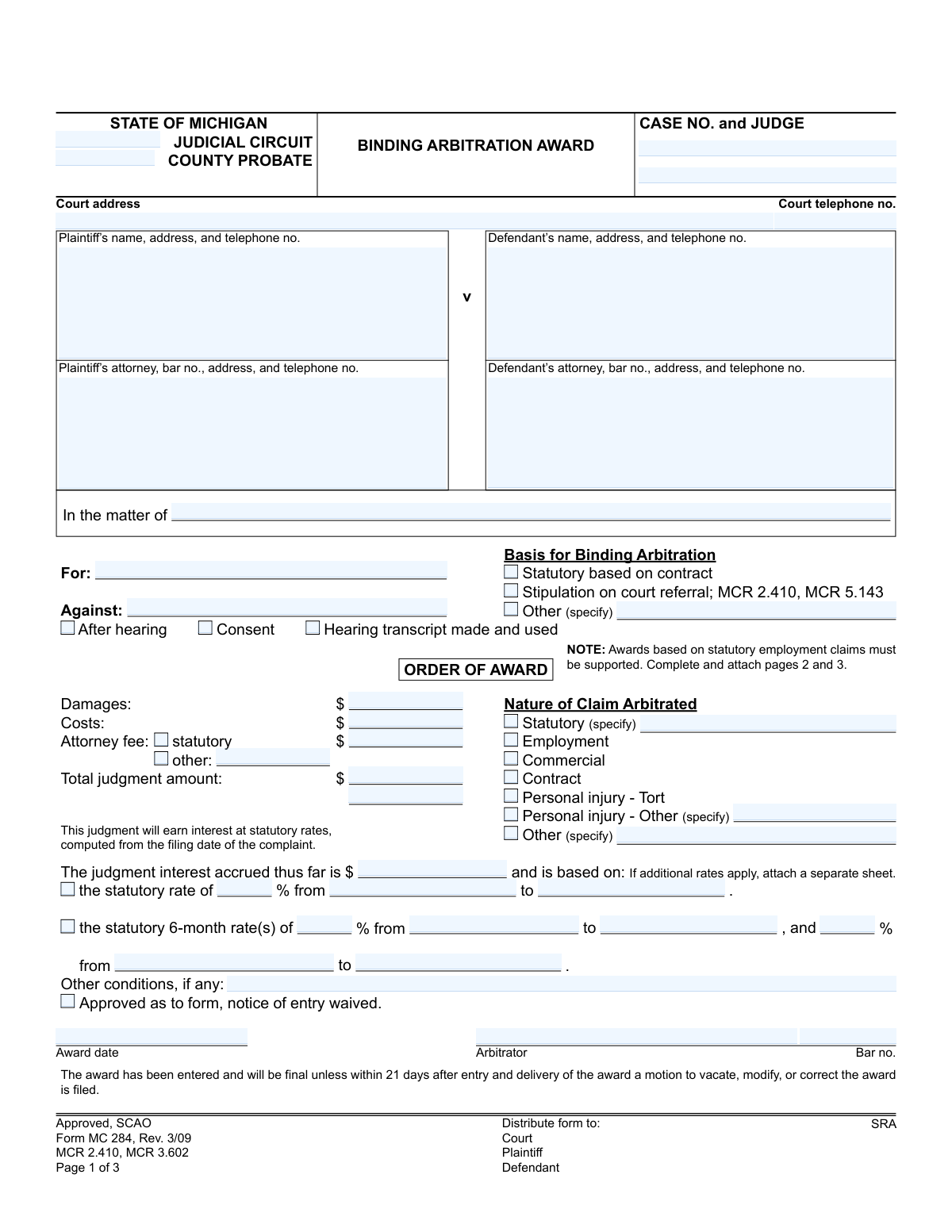
Yes! You can use AI to fill out Form MC 284, Binding Arbitration Award

Form MC 284, the Binding Arbitration Award, is a legal document used within the Michigan court system to officially record the outcome of a binding arbitration hearing. It details the arbitrator's decision, including any monetary damages, costs, and attorney fees awarded to the prevailing party, making the award a legally enforceable court judgment. Today, this form can be filled out quickly and accurately using AI-powered services like Instafill.ai, which can also convert non-fillable PDF versions into interactive fillable forms.
MC 284 is part of the Michigan court forms category on Instafill.
Our AI automatically handles information lookup, data retrieval, formatting, and form filling.
It takes less than a minute to fill out MC 284 using our AI form filling.
Securely upload your data. Information is encrypted in transit and deleted immediately after the form is filled out.

Form specifications

Form name: Form MC 284, Binding Arbitration Award
Number of fields: 71
Number of pages: 1
Language: English
main-image

Instafill Demo: How to fill out PDF forms in seconds with AI

How to Fill Out MC 284 Online for Free in 2026

Are you looking to fill out a MC 284 form online quickly and accurately? Instafill.ai offers the #1 AI-powered PDF filling software of 2026, allowing you to complete your MC 284 form in just 37 seconds or less.
Follow these steps to fill out your MC 284 form online using Instafill.ai:
  1. 1 Navigate to Instafill.ai and upload or select the MC 284, Binding Arbitration Award form.
  2. 2 Use the AI assistant to input case information, including the court, case number, judge, and contact details for the plaintiff, defendant, and their attorneys.
  3. 3 Specify the basis for the arbitration (e.g., statutory, stipulation) and the nature of the claim that was arbitrated.
  4. 4 Enter the specific details of the award, including damages, costs, attorney fees, and the total judgment amount.
  5. 5 Provide the judgment interest calculation details, including statutory rates and the relevant time periods.
  6. 6 The arbitrator must complete the sections for findings of fact, conclusions of law, and the basis for relief, then digitally or manually sign and date the award.
  7. 7 Review the entire completed form for accuracy, then download, print, and file it with the court and serve it to all parties as required.

Our AI-powered system ensures each field is filled out correctly, reducing errors and saving you time.

Why Choose Instafill.ai for Your Fillable MC 284 Form?

Speed

Complete your MC 284 in as little as 37 seconds.

Up-to-Date

Always use the latest 2026 MC 284 form version.

Cost-effective

No need to hire expensive lawyers.

Accuracy

Our AI performs 10 compliance checks to ensure your form is error-free.

Security

Your personal information is protected with bank-level encryption.

Frequently Asked Questions About Form MC 284

This form is used by an arbitrator in Michigan to officially document the final decision, financial award, and legal reasoning of a binding arbitration case for filing with the court.

The arbitrator who presided over the case is responsible for completing, signing, and submitting the Binding Arbitration Award form.

The award becomes final unless a party files a motion to vacate, modify, or correct it within 21 days after the award is entered and delivered.

Pages 2 and 3, which detail the findings of fact, conclusions of law, and evidence, are mandatory for awards based on statutory employment claims and recommended for other complex cases to support the decision.

This section requires a breakdown of the financial award, including the amount for damages, costs, and attorney fees, leading to a total judgment amount.

Interest is calculated from the date the complaint was filed, using either a single statutory rate or various 6-month rates as specified on the form.

A 'statutory based on contract' arbitration is required by a clause in a contract, whereas a 'stipulation on court referral' is when parties in a lawsuit agree to resolve their dispute through arbitration as part of the court process.

You must file a motion to vacate, modify, or correct the award with the appropriate court within the 21-day deadline. You should consult with an attorney, as the grounds for challenging an arbitration award are very limited.

Yes, services like Instafill.ai use AI to auto-fill form fields accurately and save time, which is especially useful for arbitrators or legal staff who handle these documents frequently.

Upload the MC 284 PDF to Instafill.ai, and its AI will make the document fillable. You can then connect a data source or enter the case information once to populate all relevant fields automatically.

You can use a tool like Instafill.ai, which specializes in converting flat, non-fillable PDFs into interactive forms that you can easily complete and sign on your computer.

This section serves as legal proof, under penalty of perjury, that a copy of the award was properly mailed to all parties or their attorneys at their last-known addresses.

This section should contain a summary of the key facts that the arbitrator determined to be true based on the evidence presented, which form the basis for the final decision.

According to the form's distribution list, copies must be provided to the Court, the Plaintiff, and the Defendant.

Compliance MC 284
Validation Checks by Instafill.ai

1
Validate Case Number Presence and Format
Ensures the 'CASE NO.' field is not empty and conforms to the expected format for the specified judicial circuit. The case number is the primary identifier for the legal action, and its absence or incorrect format would make the award impossible to file and track within the court system. If this validation fails, the form cannot be processed as it cannot be linked to a specific case.
2
Verify Total Judgment Amount Calculation
Checks that the 'Total judgment amount' is the mathematical sum of the values entered for 'Damages', 'Costs', and 'Attorney fee'. This is a critical logical check to ensure the financial accuracy of the award. An incorrect total could lead to disputes over payment and complicate enforcement of the judgment.
3
Enforce Conditional 'Other (specify)' Fields
Validates that if any checkbox labeled 'Other' is selected (e.g., in 'Basis for Binding Arbitration' or 'Nature of Claim'), the corresponding 'specify' text field must be filled in. This ensures that the choice of 'Other' is properly explained and not left ambiguous. Failure to specify makes the selection meaningless and the record incomplete.
4
Validate Attorney Bar Number Format
Checks that all 'bar no.' fields for attorneys and the arbitrator follow the specific format required by the state bar (e.g., a 'P' prefix followed by a series of digits for Michigan). An invalid bar number calls into question the authority and identity of the legal professional. This validation is crucial for verifying credentials and ensuring the legitimacy of the participants.
5
Ensure Logical Date Sequence for Award and Mailing
Verifies that the 'Award date' is a valid date and is not in the future. It also checks that the 'Award date' is on or before the 'Certificate of Mailing' date. An award cannot be mailed before it is officially issued, so this check prevents logical impossibilities and ensures the timeline of events is correctly documented.
6
Require Interest Calculation Details
If the 'judgment interest accrued thus far' field contains a value greater than zero, this check ensures that one of the subsequent interest calculation methods is fully completed, including the rate percentage and the 'from' and 'to' dates. Without these details, the basis for the accrued interest amount is undocumented and cannot be verified or contested. This is essential for financial transparency.
7
Confirm Support for Statutory Employment Claims
Based on the form's instruction, this validates that if the 'Nature of Claim' is marked as both 'Statutory' and 'Employment', then key fields on pages 2 and 3, such as 'Material Findings of Fact' and 'Material Conclusions of Law', are not empty. This is required to provide the necessary legal support for the award in these specific types of cases. An unsupported award may be challenged or vacated.
8
Verify Case Number Consistency Across Pages
Compares the 'Case No.' field on pages 2 and 3 with the 'CASE NO.' on page 1 to ensure they are identical. Mismatched case numbers could lead to pages being misfiled or the supporting documentation being associated with the wrong case. This check maintains the integrity of the multi-page document.
9
Mandate Arbitrator Identification on Award Order
Ensures that the 'Arbitrator' name and 'Bar no.' fields on page 1, under the 'ORDER OF AWARD', are both completed. The arbitrator's identity and credentials are what give the award its legal authority. An anonymous or unidentifiable arbitrator would render the entire award invalid.
10
Validate Monetary Field Formats
Checks that all financial fields, including 'Damages', 'Costs', and 'Attorney fee', contain only valid, non-negative numeric characters and at most one decimal point. This prevents data entry errors and ensures that all financial calculations can be performed correctly. Submitting non-numeric text in these fields would cause calculation failures and invalidate the financial portion of the award.
11
Ensure Completeness of Party Information
Validates that the name and address fields for at least one Plaintiff and one Defendant are filled out. A legal award must clearly identify the parties involved in the dispute. Without this fundamental information, the award is unenforceable as it is not clear who is obligated to pay or who is entitled to receive the judgment.
12
Validate Telephone Number Format
Ensures that all telephone number fields are populated with values that match a standard phone number pattern (e.g., 10 digits, optional formatting like hyphens or parentheses). While not as critical as a case number, valid contact information is important for communication. This check helps maintain data quality and reduces the likelihood of typos.
13
Require Selection of Arbitration Basis
Verifies that at least one of the options under 'Basis for Binding Arbitration' (Statutory, Stipulation, or Other) has been selected. This is a jurisdictional prerequisite, as it establishes the legal authority under which the arbitrator is making the award. An award without a stated basis is subject to being vacated.
14
Require Selection of Claim Nature
Ensures that at least one checkbox under 'Nature of Claim Arbitrated' is selected. Classifying the type of dispute is essential for statistical purposes, applying the correct legal standards, and determining the correct statutory interest rates. An unclassified claim is incomplete and may cause processing delays.
15
Validate Interest Calculation Date Ranges
For any interest calculation period entered, this check verifies that the 'from' date is chronologically before or the same as the 'to' date. An inverted date range is a logical error that makes the interest calculation impossible. This ensures the data entered for financial calculations is coherent and correct.

Common Mistakes in Completing MC 284

Incorrect Case Number or Judge Information

Users often mistype the case number or omit the assigned judge's name. This happens due to simple transcription errors or not having the correct case file information readily available. An incorrect case number can lead to the award being filed in the wrong case or rejected by the court clerk, causing significant delays. Always double-check the case number against official court documents before submission.

Inaccurate Attorney Bar Numbers

Entering an incorrect or incomplete bar number for the plaintiff's or defendant's attorney is a frequent error. The bar number is a unique identifier, and a mistake can make it difficult for the court to verify the attorney's standing and contact information. This can delay case processing and communications. It's crucial to verify the bar number from an official source, like the state bar directory.

Calculation Errors in the Award Amount

Manually adding the 'Damages,' 'Costs,' and 'Attorney fee' to arrive at the 'Total judgment amount' often leads to mathematical errors. These miscalculations can result in an incorrect judgment being entered, requiring a motion to correct the award and causing legal complications. To avoid this, use a calculator to carefully sum the figures twice before entering the final total.

Improper Judgment Interest Calculation

The section for calculating judgment interest is complex, involving multiple rates and date ranges, making it highly prone to error. People may use outdated statutory rates or miscalculate the accrual period, leading to an incorrect interest amount on the judgment. This can create disputes and require later correction. AI-powered tools like Instafill.ai can help by automating these complex calculations based on current statutory rates.

Failing to Specify for 'Other' or 'Statutory' Categories

A common oversight is checking a box like 'Other (specify)' or 'Statutory (specify)' without providing the required written explanation in the adjacent field. This leaves the basis for the award or the nature of the claim ambiguous, which can be grounds for a motion to vacate or modify the award. Always ensure that any selection requiring specification is accompanied by a clear and concise description.

Insufficient Detail in Findings of Fact and Law

The form requires detailed 'Material Findings of Fact' and 'Material Conclusions of Law,' especially for statutory employment claims. Filers sometimes provide vague, one-sentence answers that fail to adequately support the award. This lack of detail can weaken the award's legal standing and make it vulnerable to appeal. Be thorough and attach additional pages if necessary to provide a complete and defensible record.

Omitting the Certificate of Mailing Signature

Forgetting to sign and date the 'Certificate of Mailing' on page 2 is a critical mistake that invalidates the proof of service on the parties. This occurs when filers rush and overlook the signature line at the bottom of the page. Without a valid certificate, there is no official record that the parties were notified of the award, potentially voiding the 21-day deadline for filing a motion to vacate.

Incomplete Witness or Exhibit Logs

When filling out the tables on page 3, users often leave columns blank, such as a witness's address or whether an exhibit was formally 'Admitted.' This creates an incomplete record of the arbitration hearing, which can be problematic if the award is challenged or reviewed later. Ensure every column for every witness and exhibit is filled out completely to maintain a clear and accurate record of the proceedings.

Missing Arbitrator Signature or Date

An arbitration award is not valid until it is signed and dated by the arbitrator. This form has multiple signature lines for the arbitrator (on pages 1, 2, and 3), and it's easy to miss one. An unsigned or undated award is legally unenforceable and will be rejected by the court. It is essential to review every page to ensure all required arbitrator signatures, bar numbers, and dates are present.

Using Illegible Handwriting on a Printed Form

If the form is a non-fillable PDF and is completed by hand, illegible handwriting can cause significant problems. Court clerks may misinterpret names, addresses, or monetary amounts, leading to data entry errors in the official court record. To prevent this, it is best to use a digital tool; for example, Instafill.ai can convert a flat PDF into a fillable format, allowing you to type directly into the fields for maximum clarity.
Saved over 80 hours a year

“I was never sure if my IRS forms like W-9 were filled correctly. Now, I can complete the forms accurately without any external help.”

Kevin Martin Green

Your data stays secure with advanced protection from Instafill and our subprocessors

Robust compliance program

Transparent business model

You’re not the product. You always know where your data is and what it is processed for.

ISO 27001, HIPAA, and GDPR

Our subprocesses adhere to multiple compliance standards, including but not limited to ISO 27001, HIPAA, and GDPR.

Security & privacy by design

We consider security and privacy from the initial design phase of any new service or functionality. It’s not an afterthought, it’s built-in, including support for two-factor authentication (2FA) to further protect your account.

Fill out MC 284 with Instafill.ai

Worried about filling PDFs wrong? Instafill securely fills form-mc-284-binding-arbitration-award forms, ensuring each field is accurate.