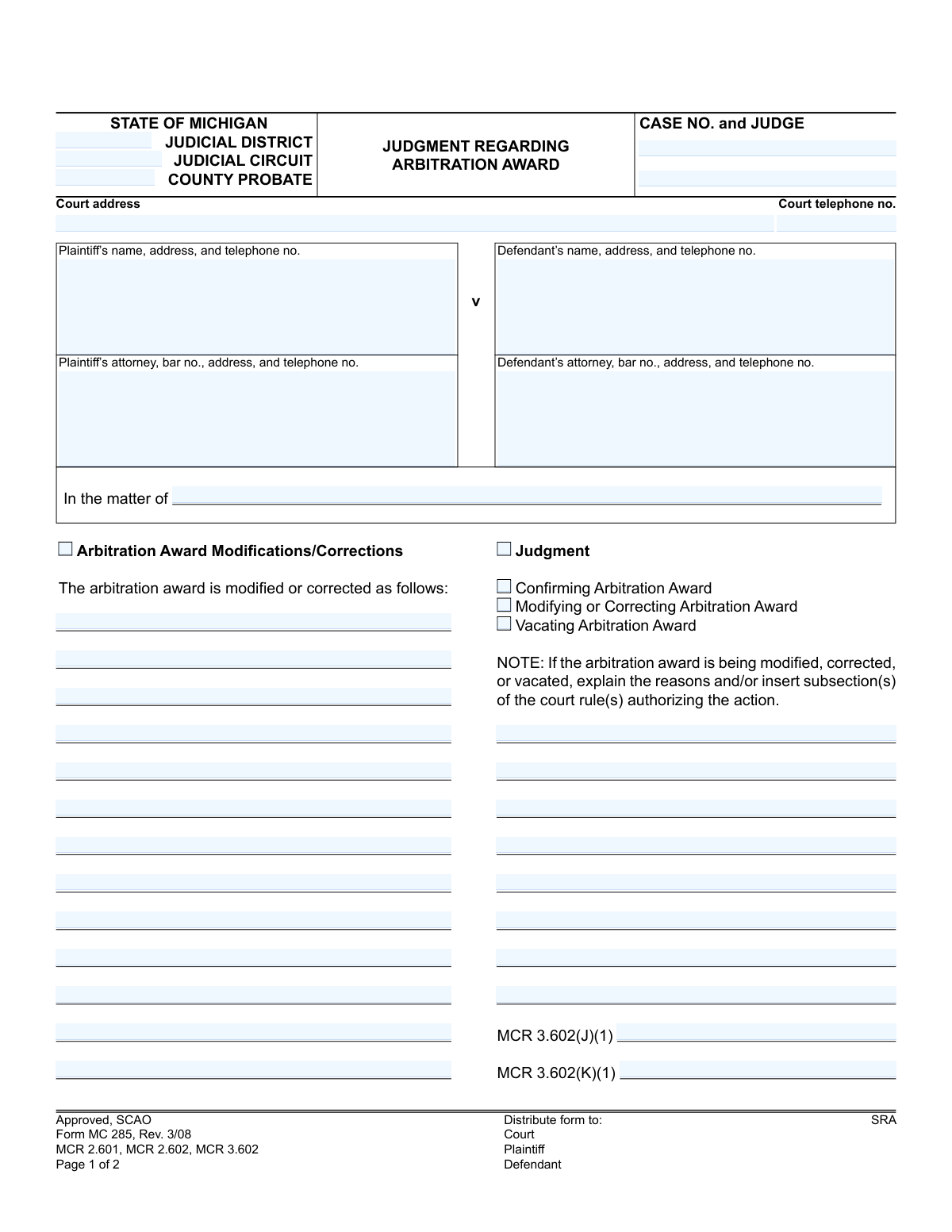
Yes! You can use AI to fill out Form MC 285, Judgment Regarding Arbitration Award
Form MC 285 is a legal document used in the State of Michigan's judicial system for a judge to issue a final judgment concerning a prior arbitration award. It officially records whether the court confirms, modifies, corrects, or vacates the arbitrator's decision, providing the legal basis for the action taken. Today, this form can be filled out quickly and accurately using AI-powered services like Instafill.ai, which can also convert non-fillable PDF versions into interactive fillable forms.
MC 285 is part of the
Michigan court forms category on Instafill.
Our AI automatically handles information lookup, data retrieval, formatting, and form filling.
It takes less than a minute to fill out MC 285 using our AI form filling.
Securely upload your data. Information is encrypted in transit and deleted immediately after the form is filled out.
Form specifications
| Form name: | Form MC 285, Judgment Regarding Arbitration Award |
| Number of fields: | 46 |
| Number of pages: | 1 |
| Language: | English |
More forms in Michigan court forms
Instafill Demo: How to fill out PDF forms in seconds with AI
How to Fill Out MC 285 Online for Free in 2026
Are you looking to fill out a MC 285 form online quickly and accurately? Instafill.ai offers the #1 AI-powered PDF filling software of 2026, allowing you to complete your MC 285 form in just 37 seconds or less.
Follow these steps to fill out your MC 285 form online using Instafill.ai:
- 1 Navigate to Instafill.ai and upload or select the Judgment Regarding Arbitration Award (Form MC 285).
- 2 Use the AI assistant to input essential case details, such as the court, case number, and judge's name.
- 3 Provide the full names, addresses, and representative information for both the plaintiff and the defendant.
- 4 Indicate the court's decision by selecting whether the arbitration award is being confirmed, modified/corrected, or vacated.
- 5 If the award is being modified, corrected, or vacated, enter the specific reasons and cite the relevant court rules as prompted.
- 6 Review all the auto-filled information for accuracy and completeness before finalizing the document.
- 7 Download the completed form, ready for the judge's signature and official filing with the court.
Our AI-powered system ensures each field is filled out correctly, reducing errors and saving you time.
Why Choose Instafill.ai for Your Fillable MC 285 Form?
Speed
Complete your MC 285 in as little as 37 seconds.
Up-to-Date
Always use the latest 2026 MC 285 form version.
Cost-effective
No need to hire expensive lawyers.
Accuracy
Our AI performs 10 compliance checks to ensure your form is error-free.
Security
Your personal information is protected with bank-level encryption.
Frequently Asked Questions About Form MC 285
This form is used by a Michigan court to issue a final judgment on a prior arbitration award. It officially confirms, modifies, corrects, or vacates the arbitrator's decision, making it legally enforceable.
This form is an official court order, so it is typically prepared by an attorney for one of the parties and then signed by the judge to make it official. The judge's signature finalizes the judgment.
You will need the court and case information, including the case number and judge's name. You also need the full names, addresses, and telephone numbers for the plaintiff, defendant, and their respective attorneys.
Vacating an award means the court has completely nullified or canceled the original decision made by the arbitrator. The form requires a written explanation for this action, citing the specific court rules that authorize it.
Use the 'Arbitration Award Modifications/Corrections' section to list the specific changes. In the 'Judgment' section below that, you must explain the legal reasons for the changes, referencing the applicable court rules like MCR 3.602.
After the judge signs it, the judgment is officially entered with the court. Copies must then be sent to the plaintiff, the defendant, and any attorneys involved, as confirmed by the 'Certificate of Mailing'.
The form notes that you have 21 days from the date of the judgment to file a motion for a new trial or an appeal. You should consult with an attorney immediately to discuss your legal options.
The case number is assigned by the court when the lawsuit is first filed. It should appear on all previous documents related to your case, such as the initial complaint or motions.
Yes, services like Instafill.ai use AI to help you accurately fill in standard fields like names, addresses, and case numbers, saving time and reducing errors. However, a legal professional should draft the specific reasons for modifying or vacating an award.
You can upload the PDF of the form to the Instafill.ai platform. The AI will make the document interactive, allowing you to type your information directly into the appropriate fields before downloading or printing the completed form.
You can use a tool like Instafill.ai to solve this problem. Simply upload the non-fillable PDF, and the service will automatically convert it into an interactive, fillable form you can complete on your computer.
This section is where the person who mails the final judgment to all parties signs to certify that this has been done. It serves as official proof that all parties have been notified of the court's decision.
The judgment becomes final 21 days after the date it is signed by the judge. This period allows time for either party to file an appeal or a motion for a new trial.
Compliance MC 285
Validation Checks by Instafill.ai
1
Case Number Validation
Checks that the 'Case No.' field is not empty and conforms to the standard Michigan court case number format. This is crucial for correctly identifying and filing the document within the court system. A missing or malformed case number would cause the document to be rejected or misfiled.
2
Court Jurisdiction Identification
Verifies that at least one of the court identification fields ('Judicial District', 'Judicial Circuit', or 'County Probate') is completed. This ensures the judgment is filed in the correct jurisdiction and avoids ambiguity about which court is issuing the order. Failure to specify the court would render the document legally invalid.
3
Attorney Bar Number Format
Validates that the attorney 'bar no.' for both plaintiff and defendant follows the required format for the State Bar of Michigan (e.g., a 'P' prefix followed by a specific number of digits). This confirms the attorney is licensed and in good standing, which is a legal requirement for representation. An invalid bar number could indicate an unauthorized practitioner and invalidate the filing.
4
Standard Phone Number Formatting
Ensures all telephone number fields on the form are entered in a consistent, valid format, such as (XXX) XXX-XXXX. Proper formatting is essential for data consistency and ensures that court staff and parties can successfully contact each other. An invalid format could lead to communication failures and processing delays.
5
Judgment and Order Consistency Check
Verifies that the selection made in the 'Judgment' section on page 1 (Confirming, Modifying/Correcting, or Vacating) logically corresponds to the 'IT IS ORDERED' selection on page 2. This cross-check prevents internal contradictions within the final judgment document. A mismatch would create an ambiguous and unenforceable order, requiring correction and re-issuance.
6
Conditional Explanation for Modification or Vacation
This check ensures that if the judgment is to modify, correct, or vacate an arbitration award, the corresponding text area explaining the reasons is filled out. Court rules require a stated basis for such actions, as noted on the form. Omitting the explanation would make the judgment legally insufficient and subject to appeal or reversal.
7
Exclusive Judgment Type Selection
Validates that only one option among 'Confirming Arbitration Award', 'Modifying or Correcting Arbitration Award', and 'Vacating Arbitration Award' is selected. These actions are mutually exclusive, and selecting more than one would create a logically impossible and invalid order. The system should prevent submission if multiple options are checked.
8
Judge's Signature and Date Presence
Confirms that the judge's signature and the date of signing are both present. A judgment is not legally effective until it is signed and dated by the presiding judge. The absence of either of these elements would render the document a draft, not a final, enforceable order.
9
Valid Date Format
Checks that all date fields on the form are entered in a valid format (e.g., MM/DD/YYYY) and represent a real calendar date. This prevents data entry errors and ensures the legal timeline of events is clear and unambiguous. An invalid date could jeopardize deadlines for appeals or further actions.
10
Certificate of Mailing Date Sequence
Verifies that the date on the 'Certificate of Mailing' is the same as or later than the date the judgment was signed by the judge. It is logically impossible to mail a document before it has been finalized and signed. This check ensures the procedural timeline is accurate and legally sound, which is critical for calculating appeal deadlines.
11
Party Information Completeness
Ensures that the name and address fields for both the plaintiff and defendant are fully completed. This information is essential for proper case identification, serving legal notice, and enforcing the judgment. Incomplete party information can lead to significant delays and challenges in the legal process.
12
Exclusive 'IT IS ORDERED' Selection
Validates that only one of the three checkboxes under the 'IT IS ORDERED' heading is selected. These options represent the final disposition of the award (confirmed, modified, or vacated) and are mutually exclusive. Allowing multiple selections would result in a contradictory and unenforceable court order.
13
Court Rule Citation for Modification or Vacation
Checks that if the judgment modifies, corrects, or vacates the award, the reasons are explained and/or the relevant court rule subsection (MCR 3.602(J)(1) or MCR 3.602(K)(1)) is cited. The form explicitly requires this justification. Failure to provide the legal basis for the court's action could be grounds for appeal.
Common Mistakes in Completing MC 285
Users frequently enter the case number incorrectly, omitting the year, case type code (e.g., CZ, CK), or transposing digits. This happens due to carelessness or not referencing official documents. An incorrect case number will cause the court clerk to reject the filing or misfile the judgment, leading to significant delays and preventing the judgment from being linked to the correct court record.
The form provides checkboxes for Judicial District, Judicial Circuit, and County Probate, and filers often select the wrong one or leave it blank. This confusion arises from not knowing the specific jurisdiction of their case. Filing in the wrong court will result in immediate rejection, forcing the filer to start over and potentially miss critical deadlines.
When asking to modify, correct, or vacate an award, filers often check the box but fail to provide the required explanation and cite the specific court rule (MCR 3.602). This is a critical omission, as the judge cannot legally grant the request without a stated legal basis. The proposed judgment will be denied, requiring a corrected submission and potentially another court hearing.
A common error is selecting one type of action on page 1 (e.g., 'Modifying or Correcting Arbitration Award') but then checking a different, conflicting box under the 'IT IS ORDERED' section on page 2 (e.g., 'The arbitration award is vacated'). This creates an ambiguous and legally unenforceable document. The judge will reject any judgment with such internal contradictions.
Filers may sign and date the Certificate of Mailing before they have actually mailed the document, or forget to sign it altogether. Signing prematurely constitutes a false statement under penalty of perjury, while forgetting to sign means there is no official proof of service. This can give the opposing party grounds to challenge the judgment by claiming they were never properly served.
People often list an old address for the plaintiff or defendant instead of their official 'last-known address' as defined by court rules. Proper service of the judgment is legally required, and using an incorrect address can invalidate it. The opposing party could later move to set aside the judgment by arguing they never received notice, nullifying the entire process.
Forgetting to include the attorney's bar number (P-number in Michigan) or entering it incorrectly is a frequent oversight. This unique identifier is essential for the court to verify the attorney's credentials and associate them with the case. This mistake can lead to administrative processing delays or rejection of the filing by the clerk's office.
When a form is only available as a non-fillable PDF, people often print it and fill it out by hand, resulting in illegible handwriting. If the court clerk cannot decipher names, addresses, or the case number, the document will be rejected or critical data may be entered incorrectly into the court's system. AI-powered tools like Instafill.ai can convert such flat PDFs into fillable versions, ensuring all information is typed and perfectly clear.
Users sometimes provide a generic or unhelpful description, such as 'Arbitration,' in the 'In the matter of' field. This field is intended to specify the subject of the arbitration for the court record. A vague entry makes it difficult for future reviewers of the case file to understand the context, so it should clearly identify the parties and the nature of the dispute (e.g., 'Arbitration regarding residential construction contract').
When requesting a modification or vacation of an award, the form requires citing the relevant subsection of MCR 3.602. Filers without legal expertise may cite the wrong rule or fail to cite one at all. This invalidates the legal reasoning for the judgment, which will either be rejected by the judge or be highly vulnerable to being overturned on appeal.
Saved over 80 hours a year
“I was never sure if my IRS forms like W-9 were filled correctly. Now, I can complete the forms accurately without any external help.”
Kevin Martin Green
Your data stays secure with advanced protection from Instafill and our subprocessors
Robust compliance program
Transparent business model
You’re not the product. You always know where your data is and what it is processed for.
ISO 27001, HIPAA, and GDPR
Our subprocesses adhere to multiple compliance standards, including but not limited to ISO 27001, HIPAA, and GDPR.
Security & privacy by design
We consider security and privacy from the initial design phase of any new service or functionality. It’s not an afterthought, it’s built-in, including support for two-factor authentication (2FA) to further protect your account.
Fill out MC 285 with Instafill.ai
Worried about filling PDFs wrong? Instafill securely fills form-mc-285-judgment-regarding-arbitration-award forms, ensuring each field is accurate.