Yes! You can use AI to fill out Form MC 287, Financial Statement

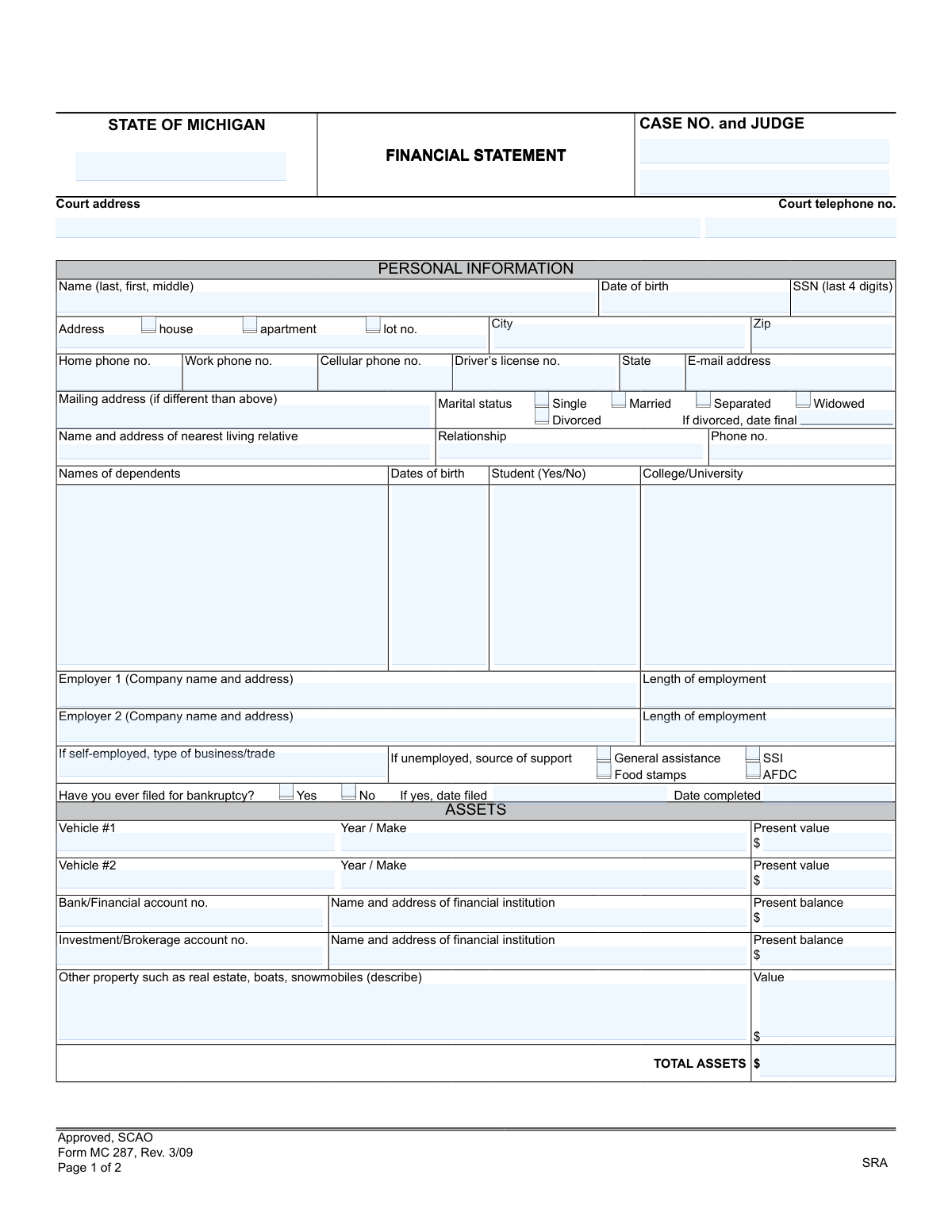
The Michigan Financial Statement, Form MC 287, is a legal document submitted to the court to provide a comprehensive overview of a person's financial standing. It details personal information, assets, monthly income, and monthly expenses, and is often required in cases where financial ability or hardship is a factor. Today, this form can be filled out quickly and accurately using AI-powered services like Instafill.ai, which can also convert non-fillable PDF versions into interactive fillable forms.
MC 287 is part of the Michigan court forms category on Instafill.
Our AI automatically handles information lookup, data retrieval, formatting, and form filling.
It takes less than a minute to fill out MC 287 using our AI form filling.
Securely upload your data. Information is encrypted in transit and deleted immediately after the form is filled out.

Form specifications

Form name: Form MC 287, Financial Statement
Number of fields: 87
Number of pages: 1
Language: English
main-image

Instafill Demo: How to fill out PDF forms in seconds with AI

How to Fill Out MC 287 Online for Free in 2026

Are you looking to fill out a MC 287 form online quickly and accurately? Instafill.ai offers the #1 AI-powered PDF filling software of 2026, allowing you to complete your MC 287 form in just 37 seconds or less.
Follow these steps to fill out your MC 287 form online using Instafill.ai:
  1. 1 Navigate to Instafill.ai and upload or select the Michigan Financial Statement (Form MC 287).
  2. 2 Provide your personal information, including your name, address, date of birth, marital status, and dependent details.
  3. 3 Use the AI assistant to list all your assets, such as vehicles, bank accounts, investments, and real estate, along with their current values.
  4. 4 Detail all sources of your monthly income, including wages, benefits, child support, and any other earnings.
  5. 5 Itemize your total monthly expenses, covering categories like housing, utilities, vehicle payments, insurance, and other debts.
  6. 6 Carefully review the entire form to ensure all financial data entered by the AI is accurate and complete.
  7. 7 Sign and date the form to certify the information is correct, then download it for submission to the court.

Our AI-powered system ensures each field is filled out correctly, reducing errors and saving you time.

Why Choose Instafill.ai for Your Fillable MC 287 Form?

Speed

Complete your MC 287 in as little as 37 seconds.

Up-to-Date

Always use the latest 2026 MC 287 form version.

Cost-effective

No need to hire expensive lawyers.

Accuracy

Our AI performs 10 compliance checks to ensure your form is error-free.

Security

Your personal information is protected with bank-level encryption.

Frequently Asked Questions About Form MC 287

This form is used to provide the court with a complete and accurate picture of your financial situation, including your income, assets, and expenses. It is often required in court cases where financial standing is relevant, such as determining eligibility for a court-appointed attorney or setting payment plans.

You need to complete this form if you have been ordered by a Michigan court to provide details about your financial status. This is common in cases involving the assessment of court costs, fines, or determining eligibility for public legal services.

While you don't need to attach them initially, the form states you must be prepared to provide supporting documentation upon request. It's a good idea to have recent pay stubs, bank statements, and tax returns ready to verify the information you provide.

The form specifically asks for your 'Gross monthly income,' which is your total earnings before any taxes or deductions are taken out. Be sure to enter the pre-tax amount for yourself and your spouse.

If you are unemployed, indicate your source of support by checking the appropriate boxes, such as General assistance, SSI, or Food stamps. You should also list any income you receive from sources like unemployment benefits in the 'MONTHLY INCOME' section.

The form only provides space for two of each, so list the two most valuable ones. You can attach a separate sheet with the details of any additional vehicles or accounts, clearly labeling it with your name and case number.

By signing this authorization, you are giving the court permission to obtain a consumer credit report and other financial information about you. This allows them to verify the details you have provided on the form.

The court requires a complete view of the household's financial resources to make an accurate assessment. Your spouse's income is considered part of the total household income, which influences the overall financial picture.

You should submit the completed and signed form to the court handling your case, as indicated by the court address at the top of the form. Always check with the court clerk for specific submission instructions or deadlines.

You should list anyone who relies on you for financial support, such as your children or other relatives living with you. Be sure to include their names, dates of birth, and whether they are a student.

Yes, AI-powered services like Instafill.ai can help you fill out this form quickly and accurately. These tools use AI to extract information from your profile and auto-fill the required fields, saving you time and reducing errors.

To fill this form using Instafill.ai, simply upload the PDF to the platform. The AI will identify the fields and you can fill them out interactively, or let the AI auto-fill them with your saved information.

If you have a non-fillable or 'flat' PDF, you can use a service like Instafill.ai. It can convert the non-fillable PDF into an interactive, fillable form that you can easily complete and sign online.

Compliance MC 287
Validation Checks by Instafill.ai

1
SSN Last 4 Digits Format
This check verifies that the 'SSN (last 4 digits)' field contains exactly four numeric digits. This is crucial for correct, partial identification without exposing the full Social Security Number. If the input contains non-numeric characters, or is longer or shorter than 4 digits, the submission should be rejected with an error message prompting for the correct format.
2
Date of Birth Plausibility
Validates that the 'Date of birth' is a real date in the past and that the calculated age is reasonable for an individual filing a financial statement (e.g., over 18 years old). This prevents data entry errors like future dates or typos that result in an impossible age. A failure would prompt the user to re-enter a valid date.
3
Conditional Divorce Date Requirement
This validation ensures that if the 'Marital status' is marked as 'Divorced', the 'If divorced, date final' field must be filled with a valid date. This information is legally significant for assessing financial obligations and history. If 'Divorced' is selected but the date is missing, the form should not be accepted until the date is provided.
4
Conditional Bankruptcy Date Requirement
Checks if the answer to 'Have you ever filed for bankruptcy?' is 'Yes'. If it is, the 'If yes, date filed' field must be completed with a valid date. This is a critical piece of financial history for the court to consider. The form submission will be blocked until this required conditional information is entered.
5
Total Assets Summation Accuracy
This check automatically calculates the sum of all individual asset values (vehicles, bank accounts, investments, other property) and verifies that it matches the value entered in the 'TOTAL ASSETS' field. This ensures the mathematical accuracy of the financial statement and prevents manual calculation errors. If the totals do not match, the system should flag the discrepancy and require correction before submission.
6
Total Monthly Income Summation Accuracy
Verifies that the value in the 'TOTAL INCOME' field is the correct sum of all individual monthly income sources listed (self, spouse, benefits, etc.). This is essential for an accurate assessment of the individual's financial capacity. A mismatch should trigger an error, forcing a review and correction of the income figures or the total.
7
Total Monthly Expenses Summation Accuracy
Ensures the 'TOTAL EXPENSES' field accurately reflects the sum of all listed monthly expense items (rent, utilities, payments, etc.). This validation confirms the arithmetic on the form is correct, which is fundamental to understanding the filer's net financial situation. If the user-entered total does not match the calculated sum, the form will be considered invalid until corrected.
8
Phone Number Format Validation
This check ensures that all phone number fields (Home, Work, Cellular) adhere to a standard 10-digit format, potentially allowing for common characters like parentheses, spaces, or hyphens. Consistent formatting is important for data integrity and ensuring the court can successfully contact the individual. An invalid format would trigger an error message requesting the user to enter a valid phone number.
9
Marital Status Single Selection
Validates that only one option has been selected for 'Marital status'. An individual can only have one current marital status, so selecting multiple options (e.g., 'Married' and 'Separated') is a logical impossibility. The form interface should ideally use radio buttons to prevent this, but a backend validation is still necessary to ensure data integrity.
10
Monetary Field Numeric Format
This validation confirms that all fields intended to hold dollar amounts contain only valid numeric characters, decimal points, and optionally commas. This applies to all asset values, income sources, and expense items. Entering text like 'None' or 'N/A' would cause calculation errors, so this check ensures all financial data is machine-readable and ready for summation.
11
Case Number Presence and Format
Verifies that the 'CASE NO.' field is not empty and conforms to the expected format for the specific court system. The case number is the primary identifier linking this financial statement to the correct legal proceeding. If the field is empty or does not match the expected pattern (e.g., `YY-######-XX`), the submission should be rejected to prevent misfiling.
12
Signature and Date Completion
This check ensures the 'Signature' and 'Date' fields on the second page are completed before the form can be submitted. The signature and date certify the accuracy of the provided information under penalty of perjury, making them legally essential components of the document. An incomplete submission would be legally invalid, so the system must block it until these fields are filled.
13
Employment Length vs. Age Consistency
This is a logical consistency check that compares the 'Length of employment' against the applicant's age derived from their 'Date of birth'. The length of employment cannot be greater than the applicant's age minus a reasonable starting work age (e.g., 16). This check catches significant logical errors or typos, such as a 30-year-old person listing 25 years of employment. A failure would result in a warning asking the user to verify their entries.
14
Email Address Syntax Validation
If an email address is provided in the 'E-mail address' field, this check verifies that it follows a standard email format (e.g., contains an '@' symbol and a domain with a period). This ensures that if the court needs to communicate electronically, the provided address is syntactically valid and has a chance of being deliverable. An invalid format should prompt the user for correction.

Common Mistakes in Completing MC 287

Reporting Net Instead of Gross Income

The form explicitly requests 'Gross monthly income,' which is total earnings before taxes or deductions. Many individuals mistakenly enter their take-home pay (net income), which underreports their financial capacity and can lead to an inaccurate assessment by the court. To avoid this, review your pay stubs for the gross earnings figure, and use that amount. AI-powered tools like Instafill.ai can help by providing clear instructions for such fields.

Forgetting to Sign and Date the Form

An unsigned financial statement is legally invalid and will be immediately rejected by the court clerk, causing significant delays. This common oversight often happens when people are in a hurry to complete the paperwork. Always perform a final check for the signature and date before submitting. Since this form is a non-fillable PDF, a tool like Instafill.ai can convert it into a fillable version, making it easier to manage and ensuring no fields, including the signature block, are missed before printing.

Missing or Incorrect Case Information

Applicants often forget to fill in the 'CASE NO. and JUDGE' fields at the top of the form or enter them incorrectly. This information is critical for the court to associate the financial statement with the correct legal proceeding. An omission or error here will cause filing delays or outright rejection of the document. Always double-check your official court notices for the exact case number and judge's name before submission.

Inaccurately Valuing Assets

When listing assets like vehicles or real estate, people often provide a rough guess for the 'Present value' instead of a researched market value. Significant undervaluation may be perceived as an attempt to hide assets, while overvaluation can negatively impact the assessment of financial need. Use reliable resources like Kelley Blue Book for vehicles or recent property appraisals to provide an accurate, defensible value.

Leaving 'Total' Fields Blank

The form includes fields for 'TOTAL ASSETS,' 'TOTAL INCOME,' and 'TOTAL EXPENSES' that require the applicant to sum the preceding lines. It is a frequent error to leave these calculation fields blank, which renders the form incomplete and can lead to its rejection. Carefully add up each section and enter the totals in the designated boxes. AI-powered form filling tools like Instafill.ai can prevent this by performing calculations automatically and flagging empty required fields.

Omitting Financial Accounts

Individuals sometimes fail to list all financial accounts, especially those with low balances or ones they use infrequently. The certification is made under penalty of perjury and requires a 'complete and accurate statement,' meaning all assets must be disclosed. Omitting accounts can have serious legal consequences if discovered. Gather statements for all bank, brokerage, and other financial accounts to ensure none are missed.

Providing Incomplete Employer Information

The form requires the full 'Company name and address,' but applicants often provide only a name (e.g., 'Walmart') without the specific store address. Similarly, they may misinterpret 'Length of employment' and enter a start date instead of a duration (e.g., '3 years'). These incomplete details make verification difficult and can delay the process. Be sure to provide the full, specific address of your workplace and calculate the total time you have been employed there.

Overlooking Conditional Information Fields

The form contains fields that are only required if a certain condition is met, such as 'If divorced, date final' or 'If unemployed, source of support.' People often check the primary box (e.g., 'Divorced') but then overlook the required follow-up information. This missing data is crucial for a full financial picture and will likely result in the court requesting a corrected form. Pay close attention to any 'if' statements and ensure you provide the additional details when applicable.

Confusing Physical and Mailing Addresses

The primary address section is structured for a physical residence, while a separate field exists for a 'Mailing address (if different)'. A common mistake is to only list a P.O. Box, even if it's in the mailing address field, without providing a physical street address. Most courts require a physical address for residency verification and service of process. Always provide your actual physical address in the main section and use the 'Mailing address' field only if you receive mail elsewhere.

Incomplete Dependent Information

Applicants may list the names of their dependents but fail to provide the required 'Dates of birth' and 'Student (Yes/No)' status for each one. This information is essential for determining eligibility for certain allowances, calculating support, and verifying the household composition. Leaving these details blank makes the section incomplete and can lead to an incorrect financial assessment. Ensure every column for every listed dependent is filled out accurately.
Saved over 80 hours a year

“I was never sure if my IRS forms like W-9 were filled correctly. Now, I can complete the forms accurately without any external help.”

Kevin Martin Green

Your data stays secure with advanced protection from Instafill and our subprocessors

Robust compliance program

Transparent business model

You’re not the product. You always know where your data is and what it is processed for.

ISO 27001, HIPAA, and GDPR

Our subprocesses adhere to multiple compliance standards, including but not limited to ISO 27001, HIPAA, and GDPR.

Security & privacy by design

We consider security and privacy from the initial design phase of any new service or functionality. It’s not an afterthought, it’s built-in, including support for two-factor authentication (2FA) to further protect your account.

Fill out MC 287 with Instafill.ai

Worried about filling PDFs wrong? Instafill securely fills form-mc-287-financial-statement forms, ensuring each field is accurate.