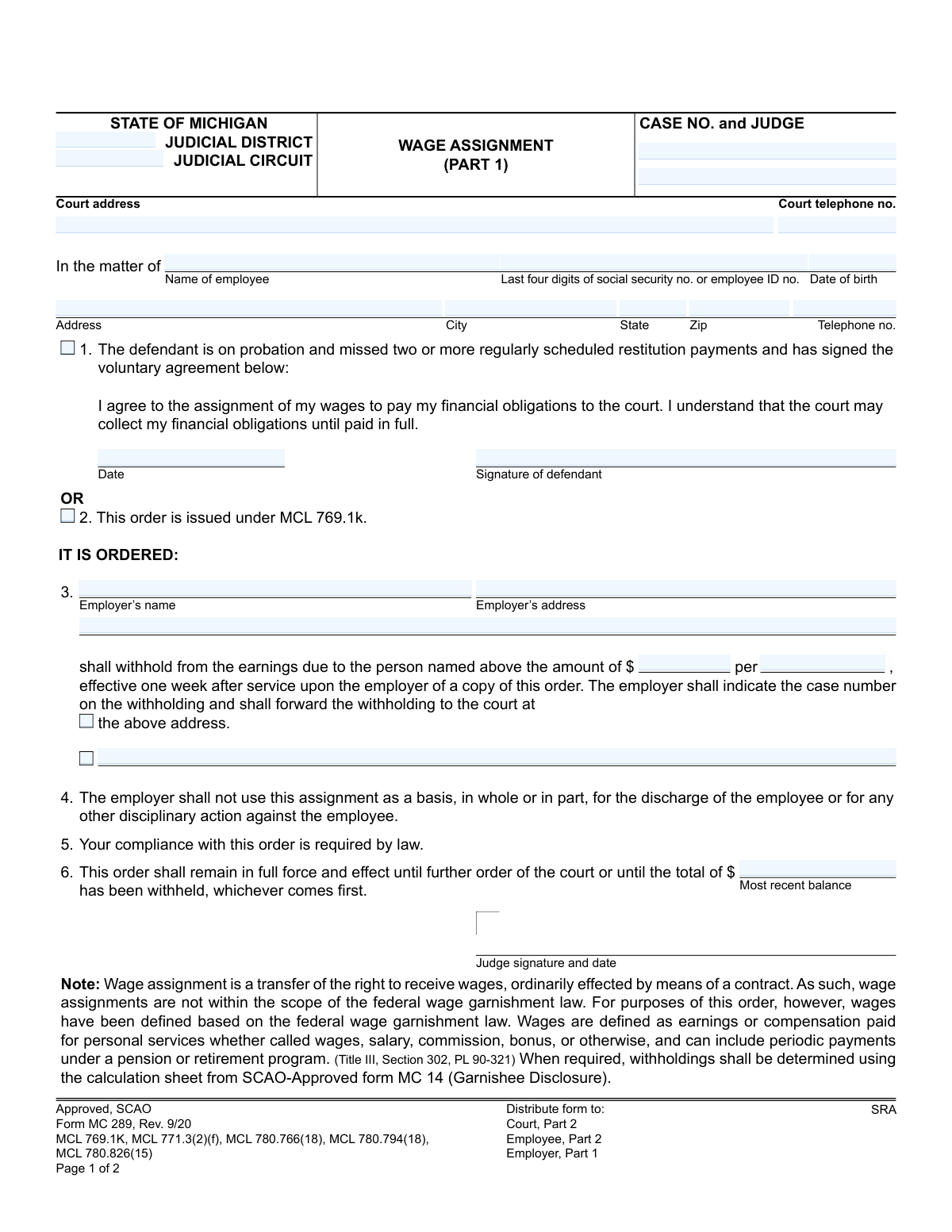
Yes! You can use AI to fill out Form MC 289, Wage Assignment

Form MC 289 is a legal document issued by the State of Michigan judicial system to formalize a wage assignment. It directs an employer to withhold a specific amount from an employee's earnings to pay court-ordered debts, such as restitution, either voluntarily by the employee or as ordered by a judge. This ensures that financial obligations to the court are met consistently. Today, this form can be filled out quickly and accurately using AI-powered services like Instafill.ai, which can also convert non-fillable PDF versions into interactive fillable forms.
MC 289 is part of the Michigan court forms category on Instafill.
Our AI automatically handles information lookup, data retrieval, formatting, and form filling.
It takes less than a minute to fill out MC 289 using our AI form filling.
Securely upload your data. Information is encrypted in transit and deleted immediately after the form is filled out.

Form specifications

Form name: Form MC 289, Wage Assignment
Number of fields: 58
Number of pages: 1
Language: English
main-image

Instafill Demo: How to fill out PDF forms in seconds with AI

How to Fill Out MC 289 Online for Free in 2026

Are you looking to fill out a MC 289 form online quickly and accurately? Instafill.ai offers the #1 AI-powered PDF filling software of 2026, allowing you to complete your MC 289 form in just 37 seconds or less.
Follow these steps to fill out your MC 289 form online using Instafill.ai:
  1. 1 Navigate to Instafill.ai and upload or select the Michigan Wage Assignment Form MC 289.
  2. 2 Use the AI assistant to accurately input court information, including the judicial district, circuit, case number, and judge's name.
  3. 3 Provide the employee's personal information, such as their full name, address, date of birth, and the last four digits of their SSN or employee ID.
  4. 4 Indicate the reason for the assignment, either by checking the voluntary agreement box (which requires the defendant's signature) or the box for an order under MCL 769.1k.
  5. 5 Enter the employer's name and address, the specific amount to be withheld per pay period, and the total balance owed.
  6. 6 Review all entered information for accuracy before the judge signs and dates the order to make it legally binding.
  7. 7 Once signed, use the platform to securely download, print, or share the completed form with all required parties, including the court, employee, and employer.

Our AI-powered system ensures each field is filled out correctly, reducing errors and saving you time.

Why Choose Instafill.ai for Your Fillable MC 289 Form?

Speed

Complete your MC 289 in as little as 37 seconds.

Up-to-Date

Always use the latest 2026 MC 289 form version.

Cost-effective

No need to hire expensive lawyers.

Accuracy

Our AI performs 10 compliance checks to ensure your form is error-free.

Security

Your personal information is protected with bank-level encryption.

Frequently Asked Questions About Form MC 289

This form is a court order that directs an employer to withhold a specific amount from an employee's wages to pay financial obligations, like restitution, owed to a Michigan court.

This form is used by the court for a defendant (employee) who has either missed restitution payments while on probation or has voluntarily agreed to have their wages assigned to pay court debts. It involves the court, the employee, and their employer.

A wage assignment is typically issued if you are on probation and have missed two or more scheduled restitution payments, or if you have signed the voluntary agreement on the form to pay your court financial obligations.

No. The form explicitly states that your employer cannot use this assignment as a basis for discharge or any other disciplinary action against you.

The form requires the case number, court details, the employee's name, address, date of birth, and last four digits of their SSN or employee ID. It also requires the employer's name and address.

The court determines the specific dollar amount to be withheld from your earnings per pay period. This amount is specified in section 3 of the order.

The withholding will continue until the total balance listed in section 6 has been paid in full, or until the court issues a further order to stop the assignment.

You are legally required to withhold the specified amount from the employee's earnings, starting one week after you receive the order. You must then forward the withheld funds to the court at the address provided, making sure to include the case number.

The main order is identical on both parts, but they are distributed differently. Part 1 is sent to the employer, while Part 2 is for the court's records and the employee.

Wages are broadly defined as any compensation for personal services, including salary, commission, bonuses, and even periodic payments from a pension or retirement program.

Yes, services like Instafill.ai use AI to accurately auto-fill form fields with your saved information, which can save time and help reduce errors.

To fill this form online, you can upload it to a platform like Instafill.ai. The service allows you to click on any field to type your information, add a signature, and then download or print the completed document.

You can use a service like Instafill.ai, which can convert flat, non-fillable PDFs into interactive forms. This allows you to easily type your information directly into the fields online.

Compliance MC 289
Validation Checks by Instafill.ai

1
Case Number Presence and Consistency
This check ensures that the 'CASE NO.' field is populated on both pages of the form and that the value is identical on each page. A valid and consistent case number is critical for correctly filing the document and associating the wage assignment with the proper legal proceeding. If the case number is missing or mismatched, the form could be rejected by the court or applied to the wrong case.
2
Mutually Exclusive Reason for Order
Validates that either checkbox 1 (voluntary agreement) or checkbox 2 (order under MCL 769.1k) is selected, but not both. The form logic indicates these are mutually exclusive reasons for the wage assignment. Failure to select exactly one option makes the legal basis for the order ambiguous and would require clarification before processing.
3
Conditional Requirement for Voluntary Agreement
If checkbox 1 ('The defendant is on probation...') is selected, this validation ensures that the 'Date' and 'Signature of defendant' fields are completed. These fields are required to confirm the employee's voluntary consent to the wage assignment. Without the date and signature, the voluntary agreement is not legally valid, and the order cannot be processed on that basis.
4
Employee Identifier Format
This check verifies that the 'Last four digits of social security no. or employee ID no.' field contains a valid entry. It should typically be exactly four digits for an SSN or conform to a predefined format for an employee ID. This identifier is essential for the employer to accurately identify the correct employee, and an invalid format could lead to errors in applying the withholding.
5
Date of Birth Chronology
Ensures the 'Date of birth' provided for the employee is a valid date that occurs in the past. A future or invalid date is a clear data entry error and must be corrected for the employee's record to be accurate. This check prevents nonsensical data from being entered and helps confirm the identity of the individual.
6
Withholding Amount Validity
Validates that the withholding 'amount of $' is a positive numeric value greater than zero. A zero, negative, or non-numeric value is not a valid withholding amount and would make the order unenforceable. This check ensures the order specifies a clear, actionable amount for the employer to withhold.
7
Total Balance vs. Periodic Withholding
This check ensures the 'Most recent balance' is a positive number and is greater than or equal to the periodic withholding 'amount'. It is illogical for a single withholding payment to be greater than the total amount owed. This validation prevents data entry errors that would make the order's terms nonsensical and impossible to fulfill.
8
Employer Information Completeness
Verifies that both the 'Employer’s name' and 'Employer’s address' fields are fully populated. This information is legally required to serve the order to the correct entity responsible for withholding wages. If this information is missing or incomplete, the wage assignment cannot be executed as the order cannot be delivered to the employer.
9
Judge's Signature Date Presence and Validity
This check confirms that a valid date is entered alongside the judge's signature. The judge's signature legally enacts the order, and the date establishes when the order was made official. An order without a valid signature date is incomplete and may be considered invalid, preventing its enforcement.
10
Mailing Date Chronology
Ensures the 'Certificate of Mailing Date' is on or after the 'Judge signature and date'. An order cannot be certified as mailed before it has been officially signed and dated by the judge. This chronological check maintains the logical and legal integrity of the process, preventing claims that the order was served before it was legally active.
11
Court Telephone Number Format
Validates that the 'Court telephone no.' field follows a standard 10-digit phone number format (e.g., (XXX) XXX-XXXX or XXX-XXX-XXXX). A valid phone number is necessary for employers or employees who may have questions regarding the wage assignment. An incorrectly formatted number can hinder communication and delay resolution of any issues.
12
Withholding Frequency Presence
This check ensures the 'per' field, which specifies the frequency of the withholding (e.g., week, month), is not empty. The frequency is a critical component of the order, defining how often the specified amount should be withheld from the employee's earnings. Without this information, the employer cannot comply with the order correctly.

Common Mistakes in Completing MC 289

Incorrect or Incomplete Case Number

Users often enter the wrong case number, transpose digits, or leave it blank. This typically happens when they don't have the official court documents on hand. An incorrect case number is a critical error that prevents the court from filing the document, leading to processing rejection, significant delays in the wage assignment, and potential non-compliance with the court's order.

Providing Full Social Security Number

The form specifically requests only the 'Last four digits of social security no.', but people frequently write their full SSN out of habit. This exposes sensitive personal information unnecessarily, increasing the risk of identity theft if the document is mishandled. Forms submitted with a full SSN may be rejected by the clerk's office to protect the individual's privacy.

Using an Incorrect Employer Name or Address

An employee might list their company's common brand name (e.g., 'Starbucks') instead of its legal business name, or provide a local store address instead of the corporate payroll processing address. This causes the legal order to be sent to the wrong entity or department, rendering it ineffective. To avoid this, one must obtain the precise legal name and the correct address for the HR or payroll department that handles wage garnishments.

Ambiguous Withholding Amount or Frequency

The form requires a specific amount and pay period (e.g., '$150 per week'). Common mistakes include leaving the 'per' field blank or using vague terms. This ambiguity makes it impossible for the employer to calculate the withholding correctly, leading to non-compliance, incorrect payments, and the need for a corrected court order to be issued.

Failure to Select the Basis for the Order

The form requires the user to check either Box 1 (voluntary agreement) or Box 2 (direct order), but not both. Users often get confused and either check both boxes or leave them both blank. This creates legal ambiguity about the authority for the wage assignment, causing the form to be rejected by the court or the employer.

Missing Defendant Signature on Voluntary Agreement

If the wage assignment is voluntary (Box 1 is checked), the defendant must sign and date the agreement section. It is common for a defendant to agree and check the box but forget to provide the required signature. Without a signature, the voluntary agreement is invalid, and the wage assignment cannot be processed on that basis, halting the entire procedure.

Omitting the Total Balance Due

Field 6 requires entering the 'Most recent balance' which acts as a cap on the total amount to be withheld. People often leave this blank because they don't have the exact figure available. This mistake can cause the wage assignment to continue indefinitely, leading to overpayment and requiring complicated refunds, whereas an incorrect balance can lead to underpayment and further legal issues.

Inconsistent Information Between Form Copies

This form is printed in two parts ('PART 1' for the employer, 'PART 2' for the court/employee), which must be identical. People sometimes make a correction on one copy but forget to update the other, especially with physical forms. This creates conflicting versions of the order, causing confusion and potential legal disputes over which terms are valid. Using a tool that populates data across all copies simultaneously prevents this.

Illegible Handwriting

Using messy or unclear handwriting on a legal document is a frequent problem. A poorly written name, address, or case number can be easily misinterpreted by the court clerk or employer's payroll staff. This leads to data entry errors that can cause the order to be misdirected, misfiled, or applied to the wrong person, completely derailing the process. To prevent this, print clearly or use a fillable PDF; tools like Instafill.ai can convert non-fillable PDFs into easy-to-type-in versions.

Forgetting to Complete the Certificate of Mailing

The Certificate of Mailing on page 2 is crucial for proving the order was legally served, but it is often overlooked and left unsigned or undated. Without this completed certificate, there is no official proof of service. This can give the employer or employee a valid reason to claim they never received the notice, invalidating the enforcement action and requiring the process to start over.

Using a Nickname Instead of a Full Legal Name

The form may be filled out using a common nickname for the employee (e.g., 'Mike' instead of 'Michael James'). An employer's payroll system, especially in a large company, may not be able to match a nickname to an official employee record. This can result in the order being returned as 'employee not found,' delaying the withholding process until a corrected form with the full legal name is submitted.
Saved over 80 hours a year

“I was never sure if my IRS forms like W-9 were filled correctly. Now, I can complete the forms accurately without any external help.”

Kevin Martin Green

Your data stays secure with advanced protection from Instafill and our subprocessors

Robust compliance program

Transparent business model

You’re not the product. You always know where your data is and what it is processed for.

ISO 27001, HIPAA, and GDPR

Our subprocesses adhere to multiple compliance standards, including but not limited to ISO 27001, HIPAA, and GDPR.

Security & privacy by design

We consider security and privacy from the initial design phase of any new service or functionality. It’s not an afterthought, it’s built-in, including support for two-factor authentication (2FA) to further protect your account.

Fill out MC 289 with Instafill.ai

Worried about filling PDFs wrong? Instafill securely fills form-mc-289-wage-assignment forms, ensuring each field is accurate.