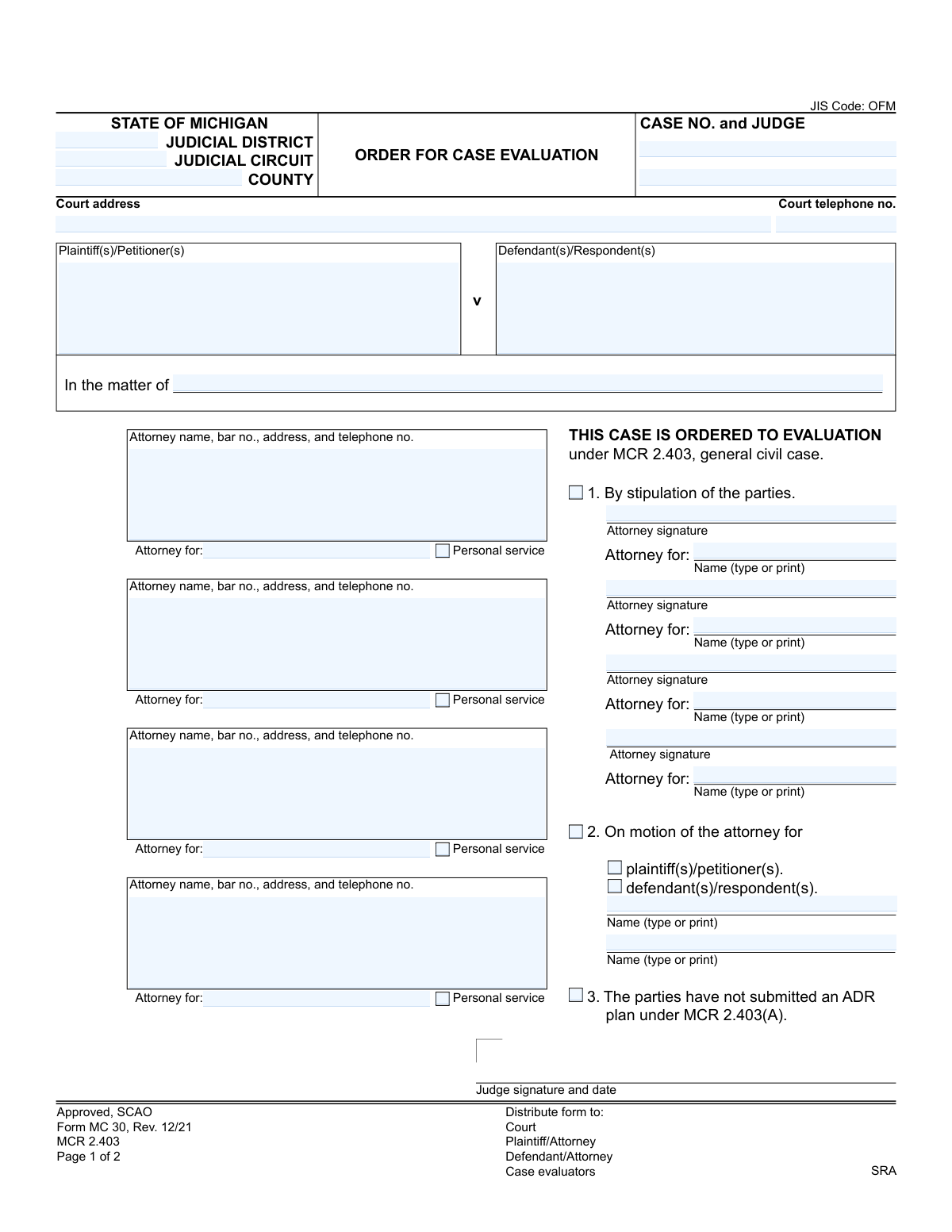
Yes! You can use AI to fill out Form MC 30, Order for Case Evaluation

Form MC 30, Order for Case Evaluation, is a legal document used within the Michigan court system to formally order a general civil case to undergo case evaluation as a form of alternative dispute resolution (ADR) under MCR 2.403. This order can be initiated by stipulation of the parties, on motion by one of the parties, or if the parties fail to submit an ADR plan. Today, this form can be filled out quickly and accurately using AI-powered services like Instafill.ai, which can also convert non-fillable PDF versions into interactive fillable forms.
MC 30 is part of the Michigan court forms category on Instafill.
Our AI automatically handles information lookup, data retrieval, formatting, and form filling.
It takes less than a minute to fill out MC 30 using our AI form filling.
Securely upload your data. Information is encrypted in transit and deleted immediately after the form is filled out.

Form specifications

Form name: Form MC 30, Order for Case Evaluation
Number of fields: 40
Number of pages: 1
Language: English
main-image

Instafill Demo: How to fill out PDF forms in seconds with AI

How to Fill Out MC 30 Online for Free in 2026

Are you looking to fill out a MC 30 form online quickly and accurately? Instafill.ai offers the #1 AI-powered PDF filling software of 2026, allowing you to complete your MC 30 form in just 37 seconds or less.
Follow these steps to fill out your MC 30 form online using Instafill.ai:
  1. 1 Navigate to Instafill.ai and upload or select the Form MC 30, Order for Case Evaluation.
  2. 2 Use the AI assistant to accurately input court details such as the judicial district/circuit, county, case number, and judge's name.
  3. 3 Identify all parties involved, including plaintiffs, petitioners, defendants, and respondents, along with their respective attorneys' information.
  4. 4 Indicate the basis for the order by checking the appropriate box: by stipulation of the parties, on motion of a party, or because an ADR plan was not submitted.
  5. 5 If the order is by stipulation, provide the signatures and printed names of the attorneys for all consenting parties.
  6. 6 Review all the information entered for completeness and accuracy before the judge signs and dates the order.
  7. 7 Once signed, complete the Certificate of Mailing section and distribute the form to the court, all parties/attorneys, and case evaluators as required.

Our AI-powered system ensures each field is filled out correctly, reducing errors and saving you time.

Why Choose Instafill.ai for Your Fillable MC 30 Form?

Speed

Complete your MC 30 in as little as 37 seconds.

Up-to-Date

Always use the latest 2026 MC 30 form version.

Cost-effective

No need to hire expensive lawyers.

Accuracy

Our AI performs 10 compliance checks to ensure your form is error-free.

Security

Your personal information is protected with bank-level encryption.

Frequently Asked Questions About Form MC 30

This is a Michigan court form used to officially order a general civil case into the case evaluation process. It documents the court's decision to send the case to a panel of neutral evaluators to facilitate a settlement.

This form is typically prepared by an attorney for one of the parties or by court staff. It becomes an official order only after it is signed by the judge presiding over the case.

Case evaluation is a form of alternative dispute resolution (ADR) governed by Michigan Court Rule 2.403. A panel of neutral attorneys reviews the case and provides an evaluation of its settlement value to encourage resolution before trial.

A case is ordered to evaluation if the parties agree to it (stipulation), if a party's motion for evaluation is granted by the judge, or if the parties failed to submit an alternative dispute resolution plan as required by the court.

If the parties are agreeing (stipulating) to case evaluation, their attorneys must sign. Regardless of the reason, the form must be signed by the judge to become a valid and enforceable court order.

You will need the full case details, including the court, case number, and judge's name. You also need the names, addresses, and bar numbers for all attorneys involved in the case.

The signed order is filed with the court clerk. Copies must then be distributed to all parties or their attorneys, the case evaluators, and the SRA (Settlement and Resolution Alternatives) office.

The Certificate of Mailing is a sworn statement by the person who mails the order, confirming that copies were sent to all parties or their attorneys. This serves as official proof of service for the court record.

If you are representing yourself (pro se), you would list your own name and contact information in the space provided for the attorney. You are responsible for all the duties an attorney would normally handle regarding this order.

Yes, services like Instafill.ai use AI to accurately auto-fill form fields from your case data, which can save time and reduce errors. This is especially helpful for repetitive information like court and attorney details.

You can use a service like Instafill.ai to upload the form and fill it out digitally. The platform allows you to easily enter all required information, add signatures, and then download or share the completed document.

If you have a non-fillable or 'flat' PDF, you can upload it to a service like Instafill.ai. Their technology can convert the static form into an interactive, fillable one that you can complete on your computer.

'By stipulation' means all parties in the lawsuit have mutually agreed to send the case to evaluation. 'On motion' means one party formally requested the court to order evaluation, and the judge granted that request, possibly over another party's objection.

Compliance MC 30
Validation Checks by Instafill.ai

1
Case Number Format and Consistency
Checks that the 'Case No.' field follows the standard Michigan court case number format. It also verifies that the case number entered on page 1 matches the case number on page 2. This is crucial for correctly identifying and tracking the case file across all documents, and an incorrect or inconsistent number could lead to the order being misfiled or rejected.
2
Jurisdictional Fields Completeness
Validates that the 'Judicial District', 'Judicial Circuit', and 'County' fields are filled out to identify the proper court jurisdiction. This information is essential for routing the document to the correct courthouse and judge. Missing or incorrect jurisdictional data will result in processing delays or rejection of the filing by the court clerk.
3
Ensures Parties to the Action are Identified
Verifies that the form identifies the parties involved in the case. This means either the 'Plaintiff(s)/Petitioner(s)' and 'Defendant(s)/Respondent(s)' fields must be completed, or the 'In the matter of' field must be filled for cases structured differently. A case cannot proceed without clearly identified parties, and failure to provide this information will cause the order to be deemed incomplete.
4
Exclusive Selection of Order Reason
Checks that exactly one of the three reasons for the order ('1. By stipulation', '2. On motion', or '3. The parties have not submitted an ADR plan') is selected. These options are mutually exclusive and define the legal basis for the order. Selecting none or more than one option creates ambiguity and will likely lead to the form's rejection for being improperly completed.
5
Stipulation Requires Attorney Signatures
If the box for '1. By stipulation of the parties' is checked, this validation ensures that the corresponding attorney signature fields are completed. A stipulation is a formal agreement between parties, and it is only valid with the signatures of their legal representatives. An unsigned stipulation is legally non-binding and will render the order invalid.
6
Motion Filer Identification
Validates that if '2. On motion' is selected, one of the subsequent checkboxes ('plaintiff(s)/petitioner(s)' or 'defendant(s)/respondent(s)') is also marked. This clarifies which party initiated the motion for case evaluation. Failure to specify the moving party makes the request ambiguous and will prevent the court from processing it correctly.
7
Michigan Attorney Bar Number Format
This check ensures that any attorney bar number provided follows the official State Bar of Michigan format (e.g., 'P' followed by a sequence of digits). A valid bar number is required to verify the attorney's credentials and authority to practice. An invalid or missing bar number can lead to the rejection of the entire filing.
8
Court Telephone Number Format Validation
Verifies that the 'Court telephone no.' field contains a number in a valid U.S. phone number format, such as (XXX) XXX-XXXX. This ensures that the contact information for the court is usable and accurate for any necessary communication. An improperly formatted number can hinder communication and cause delays if parties or evaluators need to contact the court.
9
Certificate of Mailing Date Validity
Ensures the 'Date' under the 'Certificate of Mailing' section is a valid calendar date and is not set in the future. This date certifies when the order was served on all parties, which is critical for legal deadlines. An invalid or future date would invalidate the certificate of service and could jeopardize the legal standing of the order.
10
Judge's Signature and Date Presence
Checks for the presence of the judge's signature and the date of signing, as an order from the court is not official or enforceable until it has been signed. This validation is critical to confirm the document's authenticity and legal effect. Without the signature, the document is merely a draft and has no power.
11
Attorney-Party Representation Consistency
This validation cross-references the 'Attorney for:' field with the parties listed as 'Plaintiff(s)/Petitioner(s)' or 'Defendant(s)/Respondent(s)'. It ensures that every attorney listed is explicitly associated with a valid party in the case. This prevents ambiguity about who represents whom, which is fundamental for proper legal proceedings.
12
Printed Name for Corresponding Signature
Ensures that for every attorney signature provided under the stipulation section, the associated 'Name (type or print)' field is also filled. Signatures can often be illegible, so the printed name is essential for clear identification of the signing individual. This is a standard requirement for legal documents to prevent any dispute over the identity of the signatory.
13
Certificate of Mailing Signature Requirement
Validates that the 'Signature' field within the 'Certificate of Mailing' section is signed. This signature certifies that the person mailing the document has served it on all parties, a crucial step known as 'service of process.' An unsigned certificate is invalid and fails to provide legal proof that parties were properly notified of the order.

Common Mistakes in Completing MC 30

Entering an Incorrect or Incomplete Case Number

The case number is the primary identifier for a court filing, but filers often transpose digits or omit prefixes/suffixes (e.g., year or case type codes). This happens due to manual data entry errors or referencing incorrect documents. An incorrect case number can lead to the document being rejected by the clerk, misfiled in another case, or significant delays in processing the order. To avoid this, always double-check the case number against the official court record or complaint before submission. AI-powered tools like Instafill.ai can help by storing and accurately auto-filling case numbers for ongoing matters.

Omitting or Providing an Incorrect Attorney Bar Number

Each attorney's information block requires a name, bar number, address, and phone number. The bar number is a unique identifier that is frequently forgotten or entered incorrectly. This oversight prevents the court from quickly verifying the attorney's credentials and good standing. A missing or incorrect bar number can result in the court clerk rejecting the filing until the information is corrected, delaying the entire case evaluation process. Always include the full, correct bar number next to the attorney's name.

Failing to Specify Which Party an Attorney Represents

The form includes multiple 'Attorney for:' fields, which are often left blank or filled with ambiguous terms. This mistake occurs when the filer is in a hurry and assumes the context is clear. This creates confusion for the court and opposing counsel, as it's not immediately obvious which plaintiff or defendant each attorney represents. To prevent this, explicitly write the full name of the specific party (e.g., 'Plaintiff John Doe') in the 'Attorney for:' field associated with that attorney's signature block.

Omitting the Case Number on the Second Page

Filers often meticulously complete the first page but forget to carry over information to subsequent pages. The 'Case No.' field at the top of Page 2 is crucial but easily missed. If the pages of the document are separated during processing, the second page, containing the important Certificate of Mailing, becomes an 'orphan' document with no clear case association. This can invalidate the proof of service. AI form-filling tools like Instafill.ai can prevent this by automatically populating repeated fields across all pages of a document.

Submitting a Stipulation Without All Required Signatures

If the order is being submitted 'By stipulation of the parties' (Option 1), it is a joint agreement that requires the signature of attorneys for all participating parties. A common error is for one attorney to file the form without first circulating it to obtain all necessary signatures. A stipulation with missing signatures is invalid and will be rejected by the court, halting the process and requiring the filer to start over. Always coordinate with all counsel to ensure everyone has signed before submitting a stipulated order.

Providing a Signature Without a Typed or Printed Name

Below each signature line is a field for 'Name (type or print),' which is essential for identifying the signer. Attorneys sometimes sign the document but neglect to type or print their name, especially when rushing. An illegible signature without a printed name makes it difficult for the court clerk to verify who signed the document, potentially leading to rejection or requests for clarification. Always ensure a clearly printed or typed name accompanies every signature.

Leaving the Certificate of Mailing Incomplete or Unsigned

The Certificate of Mailing on page 2 is the official proof that all parties have been served with the order. It is common for the person who mails the documents to forget to return to the form to sign and date the certificate. Without a date and signature, there is no valid proof of service, which can lead to legal challenges, arguments over notice, and potential dismissal of the order. The best practice is to sign and date the certificate immediately after the documents are mailed.

Incomplete 'On Motion' Selection

When the order is based on a motion (Option 2), the filer must check the box for 'On motion of the attorney for' and also a sub-box indicating whether it was the 'plaintiff(s)/petitioner(s)' or 'defendant(s)/respondent(s)' who filed the motion. A frequent mistake is to check the main box but forget to specify the moving party. This leaves the basis for the order unclear and may require the court to seek clarification, delaying the judge's signature.

Incorrectly Identifying the Court

The top of the form requires the 'JUDICIAL DISTRICT,' 'JUDICIAL CIRCUIT,' and 'COUNTY.' Michigan's court system can be complex, and filers, especially those working across multiple counties, may enter the wrong information. Filing a document with the incorrect circuit or district information can lead to it being sent to the wrong courthouse, causing major delays or outright rejection. Always verify the precise court name and jurisdiction for the specific case before filling out the form.

Failing to Digitize a Non-Fillable PDF

Often, court forms are only available as flat, non-fillable PDFs, forcing staff to print them and fill them out by hand. This manual process is slow and introduces many of the errors listed, such as illegible handwriting and missed fields. This leads to wasted time and a higher likelihood of rejection. To avoid this, use a tool like Instafill.ai, which can convert any non-fillable PDF into a smart, fillable form, enabling you to type information clearly, save progress, and leverage automation to prevent errors.
Saved over 80 hours a year

“I was never sure if my IRS forms like W-9 were filled correctly. Now, I can complete the forms accurately without any external help.”

Kevin Martin Green

Your data stays secure with advanced protection from Instafill and our subprocessors

Robust compliance program

Transparent business model

You’re not the product. You always know where your data is and what it is processed for.

ISO 27001, HIPAA, and GDPR

Our subprocesses adhere to multiple compliance standards, including but not limited to ISO 27001, HIPAA, and GDPR.

Security & privacy by design

We consider security and privacy from the initial design phase of any new service or functionality. It’s not an afterthought, it’s built-in, including support for two-factor authentication (2FA) to further protect your account.

Fill out MC 30 with Instafill.ai

Worried about filling PDFs wrong? Instafill securely fills form-mc-30-order-for-case-evaluation forms, ensuring each field is accurate.