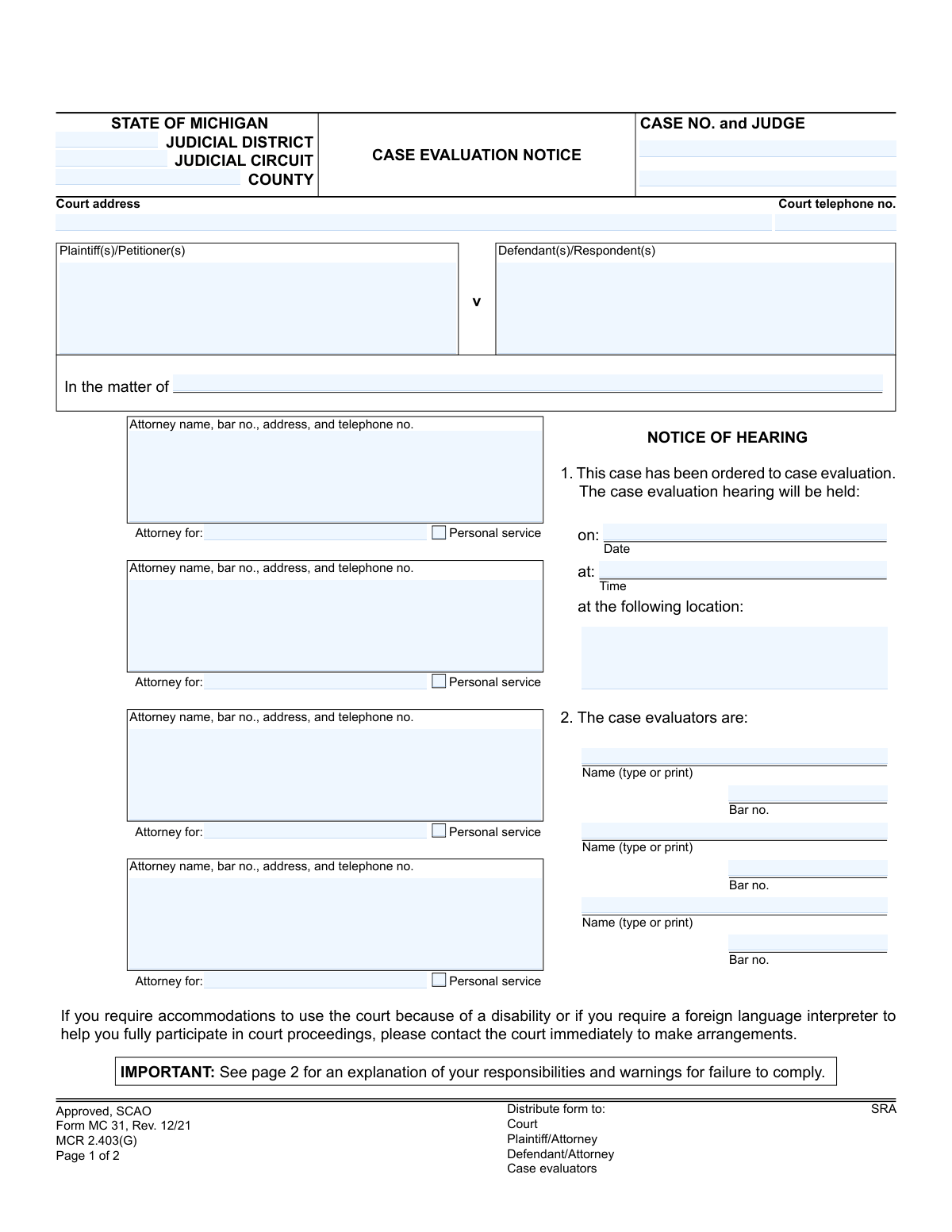
Yes! You can use AI to fill out Form MC 31, Case Evaluation Notice

Form MC 31 is a legal document issued by Michigan courts to officially notify all parties in a civil case that their case has been ordered to case evaluation. This notice provides crucial details such as the date, time, and location of the hearing, the names of the appointed case evaluators, and instructions for submitting required documents and fees. Completing this form accurately is essential for complying with court-ordered alternative dispute resolution procedures. Today, this form can be filled out quickly and accurately using AI-powered services like Instafill.ai, which can also convert non-fillable PDF versions into interactive fillable forms.
MC 31 is part of the Michigan court forms category on Instafill.
Our AI automatically handles information lookup, data retrieval, formatting, and form filling.
It takes less than a minute to fill out MC 31 using our AI form filling.
Securely upload your data. Information is encrypted in transit and deleted immediately after the form is filled out.

Form specifications

Form name: Form MC 31, Case Evaluation Notice
Number of fields: 41
Number of pages: 1
Language: English
main-image

Instafill Demo: How to fill out PDF forms in seconds with AI

How to Fill Out MC 31 Online for Free in 2026

Are you looking to fill out a MC 31 form online quickly and accurately? Instafill.ai offers the #1 AI-powered PDF filling software of 2026, allowing you to complete your MC 31 form in just 37 seconds or less.
Follow these steps to fill out your MC 31 form online using Instafill.ai:
  1. 1 Navigate to Instafill.ai and upload your Form MC 31 or select it from the template library.
  2. 2 Provide the essential case details, including the court, county, case number, and judge's name, into the designated fields.
  3. 3 Enter the full names and contact information for all plaintiffs, defendants, and their respective attorneys.
  4. 4 Input the specific details for the case evaluation hearing, including the date, time, and location.
  5. 5 List the names and bar numbers of the three appointed case evaluators as provided by the court.
  6. 6 Specify the requirements for fee payment and document submission as detailed on the second page of the notice.
  7. 7 Review all the information you've entered for accuracy, then allow the AI to generate the completed document for signing, certification, and distribution to all parties.

Our AI-powered system ensures each field is filled out correctly, reducing errors and saving you time.

Why Choose Instafill.ai for Your Fillable MC 31 Form?

Speed

Complete your MC 31 in as little as 37 seconds.

Up-to-Date

Always use the latest 2026 MC 31 form version.

Cost-effective

No need to hire expensive lawyers.

Accuracy

Our AI performs 10 compliance checks to ensure your form is error-free.

Security

Your personal information is protected with bank-level encryption.

Frequently Asked Questions About Form MC 31

This notice officially informs all parties in a lawsuit that their case has been ordered to case evaluation. It specifies the hearing date, time, location, and the responsibilities of each party leading up to the hearing.

The court's ADR (Alternative Dispute Resolution) clerk typically completes this form and sends it to the plaintiffs, defendants, their attorneys, and the assigned case evaluators.

You must pay a fee by the specified deadline and submit a case evaluation summary with supporting documents. The summary must be filed with the ADR clerk and served to all other parties at least 7 days before the hearing.

It is a document, no more than 20 double-spaced pages, that concisely presents your factual and legal arguments. This is your chance to explain your position to the evaluators before the hearing.

Failure to file and serve your summary on time subjects you to a $150 penalty. If you file the materials within 24 hours of the hearing, you face an additional $150 penalty.

The date, time, and location of the hearing are listed in Section 1 on the first page of the notice. The names of the evaluators assigned to your case are in Section 2.

Page 2 of the form specifies the fee amount and who the check should be made payable to. You must send the check to the ADR clerk or another specified recipient within the given timeframe.

According to the form, if you qualify for a general fee waiver under court rule MCR 2.002, you are also entitled to a waiver of the case evaluation fees. You should contact the court to make these arrangements.

You must file three copies of your case evaluation summary and supporting documents with the ADR clerk, along with a proof of service. You must also serve one copy to each of the other parties in the case.

You must contact the court immediately to request accommodations for a disability or a foreign language interpreter. The court's phone number is listed at the top of the form.

Yes, services like Instafill.ai use AI to help manage case documents and auto-fill related legal forms accurately. This can save significant time and help avoid errors in your paperwork.

You can upload your case documents, like this notice, to Instafill.ai to create a secure profile. The platform then uses that information to automatically populate other necessary legal forms for your case.

Tools like Instafill.ai can convert non-fillable PDFs into interactive, fillable forms. This allows you to easily type your information into the required fields directly on your computer.

Compliance MC 31
Validation Checks by Instafill.ai

1
Case Number Format and Consistency
This check verifies that the 'Case No.' field follows the standard Michigan court case number format (e.g., YY-######-AA). It also ensures the same case number is used on both page 1 and page 2 of the form. This is critical for accurate record-keeping and linking documents to the correct legal action, preventing processing errors or misfiling.
2
Attorney Bar Number Format
Validates that any entered Bar Number for an attorney or case evaluator (e.g., 'ebarno1') starts with a 'P' followed by a sequence of digits. This ensures the number corresponds to a valid Michigan State Bar identifier. An incorrect bar number can prevent proper identification of legal counsel and lead to communication breakdowns.
3
Future Hearing Date
Ensures the 'Date' of the case evaluation hearing ('nhdate') is a valid, future date. The system should reject any dates that are in the past or the current day. This validation is crucial as the purpose of the notice is to inform parties of an upcoming event, and a past date would render the notice invalid and confusing.
4
Valid Hearing Time
This check confirms that the 'Time' of the hearing ('htime') is entered in a valid time format, such as HH:MM AM/PM. It prevents ambiguous or nonsensical entries like 'afternoon' or '25:00'. A clear, unambiguous time is essential for ensuring all parties appear at the correct moment, avoiding missed hearings and potential sanctions.
5
Required Party Information
Verifies that at least one Plaintiff/Petitioner ('plname') and one Defendant/Respondent ('defname') are listed on the form. A case cannot proceed without opposing parties being clearly identified. Failure to list them would make the notice incomplete and legally insufficient for proper service.
6
Hearing Details Completeness
This validation ensures that the hearing date ('nhdate'), time ('htime'), and location ('hlocation') fields are all filled out. These three pieces of information are the primary purpose of the notice. If any are missing, the notice fails to inform parties of their obligations, and the form submission should be rejected.
7
Logical Check Destination
This check enforces the logic for payment destination on page 2. If the 'check other' checkbox is selected, the 'check specify other' text field must be filled in. Conversely, the 'specify' field should be disabled or empty if 'ADR clerk' is checked. This prevents ambiguity about where the required fees should be sent.
8
Minimum Case Evaluator Entry
Ensures that at least one case evaluator's name ('evalname1') and bar number ('ebarno1') are provided. The document is a 'Case Evaluation Notice,' and the evaluation cannot proceed without an assigned evaluator. This check guarantees the form is not submitted before a crucial participant is identified.
9
Attorney-Party Association
Validates that for every attorney listed ('attorney1', 'attorney2', etc.), the corresponding field indicating which party they represent ('attyassoc1', 'attyassoc2', etc.) is also completed. An attorney's presence on the form is meaningless without knowing their client. This prevents confusion and ensures all parties know who represents whom.
10
Court Telephone Number Format
Verifies that the 'Court telephone no.' ('cttelno') field is a valid 10-digit phone number, allowing for common formats like (XXX) XXX-XXXX or XXX-XXX-XXXX. This ensures that parties and attorneys have a functional contact number for the court. An invalid number could hinder communication, especially for individuals needing to arrange accommodations.
11
Court Identifier Completeness
This check ensures that the essential court identifiers, specifically the 'County' and either the 'Judicial District' or 'Judicial Circuit', are filled in. These fields are fundamental to identifying the jurisdiction hearing the case. Omitting this information would make it impossible to file the document in the correct courthouse.
12
Payment Amount and Payee Co-dependency
This validation ensures that if a 'check amount' is specified, the 'check payable to' field must also be filled out. It is critical that parties know both the amount of the fee and the exact entity to whom the check should be made payable. A missing payee would lead to incorrect payments and processing delays.
13
Valid Currency Format for Check Amount
Ensures the 'check amount' field contains a valid, positive numerical value representing a currency amount. The system should reject any text, negative numbers, or zero values. This validation maintains the integrity of financial data and ensures the fee amount is clear and unambiguous.
14
Certificate of Mailing Date Logic
This check validates that the date on the 'Certificate of Mailing' ('COM signature') is on or after the date of the 'ADR clerk signature'. The form cannot be certified as mailed before it has been officially approved and signed by the clerk. This ensures the chronological integrity of the court's process.

Common Mistakes in Completing MC 31

Incorrect or Incomplete Case Number and Judge

Users often transpose digits in the case number or misspell the judge's name. This typically happens due to manual data entry from another document. An incorrect case number can lead to the notice being filed in the wrong case, causing significant delays, confusion, and requiring the notice to be re-issued and re-served.

Missing Attorney Bar Numbers

The form requires a bar number for each attorney and case evaluator. Filers frequently omit this information, assuming a name is sufficient. This prevents the court and other parties from quickly verifying the attorney's standing and contact information, potentially leading to the rejection of the form or delays in communication.

Ambiguous Hearing Location Details

Entering a vague location like 'Courthouse' or 'Zoom' in the 'hlocation' field is a common error. The notice requires a specific address, room number, or a complete, unique virtual meeting link. Ambiguity can cause attorneys, parties, and evaluators to miss the hearing, resulting in sanctions and the need to reschedule.

Errors in Fee Payment Instructions

Page two requires specifying the check amount and the exact payee. People often make mistakes by writing the wrong dollar amount or making the check payable to a generic entity like 'The Court' instead of the specific name required. This leads to rejected payments, non-compliance with the case evaluation order, and the assessment of financial penalties.

Omitting Required Court Identifiers

Filers, especially those not frequently in a particular court, may leave the 'Judicial District,' 'Judicial Circuit,' or 'County' fields blank. Each field is essential for routing the document correctly within the Michigan court system. Omitting this information will cause the clerk's office to reject the filing until it is corrected.

Using Inexact Party Names

The 'Plaintiff(s)' and 'Defendant(s)' fields must contain the full, official names of the parties as they appear on the original complaint. Users may use abbreviations, informal names, or omit 'Inc.' or 'LLC' designations. This creates a defective notice that could be legally challenged, potentially invalidating the case evaluation process.

Failing to Specify the Fee Recipient

The form provides checkboxes to indicate if the fee should be sent to the 'ADR clerk' or another specified party. A frequent mistake is failing to check either box, or checking 'Specify' without filling in the recipient's details. This confusion causes payments to be delayed or sent to the wrong office, resulting in non-compliance and penalties.

Disregarding Page 2 Deadlines and Formatting Rules

Many users treat page two as boilerplate text, but it contains critical, legally binding instructions about deadlines for payments and the submission of the case evaluation summary. Failing to submit the summary at least 7 days before the hearing or ignoring the 20-page, double-spaced formatting rule will result in the automatic $150 penalty outlined on the form.

Incorrect Date and Time Formatting

Users sometimes enter the hearing date and time in a non-standard or ambiguous format, such as 'Next Tuesday' for the date or 'Morning' for the time. This creates confusion and can cause parties to miss the hearing. All dates should be in MM/DD/YYYY format and times should be specific, including AM/PM, to avoid any misinterpretation. AI-powered form filling tools like Instafill.ai can help prevent these errors by automatically validating and formatting data correctly. If the form is a non-fillable PDF, Instafill.ai can also convert it into a fillable version.
Saved over 80 hours a year

“I was never sure if my IRS forms like W-9 were filled correctly. Now, I can complete the forms accurately without any external help.”

Kevin Martin Green

Your data stays secure with advanced protection from Instafill and our subprocessors

Robust compliance program

Transparent business model

You’re not the product. You always know where your data is and what it is processed for.

ISO 27001, HIPAA, and GDPR

Our subprocesses adhere to multiple compliance standards, including but not limited to ISO 27001, HIPAA, and GDPR.

Security & privacy by design

We consider security and privacy from the initial design phase of any new service or functionality. It’s not an afterthought, it’s built-in, including support for two-factor authentication (2FA) to further protect your account.

Fill out MC 31 with Instafill.ai

Worried about filling PDFs wrong? Instafill securely fills form-mc-31-case-evaluation-notice forms, ensuring each field is accurate.