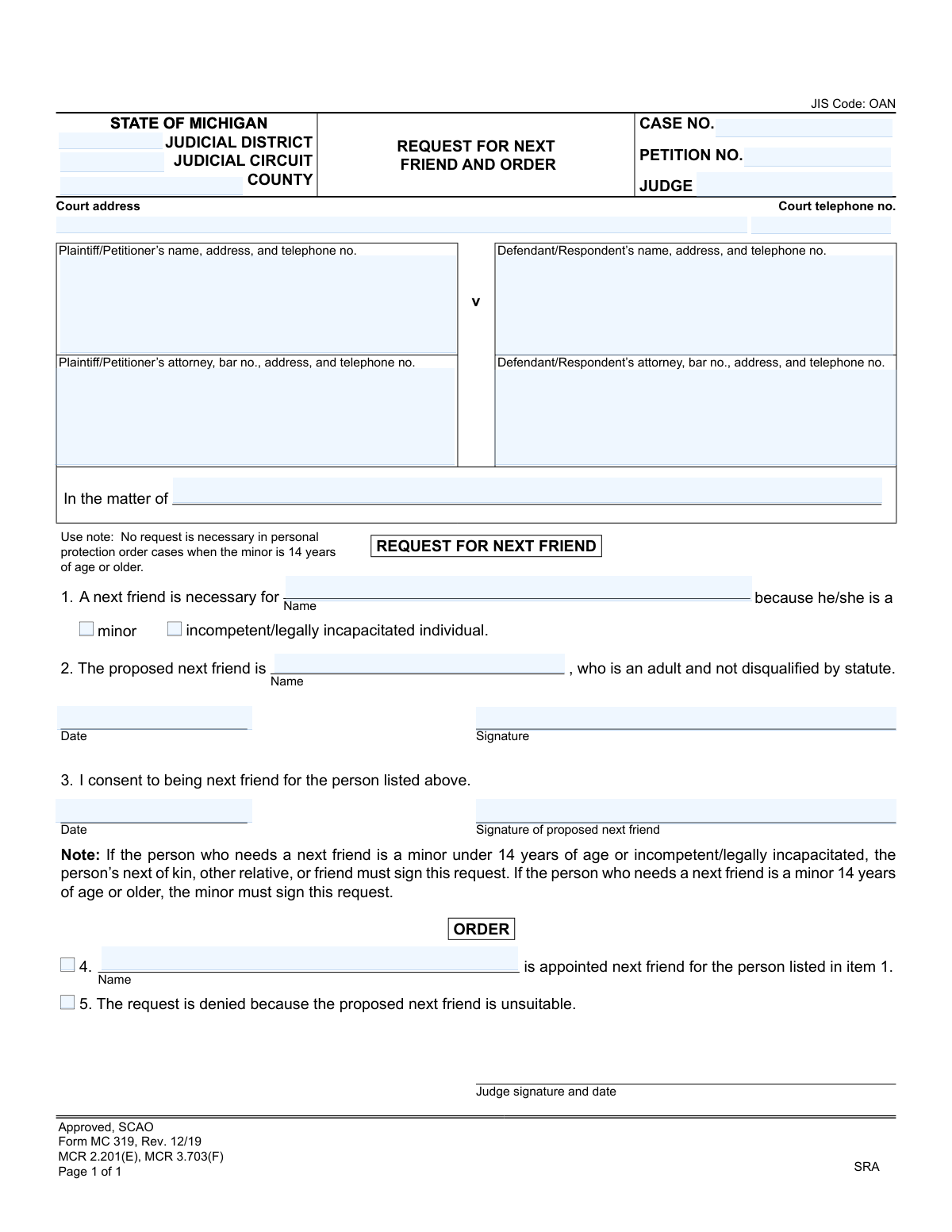
Yes! You can use AI to fill out Form MC 319, Request for Next Friend and Order

Form MC 319, the Request for Next Friend and Order, is a legal document used in the State of Michigan to ask a court to appoint a representative for someone who cannot act on their own behalf in a lawsuit, such as a minor or a legally incapacitated individual. This appointed person, known as a 'next friend,' acts in the best interests of the individual during the legal proceedings. Today, this form can be filled out quickly and accurately using AI-powered services like Instafill.ai, which can also convert non-fillable PDF versions into interactive fillable forms.
MC 319 is part of the Michigan court forms category on Instafill.
Our AI automatically handles information lookup, data retrieval, formatting, and form filling.
It takes less than a minute to fill out MC 319 using our AI form filling.
Securely upload your data. Information is encrypted in transit and deleted immediately after the form is filled out.

Form specifications

Form name: Form MC 319, Request for Next Friend and Order
Number of fields: 24
Number of pages: 1
Language: English
main-image

Instafill Demo: How to fill out PDF forms in seconds with AI

How to Fill Out MC 319 Online for Free in 2026

Are you looking to fill out a MC 319 form online quickly and accurately? Instafill.ai offers the #1 AI-powered PDF filling software of 2026, allowing you to complete your MC 319 form in just 37 seconds or less.
Follow these steps to fill out your MC 319 form online using Instafill.ai:
  1. 1 Navigate to Instafill.ai and upload or select the Michigan Form MC 319.
  2. 2 Use the AI assistant to input the court information, including the judicial district/circuit, county, and case number.
  3. 3 Provide the names and contact details for the plaintiff/petitioner and defendant/respondent involved in the case.
  4. 4 In the 'Request' section, identify the person who needs a next friend and specify whether they are a minor or a legally incapacitated individual.
  5. 5 Enter the name of the proposed next friend and have the appropriate party sign the request and consent sections.
  6. 6 Review all the information populated by the AI for accuracy, including names, dates, and case details.
  7. 7 Download the completed form to be submitted to the court for a judge's signature and order.

Our AI-powered system ensures each field is filled out correctly, reducing errors and saving you time.

Why Choose Instafill.ai for Your Fillable MC 319 Form?

Speed

Complete your MC 319 in as little as 37 seconds.

Up-to-Date

Always use the latest 2026 MC 319 form version.

Cost-effective

No need to hire expensive lawyers.

Accuracy

Our AI performs 10 compliance checks to ensure your form is error-free.

Security

Your personal information is protected with bank-level encryption.

Frequently Asked Questions About Form MC 319

This form is used to ask a Michigan court to appoint a responsible adult, known as a 'next friend,' to represent a minor or a legally incapacitated person in a legal case. The next friend acts on their behalf during the proceedings.

A next friend is necessary for individuals who cannot legally represent themselves in court. This includes minors (anyone under 18) and individuals who have been legally determined to be incompetent or incapacitated.

Any competent adult who is not disqualified by statute can serve as a next friend. This is typically a parent, guardian, close relative, or another trusted adult willing to take on the responsibility.

If the person needing representation is a minor aged 14 or older, the minor must sign the request. If the person is a minor under 14 or is legally incapacitated, their next of kin, another relative, or a friend must sign the request.

Yes, the proposed next friend must sign their name in the consent section (Item 3). This signature confirms that they agree to take on the role and its responsibilities.

Generally, yes, but there are specific exceptions. For instance, in personal protection order (PPO) cases, a minor who is 14 years of age or older can file a petition without needing a next friend.

You need the case details, which can be found on other court documents. This includes the court name, case number, and the names and addresses of the plaintiff and defendant.

A judge will review the request. If approved, the judge will sign the order in Item 4, officially appointing the next friend. If the judge finds the proposed person unsuitable, they will deny the request by signing Item 5.

The completed and signed form must be filed with the clerk of the court where the legal case is being handled. You should also provide copies to all other parties involved in the case.

If the request is denied, it means the judge found the proposed person unsuitable to serve. You will need to find another appropriate adult and submit a new 'Request for Next Friend and Order' form for the judge's consideration.

Yes, services like Instafill.ai use AI to accurately auto-fill form fields, which can save time and help prevent errors. You provide your information once, and the tool populates the document for you.

To use Instafill.ai, you upload the MC 319 form to the platform. The AI will identify all the fillable fields, allowing you to enter your information easily and have it placed correctly throughout the document.

If you have a non-fillable or 'flat' PDF, you can use a service like Instafill.ai. It can convert the static PDF into an interactive, fillable form so you can type your information directly into the fields online.

Compliance MC 319
Validation Checks by Instafill.ai

1
Reason for Next Friend Requirement
This check ensures that one of the two checkboxes in item 1, 'minor' or 'incompetent/legally incapacitated individual', is selected. This information is fundamental to the request, as it establishes the legal basis for needing a next friend and dictates who is eligible to sign the request. If neither is selected, the form is incomplete and the legal grounds for the request are not established, leading to rejection.
2
Completeness of Next Friend and Subject Information
Validates that the name of the person needing a next friend (item 1) and the name of the proposed next friend (item 2) are both provided. These fields are the core of the request, identifying the key individuals involved. Failure to provide either name makes the request ambiguous and legally insufficient, preventing the court from processing it.
3
Proposed Next Friend Consent
This check verifies that the 'Signature of proposed next friend' and the associated 'Date' in item 3 are both completed. The consent of the proposed next friend is a mandatory legal requirement to ensure they willingly accept the responsibilities of the role. Without a signature and date, there is no proof of consent, and the court cannot appoint them.
4
Michigan Attorney Bar Number Format
If an attorney's name is provided for either the plaintiff or defendant, this validation ensures the corresponding 'bar no.' field is present and follows the Michigan State Bar format (typically a 'P' followed by a sequence of numbers). This is crucial for verifying the attorney's credentials and active status with the state bar. An invalid or missing bar number can delay proceedings while credentials are verified.
5
Case Number Format and Presence
This validation ensures the 'CASE NO.' field is not empty and conforms to the standard format used by Michigan courts. The case number is the primary identifier that links this request to the correct legal proceeding. An incorrect or missing case number will result in filing errors and prevent the document from being associated with the proper case file.
6
Court Telephone Number Format
Verifies that the 'Court telephone no.' field contains a valid 10-digit phone number, including area code. This ensures that parties involved in the case have accurate contact information for the court, which is essential for communication regarding hearings and filings. An invalid number could prevent timely communication and cause delays.
7
Valid Date Format Across All Date Fields
Ensures that all date fields on the form (request date, consent date, and judge's order date) are entered in a valid and recognizable format, such as MM/DD/YYYY. Consistent and valid dates are critical for establishing a legal timeline of events, such as when consent was given and when the order was issued. An invalid date format would render the document legally questionable.
8
Logical Consistency of Names in Request
This check compares the name in the 'In the matter of' field with the name of the person needing a next friend in item 1. These names should refer to the same individual to ensure the request is internally consistent. A mismatch could indicate a clerical error and cause confusion about the subject of the legal action, potentially leading to rejection of the form.
9
Required Party Identification
Validates that the names for the 'Plaintiff/Petitioner' and 'Defendant/Respondent' are filled in. Identifying the primary parties in the case is a fundamental requirement for any court filing. Omitting this information makes it impossible to know who the legal action is between, and the form will be rejected by the court clerk.
10
Judicial Circuit or District Completeness
This check ensures that either the 'JUDICIAL DISTRICT' or 'JUDICIAL CIRCUIT' field is completed, along with the 'COUNTY'. This information is essential for routing the document to the correct court and jurisdiction for filing and review. Failure to specify the correct court will result in the document being rejected or misfiled.
11
Judge's Order Selection Logic
In the 'ORDER' section, this validation ensures that the judge has selected either item 4 (approved) or item 5 (denied), but not both. The order is the legally binding outcome of the request, and it must be unambiguous. If neither or both options are selected, the order is invalid and has no legal effect.
12
Completeness of Judge's Approval Order
If the judge approves the request by selecting item 4, this check verifies that the name of the appointed next friend has been entered in that section. This explicitly states who has been appointed by the court. If the name is missing, the approval order is incomplete and unenforceable as it does not specify who holds the appointed role.
13
Judge's Signature and Date on Order
Verifies that the 'Judge signature and date' field at the bottom of the 'ORDER' section is completed. A judge's signature and date are what give the order its legal authority and make it official. An unsigned or undated order is not legally binding and cannot be enforced.
14
Consistency of Appointed Next Friend Name
This validation compares the name of the 'proposed next friend' from item 2 with the name of the appointed next friend entered by the judge in item 4 (if approved). The names must match to confirm that the person who consented was the one who was actually appointed. A discrepancy could indicate a serious error and invalidate the appointment.

Common Mistakes in Completing MC 319

Incorrect Signatory for the Request

The form has a strict rule for who signs the initial request: a minor 14 or older must sign for themselves, while a next of kin must sign for a minor under 14 or an incapacitated person. This mistake happens when a parent signs for their 15-year-old, assuming they should. An incorrect signature will cause the court to reject the request, delaying the proceedings until a corrected form is filed. To avoid this, carefully read the note below item 2 and ensure the correct individual signs based on the person's age and capacity.

Missing Signature for Consent of Next Friend

A frequent oversight is that the proposed next friend, named in item 2, forgets to sign and date their consent in item 3. This happens because the filer focuses on their own signature and overlooks the second signature requirement. Without this consent signature, the court has no proof the nominee agrees to the role, rendering the request invalid and causing it to be rejected. Always ensure the person nominated as the next friend signs and dates the consent section before submission.

Filling Out the Judge's 'ORDER' Section

Sections 4 and 5 are clearly marked 'ORDER' and are reserved for the judge to approve or deny the request. Applicants, especially those without legal representation, sometimes mistakenly check a box or write in this section. This immediately invalidates the document, as it appears to be tampered with or improperly completed, and will be rejected by the court clerk. To prevent this, filers should never write, check, or sign anywhere in the 'ORDER' section.

Forgetting to Check the Reason for a Next Friend

In Section 1, the filer must check a box to indicate if the person needs a next friend because they are a 'minor' or 'incompetent/legally incapacitated individual.' It's a simple but critical step that is often missed in haste. This omission makes the request legally insufficient because it fails to establish the fundamental reason for the appointment, which will result in the form being rejected. Always double-check that you have selected the appropriate status to justify the request.

Incomplete Court and Case Information

The header of the form requires specific details like the Judicial District/Circuit and Case Number. People often leave these fields blank or enter incorrect information if they are unfamiliar with court structures or don't have the case file handy. This forces court clerks to manually search for the case, leading to processing delays or the document being misfiled. Before filling, confirm the correct court information and have your case number ready; if initiating a case, ask the clerk's office for guidance.

Confusing the Parties in the Case Caption

The case caption requires identifying the 'Plaintiff/Petitioner' and 'Defendant/Respondent.' In complex or emotional cases, individuals may get these roles confused or list them incorrectly. This creates confusion in the court record and may require filing amended documents to correct the error. To avoid this, carefully review existing case documents to confirm the correct designation for each party. AI-powered form filling tools like Instafill.ai can help by saving party information and auto-populating it consistently across all related legal documents.

Improperly Using the 'In the matter of' Field

This field is intended to clearly state the subject of the legal action, which should be the minor or incapacitated person. Filers sometimes leave it blank or incorrectly enter their own name or the name of the proposed next friend. This creates ambiguity about who the legal proceeding concerns, leading to potential confusion and delays as the court tries to clarify the petition's subject. Always enter the full legal name of the person who requires the next friend in this specific field.

Using an Outdated Version of the Form

Courts periodically update their forms, indicated by a revision date like 'Rev. 12/19'. People often find and use outdated versions from old case files or unreliable internet searches. Submitting an obsolete form is a common reason for immediate rejection by the court clerk, forcing you to start the process over. To ensure compliance, always obtain the latest version of any legal form directly from the official court website.

Illegible Handwriting and Inconsistent Naming

When forms are filled out by hand, illegible writing can cause court staff to make data entry errors, such as misspelling names or addresses. Another common issue is using name variations (e.g., 'Robert' in one field, 'Bob' in another). These mistakes can cause official notices to be lost or create confusion in the case record. To prevent this, it is best to type all information. If the form is a non-fillable PDF, tools like Instafill.ai can convert it into a fillable version, ensuring all entries are clear, legible, and consistent.
Saved over 80 hours a year

“I was never sure if my IRS forms like W-9 were filled correctly. Now, I can complete the forms accurately without any external help.”

Kevin Martin Green

Your data stays secure with advanced protection from Instafill and our subprocessors

Robust compliance program

Transparent business model

You’re not the product. You always know where your data is and what it is processed for.

ISO 27001, HIPAA, and GDPR

Our subprocesses adhere to multiple compliance standards, including but not limited to ISO 27001, HIPAA, and GDPR.

Security & privacy by design

We consider security and privacy from the initial design phase of any new service or functionality. It’s not an afterthought, it’s built-in, including support for two-factor authentication (2FA) to further protect your account.

Fill out MC 319 with Instafill.ai

Worried about filling PDFs wrong? Instafill securely fills form-mc-319-request-for-next-friend-and-order forms, ensuring each field is accurate.