
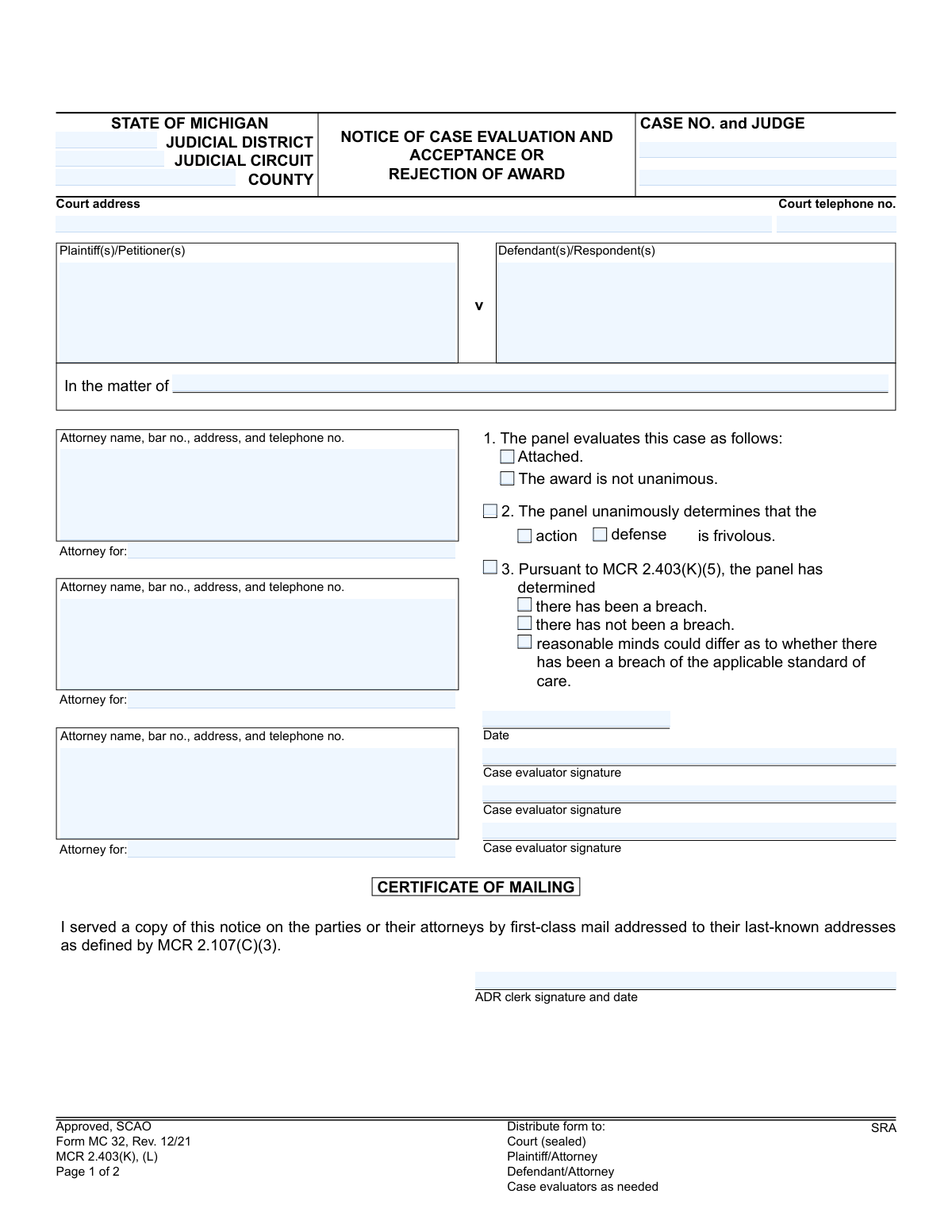
Yes! You can use AI to fill out Form MC 32, Notice of Case Evaluation and Acceptance or Rejection of Award
Don't type 40 fields by hand. Tell our AI about yourself, or upload a document you already have, and it fills every field in seconds. You check it, then download, print or sign.
The AI does the filling. You just check it.
No typing into boxes, nothing to install.
What this form asks for
The AI fills all of it, from your answers or your documents.
The AI checks your answers before you download
12 checks built for this form, so a wrong date or a missing answer is caught before anyone else sees it.
This check verifies that the 'Case No.' field on Page 2 is identical to the 'CASE NO.' field on Page 1. This is critical for ensuring that a party's acceptance or rejection is correctly associated with the original case evaluation. A mismatch could lead to the response being misfiled or invalidated, causing significant legal and administrative delays.
Validates that only one option among 'accept', 'reject', and 'accept if' is selected on Page 2. A party cannot simultaneously accept and reject the evaluation. This check prevents ambiguous or contradictory responses, ensuring the party's decision is clear and legally binding. If more than one option is selected, the form submission should be blocked until the user corrects it.
If the 'accept if' option is chosen, this validation ensures that one of the subsequent conditions ('all opposing parties accept' or 'specific coparties accept') is also selected. Furthermore, if 'specific coparties accept' is checked, the corresponding text field listing the coparties must not be empty. This guarantees that a conditional acceptance is complete and unambiguous.
This check compares the 'accept reject date' on Page 2 with the 'notice date' on Page 1. According to the form's instructions (MCR 2.403), the acceptance or rejection must be filed within 28 days of service. This validation flags any submissions made after the deadline, as they are considered a rejection by default under court rules.
On Page 1, the form provides three options for the panel's determination regarding a breach of care: 'breach', 'no breach', or 'reasonable minds could differ'. This validation ensures that only one of these three mutually exclusive options is selected. An evaluation cannot be submitted if zero or more than one of these options are checked, as it would make the panel's finding unclear.
This check applies if the panel determines the case is frivolous (Section 2). If the panel makes a frivolous determination, it must specify whether it applies to the 'action' or the 'defense'. This validation ensures that if the frivolous finding is indicated, one of the two sub-options is selected, but not both, to clarify the panel's unanimous decision.
And 6 more checks
- Required Party Identification
- Signature Requirement for Acceptance/Rejection
- Valid Date Format and Plausibility
- Michigan Case Number Format
- Evaluation Panel Completeness
- Specified Coparties Field Integrity
Let AI fill out your MC 32
No typing. Every field filled in seconds, checked, ready to sign.
How to Fill Out MC 32 Online for Free in 2026
What the AI walks you through.
- Navigate to Instafill.ai and upload your MC 32 form or select it from our template library.
- Use the AI assistant to automatically populate case information, including the court, case number, judge, and party details (plaintiffs and defendants).
- Enter the details from the case evaluation panel's decision, such as the award amount and any specific findings regarding frivolousness or breach of care.
- Complete the Acceptance/Rejection section by clearly indicating whether you accept, reject, or conditionally accept the evaluation award.
- Provide your name, date the document, and apply your digital signature in the designated fields.
- Review all the information entered on the form for accuracy and completeness.
- Securely download, print, or share your completed Form MC 32 for filing with the ADR clerk.
Frequently Asked Questions About MC 32
Is it really free for 7 days?
Can I fill other forms too?
How do I cancel?
How does the AI fill out MC 32?
What happens to my information?
How complex is MC 32 to fill out?
What is the purpose of the Notice of Case Evaluation and Acceptance or Rejection of Award form?
Who needs to fill out this form?
What is the deadline for submitting my response?
How do I complete the 'Acceptance/Rejection' section on page 2?
What does it mean to 'accept the settlement evaluation only if all opposing parties accept'?
What does it mean if the award is marked as 'not unanimous'?
Where do I submit the completed form?
What happens if the panel determines my 'action' or 'defense' is frivolous?
What information do I need to have ready to fill out my part of the form?
Can an AI tool help me fill out this form?
How can I use Instafill.ai to complete this form online?
The PDF I received is not fillable. What should I do?
What does the determination regarding a 'breach' on page 1 refer to?
Get your MC 32 filled out by AI
$0 today. Cancel before Nov 10 and you pay nothing.
Other forms like this one
Michigan court forms: Form MC 03, Answer, Civil, Form MC 02, Appearance, Form MC 6, Notice to Appear, Form MC 01, Summons, State of Michigan, Form MC 01a, Complaint, Form MC 01b, Motion for Second Summons and Order, State of Michigan Blank Court Form, Form MC 07, Default Request and Entry, Form MC 07a, Default Request, Entry, and Judgment (Sum Certain), Form MC 09, Dismissal, Form MC 09a, Dismissal, Nonservice/No Progress, Form MC 10, Judgment, Civil, Form MC 11, Subpoena, Order to Appear and/or Produce, Request and Writ for Garnishment (Periodic), Form MC 13, Request and Writ for Garnishment (Nonperiodic), Form MC 14, Garnishee Disclosure, Form MC 15, Motion and Affidavit for Installment Payments/To Amend Order for Installment Payments, Form MC 15a, Order Regarding Installment Payments, Form MC 16, Motion to Set Aside Order for Installment Payments, State of Michigan, Form MC 16a, Order on Motion to Set Aside Order for Installment Payments
Let AI fill out your MC 32
Your trial starts once a card is added. You pay nothing before Nov 10.
Our AI already knows this form, all 40 fields of it. Skip the typing: tell it about yourself, or upload what you have, and it fills the whole form in seconds.
- AI fills every field on both pages, checkboxes included
- No typing into boxes: answer a few questions, or upload a document you already have, an old copy of this form, a photo of a document
- The AI checks the answers; you review and change anything before you download
- Download the finished PDF, print it, or sign it online
- Encrypted, and never used to train AI
Cancel before Nov 10 and you pay nothing.
A card is needed to start the trial. Cancel in two clicks from your account.
Terms · Privacy