Yes! You can use AI to fill out Form MC 321b, Juror Personal History Questionnaire
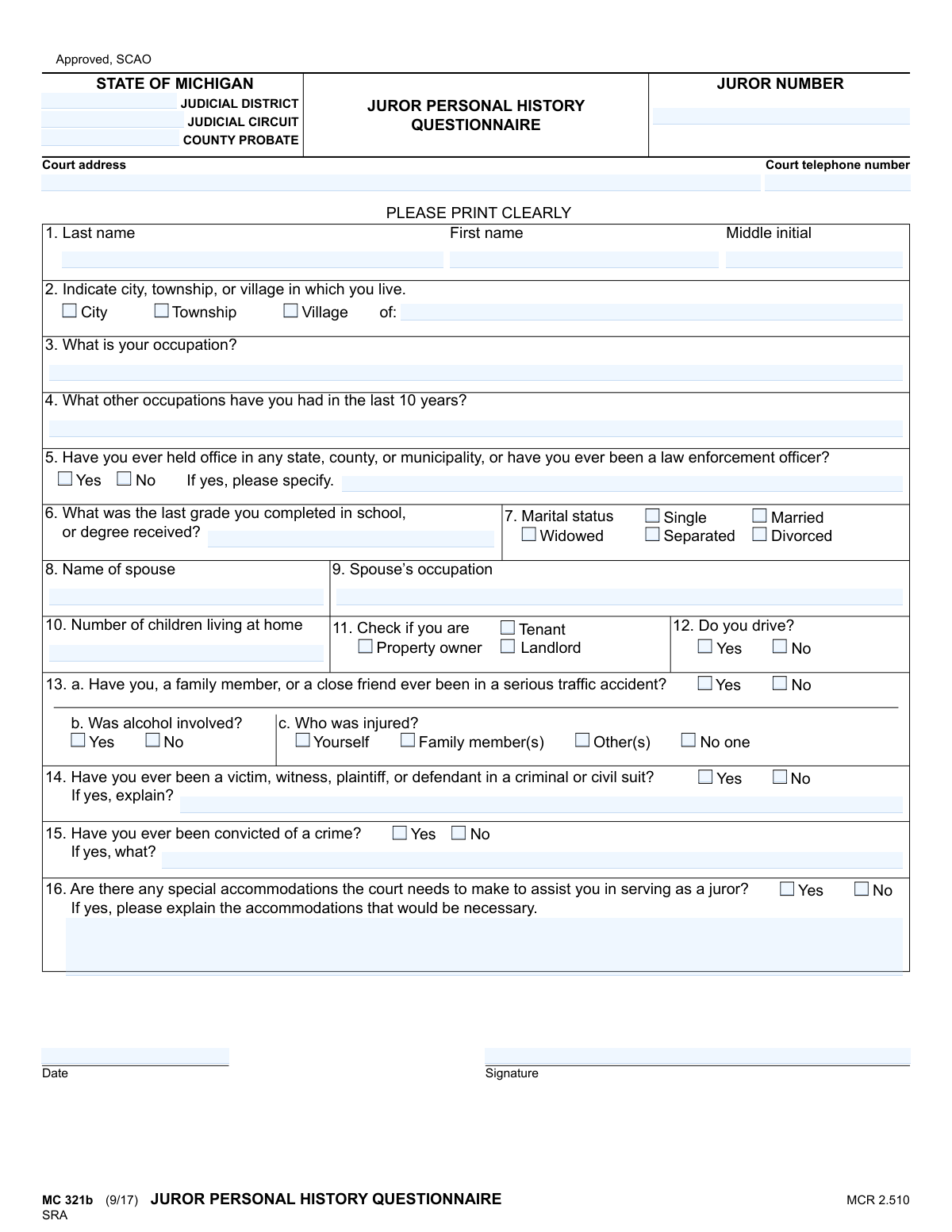
Form MC 321b, the Juror Personal History Questionnaire, is a document used by the State of Michigan judicial system to collect essential information from individuals summoned for jury duty. This questionnaire helps the court and attorneys understand a potential juror's background, experiences, and potential biases to ensure a fair and impartial jury is selected. Today, this form can be filled out quickly and accurately using AI-powered services like Instafill.ai, which can also convert non-fillable PDF versions into interactive fillable forms.
MC 321b is part of the
Michigan court forms category on Instafill.
Our AI automatically handles information lookup, data retrieval, formatting, and form filling.
It takes less than a minute to fill out MC 321b using our AI form filling.
Securely upload your data. Information is encrypted in transit and deleted immediately after the form is filled out.
Form specifications
| Form name: | Form MC 321b, Juror Personal History Questionnaire |
| Number of fields: | 51 |
| Number of pages: | 1 |
| Language: | English |
More forms in Michigan court forms
Instafill Demo: How to fill out PDF forms in seconds with AI
How to Fill Out MC 321b Online for Free in 2026
Are you looking to fill out a MC 321B form online quickly and accurately? Instafill.ai offers the #1 AI-powered PDF filling software of 2026, allowing you to complete your MC 321B form in just 37 seconds or less.
Follow these steps to fill out your MC 321B form online using Instafill.ai:
- 1 Navigate to Instafill.ai and upload or select the Juror Personal History Questionnaire (MC 321b).
- 2 Allow the AI to scan the form and identify all fields, including personal details, occupation, and legal history.
- 3 Answer the AI's prompts for your name, address, occupation, marital status, and educational background.
- 4 Provide truthful responses to questions regarding your history with traffic accidents, legal suits, and criminal convictions.
- 5 Indicate whether you require any special accommodations to serve as a juror and provide details if necessary.
- 6 Review all the information auto-filled by the AI for accuracy, then e-sign and date the completed questionnaire before submission.
Our AI-powered system ensures each field is filled out correctly, reducing errors and saving you time.
Why Choose Instafill.ai for Your Fillable MC 321b Form?
Speed
Complete your MC 321b in as little as 37 seconds.
Up-to-Date
Always use the latest 2026 MC 321b form version.
Cost-effective
No need to hire expensive lawyers.
Accuracy
Our AI performs 10 compliance checks to ensure your form is error-free.
Security
Your personal information is protected with bank-level encryption.
Frequently Asked Questions About Form MC 321b
This form is used by the court and attorneys to gather background information about potential jurors. It helps determine if you are qualified to serve and assists in the jury selection process for a fair trial.
Individuals who have received a jury summons in the State of Michigan must complete this questionnaire. It is a required part of the jury selection process.
Your Juror Number is a unique identifier assigned to you by the court. It should be prominently displayed on the jury summons or other official correspondence you received about your jury service.
You should state your current status accurately in question 3. Simply write 'Retired,' 'Unemployed,' 'Student,' or 'Homemaker' in the space provided.
Not necessarily, but you must answer question 15 truthfully. Eligibility can depend on the nature and timing of the conviction, and providing false information has legal consequences.
Briefly explain the nature of the case without going into excessive detail. For example, you could write 'Witness in a minor traffic case' or 'Plaintiff in a small claims suit.'
This section is for any assistance you may need to serve as a juror, such as wheelchair accessibility, an assistive listening device, or considerations for a medical condition. Be specific about what you require to participate fully.
The information is used for jury selection and may be seen by the judge, court staff, and attorneys in the case. It is not generally made public, but you should follow any specific confidentiality instructions from the court.
Submission instructions are usually included with your jury summons. You may be asked to mail it back by a certain date or bring it with you on your first day of jury duty.
If you are widowed or divorced, you can leave the 'Spouse’s occupation' field blank. Ensure you have correctly marked your marital status in question 7.
Yes, services like Instafill.ai use AI to auto-fill form fields accurately from your saved profile, which can save time and help avoid errors. You are still responsible for ensuring all information is truthful and correct before signing.
You can upload a scan or photo of the paper form to a service like Instafill.ai. The platform will make it digitally fillable, allowing you to type your answers, save your progress, and print the completed document.
If you have a non-fillable or 'flat' PDF, you can use a tool like Instafill.ai to convert it into an interactive, fillable form. This allows you to easily type your information directly into the fields before printing.
Yes, your signature is required at the bottom of the form. By signing, you are certifying that the information you have provided is true and correct to the best of your knowledge.
Compliance MC 321b
Validation Checks by Instafill.ai
1
Conditional Spouse Information Requirement
This validation checks if the 'Married' checkbox is selected. If it is, the system verifies that both the 'Spouse Name' and 'Spouse’s Occupation' fields are filled out. This is important for understanding the juror's potential connections and background. If 'Married' is selected but these fields are empty, the form submission will be blocked with a message prompting the user to provide spouse details or change their marital status.
2
Exclusive Marital Status Selection
This check ensures that the user has selected exactly one option from the available marital statuses (Single, Married, Widowed, Separated, Divorced). A person can only have one current marital status, so this prevents illogical or incomplete data. If zero or more than one option is selected, an error will be displayed, requiring the user to make a single, valid choice before proceeding.
3
Conditional Explanation for Prior Office
This rule validates that if a user checks 'Yes' for question 5 ('Have you ever held office...'), the corresponding text field for specifying the details is not left empty. This follow-up information is critical for the court to understand the nature of the juror's public service. Failure to provide the specification will result in a validation error, preventing submission until the details are provided.
4
Children at Home Numeric Validation
This check ensures that the value entered for 'Number of children living at home' is a valid, non-negative integer (e.g., 0, 1, 2). Text or negative numbers are not permissible for this field as they are not logical answers. This validation maintains data integrity and ensures the information is usable. An invalid entry will trigger an error message asking the user to enter a whole number.
5
Exclusive Residence Type Selection
This validation ensures that the user selects only one of the 'City', 'Township', or 'Village' checkboxes to indicate their place of residence. Since a person's primary residence can only be in one of these jurisdiction types, this check prevents ambiguity. If the user selects none or more than one, the form will show an error and require them to select exactly one option.
6
Conditional Explanation for Legal Involvement
This check is triggered if the user answers 'Yes' to question 14 ('Have you ever been a victim, witness, plaintiff, or defendant...'). It verifies that the 'explain' text box associated with this question is filled out. This context is crucial for voir dire, and an empty explanation makes the 'Yes' answer unhelpful. The form will not submit without this explanation if 'Yes' is selected.
7
Conditional Explanation for Criminal Conviction
This validation ensures that if a user answers 'Yes' to question 15 ('Have you ever been convicted of a crime?'), they must provide details in the 'If yes, what?' field. This information is legally significant for determining juror eligibility. A 'Yes' answer without an explanation will block form submission until the required details are entered.
8
Conditional Explanation for Special Accommodations
This rule verifies that if a user checks 'Yes' for question 16, indicating they need special accommodations, the corresponding explanation field is not empty. The court needs this information to prepare for the juror's service and meet accessibility requirements. The form will be considered incomplete and rejected if 'Yes' is checked without an explanation.
9
Conditional Accident Sub-Question Logic
This check ensures that if a user answers 'Yes' to question 13a ('Have you... ever been in a serious traffic accident?'), they must then answer the follow-up questions 13b ('Was alcohol involved?') and 13c ('Who was injured?'). These sub-questions are only relevant in the context of an affirmative answer to the main question. The system will flag an error if 13a is 'Yes' but the subsequent questions are left unanswered.
10
Date Format and Logical Validity
This validation checks the 'Date' field to ensure the entered value is a valid date in an expected format (e.g., MM/DD/YYYY). It also verifies that the date is not in the future, as the form should be dated on or before the day of submission. This ensures the chronological accuracy of the record. An invalid format or a future date will result in an error.
11
Signature Completeness Check
This validation verifies that the 'Signature' field has been completed. The signature legally attests that the information provided is true and correct to the best of the juror's knowledge. An empty signature field would invalidate the questionnaire, so the system will prevent submission until a signature (digital or otherwise) is provided.
12
Juror Number Format and Presence
This check validates that the 'Juror Number' field is not empty and conforms to the expected format (e.g., a specific number of digits). This number is the primary key for identifying the juror in the court's system, making its accuracy and presence essential for processing the form. If the field is empty or incorrectly formatted, the system will reject the submission.
13
Primary Occupation Completeness
This validation ensures that the 'What is your occupation?' field is not left blank. A juror's occupation is a key piece of demographic information used during the jury selection process to identify potential biases or relevant expertise. The form will be considered incomplete if this required field is empty.
14
Full Name Completeness
This check verifies that both the 'First name' and 'Last name' fields contain text. A complete name is the most basic requirement for identifying the individual juror and processing their information correctly. If either of these fields is left empty, the form submission will fail with a message prompting the user to enter their full name.
Common Mistakes in Completing MC 321b
On questions with a 'Yes/No' choice followed by a request for details (e.g., questions 5, 14, 15, 16), people often check 'Yes' but forget to provide the mandatory explanation. This renders the answer incomplete and requires court staff to follow up, delaying the jury selection process. To avoid this, carefully review each question and ensure any 'Yes' answer is accompanied by the required details in the space provided.
For questions 3 ('What is your occupation?') and 9 ('Spouse’s occupation'), individuals often write vague terms like 'Sales,' 'IT,' or 'Consultant' without specifying their role or industry. This information is used by attorneys to understand potential biases, so ambiguity can lead to unnecessary questioning during voir dire. Be specific, for example, 'Retail clothing sales associate' or 'Network administrator for a school district'.
Question 2 asks prospective jurors to both check a box (City, Township, or Village) and write the name of their municipality. People often forget one of these two parts or are unsure of their correct municipal designation, which can cause processing issues. Before filling out the form, you can confirm your official municipality by checking your voter registration card or a recent property tax bill.
In question 15, people may be confused about what legally constitutes a 'crime' and fail to disclose relevant information. They might omit misdemeanor convictions, assuming only felonies count, or forget about past offenses. Omitting a conviction can lead to disqualification and potential legal consequences, so it is crucial to answer truthfully and provide the specific crime as requested.
Forgetting to sign and date the questionnaire is one of the most common and critical errors. An unsigned form is legally invalid and will be returned by the court, which can cause you to miss your jury duty summons and lead to further complications. Always double-check the bottom of the form for the signature and date lines before submitting it.
After checking 'Married' for marital status (question 7), individuals frequently forget to fill in their spouse's name and occupation in questions 8 and 9. This information is relevant for identifying potential conflicts of interest for the court and attorneys. If you are married, ensure you complete these subsequent fields to provide a full picture.
When answering 'Yes' to question 14 about prior involvement in a lawsuit, people often provide unhelpful explanations like 'car accident' or 'civil suit.' This forces attorneys to ask clarifying questions, slowing down the jury selection process. A better answer specifies your role and the nature of the case, such as 'Plaintiff in a personal injury suit after a car accident' or 'Defendant in a small claims court dispute'.
The form explicitly requests 'PLEASE PRINT CLEARLY,' yet many are filled out with rushed, illegible handwriting, causing data entry errors and delays. Court staff may misinterpret names, occupations, or critical answers, requiring follow-up. To prevent this, take your time and print neatly, or use a tool like Instafill.ai, which can convert flat PDFs into fillable forms so you can type your answers for perfect clarity.
The top of the form has fields for Juror Number, Judicial District, and other court-specific details that must be copied from the jury summons. Prospective jurors sometimes overlook these fields, assuming they are for office use only. Failing to include your Juror Number makes it difficult for the court to process your questionnaire, so be sure to transfer all required information from your summons.
Question 13 about traffic accidents is a multi-part question where answering 'Yes' to part 'a' requires answers to parts 'b' and 'c'. People often answer the first part but then skip the follow-up questions about alcohol involvement or injuries. This leaves the court with incomplete data, so it's important to read each question carefully and ensure you answer all relevant sub-parts. AI-powered form fillers like Instafill.ai can help prevent this by highlighting required follow-up fields based on your answers.
Saved over 80 hours a year
“I was never sure if my IRS forms like W-9 were filled correctly. Now, I can complete the forms accurately without any external help.”
Kevin Martin Green
Your data stays secure with advanced protection from Instafill and our subprocessors
Robust compliance program
Transparent business model
You’re not the product. You always know where your data is and what it is processed for.
ISO 27001, HIPAA, and GDPR
Our subprocesses adhere to multiple compliance standards, including but not limited to ISO 27001, HIPAA, and GDPR.
Security & privacy by design
We consider security and privacy from the initial design phase of any new service or functionality. It’s not an afterthought, it’s built-in, including support for two-factor authentication (2FA) to further protect your account.
Fill out MC 321b with Instafill.ai
Worried about filling PDFs wrong? Instafill securely fills form-mc-321b-juror-personal-history-questionnaire forms, ensuring each field is accurate.