Yes! You can use AI to fill out Form MC 326, Notice of Hearing and Motion

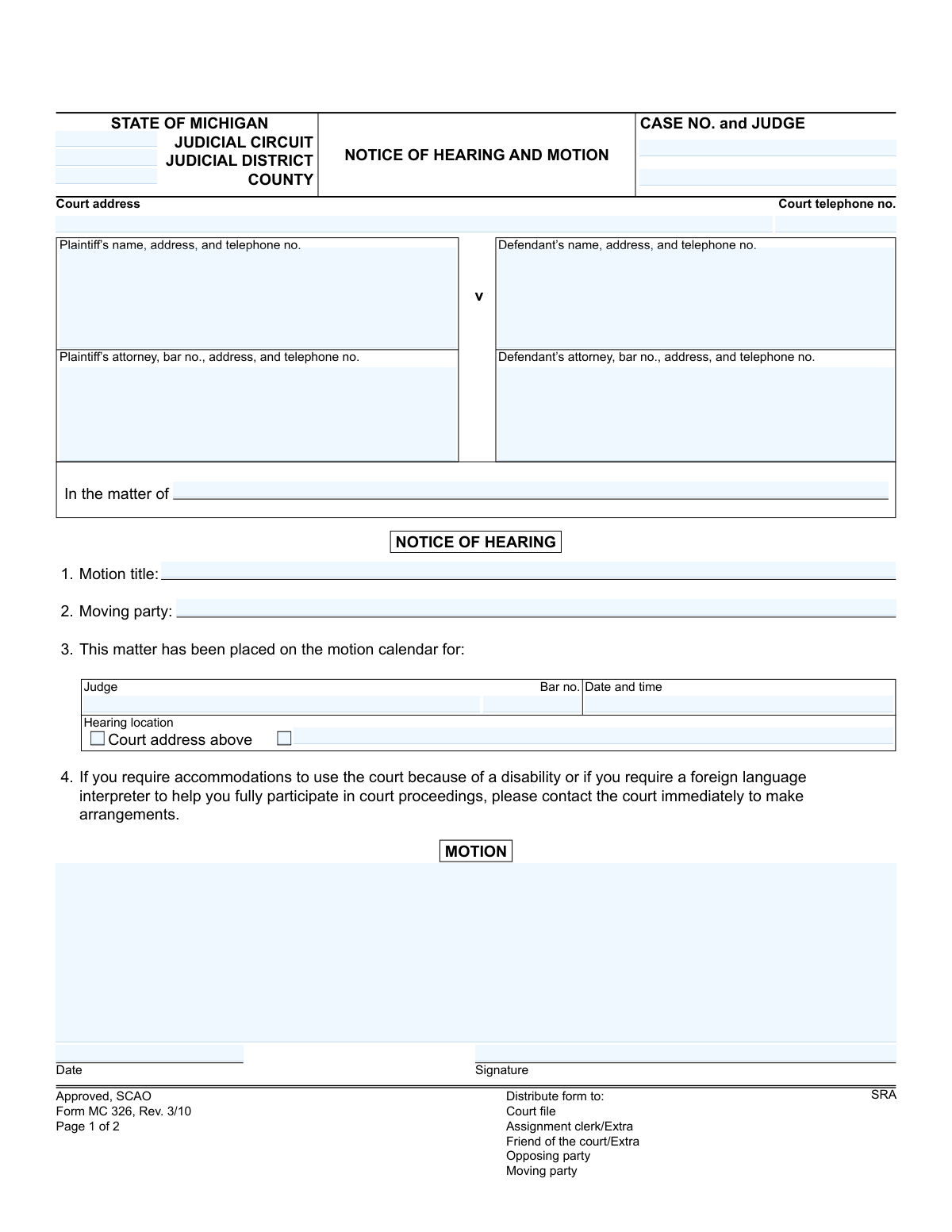
Form MC 326, Notice of Hearing and Motion, is a legal document used in the Michigan judicial system to formally notify parties of a scheduled court hearing. It details the specific motion to be discussed, the date, time, and location of the hearing, ensuring all involved are aware and can prepare accordingly. Today, this form can be filled out quickly and accurately using AI-powered services like Instafill.ai, which can also convert non-fillable PDF versions into interactive fillable forms.
MC 326 is part of the Michigan court forms category on Instafill.
Our AI automatically handles information lookup, data retrieval, formatting, and form filling.
It takes less than a minute to fill out MC 326 using our AI form filling.
Securely upload your data. Information is encrypted in transit and deleted immediately after the form is filled out.

Form specifications

Form name: Form MC 326, Notice of Hearing and Motion
Number of fields: 26
Number of pages: 1
Language: English
main-image

Instafill Demo: How to fill out PDF forms in seconds with AI

How to Fill Out MC 326 Online for Free in 2026

Are you looking to fill out a MC 326 form online quickly and accurately? Instafill.ai offers the #1 AI-powered PDF filling software of 2026, allowing you to complete your MC 326 form in just 37 seconds or less.
Follow these steps to fill out your MC 326 form online using Instafill.ai:
  1. 1 Navigate to Instafill.ai and upload or select the Michigan Form MC 326, Notice of Hearing and Motion.
  2. 2 Allow the AI to scan and process the form, identifying all necessary fields like case number, party information, and hearing details.
  3. 3 Provide the required case information, including the judicial circuit/district, case number, and judge's name.
  4. 4 Enter the names, addresses, and attorney information for both the plaintiff and defendant.
  5. 5 Clearly state the motion title, the moving party, and the scheduled date, time, and location for the hearing.
  6. 6 Review all entered information for accuracy, then electronically sign and date the motion and certificate of mailing sections as required.
  7. 7 Download the completed form and distribute copies to the court, opposing party, and other required recipients as indicated on the form.

Our AI-powered system ensures each field is filled out correctly, reducing errors and saving you time.

Why Choose Instafill.ai for Your Fillable MC 326 Form?

Speed

Complete your MC 326 in as little as 37 seconds.

Up-to-Date

Always use the latest 2026 MC 326 form version.

Cost-effective

No need to hire expensive lawyers.

Accuracy

Our AI performs 10 compliance checks to ensure your form is error-free.

Security

Your personal information is protected with bank-level encryption.

Frequently Asked Questions About Form MC 326

This form is used in Michigan courts to officially notify all parties in a legal case that a motion has been filed and to inform them of the scheduled date, time, and location for the court hearing on that motion.

The 'moving party,' which is the person or their attorney asking the court to take a specific action, is responsible for completing this form, filing it with the court, and serving it on the opposing party.

A motion is a formal request for a judge to make a ruling or order. In the large 'MOTION' section, you must state what you are asking the court to do and provide the legal reasons for your request.

You must contact the judge's clerk or the court's scheduling office for the specific court handling your case. They will provide you with an available date and time for your motion to be heard, which you then fill in on the form.

This section is your sworn statement that you have sent a copy of the completed form to the other party or their attorney via first-class mail. Signing this provides the court with proof of service, showing you properly notified the other side.

This field is often used in specific case types like family law or probate to further describe the subject (e.g., 'the marriage of Jane Doe and John Doe'). If you are unsure, you can often leave it blank or check with the court clerk for guidance.

The form advises you to contact the court immediately to make arrangements. The court's telephone number should be listed at the top of the form.

After completing and signing the form, you must file the original with the court clerk, serve a copy on the opposing party, and keep a copy for your records. The distribution list at the bottom of page 1 provides guidance on who needs a copy.

Yes, services like Instafill.ai use AI to help you accurately auto-fill repetitive information like case numbers, party names, and addresses, which saves time and helps prevent errors.

You can upload the MC 326 PDF to the Instafill.ai platform. The AI will identify all the fields, allowing you to enter your information once and have it automatically and accurately placed throughout the document.

If you have a flat, non-fillable PDF, you can use a service like Instafill.ai. It can convert the document into an interactive, fillable form online, so you can easily type your information into the correct fields before printing.

The 'moving party' is the individual or entity filing the motion and requesting a court action. The 'opposing party' is the party who the motion is filed against and who has the right to respond.

Compliance MC 326
Validation Checks by Instafill.ai

1
Case Number Format and Presence
This check verifies that the 'Case No.' field is not empty and conforms to the standard Michigan court case number format. The case number is the primary identifier for the entire legal proceeding, and an incorrect or missing number would cause the document to be misfiled or rejected by the court clerk. This validation is critical for ensuring the motion is associated with the correct case.
2
Attorney and Judge Bar Number Format
This validation ensures that all attorney and judge bar numbers start with a 'P' followed by a specific number of digits (e.g., P12345). This format is the standard for the State Bar of Michigan. Validating the format helps ensure the professional listed is correctly identified and is a registered member of the bar, which is essential for legal practice verification.
3
Future Hearing Date Requirement
This check confirms that the 'notice of hearing date and time' is a date and time in the future. A hearing cannot be scheduled for a past date, so this validation prevents a common and critical data entry error. An invalid date would make the notice legally deficient and require it to be corrected and re-served to all parties.
4
Mandatory Motion Title
This validation ensures that the 'Motion title' field is filled out. The title provides a concise summary of the motion's purpose for the judge, court staff, and opposing counsel. A missing title would make the document's intent unclear, leading to processing delays or outright rejection by the court.
5
Moving Party Consistency Check
This check verifies that the 'Moving party' field identifies a party that is listed in the case caption (e.g., 'Plaintiff' or 'Defendant'). This logical check is important to clearly establish who is making the request to the court. An ambiguous or inconsistent moving party could lead to legal confusion and require clarification, delaying the proceedings.
6
Presence of Primary Parties
This validation confirms that both the plaintiff's and defendant's name and address blocks contain information. A legal motion must clearly identify the opposing parties in the case. Failure to identify both a plaintiff and a defendant would render the motion legally incomplete and cause it to be rejected by the court.
7
Logical Date Sequencing
This check ensures the 'Motion date' is on or before the 'Certificate of Mailing date' and the 'Notice of Hearing date'. A motion cannot logically be mailed or heard before it has been signed and dated. This validation maintains the chronological integrity of the legal process and prevents impossible date sequences.
8
Hearing Location Specificity
This validation rule checks that if the 'Court address above' box is not checked, the alternative 'Hearing location' field must be filled in. It is legally required that all parties receive clear notice of where the hearing will occur. Ambiguity in the location would invalidate the notice and could cause parties to miss the court date.
9
Case Number Consistency Across Pages
This check validates that the 'Case No.' field on Page 2 is filled in and matches the case number from Page 1. Legal documents can sometimes have pages separated during handling. Ensuring the case number is present and consistent on all pages guarantees that the entire document can be correctly reassembled and filed.
10
Certificate of Mailing Date and Signature Co-dependency
This validation ensures that if the 'Certificate of Mailing signature' is present, the 'Certificate of Mailing date' is also filled out, and vice versa. The signature attests that the mailing occurred on the specified date, making the two fields inseparable for the certificate to be valid. A missing date or signature invalidates the proof of service.
11
Jurisdictional Information Completeness
This check verifies that the 'Judicial Circuit,' 'Judicial District,' and 'County' fields are all completed. This information is fundamental as it establishes the court's jurisdiction over the matter. Missing jurisdictional details would result in the filing being rejected, as it would be unclear which court is responsible for the case.
12
Standard Telephone Number Format
This check verifies that all telephone number fields are entered in a consistent, valid format, such as (XXX) XXX-XXXX. Proper formatting ensures the data is clean and that the contact information is usable for court staff and opposing parties who may need to communicate regarding the motion. Invalid numbers can hinder communication and delay proceedings.

Common Mistakes in Completing MC 326

Entering Incorrect Court or Case Information

Users often confuse the Judicial Circuit, Judicial District, and County, or they transcribe the Case Number incorrectly from other documents. This happens due to unfamiliarity with legal terminology or simple typos, and can lead to the motion being rejected, misfiled, or significantly delayed. To avoid this, carefully double-check the information against previous court documents and use tools like Instafill.ai, which can help populate correct jurisdictional data based on the case number.

Forgetting the Case Number on Subsequent Pages

The form requires the Case Number to be entered again at the top of page 2, a small field that is very easy to overlook. If the pages get separated, the second page containing the crucial Certificate of Mailing becomes an orphan document, making it impossible to associate with the correct case file. This oversight can invalidate the proof of service, so it's critical to review every field on every page before submission.

Providing Incomplete Party or Attorney Details

Filers frequently omit required details like an attorney's bar number, a full address with a zip code, or a current telephone number for themselves or the opposing party. This often occurs when the information isn't readily available, but failing to provide it can prevent the court and opposing counsel from communicating effectively, leading to delays or missed notices. It's crucial to gather all necessary information before starting the form; AI-powered tools can also help by storing and auto-filling contact details for recurring parties, ensuring consistency.

Using a Vague or Improper Motion Title

The 'Motion title' field requires a specific and legally accurate description of the relief being sought (e.g., 'Motion to Compel Discovery' instead of just 'Motion'). Self-represented litigants, in particular, may use generic language, which confuses the court and the opposing party about the motion's purpose. This can result in the hearing being adjourned or the motion being denied for lack of clarity, so always use the precise legal title for the motion you are filing.

Specifying a Hearing Date Without Court Confirmation

A critical error is for a party to unilaterally fill in a date and time for the hearing without first contacting the judge's clerk to schedule it. Courts have specific procedures for scheduling motions, and an unconfirmed date will be ignored, meaning the motion will not be heard and the notice is invalid. This wastes time and filing fees, so always contact the court clerk or follow local court rules to obtain a valid hearing date before completing this section.

Missing Signature or Date on the Motion

Forgetting to sign and date the motion in the designated signature block is a frequent and fatal oversight. An unsigned motion is legally invalid and will be rejected by the court clerk or disregarded by the judge, as the signature certifies the filer's belief in the motion's merits. This simple mistake nullifies the entire filing, forcing the filer to start the process over, so always perform a final review to check for signatures.

Neglecting the Certificate of Mailing

The Certificate of Mailing on page 2 is a sworn statement that you have legally notified the other parties, not just a formality. Many filers either forget to fill it out, fail to sign it, or sign it before actually mailing the documents. An incomplete or improperly executed certificate can lead to the motion being dismissed for improper service, as there is no proof the opposing party was notified.

Incorrectly Identifying the Case Style

The form provides fields for both 'Plaintiff v Defendant' and 'In the matter of,' and filers often get confused about which to use. 'In the matter of' is typically used for cases without traditional opposing parties, such as probate or adoptions. Using the wrong format can cause confusion and processing delays in the clerk's office, so it's important to identify the correct case caption from previous filings and use it consistently.

Assuming the Form is Fillable and Using Illegible Handwriting

Many court forms are distributed as flat, non-fillable PDFs, leading to submissions with illegible handwriting that can cause critical data entry errors by court clerks. Poor handwriting in fields like case numbers or names can cause a filing to be rejected outright or lead to misdirected mail. To avoid this, use a tool like Instafill.ai that can convert non-fillable PDFs into interactive, fillable forms, ensuring all entries are clear, legible, and properly formatted.
Saved over 80 hours a year

“I was never sure if my IRS forms like W-9 were filled correctly. Now, I can complete the forms accurately without any external help.”

Kevin Martin Green

Your data stays secure with advanced protection from Instafill and our subprocessors

Robust compliance program

Transparent business model

You’re not the product. You always know where your data is and what it is processed for.

ISO 27001, HIPAA, and GDPR

Our subprocesses adhere to multiple compliance standards, including but not limited to ISO 27001, HIPAA, and GDPR.

Security & privacy by design

We consider security and privacy from the initial design phase of any new service or functionality. It’s not an afterthought, it’s built-in, including support for two-factor authentication (2FA) to further protect your account.

Fill out MC 326 with Instafill.ai

Worried about filling PDFs wrong? Instafill securely fills form-mc-326-notice-of-hearing-and-motion forms, ensuring each field is accurate.