Yes! You can use AI to fill out Form MC 327, Order

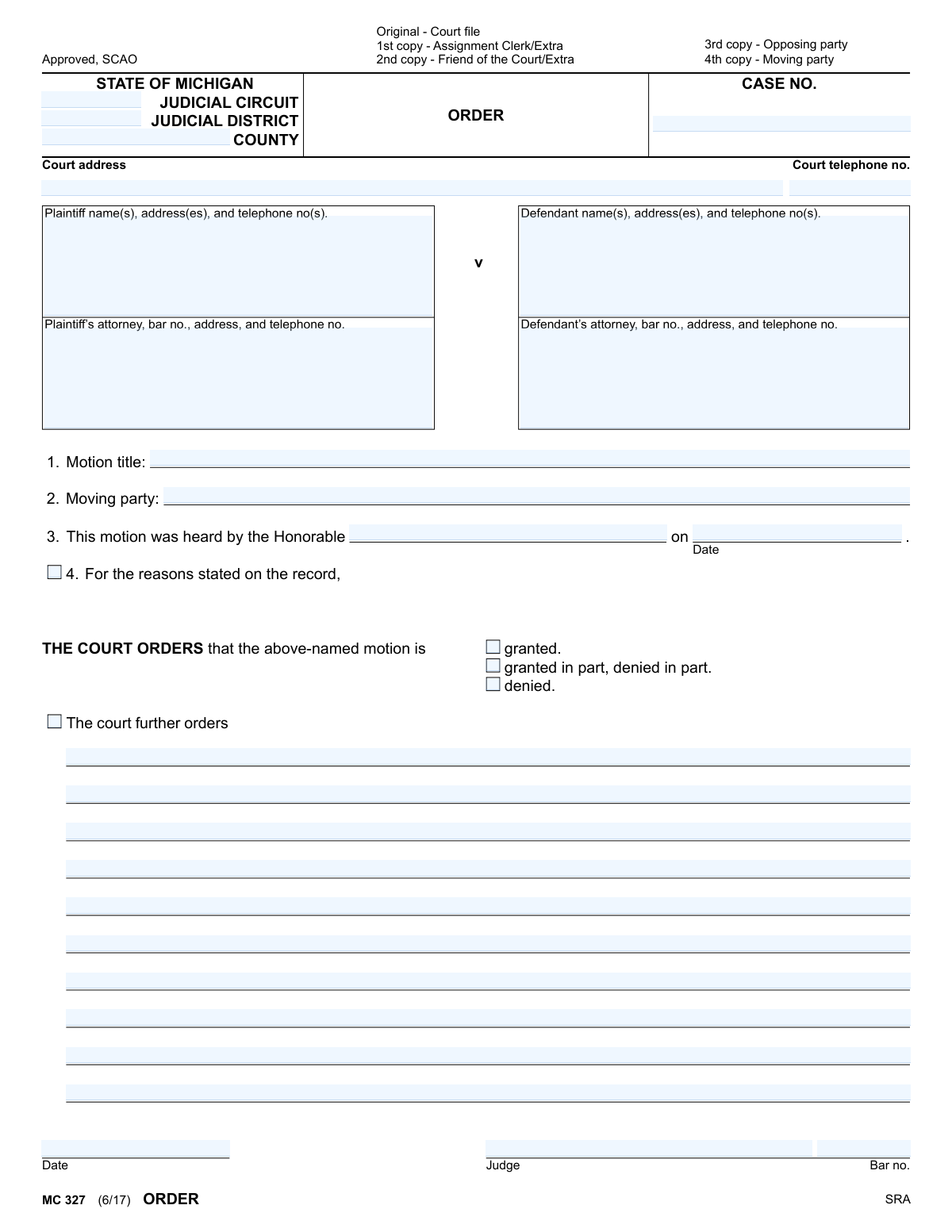
The MC 327, Order form is an official State of Michigan court document used by a judge to record their decision on a motion presented in a case. It specifies whether a motion is granted, denied, or granted in part, and includes space for any additional directives from the court. This form is crucial for creating an official record of the court's ruling. Today, this form can be filled out quickly and accurately using AI-powered services like Instafill.ai, which can also convert non-fillable PDF versions into interactive fillable forms.
MC 327 is part of the Michigan court forms category on Instafill.
Our AI automatically handles information lookup, data retrieval, formatting, and form filling.
It takes less than a minute to fill out MC 327 using our AI form filling.
Securely upload your data. Information is encrypted in transit and deleted immediately after the form is filled out.

Form specifications

Form name: Form MC 327, Order
Number of fields: 32
Number of pages: 1
Language: English
main-image

Instafill Demo: How to fill out PDF forms in seconds with AI

How to Fill Out MC 327 Online for Free in 2026

Are you looking to fill out a MC 327 form online quickly and accurately? Instafill.ai offers the #1 AI-powered PDF filling software of 2026, allowing you to complete your MC 327 form in just 37 seconds or less.
Follow these steps to fill out your MC 327 form online using Instafill.ai:
  1. 1 Navigate to Instafill.ai and upload or select the MC 327 Order form.
  2. 2 Use the AI assistant to input the case information, including the court, case number, and details for the plaintiff and defendant.
  3. 3 Enter the specifics of the motion, such as the motion title, the moving party, and the date it was heard by the judge.
  4. 4 Check the appropriate box to indicate the court's decision: granted, granted in part/denied in part, or denied.
  5. 5 If applicable, fill in the section for any further orders or specific instructions from the court.
  6. 6 Review all the information populated by the AI for accuracy and completeness, ensuring it matches the court's verbal or written instructions.
  7. 7 Download the completed MC 327 form, ready for the judge's signature and filing with the court clerk.

Our AI-powered system ensures each field is filled out correctly, reducing errors and saving you time.

Why Choose Instafill.ai for Your Fillable MC 327 Form?

Speed

Complete your MC 327 in as little as 37 seconds.

Up-to-Date

Always use the latest 2026 MC 327 form version.

Cost-effective

No need to hire expensive lawyers.

Accuracy

Our AI performs 10 compliance checks to ensure your form is error-free.

Security

Your personal information is protected with bank-level encryption.

Frequently Asked Questions About Form MC 327

This form is used by a Michigan judge to document their official decision, or 'order,' after hearing a motion in a court case. It communicates whether the motion was granted, denied, or partially granted.

While the judge ultimately signs the order, the court clerk typically fills in the case information, and the attorney for the party that won the motion often prepares a 'proposed order' for the judge's review and signature.

You need the full case details, including the court name, case number, and the names and addresses for the plaintiff, defendant, and their respective attorneys.

The case number is a unique identifier for your lawsuit and can be found on any previous documents filed with the court for your case. If you cannot find it, you can contact the court clerk's office for assistance.

In this field, you should enter the exact title of the motion that was decided by the judge, such as 'Defendant's Motion for Summary Disposition' or 'Plaintiff's Motion to Compel Discovery.'

This means the judge agreed with some requests in the motion but disagreed with others. The specific details of what was approved and what was rejected will be explained in 'The court further orders' section.

This space is for the judge to provide specific instructions or details about the ruling. This can include deadlines, required actions for a party, or clarification on the decision.

The form indicates that after the original is filed with the court, copies are distributed to the moving party, the opposing party, and sometimes the Friend of the Court or Assignment Clerk.

Yes, services like Instafill.ai use AI to help you accurately auto-fill form fields with your case information, which can save time and help prevent errors.

You can use a service like Instafill.ai to complete the form digitally. Simply upload the form to the platform, and it will allow you to type directly into the fields before saving or printing.

If you have a non-fillable or 'flat' PDF, you can use a tool like Instafill.ai to convert it into an interactive, fillable form. Just upload your document, and the service will make the fields available for you to type in.

The 'Moving party' is the person or entity (either the plaintiff or the defendant) who filed the specific motion that this order is addressing.

Compliance MC 327
Validation Checks by Instafill.ai

1
Validates Michigan Case Number Format
Ensures the 'Case No.' field adheres to the specific format used by Michigan courts, which typically includes the year, a sequence number, and a case type code (e.g., YY-######-XX). This is critical for correct filing and retrieval of the document within the court's system. A malformed case number will cause the document to be rejected or misfiled.
2
Ensures Exclusive Motion Outcome Selection
Validates that exactly one of the three outcome checkboxes ('granted,' 'granted in part, denied in part,' or 'denied') is selected. A motion cannot be both fully granted and fully denied simultaneously. Selecting more than one or none at all creates a legally ambiguous and unenforceable order, which will be rejected by the court clerk.
3
Verifies Order Date is on or after Hearing Date
Performs a logical check to ensure the final 'Date' of the order is on or after the 'Motion heard on' date. An order cannot be signed before the hearing where the decision was made. This validation prevents chronological impossibilities that would invalidate the legal document.
4
Validates Attorney and Judge Bar Number Format
Checks that any provided bar numbers for attorneys or the judge follow the Michigan State Bar format (e.g., P-#####). A valid bar number is essential for officially identifying the legal counsel and judge, verifying their standing and authority. An invalid format indicates a data entry error that must be corrected.
5
Requires Explanation for Partial Grant/Denial
This is a conditional logic check. If the 'granted in part, denied in part' option is selected, the system verifies that the 'The court further orders' section contains text. A partial grant/denial inherently requires specific details on what was granted and what was denied, and an order lacking this explanation is ambiguous and likely to be rejected for clarification.
6
Ensures Completeness of Hearing Details
Confirms that both the judge's name ('Honorable') and the 'Date' the motion was heard are filled in. These details are fundamental to the order's context, establishing who made the decision and when the hearing occurred. Missing this information makes the order incomplete and potentially invalid.
7
Ensures Plaintiff and Defendant Names are Present
Verifies that the names of the plaintiff(s) and defendant(s) are provided. These fields are essential for identifying the parties to whom the order applies. An order without clearly identified parties is unenforceable and has no legal effect.
8
Requires Motion Title for Context
Checks that the 'Motion title' field is not empty. The title specifies which motion the order is resolving, providing critical context for the court record and the parties involved. Without a title, it is impossible to know what issue the order addresses, making it ambiguous and unusable.
9
Requires Identification of Moving Party
Ensures the 'Moving party' field is completed, identifying whether the plaintiff, defendant, or another party initiated the motion. This information is crucial for understanding the procedural history of the case. An order that does not specify who brought the motion is incomplete and may be rejected.
10
Validates Format of All Date Fields
Checks that the 'Motion heard on' date and the final 'Date' of the order are in a valid, machine-readable date format (e.g., MM/DD/YYYY). Incorrectly formatted dates can cause processing errors and create ambiguity in the legal record. This validation ensures all dates are parseable and chronologically sound.
11
Ensures Jurisdictional Information is Provided
Verifies that the form specifies the jurisdiction by providing either a 'Judicial Circuit,' 'Judicial District,' or 'County.' This information is mandatory for routing the order to the correct court and ensuring it is legally valid. Forms lacking this information cannot be processed and will be rejected.
12
Checks for Judge Name Consistency
Compares the name entered in the 'Honorable' field with the judge's name entered near the signature line. These names should match to ensure the judge who heard the motion is the same one who signed the order. A mismatch could indicate a significant clerical error that could invalidate the order.

Common Mistakes in Completing MC 327

Incorrect Case Number Format or Value

The case number is the primary identifier for a legal action, but filers often make typos or use an incorrect format. This can cause the order to be rejected by the court clerk or, worse, filed in the wrong case, leading to significant delays and legal complications. To prevent this, always double-check the case number against official court documents before submission.

Omitting or Misidentifying Court Details

Filers frequently leave the 'Judicial Circuit,' 'County,' or 'Court Address' fields blank or enter incorrect information, especially if they are unfamiliar with the specific court's jurisdiction. This error can result in the order being sent to the wrong courthouse, delaying the entire legal process. It is crucial to verify the correct court jurisdiction, name, and address on the court's official website before filling out the form.

Using Outdated Party or Attorney Contact Information

Addresses and phone numbers for plaintiffs, defendants, and their attorneys can change over time. Using old information on the order can lead to failed service of documents and critical communication breakdowns, potentially violating due process requirements. Always confirm the most current contact details for all parties and counsel before preparing the form to ensure proper notice is given.

Entering an Incorrect Attorney Bar Number

An attorney's bar number is a unique and essential identifier, yet it is a common field for data entry errors. An incorrect bar number can cause administrative processing delays and reflects poorly on the filer's attention to detail. This mistake can be easily avoided by cross-referencing the number with the state bar association's online directory.

Using a Vague or Mismatched Motion Title

The 'Motion title' must be specific and accurately match the motion that was heard by the judge. Filers often use a generic title like 'Order on Motion' instead of 'Order on Defendant's Motion to Compel Discovery,' which creates ambiguity in the court record. This can cause significant confusion for anyone reviewing the case file in the future.

Incorrectly Checking the Motion Outcome Box

The person preparing the proposed order may mistakenly check 'granted' when the motion was 'denied,' or vice-versa, or fail to check any box at all. This is a critical error that completely misrepresents the court's decision and renders the order unenforceable. The form will be rejected or require an amendment, delaying the finality of the ruling.

Writing Ambiguous or Incomplete Order Language

The 'The court further orders' section is a free-text area that requires precise legal language reflecting the judge's ruling. A common mistake is to write vague, incomplete, or overly broad directives, which can lead to future disputes over the order's interpretation and enforcement. The language must be clear, specific, and encompass all relief granted by the judge as stated on the record.

Confusing the Hearing Date with the Signature Date

This form has two separate date fields: one for when the motion was heard and another for when the judge signs the order. A frequent error is to pre-fill the judge's signature date, often with the hearing date. The final date field should be left blank for the judge to date upon signing, as filling it in beforehand is improper.

Submitting a Form with Illegible Handwriting

When this form is not filled out electronically, poor handwriting can make critical information like names, dates, and case numbers unreadable. This often leads to data entry errors by court clerks and can result in the outright rejection of the filing. To avoid this, it is always best to use a fillable PDF; if the original is a non-fillable scan, AI-powered tools like Instafill.ai can convert it into a fillable version to ensure all entries are typed and legible.

Failing to Fill Out All Required Header Fields

Filers, often in a hurry, sometimes leave crucial identifying information like the case number, county, or party details blank. An incomplete form is one of the most common reasons for rejection by the court clerk, forcing the filer to correct and resubmit the document, thereby losing valuable time. Using a tool like Instafill.ai can help prevent this by automatically validating that all required fields are completed before submission.
Saved over 80 hours a year

“I was never sure if my IRS forms like W-9 were filled correctly. Now, I can complete the forms accurately without any external help.”

Kevin Martin Green

Your data stays secure with advanced protection from Instafill and our subprocessors

Robust compliance program

Transparent business model

You’re not the product. You always know where your data is and what it is processed for.

ISO 27001, HIPAA, and GDPR

Our subprocesses adhere to multiple compliance standards, including but not limited to ISO 27001, HIPAA, and GDPR.

Security & privacy by design

We consider security and privacy from the initial design phase of any new service or functionality. It’s not an afterthought, it’s built-in, including support for two-factor authentication (2FA) to further protect your account.

Fill out MC 327 with Instafill.ai

Worried about filling PDFs wrong? Instafill securely fills form-mc-327-order forms, ensuring each field is accurate.