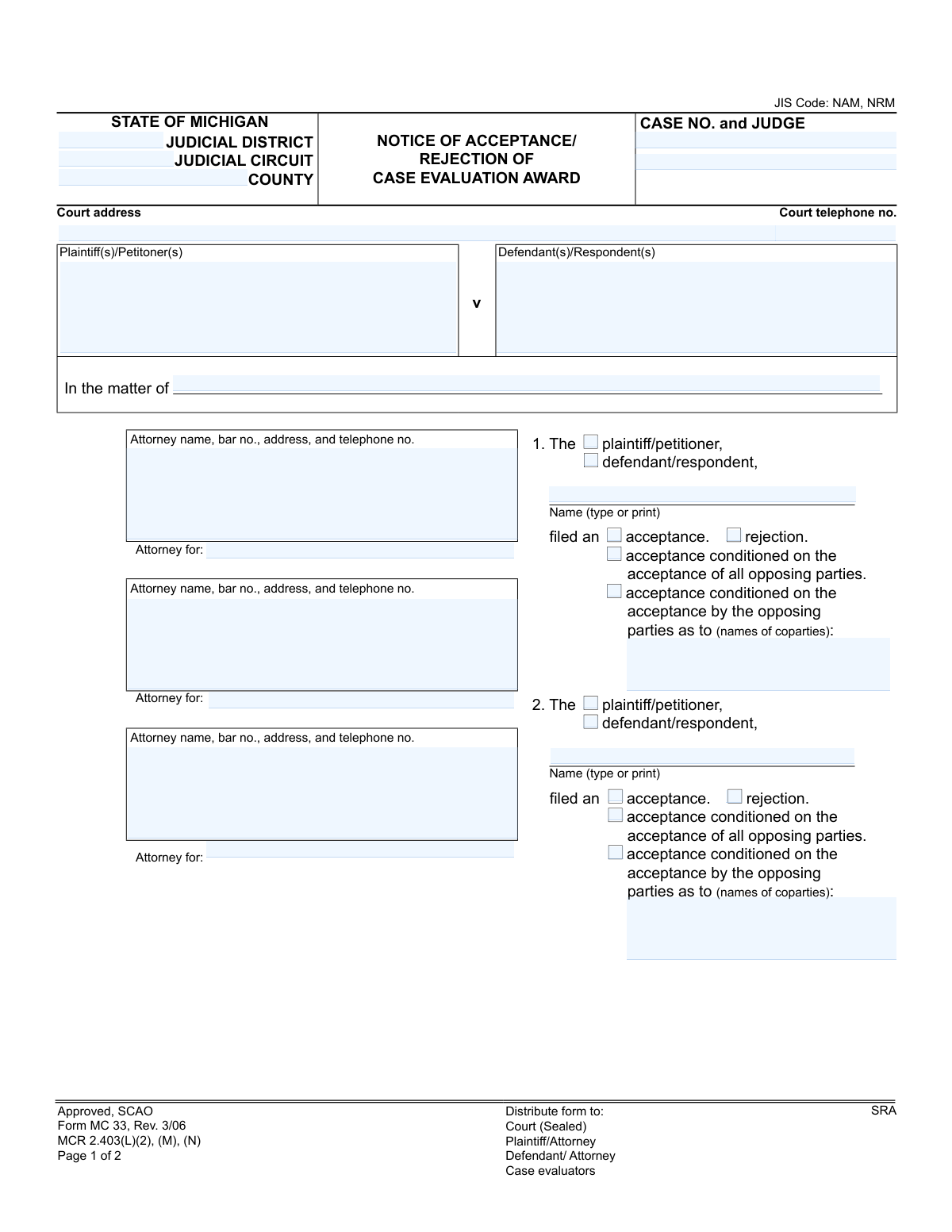
Yes! You can use AI to fill out Form MC 33, Notice of Acceptance/Rejection of Case Evaluation Award

The Notice of Acceptance/Rejection of Case Evaluation Award, Form MC 33, is a legal document used in the Michigan court system for parties to formally declare their decision on a case evaluation award proposed by neutral evaluators. This decision is critical as it can impact cost sanctions and the future direction of the litigation. Today, this form can be filled out quickly and accurately using AI-powered services like Instafill.ai, which can also convert non-fillable PDF versions into interactive fillable forms.
MC 33 is part of the Michigan court forms category on Instafill.
Our AI automatically handles information lookup, data retrieval, formatting, and form filling.
It takes less than a minute to fill out MC 33 using our AI form filling.
Securely upload your data. Information is encrypted in transit and deleted immediately after the form is filled out.

Form specifications

Form name: Form MC 33, Notice of Acceptance/Rejection of Case Evaluation Award
Number of fields: 45
Number of pages: 1
Language: English
main-image

Instafill Demo: How to fill out PDF forms in seconds with AI

How to Fill Out MC 33 Online for Free in 2026

Are you looking to fill out a MC 33 form online quickly and accurately? Instafill.ai offers the #1 AI-powered PDF filling software of 2026, allowing you to complete your MC 33 form in just 37 seconds or less.
Follow these steps to fill out your MC 33 form online using Instafill.ai:
  1. 1 Navigate to Instafill.ai and upload or select the Form MC 33.
  2. 2 Use the AI assistant to input the court and case information, including the judicial district, case number, and judge's name.
  3. 3 Identify the plaintiffs, defendants, and their respective attorneys in the designated fields.
  4. 4 For each party filing a response, check the appropriate box to indicate acceptance, rejection, or a conditional acceptance of the case evaluation award.
  5. 5 If acceptance is conditional, specify the names of the co-parties whose acceptance is required.
  6. 6 Review all entered information for accuracy before the ADR clerk signs and dates the notice.
  7. 7 Complete the Certificate of Mailing section, including the date and signature, to certify that all parties have been served with the notice.

Our AI-powered system ensures each field is filled out correctly, reducing errors and saving you time.

Why Choose Instafill.ai for Your Fillable MC 33 Form?

Speed

Complete your MC 33 in as little as 37 seconds.

Up-to-Date

Always use the latest 2026 MC 33 form version.

Cost-effective

No need to hire expensive lawyers.

Accuracy

Our AI performs 10 compliance checks to ensure your form is error-free.

Security

Your personal information is protected with bank-level encryption.

Frequently Asked Questions About Form MC 33

This form is used in Michigan courts to formally declare whether you accept or reject the non-binding award proposed by a case evaluation panel. Your response is filed with the court and served on the other parties in your case.

Each party (plaintiff or defendant) involved in a case that has gone through the case evaluation process must fill out this form to state their decision. It is typically completed by the party's attorney.

This means you agree to accept the award, but only if every opposing party in the lawsuit also agrees to accept it. If even one opposing party rejects the award, your conditional acceptance is treated as a rejection.

A simple 'acceptance' means you agree to the award regardless of what other parties decide. A 'conditional acceptance' means your acceptance is dependent on other specific parties also accepting the award.

The completed form should be filed with the court clerk in a sealed envelope, and copies must be sent to all other parties or their attorneys, as well as the case evaluators.

The notice is filed in a sealed envelope to keep the parties' decisions confidential from the judge until all responses are received. This prevents the judge from being influenced by who accepted or rejected the award if the case proceeds to trial.

Under Michigan Court Rule 2.403, you must file your acceptance or rejection within 28 days after the case evaluation award is served. Failure to respond within this timeframe is treated as a rejection.

If you reject the award, the case will continue toward trial. Be aware that if the verdict at trial is not more favorable to you than the case evaluation award was, you may be required to pay the opposing party's actual costs.

If all parties accept the award, the case is typically settled for the amount of the award. A judgment will be entered in accordance with the evaluation, and the litigation is concluded.

The ADR (Alternative Dispute Resolution) clerk is a court official responsible for managing the administrative aspects of the case evaluation process. They will unseal the notices and record the results after the deadline for submission has passed.

Yes, AI-powered services like Instafill.ai can help you fill out this form quickly and accurately. These tools use AI to identify and auto-fill form fields, which saves time and reduces the risk of errors.

If you have a non-fillable or 'flat' PDF, you can use a service like Instafill.ai. It can convert the non-fillable PDF into an interactive, fillable form that you can complete and sign online.

Simply upload the Notice of Acceptance/Rejection of Case Evaluation Award form to the Instafill.ai platform. The AI will make the form fillable, and you can then type your information directly into the fields, select your response, and e-sign before downloading or sharing.

You will need the full case information including the court, case number, and judge's name, as well as the names and contact information for all attorneys involved. Most importantly, you must know which response (acceptance, rejection, or conditional acceptance) you are selecting.

Compliance MC 33
Validation Checks by Instafill.ai

1
Case Number Consistency Across Pages
This check ensures the 'CASE NO.' field on page 1 matches the 'Case No.' field on page 2. It is critical for document integrity, confirming that both pages belong to the same legal case. A mismatch could lead to misfiling and render the notice invalid.
2
Exclusive Acceptance/Rejection Choice
For each party's response (sections 1, 2, and 3), this validation verifies that only one option is selected from 'acceptance,' 'rejection,' 'acceptance conditioned on all,' or 'acceptance conditioned on some.' Selecting multiple conflicting options for a single party would make their response ambiguous and legally void. The system should flag any entry where more than one choice is made.
3
Conditional Acceptance Co-Party Requirement
This check ensures that if a party selects 'acceptance conditioned on the acceptance by the opposing parties as to (names of coparties),' the corresponding 'coparties' text field is not empty. This condition is meaningless without specifying the relevant co-parties. Failure to provide names would make the conditional acceptance unenforceable and require clarification.
4
Required Case Identification Fields
Validates that essential court and case identifiers like 'CASE NO.', 'JUDICIAL CIRCUIT', and 'COUNTY' are present. These fields are fundamental for routing the document to the correct court and case file. A submission missing this information cannot be processed and would be rejected by the court clerk.
5
Party Role Specification
For each of the three response sections, this check confirms that either 'plaintiff/petitioner' or 'defendant/respondent' has been selected. This designation is crucial for understanding which side of the case is responding. An entry without a specified role is incomplete and cannot be accurately recorded.
6
Responding Party Name Presence
Verifies that for every section where an acceptance/rejection choice is made, the corresponding 'Name (type or print)' field is filled. This identifies the specific individual or entity making the decision. Without a name, the response is anonymous and has no legal standing.
7
At Least One Party Response Required
This validation ensures that at least one of the three available party response sections has been fully completed. A form submitted with no party responses is effectively blank and serves no purpose. The system should prevent the submission of a form that contains no acceptance or rejection information.
8
Valid Date Format
Checks that the 'Date' field for the ADR clerk's signature and the date in the 'CERTIFICATE OF MAILING' are in a valid and recognizable format (e.g., MM/DD/YYYY). Incorrect or unreadable dates can create legal challenges regarding the timeliness of the notice. The system should enforce a standard date format.
9
Chronological Date Logic
This validation compares the 'Date' of the notice (signed by the ADR clerk) with the 'Date' on the Certificate of Mailing. The mailing date must be on or after the notice date. It is logically impossible to mail a document before it has been officially dated and signed, and a discrepancy could invalidate the proof of service.
10
Attorney Bar Number Format
This check validates that the bar number provided in the attorney information sections follows the expected format for the State of Michigan (e.g., a 'P' prefix followed by a specific number of digits). This helps ensure the attorney is correctly identified and is licensed to practice. An invalid format could indicate a typo or an invalid practitioner.
11
Court Telephone Number Format
Ensures the 'Court telephone no.' field contains a valid phone number format (e.g., 10 digits with optional formatting like parentheses or hyphens). This is a data quality check to ensure contact information for the court is correctly captured. An invalid format would be flagged for review.
12
Signature Presence Verification
This check verifies that the 'Signature of ADR clerk' and the signature for the 'CERTIFICATE OF MAILING' are present. These signatures are essential for the document's legal validity and proof of service. The system should detect if a digital signature is missing or if a field designated for a wet signature is empty.
13
Primary Party Identification
Validates that the primary 'Plaintiff(s)/Petitioner(s)' and 'Defendant(s)/Respondent(s)' fields at the top of the form are filled out. These fields define the main parties to the case, providing essential context for the entire document. A form without this information is fundamentally incomplete.

Common Mistakes in Completing MC 33

Incomplete Case Identification Information

Users often forget to fill in the complete Case Number, Judge's name, or Judicial Circuit/District at the top of the form. This happens due to rushing or assuming the information is known. An incomplete header can lead to the document being rejected by the court clerk or misfiled, causing critical delays and potentially missed deadlines.

Ambiguous Acceptance or Rejection Selection

A frequent error is either checking multiple conflicting boxes (e.g., both 'acceptance' and 'rejection') or failing to check any box for a party's decision. This ambiguity renders the filing invalid and requires resubmission, which can be problematic if a response deadline is imminent. To avoid this, carefully select only one option that accurately reflects the party's decision for each entry.

Failing to Specify Parties for Conditional Acceptance

When a party selects 'acceptance conditioned on the acceptance by the opposing parties as to (names of coparties),' they often forget to write in the specific names of those coparties. This omission makes the conditional acceptance legally vague and potentially unenforceable. It is crucial to clearly list all required parties by name to ensure the condition is valid.

Omitting the Case Number on Page 2

The form requires the Case Number to be entered at the top of both page 1 and page 2. It is very common for filers to complete the first page correctly but forget to add the case number to the second page. This can lead to the pages being separated and misfiled by the court, creating administrative confusion and delaying case progress.

Incorrect Party Designation

In sections 1, 2, and 3, the filer must check whether the party making the decision is the 'plaintiff/petitioner' or 'defendant/respondent.' People sometimes select the wrong role, especially in complex cases with multiple parties or counterclaims. This error creates confusion and may necessitate filing a corrected notice.

Incomplete Attorney Information

Filers frequently provide an attorney's name and address but omit the mandatory bar number. The bar number is a unique identifier essential for the court to verify the attorney's credentials and for proper record-keeping. Leaving it blank can cause the filing to be flagged or delayed for verification. Using a tool like Instafill.ai can help store and auto-populate complete attorney details, preventing this error.

Unsigned or Undated Certificate of Mailing

The Certificate of Mailing at the bottom of the form is a sworn statement that all parties have been served. Forgetting to sign or date this section is a critical error that invalidates the proof of service. This can lead to legal challenges from opposing counsel and potential sanctions for failing to comply with service rules.

Illegible Handwritten Entries

When this form is printed and filled out by hand, illegible handwriting for party names, case numbers, or attorney details is a major problem. Poor handwriting can lead to data entry errors by court clerks, misdirected mail, and general confusion. To prevent this, it is best to type the information. AI-powered tools like Instafill.ai can convert non-fillable PDFs into fillable versions, eliminating handwriting issues entirely.

Incorrect Signature Placement

The form contains multiple signature lines, including one specifically for the 'ADR clerk' and another for the 'Certificate of Mailing.' A party or their attorney may mistakenly sign in the wrong place, such as the ADR clerk's box. This can invalidate the document or require clarification, causing delays. Always read the label next to a signature line before signing.

Failure to Distribute to All Required Parties

The form explicitly lists who must receive a copy: the Court, Plaintiff/Attorney, Defendant/Attorney, and Case Evaluators. A common procedural mistake is failing to send the notice to everyone on this list. This failure of service can render the notice ineffective and lead to missed deadlines or legal disputes over proper notification.
Saved over 80 hours a year

“I was never sure if my IRS forms like W-9 were filled correctly. Now, I can complete the forms accurately without any external help.”

Kevin Martin Green

Your data stays secure with advanced protection from Instafill and our subprocessors

Robust compliance program

Transparent business model

You’re not the product. You always know where your data is and what it is processed for.

ISO 27001, HIPAA, and GDPR

Our subprocesses adhere to multiple compliance standards, including but not limited to ISO 27001, HIPAA, and GDPR.

Security & privacy by design

We consider security and privacy from the initial design phase of any new service or functionality. It’s not an afterthought, it’s built-in, including support for two-factor authentication (2FA) to further protect your account.

Fill out MC 33 with Instafill.ai

Worried about filling PDFs wrong? Instafill securely fills form-mc-33-notice-of-acceptancerejection-of-case-evaluation-award forms, ensuring each field is accurate.