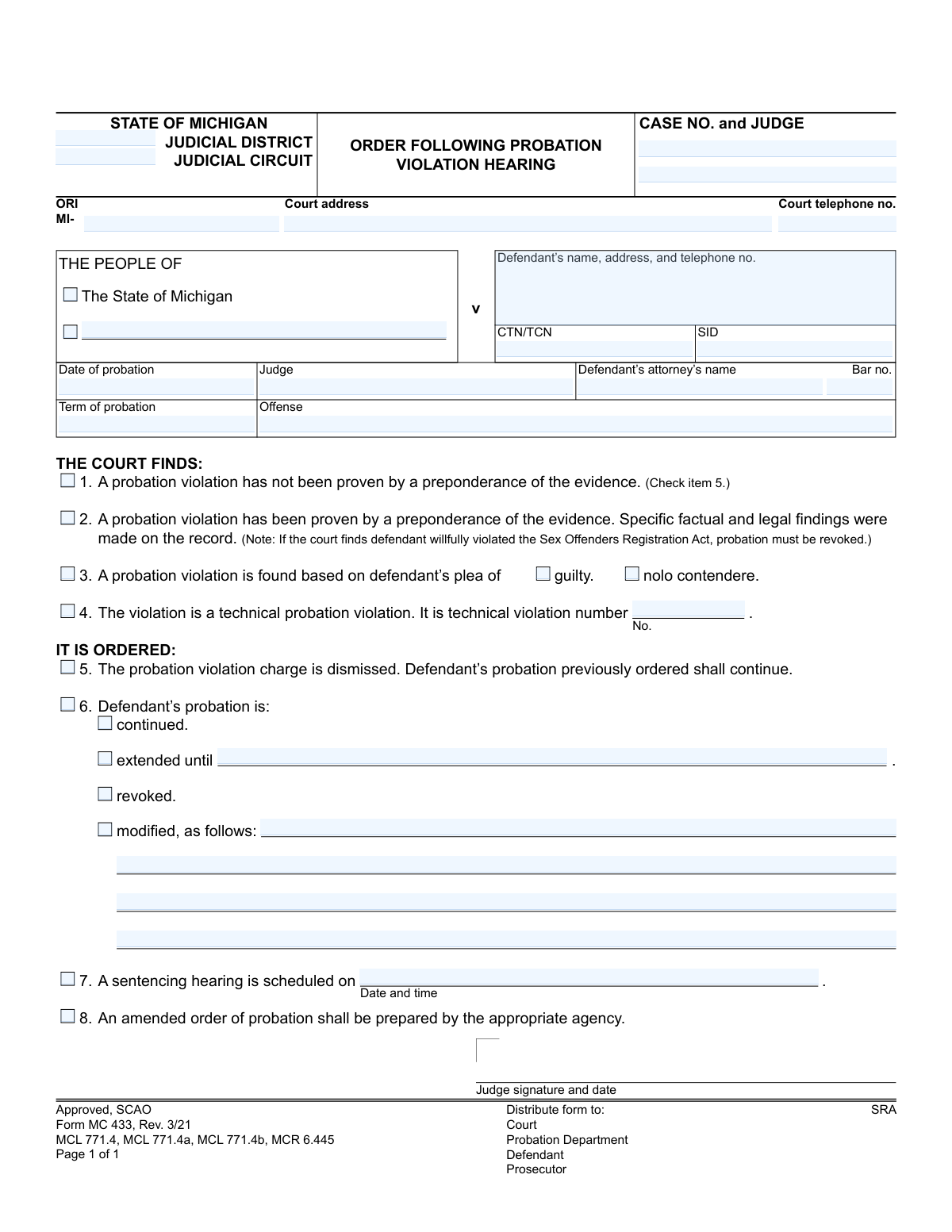
Yes! You can use AI to fill out Form MC 433, Order Following Probation Violation Hearing

Form MC 433, the Order Following Probation Violation Hearing, is a legal document used by the Michigan judicial system. A judge fills out this form to formalize the court's decision after a hearing on an alleged probation violation, indicating whether the violation was proven and what the consequences will be, such as continuing, modifying, or revoking probation. This order creates an official record for all parties involved. Today, this form can be filled out quickly and accurately using AI-powered services like Instafill.ai, which can also convert non-fillable PDF versions into interactive fillable forms.
MC 433 is part of the Michigan court forms category on Instafill.
Our AI automatically handles information lookup, data retrieval, formatting, and form filling.
It takes less than a minute to fill out MC 433 using our AI form filling.
Securely upload your data. Information is encrypted in transit and deleted immediately after the form is filled out.

Form specifications

Form name: Form MC 433, Order Following Probation Violation Hearing
Number of fields: 40
Number of pages: 1
Language: English
main-image

Instafill Demo: How to fill out PDF forms in seconds with AI

How to Fill Out MC 433 Online for Free in 2026

Are you looking to fill out a MC 433 form online quickly and accurately? Instafill.ai offers the #1 AI-powered PDF filling software of 2026, allowing you to complete your MC 433 form in just 37 seconds or less.
Follow these steps to fill out your MC 433 form online using Instafill.ai:
  1. 1 Navigate to Instafill.ai and upload or select the Michigan Form MC 433.
  2. 2 Provide the court and case information, including the judicial district, case number, judge, and defendant's details.
  3. 3 Use the AI assistant to input the original probation terms, offense, and attorney information.
  4. 4 Indicate the court's findings by checking the appropriate boxes, specifying if a violation was proven, found by plea, or is a technical violation.
  5. 5 Detail the court's final order, selecting whether probation is dismissed, continued, extended, revoked, or modified, and fill in any required dates or new conditions.
  6. 6 Review all the auto-populated fields for accuracy before the judge signs and dates the document.
  7. 7 Download the completed form for official filing and distribution to the court, probation department, defendant, and prosecutor.

Our AI-powered system ensures each field is filled out correctly, reducing errors and saving you time.

Why Choose Instafill.ai for Your Fillable MC 433 Form?

Speed

Complete your MC 433 in as little as 37 seconds.

Up-to-Date

Always use the latest 2026 MC 433 form version.

Cost-effective

No need to hire expensive lawyers.

Accuracy

Our AI performs 10 compliance checks to ensure your form is error-free.

Security

Your personal information is protected with bank-level encryption.

Frequently Asked Questions About Form MC 433

This is an official court order from the State of Michigan that documents the judge's decision after a probation violation hearing. It outlines the court's findings and the consequences for your probation status.

No, you do not fill out this form. The judge or court personnel completes and signs it to make the hearing's outcome official.

This means the judge found, by a preponderance of the evidence, that you violated the terms of your probation. The specific consequences are detailed in the 'IT IS ORDERED' section below.

If your probation is revoked, it is cancelled. You will likely face sentencing for the original offense, which may be scheduled for a later date as indicated on the form.

'Continued' means your probation goes on as it was, 'extended' means the end date is pushed back, and 'modified' means the conditions of your probation have been changed.

This is a positive outcome, meaning the judge did not find enough evidence that you violated probation. Your probation continues as previously ordered without any new penalties from this hearing.

This means your probation was likely revoked, and you must appear in court on the specified date. The judge will determine your sentence for the original conviction at that hearing.

A technical violation is a breach of the rules of your probation that is not a new crime. Examples include missing a meeting with your probation officer, failing a drug test, or not paying fines.

As noted at the bottom of the form, copies are distributed to the court, the probation department, the defendant (you), the prosecutor, and the state repository (SRA).

Yes, services like Instafill.ai use AI to accurately auto-fill form fields, which can save you significant time and help prevent errors on your paperwork.

You can upload your form to the Instafill.ai platform, and its AI will identify the fields and help you fill them in with your saved information, making the process quick and simple.

You can use a service like Instafill.ai to solve this problem. It can convert flat, non-fillable PDFs into interactive forms that you can easily complete and sign on your computer.

Compliance MC 433
Validation Checks by Instafill.ai

1
Mutually Exclusive Findings
Ensures that the form does not have conflicting findings. Specifically, it checks that checkbox 1 ('probation violation has not been proven') is not selected at the same time as checkbox 2 ('probation violation has been proven') or checkbox 3 ('violation is found based on defendant’s plea'). These findings are mutually exclusive, and selecting conflicting options would make the order legally incoherent. If validation fails, the user must be prompted to select only one finding category.
2
Mutually Exclusive Orders
Validates that the order section is not contradictory. This check ensures that checkbox 5 ('The probation violation charge is dismissed') is not selected simultaneously with checkbox 6 ('Defendant’s probation is...'). An order cannot both dismiss the charge and modify the probation terms. Failure to comply should trigger an error forcing the user to choose a single, valid order.
3
Finding and Order Consistency
Performs a logical cross-check between the 'FINDS' and 'ORDERED' sections. If finding 1 ('not proven') is selected, then order 5 ('dismissed') must be selected. Conversely, if finding 2 or 3 ('proven' or 'plea') is selected, then order 6 ('probation is...') must be selected. This ensures the court's order logically follows from its findings, preventing nonsensical documents.
4
Probation Status Requirement
Checks that if box 6 ('Defendant’s probation is:') is selected, at least one of the subsequent options ('continued', 'extended', 'revoked', 'modified') is also selected. Simply checking box 6 without specifying the outcome is incomplete and renders the order ambiguous. The system should prevent submission until a specific probation status is chosen.
5
Extended Probation Date Requirement
Ensures that if the 'extended' checkbox under order 6 is selected, the corresponding 'extended until' date field is populated with a valid, future date. An order to extend probation is meaningless without a specified end date. The validation prevents incomplete orders and ensures the new probation term is clearly defined.
6
Modification Details Requirement
Validates that if the 'modified' checkbox under order 6 is selected, the 'modified, as follows:' text area is not empty. The nature of the modification must be explicitly stated to be enforceable. This check prevents the creation of a vague and legally insufficient order by requiring a description of the changes.
7
Sentencing Hearing Date Requirement
Checks that if box 7 ('A sentencing hearing is scheduled') is selected, the 'Date and time' field is filled with a valid, future date and time. Scheduling a hearing without providing the date and time makes the order ineffective. This validation ensures all parties are properly notified of the next court date.
8
Technical Violation Number Dependency
Ensures that if checkbox 4 ('The violation is a technical probation violation') is selected, the 'violation number' field is populated with a positive integer. This number is critical for tracking a defendant's history of technical violations under Michigan law. The field should be required and validated as a number only when box 4 is checked.
9
Plea Type Requirement
Validates that if checkbox 3 ('A probation violation is found based on defendant’s plea') is selected, one of the sub-options ('guilty' or 'nolo contendere') must also be selected. The basis of the plea is a critical piece of information for the court record. This check prevents an incomplete finding when a plea is the basis for the violation.
10
Case Header Completeness
Verifies that essential case identification fields such as 'case no', 'judge', and 'defendant’s name' are not empty. This information is fundamental for routing, filing, and identifying the legal matter correctly. Submitting a form without this core data would make it impossible to process and associate with the correct case file.
11
Attorney Bar Number Format
Validates that the 'defendant attorney bar number' field, if entered, conforms to the expected Michigan State Bar format (e.g., 'P' followed by 5-8 digits). This ensures the attorney can be correctly identified and that the record is accurate. An invalid format could lead to issues with record-keeping and official notifications.
12
Probation Date Chronology
Checks that the 'date of probation' is a valid date that occurs on or before the current date. A future date for the start of the original probation term is logically impossible in the context of a violation hearing. This validation maintains the chronological integrity of the case timeline.
13
Revocation and Sentencing Hearing Link
Performs a logical check to ensure that if probation is 'revoked' (under order 6), a sentencing hearing is typically scheduled (order 7 is checked). While not a universally strict rule, revoking probation without scheduling a new sentencing is a highly unusual action that should be flagged for user confirmation. This check helps prevent procedural errors.
14
Case Number Format
Validates that the 'case no' field follows the standard format for Michigan case numbers, which typically includes the year, a case type code, and a sequence number (e.g., '21-12345-CZ'). This ensures the case can be accurately looked up and filed within the court's case management system. An incorrectly formatted number can lead to filing errors and lost documents.

Common Mistakes in Completing MC 433

Incorrect or Incomplete Case Number

Users often mistype the 'CASE NO.' by transposing digits or omitting parts of the alphanumeric code required by the court. This is a critical identifier, and an error can lead to the order being misfiled, delayed, or not linked to the correct court record. Double-checking the number against official court documents is essential to ensure proper processing and avoid administrative rejection.

Selecting Contradictory Findings or Orders

A frequent error is checking boxes that conflict with each other, such as marking both item 1 ('probation violation has not been proven') and item 2 ('probation violation has been proven'). This creates an ambiguous and legally invalid order that must be corrected, causing significant delays. Each section must be reviewed carefully to ensure the selections are logical and consistent with the court's ruling.

Missing Date for Probation Extension

When selecting the option to extend probation under item 6, users frequently check 'extended until' but forget to fill in the corresponding date. This renders the order incomplete and unenforceable, as the duration of the extension is undefined. The form must be returned for correction, delaying the case's resolution and creating uncertainty for the defendant and probation department.

Failing to Specify Probation Modifications

If the 'modified' option is checked under item 6, the specific changes to the probation terms must be detailed in the 'modified, as follows' section. A common mistake is leaving this section blank or providing vague, unclear descriptions. This ambiguity makes the new terms impossible to enforce and requires an amended order, leading to further court proceedings and administrative work.

Inconsistency Between 'FINDS' and 'IT IS ORDERED' Sections

A critical logical error occurs when the 'IT IS ORDERED' section does not logically follow from 'THE COURT FINDS' section. For example, finding a violation proven (item 2) but then ordering the charge dismissed (item 5) is a direct contradiction that invalidates the order. The person filling out the form must ensure the final order is a direct and logical consequence of the court's findings.

Omitting Plea Type for Violation Finding

When indicating a violation is found based on the defendant's plea (item 3), it is mandatory to specify whether the plea was 'guilty' or 'nolo contendere.' People sometimes check the main box for item 3 but neglect to check one of the sub-options. This omission creates an incomplete record of the finding, which must be clarified before the order can be finalized and properly recorded.

Incomplete Defendant Contact Information

The field for 'Defendant’s name, address, and telephone no.' is often filled out with missing or outdated information, such as an old address or a disconnected phone number. This can severely hinder communication and the delivery of official notices, potentially leading to further legal complications for the defendant. It's crucial to verify and provide the most current contact details available in the case file.

Transposing or Mismatching Identifier Numbers (CTN/TCN/SID)

The 'CTN/TCN' and 'SID' fields require precise data entry of unique tracking numbers. Errors like transposing digits or confusing the two numbers are common and can cause significant data management problems, potentially linking the order to the wrong individual or case history. These numbers must be carefully transcribed from official source documents to ensure data integrity.

Scheduling a Sentencing Hearing Without a Date and Time

If item 7 is checked to indicate a sentencing hearing is scheduled, the date and time must be provided. A common oversight is to check the box but leave the date and time fields blank, making the entry meaningless and creating confusion for all parties. This requires follow-up communication to schedule the hearing properly, delaying the final resolution of the violation.

Not Specifying the Technical Violation Number

When the court finds the violation is a 'technical probation violation' (item 4), the form requires specifying which technical violation it is by number. Users often check the box but forget to write in the corresponding number from the original probation order. This leaves the basis for the finding unclear and requires an amendment to the order for it to be legally sufficient.
Saved over 80 hours a year

“I was never sure if my IRS forms like W-9 were filled correctly. Now, I can complete the forms accurately without any external help.”

Kevin Martin Green

Your data stays secure with advanced protection from Instafill and our subprocessors

Robust compliance program

Transparent business model

You’re not the product. You always know where your data is and what it is processed for.

ISO 27001, HIPAA, and GDPR

Our subprocesses adhere to multiple compliance standards, including but not limited to ISO 27001, HIPAA, and GDPR.

Security & privacy by design

We consider security and privacy from the initial design phase of any new service or functionality. It’s not an afterthought, it’s built-in, including support for two-factor authentication (2FA) to further protect your account.

Fill out MC 433 with Instafill.ai

Worried about filling PDFs wrong? Instafill securely fills form-mc-433-order-following-probation-violation-hearing forms, ensuring each field is accurate.