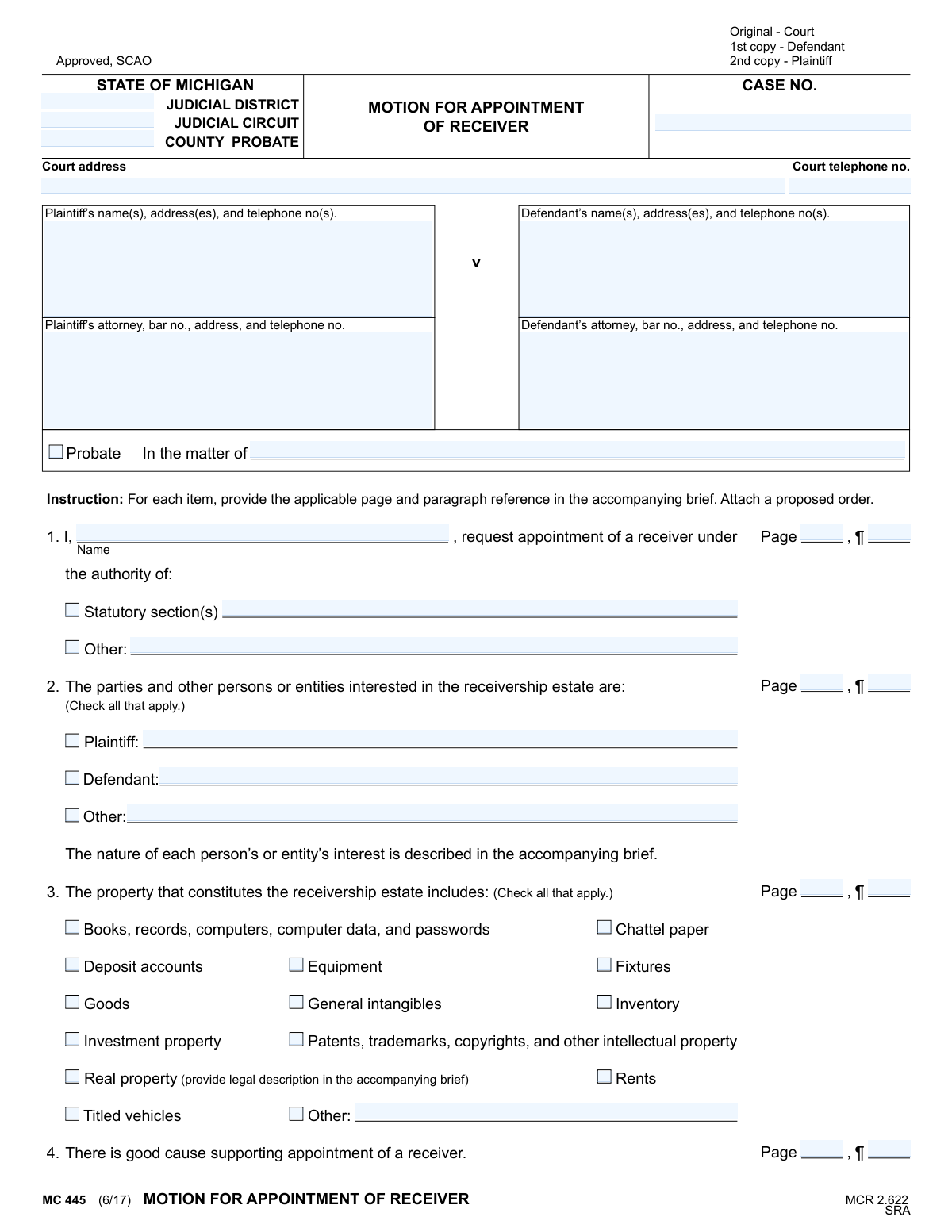
Yes! You can use AI to fill out Form MC 445, Motion for Appointment of Receiver

Form MC 445 is a legal document filed in a Michigan court to formally request the appointment of a receiver. A receiver is a neutral third party assigned by the court to take control of and manage property or assets that are the subject of a lawsuit, ensuring they are preserved until the case is resolved. This motion is crucial for protecting assets from waste, damage, or improper transfer during litigation. Today, this form can be filled out quickly and accurately using AI-powered services like Instafill.ai, which can also convert non-fillable PDF versions into interactive fillable forms.
MC 445 is part of the Michigan court forms category on Instafill.
Our AI automatically handles information lookup, data retrieval, formatting, and form filling.
It takes less than a minute to fill out MC 445 using our AI form filling.
Securely upload your data. Information is encrypted in transit and deleted immediately after the form is filled out.

Form specifications

Form name: Form MC 445, Motion for Appointment of Receiver
Number of fields: 64
Number of pages: 1
Language: English
main-image

Instafill Demo: How to fill out PDF forms in seconds with AI

How to Fill Out MC 445 Online for Free in 2026

Are you looking to fill out a MC 445 form online quickly and accurately? Instafill.ai offers the #1 AI-powered PDF filling software of 2026, allowing you to complete your MC 445 form in just 37 seconds or less.
Follow these steps to fill out your MC 445 form online using Instafill.ai:
  1. 1 Navigate to an AI-powered platform like Instafill.ai and upload or select the MC 445, Motion for Appointment of Receiver form.
  2. 2 Provide all case and court information, including the judicial district/circuit, case number, and the names and addresses of the plaintiff, defendant, and their attorneys.
  3. 3 Specify the legal authority for the appointment, citing the relevant statutory section or other grounds for the request.
  4. 4 Identify all parties with an interest in the receivership estate and check the boxes corresponding to the types of property to be included, such as real property, bank accounts, or intellectual property.
  5. 5 Enter the name of the nominated receiver and confirm their qualifications and eligibility as required by Michigan Court Rule 2.622.
  6. 6 Indicate the proposed bond amount, whether it's a nominal amount agreed upon by the parties or a specific amount you are asking the court to set.
  7. 7 Review the completed motion generated by the AI, electronically sign as the movant or attorney, and download the final document for filing with the court and service to other parties.

Our AI-powered system ensures each field is filled out correctly, reducing errors and saving you time.

Why Choose Instafill.ai for Your Fillable MC 445 Form?

Speed

Complete your MC 445 in as little as 37 seconds.

Up-to-Date

Always use the latest 2026 MC 445 form version.

Cost-effective

No need to hire expensive lawyers.

Accuracy

Our AI performs 10 compliance checks to ensure your form is error-free.

Security

Your personal information is protected with bank-level encryption.

Frequently Asked Questions About Form MC 445

This form is used to ask a Michigan court to appoint a neutral third party, known as a receiver, to take control of and manage property or assets that are the subject of a legal dispute.

Typically, the plaintiff in a lawsuit files this motion to protect assets they believe are at risk of being lost, damaged, or hidden by the defendant during the legal proceedings.

You are required to attach a detailed legal brief supporting your request and a 'proposed order' that outlines the receiver's specific duties, powers, and compensation.

These fields require you to cite the exact page and paragraph number in your accompanying brief where you provide the detailed argument or evidence for that section of the motion.

Check all the boxes that apply to the property you want the receiver to manage. For real estate, you must provide the full legal description in your separate, accompanying brief.

A receiver is a neutral person or entity appointed by the court to take possession of, manage, and preserve assets or property. Their goal is to protect the value of the property until the court resolves the case.

A bond is a type of insurance that protects the parties involved from any financial harm caused by the receiver's actions or negligence. The court determines the final bond amount required.

You need to prepare at least three copies: the original for the court, one copy for the defendant (or their attorney), and one copy for your own records.

The motion must be filed with the court clerk in the judicial district or circuit where your case is being heard. You must also serve a copy on the opposing party as indicated in the Certificate of Mailing.

Yes, services like Instafill.ai use AI to help you accurately auto-fill form fields with your saved information, which saves time and helps prevent common errors.

You can use a service like Instafill.ai to upload the PDF. The platform will make the form interactive, allowing you to type your information directly into the fields on your computer before printing.

If you have a non-fillable 'flat' PDF, you can upload it to Instafill.ai. The service can convert it into a fully interactive and fillable form for you to complete online.

It means you must provide the court with a legally valid reason, supported by facts, showing that the property is in danger of being lost, destroyed, or devalued if a receiver is not appointed.

You can nominate a person or entity with the competence and experience to manage the specific assets. The nominee must not have any conflicts of interest as outlined in Michigan Court Rule 2.622(B)(6).

Compliance MC 445
Validation Checks by Instafill.ai

1
Case Number Presence and Format
This check verifies that the 'CASE NO.' field is not empty and follows the expected format for the Michigan Judicial Circuit. A valid case number is crucial for associating the motion with the correct legal proceeding in the court's records. If the case number is missing or malformed, the document cannot be filed or processed correctly, leading to significant delays.
2
Plaintiff Information Completeness
Validates that the Plaintiff's name, address, and telephone number fields are all populated. This information is fundamental for identifying the moving party and ensuring proper communication and service of documents. A submission with incomplete plaintiff information is legally deficient and would be rejected by the court clerk.
3
Attorney Bar Number Format
Ensures that if an attorney's information is provided, the 'bar no.' field contains a value that conforms to the Michigan State Bar format (e.g., 'P' followed by a series of digits). This validates the attorney's credentials and their authority to practice. An invalid bar number could indicate a data entry error or an unauthorized filer, requiring rejection and correction.
4
Authority for Appointment Selection
This validation confirms that the filer has provided a legal basis for the appointment by either filling in the 'Statutory section(s)' field or checking 'Other' and providing a description. A motion must cite the legal authority under which the court is being asked to act. Failure to provide this justification makes the motion legally insufficient and subject to immediate denial.
5
Conditional 'Other' Field Population
Checks that if a checkbox for 'Other' is selected in sections 1, 2, or 3, the corresponding text field ('other authority name', 'other interested', 'other property name') is not empty. This rule prevents ambiguous filings where an 'Other' category is chosen without explanation. A failure would trigger an error prompting the user to either provide the required details or uncheck the 'Other' box.
6
Interested Parties Identification
Verifies that at least one checkbox is marked in section 2 to identify the parties interested in the receivership estate (Plaintiff, Defendant, or Other). The court needs to know who has an interest in the property to be managed. A motion that fails to identify any interested parties is incomplete and cannot be properly adjudicated.
7
Receivership Property Selection
Ensures that at least one checkbox is marked in section 3, identifying the property that will constitute the receivership estate. A receiver is appointed to manage specific property, so the motion is meaningless without this information. If no property is selected, the form submission should be blocked until the user specifies the assets involved.
8
Nominated Receiver Name Requirement
This check confirms that the name of the proposed receiver in section 5 ('Name or entity') is provided. The primary purpose of the motion is to appoint a specific receiver, making this a critical piece of information. The motion is incomplete and cannot be considered by the court without a nominated receiver.
9
Exclusive Bond Option Selection
Validates that in section 10, only one of the two bond options ('parties have agreed' or 'court should set bond') is selected. These options are mutually exclusive, and selecting both creates ambiguity. The system should return an error if both or neither are checked, forcing the filer to clarify the request regarding the receiver's bond.
10
Conditional Bond Amount Entry
This check is linked to the bond option selection and verifies that if a bond checkbox in section 10 is marked, the corresponding dollar amount field is filled with a valid numeric value. A request for a bond is incomplete without specifying the proposed amount. This prevents submissions where the intent is clear but the critical value is missing.
11
Date Field Format and Validity
Verifies that the 'Date' field next to the movant's signature and the 'Date' in the Certificate of Mailing are both present and formatted as valid dates (e.g., MM/DD/YYYY). These dates are legally significant as they establish when the motion was signed and when it was served. An invalid or missing date can call the timeliness and validity of the entire filing into question.
12
Signature Field Completeness
Checks for the presence of signatures in the 'Movant/Attorney signature' and 'Certificate of Mailing signature' fields. While a system cannot validate the authenticity of a handwritten signature, it can ensure that a digital signature has been applied or a physical signature checkbox has been ticked. A motion without the required signatures is not legally executable and will be rejected.
13
Page and Paragraph Reference Consistency
This validation checks that for each major section (1, 2, 3, 4, 6, 7, 10), if content is provided, the corresponding 'Page, ¶' reference fields are also filled. These references are required to guide the court to the supporting arguments in the accompanying brief. A failure indicates an incomplete reference, prompting the user to provide the citation to avoid having the court disregard the unsupported claim.
14
Court Identifier Completeness
Ensures that the combination of 'JUDICIAL DISTRICT', 'JUDICIAL CIRCUIT', and 'COUNTY PROBATE' fields, along with the 'Court address', sufficiently identifies the specific court where the motion is being filed. This information is essential for routing the document to the correct jurisdiction and venue. Ambiguous or incomplete court information will result in the document being rejected or misfiled.

Common Mistakes in Completing MC 445

Incorrect Jurisdictional and Case Information

Filers often enter the wrong Judicial District/Circuit or County, or they make typos in the Case Number. This happens due to confusion about which court has jurisdiction or simple data entry errors. An incorrect Case Number can cause the motion to be misfiled or rejected, while incorrect court information will lead to immediate rejection, significantly delaying the legal process. Always verify the correct court and double-check the case number against existing court documents before filing.

Failure to Attach Required Documents

The motion repeatedly references an 'accompanying brief' and a 'proposed order.' A frequent and critical mistake is submitting the motion without these essential attachments. This oversight renders the motion incomplete and unsupported, leading to its denial by the court. Before filing, create a checklist to ensure all required documents, including the brief and proposed order, are complete and attached to the motion.

Inaccurate Page and Paragraph References

The form requires specific 'Page, ¶' citations linking statements in the motion to the supporting brief. People often forget these references, or worse, they become inaccurate if the brief is edited after the motion is drafted. This makes it difficult for the judge to verify the claims and can undermine the credibility of the entire filing. It is crucial to perform a final review to ensure every citation points to the correct location in the final version of the brief.

Missing or Incorrect Attorney Bar Number

The form requires the bar number for both the plaintiff's and defendant's attorneys. This information is often overlooked, left blank, or entered incorrectly. A missing or invalid bar number can lead to filing rejections or delays as court clerks must verify the attorney's standing. Attorneys should ensure their information is complete and accurate on every filing. AI-powered tools like Instafill.ai can store and auto-populate this recurring information, reducing the chance of error.

Improperly Describing Real Property

In section 3, filers may check the 'Real property' box but fail to provide the full legal description in the accompanying brief as explicitly required. Simply listing a street address is insufficient and a common error. A receivership over real property requires a precise legal description (lot, block, plat, etc.) for the order to be effective and enforceable. Failure to provide this can invalidate the receiver's authority over the property.

Forgetting Signatures or Dates

This form has two separate signature and date lines: one for the motion itself and one for the Certificate of Mailing. It is a common mistake to forget one or both signatures, which can invalidate the document or the proof of service. An unsigned motion will be rejected outright. Always perform a final check specifically for signatures and dates in all required locations before submission.

Incorrectly Citing Statutory Authority

In section 1, the filer must cite the legal authority for appointing a receiver. A frequent mistake is citing the wrong statute, using an outdated or repealed section, or failing to provide any citation at all. This is a fatal flaw, as the motion lacks a legal basis for the court to grant the requested relief. It is essential to research and cite the precise, current statutory section that authorizes the appointment in the specific context of the case.

Ambiguous or Conflicting Bond Request

In section 10, filers must specify the bond amount, either by agreement or by requesting the court set it. Common errors include checking both boxes, leaving the section blank, or requesting a court-set bond without providing justification in the brief as required by MCR 2.622(G). This ambiguity forces the court to guess or deny the motion for being incomplete, delaying the appointment of the receiver. A clear and well-supported bond request is necessary.

Failing to Identify All Interested Parties

Section 2 requires the identification of all parties and other persons or entities interested in the receivership estate. Filers sometimes overlook non-party stakeholders, such as secured creditors or lienholders, who have a legal interest in the property. Failing to identify and notify all interested parties can lead to future legal challenges and may even void the receiver's actions. A thorough analysis of the estate's assets and liabilities is needed to ensure all interested parties are properly listed.

Submitting a Non-Fillable or Poorly Formatted PDF

Often, legal forms are only available as flat, non-fillable PDFs, leading users to print them and fill them out by hand. This can result in illegible handwriting, misaligned text, and an unprofessional appearance that may frustrate court clerks and judges. To avoid this, use a tool like Instafill.ai, which can convert non-fillable PDFs into interactive, fillable forms, ensuring the final document is clean, legible, and professional.
Saved over 80 hours a year

“I was never sure if my IRS forms like W-9 were filled correctly. Now, I can complete the forms accurately without any external help.”

Kevin Martin Green

Your data stays secure with advanced protection from Instafill and our subprocessors

Robust compliance program

Transparent business model

You’re not the product. You always know where your data is and what it is processed for.

ISO 27001, HIPAA, and GDPR

Our subprocesses adhere to multiple compliance standards, including but not limited to ISO 27001, HIPAA, and GDPR.

Security & privacy by design

We consider security and privacy from the initial design phase of any new service or functionality. It’s not an afterthought, it’s built-in, including support for two-factor authentication (2FA) to further protect your account.

Fill out MC 445 with Instafill.ai

Worried about filling PDFs wrong? Instafill securely fills form-mc-445-motion-for-appointment-of-receiver forms, ensuring each field is accurate.