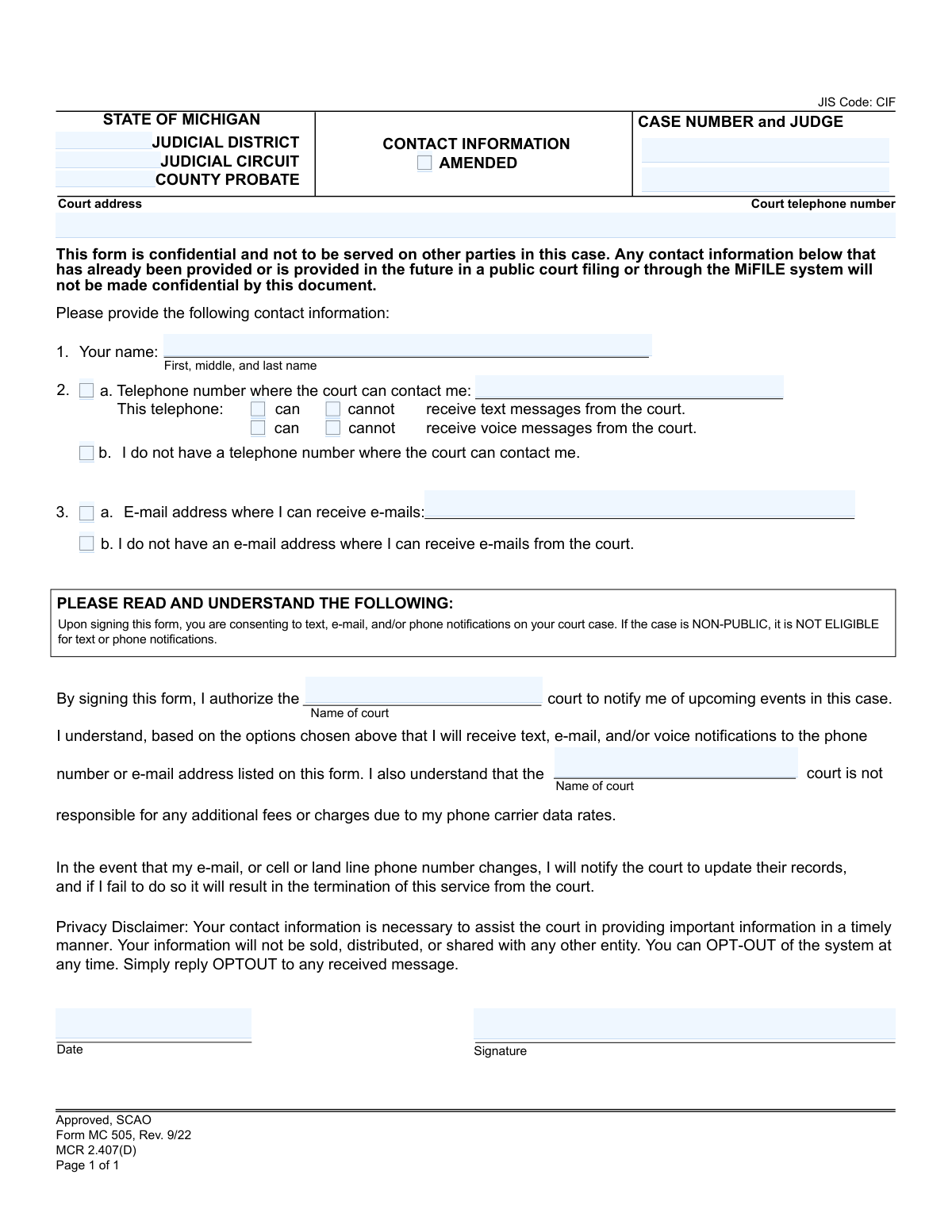
Yes! You can use AI to fill out Form MC 505, Contact Information
Form MC 505, Contact Information, is a confidential document submitted to Michigan courts to provide a telephone number and/or email address for receiving notifications about a court case. By submitting this form, you consent to receive updates via text, email, or voice message, ensuring you stay informed about upcoming events. Today, this form can be filled out quickly and accurately using AI-powered services like Instafill.ai, which can also convert non-fillable PDF versions into interactive fillable forms.
MC 505 is part of the
Michigan court forms category on Instafill.
Our AI automatically handles information lookup, data retrieval, formatting, and form filling.
It takes less than a minute to fill out MC 505 using our AI form filling.
Securely upload your data. Information is encrypted in transit and deleted immediately after the form is filled out.
Form specifications
| Form name: | Form MC 505, Contact Information |
| Number of fields: | 23 |
| Number of pages: | 1 |
| Language: | English |
More forms in Michigan court forms
Instafill Demo: How to fill out PDF forms in seconds with AI
How to Fill Out MC 505 Online for Free in 2026
Are you looking to fill out a MC 505 form online quickly and accurately? Instafill.ai offers the #1 AI-powered PDF filling software of 2026, allowing you to complete your MC 505 form in just 37 seconds or less.
Follow these steps to fill out your MC 505 form online using Instafill.ai:
- 1 Navigate to Instafill.ai and upload the MC 505 form or select it from their template library.
- 2 Use the AI assistant to automatically fill in the court details, such as the judicial district, case number, and judge's name.
- 3 Enter your full name in the designated field.
- 4 Provide your telephone number and indicate your preferences for receiving text and voice messages from the court.
- 5 Enter your email address if you wish to receive electronic notifications.
- 6 Carefully review all the information you've provided for accuracy, then add the current date and your digital signature.
- 7 Download the completed, signed form to submit to the appropriate Michigan court.
Our AI-powered system ensures each field is filled out correctly, reducing errors and saving you time.
Why Choose Instafill.ai for Your Fillable MC 505 Form?
Speed
Complete your MC 505 in as little as 37 seconds.
Up-to-Date
Always use the latest 2026 MC 505 form version.
Cost-effective
No need to hire expensive lawyers.
Accuracy
Our AI performs 10 compliance checks to ensure your form is error-free.
Security
Your personal information is protected with bank-level encryption.
Frequently Asked Questions About Form MC 505
This form is used to provide the Michigan court with your current phone number and email address. It allows the court to send you important notifications and updates about your case, such as reminders for upcoming events.
Any party involved in a Michigan court case who wishes to receive electronic notifications from the court should complete this form. It helps ensure you stay informed about your case proceedings.
Yes, the form is confidential and is not served on other parties in the case. However, if your contact information is already public from other court filings, this form will not change that.
You should submit this form directly to the court handling your case at the court address listed at the top of the form. Do not serve it on the other parties involved in your case.
Check the 'AMENDED' box if you are submitting this form to update or change contact information that you have previously provided to the court. Leave it unchecked if this is the first time you are providing this information.
The form has options for this situation. Simply check box 2b if you do not have a telephone number and/or box 3b if you do not have an email address.
You are responsible for notifying the court if your contact information changes. Failing to update your information may result in you no longer receiving court notifications.
The court does not charge for this notification service. However, you are responsible for any fees or data charges from your mobile phone carrier.
You can opt-out of the system at any time. The form states you can simply reply 'OPTOUT' to any message you receive to stop the notifications.
As stated on the form, cases that are designated as non-public are not eligible to receive text or phone notifications. You may still be able to receive communications via email or traditional mail.
Yes, services like Instafill.ai use AI to help you accurately auto-fill form fields with your personal information. This can save you time and help prevent errors.
You can use a service like Instafill.ai to complete the form digitally. Simply upload the form, and the AI will help you fill in the fields before you print it for signature and submission.
If you have a non-fillable PDF, you can use a tool like Instafill.ai to make it interactive. The service converts flat PDFs into fillable forms so you can easily type your information into the fields.
Compliance MC 505
Validation Checks by Instafill.ai
1
Case Number Format Validation
This check ensures the Case Number field follows the standard format for Michigan court cases (e.g., YY-######-XX). This is critical for correctly associating the contact information with the specific legal case in the court's system. An invalid format will prevent the form from being processed and linked to the correct file, delaying or preventing notifications.
2
Exclusive Jurisdiction Selection
Validates that only one of the jurisdiction type fields (Judicial District, Judicial Circuit, County Probate) is filled out. A single case can only belong to one type of court jurisdiction. If multiple fields are filled, it creates ambiguity and could lead to the form being misfiled or rejected, requiring the user to resubmit with the correct information.
3
Mutually Exclusive Contact Information
This check verifies that if a user enters a telephone number in section 2a, the checkbox in 2b ('I do not have a telephone number') is not selected. Similarly, if an email is provided in 3a, the checkbox in 3b ('I do not have an e-mail address') must be unchecked. This prevents logical contradictions in the submitted data, which could confuse court staff and automated systems, requiring clarification from the filer.
4
At Least One Contact Method Required
Ensures that the user has either provided a telephone number (Section 2a) or an email address (Section 3a), unless they have explicitly checked the boxes indicating they have neither. The primary purpose of the form is to establish contact, so it is useless without any contact information. If no contact method is provided and the 'I do not have...' boxes are not checked, the form should be rejected for incompleteness.
5
Telephone Number Format Validation
This validation confirms that the provided telephone number is in a valid North American format, such as (XXX) XXX-XXXX or XXXXXXXXXX. It ensures the number is legitimate and can be used by automated notification systems. An improperly formatted number would cause notification failures and defeat the purpose of the form.
6
Email Address Format Validation
Checks that the value entered in the e-mail address field conforms to the standard email format (e.g., [email protected]). This is essential for ensuring that e-mail notifications from the court are deliverable. An invalid email address would result in bounced messages and the user not receiving critical case updates.
7
Full Name Completeness
Verifies that the 'Your name' field is not empty and contains at least a first and last name. The full name is required to accurately identify the party associated with the contact information. Submitting the form without a name would make it impossible to link the contact details to the correct person in the case file.
8
Signature Date Validity
This check ensures the Date field contains a valid date, is formatted correctly (e.g., MM/DD/YYYY), and is not a future date. The signature date legally attests to when the consent was given. An invalid or future date could call the validity of the authorization into question and may lead to rejection of the form.
9
Signature Presence Check
Confirms that the signature field has been completed, either through a digital signature or a typed name, depending on the submission method. The signature is legally required to authorize the court to send notifications and signifies the user's consent. A missing signature renders the entire form invalid and unenforceable.
10
Phone Communication Preference Selection
This validation ensures that if a telephone number is provided, the user has selected one option for both text messages ('can' or 'cannot') and voice messages ('can' or 'cannot'). This information is necessary for the court's automated system to know how to use the phone number. Failure to specify preferences would leave the court unable to communicate effectively.
11
Court Name Consistency Check
Verifies that the 'Name of court' entered in the two separate locations on the form are identical. This ensures there is no ambiguity about which court is being authorized to send notifications. A mismatch could indicate a user error and might require the form to be returned for correction to ensure it is filed with the correct court.
12
Court Name Presence
This check ensures that the 'Name of court' field is not left blank, as this information is fundamental to the form's purpose. The form is an authorization for a specific court to send notifications. Without the court's name, the authorization is meaningless and cannot be processed.
13
Case Identifier Completeness
Validates that both the 'Case Number' and 'Judge' fields are filled out. These two pieces of information are critical for uniquely identifying the case and routing the form to the correct judicial officer's staff. Missing this information would require manual research by court clerks, causing significant delays or rejection of the form.
Common Mistakes in Completing MC 505
Filers often leave the 'Case Number and Judge' or 'Judicial District/Circuit' fields blank. This happens because they may not have the information readily available or overlook its importance. Without this data, the court clerk cannot link the contact form to the correct case file, rendering the submission useless and potentially causing the filer to miss crucial notifications. To avoid this, always have your case documents handy when filling out the form and double-check that all identification fields are complete and accurate.
When updating contact information, people frequently forget to check the 'AMENDED' box at the top of the form. The court may then process it as a new, separate entry rather than a replacement for old information, leading to confusion and outdated records. If you are submitting this form to change a previously provided phone number or email, you must check this box. Using a guided digital process can help by asking if the submission is an update and flagging the appropriate box.
A common mistake is entering a nickname, a shortened name, or omitting the middle name in the 'Your name' field. Court systems rely on matching the full legal name on this form to the official case record. A mismatch can delay processing or cause the form to be rejected, as the clerk may not be able to verify the party's identity. Always use your full first, middle, and last name exactly as it appears on other legal documents related to the case.
Filers often provide a phone number but fail to select their preferences for receiving text and voice messages by checking the 'can' or 'cannot' boxes. This ambiguity prevents the court from legally sending notifications, defeating the purpose of providing the number. To avoid this, you must make a clear selection for both text and voice message options. AI-powered form-filling tools like Instafill.ai can enforce this by requiring a selection before the form can be finalized.
Manual data entry often leads to typos or illegible handwriting in the email address field. A single incorrect character (like 'l' for '1' or 'o' for '0') will cause all email notifications from the court to bounce, resulting in missed deadlines or hearings. To prevent this, write extremely clearly in block letters or use a digital tool to type the information. AI tools like Instafill.ai can validate the email format and help ensure accuracy, especially when converting a non-fillable PDF into a fillable version.
Within the main consent paragraph, there are two blanks where the filer must write in the 'Name of court'. Many people skim this section and miss these required fields, focusing only on the signature line. An incomplete consent paragraph can lead to the form being rejected by the clerk. To avoid this, read every paragraph carefully and fill in all blanks, not just the main data entry fields at the top.
Forgetting to sign and date the form is one of the most frequent and critical errors. An unsigned form is legally invalid, meaning your consent to receive electronic notifications is not effective, and the court cannot act on the information provided. This can lead to the form being returned and significant delays. Always perform a final review of the entire document, paying special attention to the signature and date fields before submission.
Filers sometimes make conflicting selections, such as entering a telephone number in field 2a while also checking the box for 2b, 'I do not have a telephone number.' This creates confusion for court staff, who must then contact the filer through other means to clarify, delaying the processing of the form. Carefully review your selections to ensure they are logical and not contradictory. Digital form-filling tools can prevent this by disabling one option when a conflicting one is chosen.
The form states it is confidential, leading some to believe it protects their contact information in all circumstances. However, the disclaimer clarifies that any information already public or submitted through other public channels (like MiFILE) is not made confidential by this form. This misunderstanding can create a false sense of privacy. It is crucial to read the privacy disclaimer carefully to understand that this form only prevents the court from serving this specific document on other parties.
The form itself warns that the filer is responsible for notifying the court of any changes to their contact information. A common and serious mistake is failing to do so. People move, change phone numbers, or abandon old email addresses, and if they don't submit an 'AMENDED' form, they will miss critical court notifications, which can result in default judgments or warrants. Set a reminder to update the court immediately after any change to your contact details.
Saved over 80 hours a year
“I was never sure if my IRS forms like W-9 were filled correctly. Now, I can complete the forms accurately without any external help.”
Kevin Martin Green
Your data stays secure with advanced protection from Instafill and our subprocessors
Robust compliance program
Transparent business model
You’re not the product. You always know where your data is and what it is processed for.
ISO 27001, HIPAA, and GDPR
Our subprocesses adhere to multiple compliance standards, including but not limited to ISO 27001, HIPAA, and GDPR.
Security & privacy by design
We consider security and privacy from the initial design phase of any new service or functionality. It’s not an afterthought, it’s built-in, including support for two-factor authentication (2FA) to further protect your account.
Fill out MC 505 with Instafill.ai
Worried about filling PDFs wrong? Instafill securely fills form-mc-505-contact-information forms, ensuring each field is accurate.