Yes! You can use AI to fill out Form MC 507, Request for e-Service by MiFILE

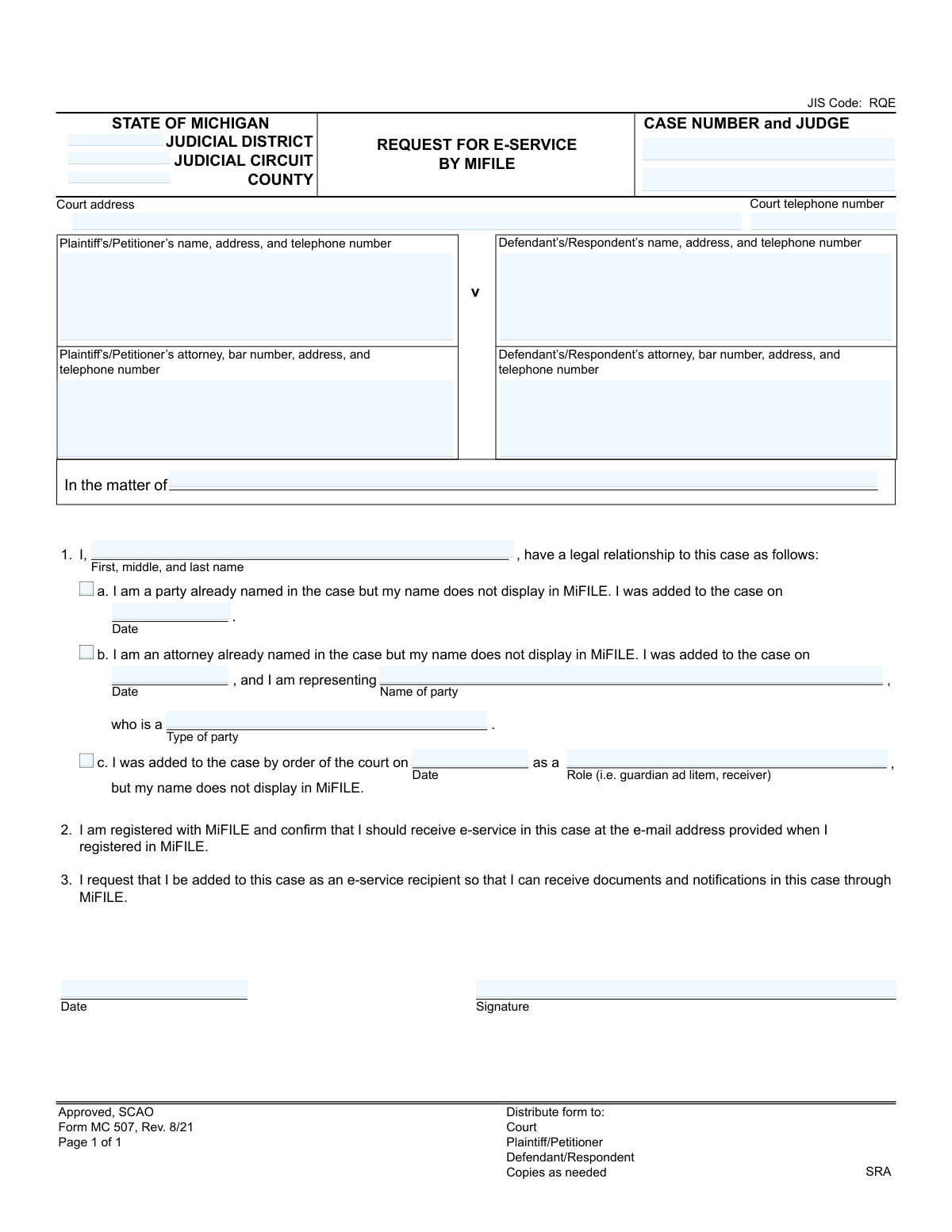
Form MC 507, Request for e-Service by MiFILE, is a legal document used in the state of Michigan by a party, attorney, or other court-appointed individual to formally request they be added to a specific case for electronic service through the MiFILE system. This ensures they receive all official documents and notifications for the case electronically. Today, this form can be filled out quickly and accurately using AI-powered services like Instafill.ai, which can also convert non-fillable PDF versions into interactive fillable forms.
MC 507 is part of the Michigan court forms category on Instafill.
Our AI automatically handles information lookup, data retrieval, formatting, and form filling.
It takes less than a minute to fill out MC 507 using our AI form filling.
Securely upload your data. Information is encrypted in transit and deleted immediately after the form is filled out.

Form specifications

Form name: Form MC 507, Request for e-Service by MiFILE
Number of fields: 24
Number of pages: 1
Language: English
main-image

Instafill Demo: How to fill out PDF forms in seconds with AI

How to Fill Out MC 507 Online for Free in 2026

Are you looking to fill out a MC 507 form online quickly and accurately? Instafill.ai offers the #1 AI-powered PDF filling software of 2026, allowing you to complete your MC 507 form in just 37 seconds or less.
Follow these steps to fill out your MC 507 form online using Instafill.ai:
  1. 1 Navigate to Instafill.ai and upload or select the MC 507 form.
  2. 2 Provide the essential case information, including the court, county, case number, and judge's name.
  3. 3 Enter the details for the plaintiff/petitioner and defendant/respondent, along with their respective attorneys if applicable.
  4. 4 Identify yourself and specify your relationship to the case by checking the appropriate box (e.g., party, attorney, or other role) and providing any required dates or details.
  5. 5 Confirm your registration with MiFILE and your request to be added as an e-service recipient.
  6. 6 Review all the information populated by the AI for accuracy and completeness.
  7. 7 Sign and date the form before submitting it to the appropriate court for processing.

Our AI-powered system ensures each field is filled out correctly, reducing errors and saving you time.

Why Choose Instafill.ai for Your Fillable MC 507 Form?

Speed

Complete your MC 507 in as little as 37 seconds.

Up-to-Date

Always use the latest 2026 MC 507 form version.

Cost-effective

No need to hire expensive lawyers.

Accuracy

Our AI performs 10 compliance checks to ensure your form is error-free.

Security

Your personal information is protected with bank-level encryption.

Frequently Asked Questions About Form MC 507

This form is used to request that you be added to a specific court case within the MiFILE system so you can receive electronic notifications and documents, a process known as e-service.

You should complete this form if you are a party, an attorney, or another individual with a legal role in a case, but your name is not appearing in MiFILE to receive electronic service.

Yes, you must be registered with MiFILE and have a valid email on file before submitting this request. The form requires you to confirm your registration to receive e-service.

Select option 1a if you are a party to the case, 1b if you are an attorney representing a party, and 1c if you were added by court order in another capacity, such as a guardian ad litem.

You should enter the official date you were added to the case. This could be the date you were named as a party, the date you became the attorney of record, or the date of the court order that appointed you.

The Case Number and Judge's name are printed on all official documents related to your case, such as the initial complaint, summons, or any court orders.

The completed form should be filed with the court handling your case. You should also provide copies to the plaintiff/petitioner and the defendant/respondent as indicated on the form.

Processing times vary by court, but it is typically handled by the clerk's office within a few business days. You will know the request is complete when you start receiving e-service notifications for the case.

If you were added to the case by a court order in a specific role, such as a guardian ad litem or receiver, you should check box 1c and provide the date of the court order.

Yes, services like Instafill.ai use AI to auto-fill form fields accurately and save time, which is especially helpful for repetitive information like your name and address.

You can use a service like Instafill.ai to upload the form and fill it out on your computer. The platform allows you to type directly into the fields, add a digital signature, and download the completed document.

If you have a non-fillable or 'flat' PDF, you can upload it to Instafill.ai. The service's AI can convert it into an interactive, fillable form that you can complete and sign online.

Compliance MC 507
Validation Checks by Instafill.ai

1
Case Number Format and Existence
Checks that the Case Number field is not empty and follows the standard format for the specified Michigan court (e.g., YY-######-XX). It should also perform a lookup to confirm that the case number is a valid, active case within the selected Judicial District/Circuit and County. This is critical for associating the request with the correct legal proceeding and preventing processing errors or rejections.
2
Exclusive Role Selection in Section 1
This validation ensures that the user has selected exactly one option from the checkboxes in section 1 (a, b, or c). The user must identify their relationship to the case as either a party, an attorney, or another role appointed by the court, but not multiple. If zero or more than one option is selected, the form is ambiguous and cannot be processed correctly.
3
Conditional Requirement for Party (Option A)
Verifies that if checkbox 'a' ('I am a party...') is selected, the corresponding 'Date' field is filled out. This date is essential as it specifies when the party was officially added to the case, providing context for why they might be missing from the e-service list. Failure to provide this date makes the request incomplete and difficult to verify.
4
Conditional Requirements for Attorney (Option B)
Checks that if checkbox 'b' ('I am an attorney...') is selected, the 'Date 2', 'Name of party', and 'Type of party' fields are all completed. This information is required to correctly associate the attorney with the specific party they are representing in the case. Without this data, the court cannot confirm the attorney's standing and relationship to the case.
5
Conditional Requirements for Court-Appointed Role (Option C)
Ensures that if checkbox 'c' ('I was added to the case by order...') is selected, the 'Date 3' and 'Role' (e.g., guardian ad litem) fields are provided. This information is crucial for the court to understand the filer's legal capacity and authority within the case. An incomplete request will be rejected as the filer's role cannot be verified.
6
Attorney Bar Number Format and Validity
This check validates that any 'Bar Number' provided for an attorney has the correct format (e.g., a 'P' prefix followed by a specific number of digits). It should also cross-reference the number with the State Bar of Michigan's official database to ensure the attorney is licensed and in good standing. This prevents unauthorized individuals from filing on behalf of a party and maintains the integrity of the legal process.
7
Valid Date Format and Logical Range
This validation confirms that all date fields on the form are entered in a valid format (e.g., MM/DD/YYYY) and represent a plausible date. The check ensures the date is not in the future and is after a reasonable start date for court records. This prevents data entry errors and ensures the timeline of events is logical and accurate for the court record.
8
Requester's Full Name Requirement
Verifies that the 'First, middle, and last name' field for the individual making the request (in section 1) is not empty. This is the primary identifier for the person asking to be added for e-service. Without a name, the request is anonymous and cannot be acted upon by the court.
9
Signature and Signature Date Completeness
This check ensures that the 'Signature' field is not blank and that the accompanying signature 'Date' field is filled in. The signature and date serve as a legal attestation that the information provided is true and that the filer is formally making the request. A form without a signature is legally non-binding and will be rejected.
10
Standard Phone Number Format
Validates that all telephone number fields for parties and attorneys conform to a standard 10-digit North American format (e.g., XXX-XXX-XXXX or (XXX) XXX-XXXX). This ensures that the contact information is usable and allows the court or other parties to make contact if necessary. Incorrectly formatted numbers can lead to communication failures.
11
Court Jurisdiction Validation
This check verifies that the combination of 'County', 'Judicial District', and 'Judicial Circuit' is a valid and existing jurisdiction within the State of Michigan. This is a critical check to prevent the form from being filed in the wrong court, which would cause significant delays and require refiling. The system should use a reference table of Michigan courts to perform this validation.
12
Judge and Case Number Association
This validation cross-references the provided 'Case Number' with the 'Judge's name in the court's case management system. It confirms that the specified judge is indeed assigned to that case. This helps ensure the request is routed to the correct judicial staff for review and approval, preventing internal processing delays.
13
Logical Date Chronology
This check ensures that the date the requester was added to the case (from section 1, options a, b, or c) is not after the signature date. The date of being added to the case must logically precede or be the same as the date the request form is signed. This validation catches logical inconsistencies that could indicate a data entry error.
14
Requester's Legal Relationship Declaration
Ensures that the requester has filled out section 1 to declare their legal relationship to the case. This involves checking that the requester's name is filled in and that one of the three options (a, b, or c) with its corresponding required fields is completed. This declaration is the entire basis for the request, and without it, the court has no information on which to grant e-service access.

Common Mistakes in Completing MC 507

Entering an Incorrect or Incomplete Case Number

The case number is the primary identifier for the legal file, and users often mistype it, omit parts like the year or case type code, or confuse it with another case. An incorrect case number will cause the request to be rejected or misfiled, leading to significant delays in receiving crucial case documents. To prevent this, meticulously copy the number from an official court document. AI-powered tools like Instafill.ai can help by validating the case number format and cross-referencing it with existing case data to ensure accuracy before submission.

Providing Vague or Incorrect Court Details

The form requires the specific Judicial District, Circuit, and County, but filers often provide incomplete information or confuse district courts with circuit courts. This causes the form to be sent to the wrong jurisdiction, resulting in rejection and forcing the filer to start the process over. To avoid this, verify the exact court name and address where the case is filed. If the form is a non-fillable PDF, a tool like Instafill.ai can convert it to a fillable version and help populate correct court information from its database, reducing the risk of jurisdictional errors.

Omitting or Incorrectly Entering the Attorney Bar Number

The attorney's bar number is a unique identifier required for verification, but attorneys or their staff may forget to include it or enter it with typos. Without a valid bar number, the court cannot confirm the attorney's standing and will reject the request to be added for e-service. Advanced form-filling solutions like Instafill.ai can automatically populate this information for known attorneys and validate the format for manual entries, preventing rejections based on this simple error.

Incorrectly Selecting the Filer's Relationship to the Case

Section 1 has three distinct options (a, b, c) to define the filer's role, but people often check the wrong box, multiple boxes, or none at all. For example, an attorney might incorrectly check box 'a' (for a party) instead of 'b' (for an attorney), leading to processing delays as the court clerk seeks clarification. Carefully read each option to select the one that accurately describes your status, and use tools like Instafill.ai which can guide users through conditional logic.

Failing to Provide Required Details for the Selected Role

Each option in Section 1 requires additional information, such as a date or the name of the party being represented, which filers often forget. For instance, an attorney checking box 'b' might forget to state which party they represent, rendering the request invalid. AI form fillers like Instafill.ai excel at preventing this by using conditional logic to make associated fields mandatory once a specific option is checked, ensuring the form is complete.

Using Inconsistent Names Throughout the Form

The name of the person making the request must be identical in Section 1 ('I, First, middle, and last name') and in the signature block's printed name field. Discrepancies, such as using a nickname in one place and a full legal name in another, can cause rejection. Smart tools like Instafill.ai can enforce consistency by auto-populating the name across all relevant fields after it's entered once, eliminating the possibility of typos.

Requesting e-Service Without a Registered MiFILE Account

Section 2 is a declaration that the filer is registered with MiFILE, but some individuals submit this form before or without creating an account, assuming the form itself will register them. This request will be denied because the system has no account or email address to link to the case. Always ensure you have an active MiFILE registration before submitting this form.

Forgetting to Sign or Date the Form

A signature and date are legal attestations that the request is valid, but filers often forget to complete this final step. An unsigned or undated form is legally invalid and will be immediately rejected by the court clerk, halting the process until a properly executed form is submitted. While AI cannot sign for you, tools like Instafill.ai ensure you don't miss this step by flagging the signature and date fields as mandatory before finalizing the document.

Incorrectly Listing Parties in the Case Caption

The top section of the form includes the case caption (e.g., 'Plaintiff's Name v Defendant's Name'), but filers may reverse the parties, misspell names, or use incomplete names. An incorrect case caption can lead to confusion and potential misfiling of the document within the court's system. Always copy the case caption exactly as it appears on other official court documents for that case to ensure accuracy.
Saved over 80 hours a year

“I was never sure if my IRS forms like W-9 were filled correctly. Now, I can complete the forms accurately without any external help.”

Kevin Martin Green

Your data stays secure with advanced protection from Instafill and our subprocessors

Robust compliance program

Transparent business model

You’re not the product. You always know where your data is and what it is processed for.

ISO 27001, HIPAA, and GDPR

Our subprocesses adhere to multiple compliance standards, including but not limited to ISO 27001, HIPAA, and GDPR.

Security & privacy by design

We consider security and privacy from the initial design phase of any new service or functionality. It’s not an afterthought, it’s built-in, including support for two-factor authentication (2FA) to further protect your account.

Fill out MC 507 with Instafill.ai

Worried about filling PDFs wrong? Instafill securely fills form-mc-507-request-for-e-service-by-mifile forms, ensuring each field is accurate.