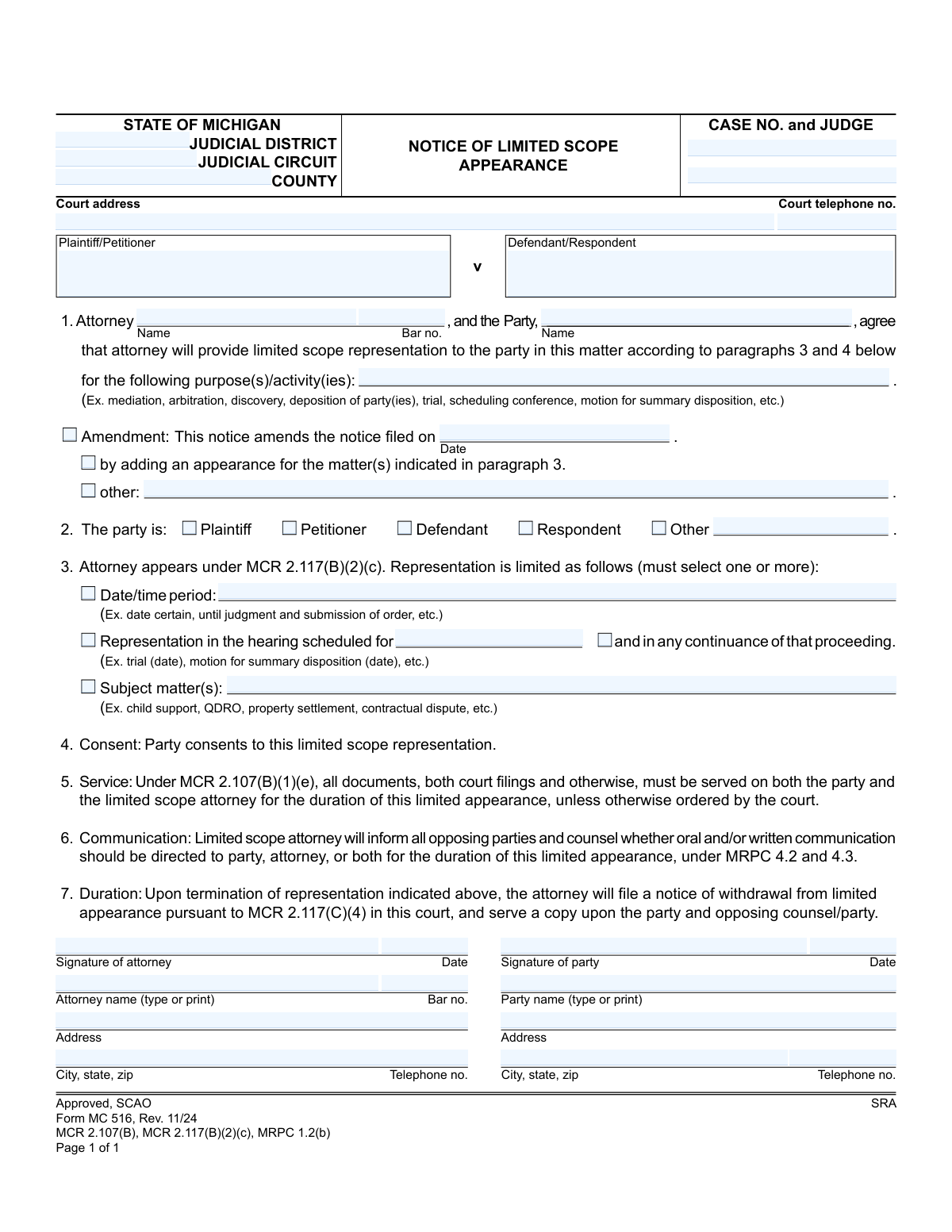
Yes! You can use AI to fill out Form MC 516, Notice of Limited Scope Appearance

Michigan Form MC 516, Notice of Limited Scope Appearance, is a legal document filed in court by an attorney to specify the exact, limited services they will provide to a client in a case. This allows for 'unbundled' legal services, where a client can hire an attorney for specific tasks like a single court hearing or mediation, rather than for the entire litigation process, making legal help more accessible. Today, this form can be filled out quickly and accurately using AI-powered services like Instafill.ai, which can also convert non-fillable PDF versions into interactive fillable forms.
MC 516 is part of the Michigan court forms category on Instafill.
Our AI automatically handles information lookup, data retrieval, formatting, and form filling.
It takes less than a minute to fill out MC 516 using our AI form filling.
Securely upload your data. Information is encrypted in transit and deleted immediately after the form is filled out.

Form specifications

Form name: Form MC 516, Notice of Limited Scope Appearance
Number of fields: 44
Number of pages: 1
Language: English
main-image

Instafill Demo: How to fill out PDF forms in seconds with AI

How to Fill Out MC 516 Online for Free in 2026

Are you looking to fill out a MC 516 form online quickly and accurately? Instafill.ai offers the #1 AI-powered PDF filling software of 2026, allowing you to complete your MC 516 form in just 37 seconds or less.
Follow these steps to fill out your MC 516 form online using Instafill.ai:
  1. 1 Navigate to Instafill.ai and upload or select the Michigan Form MC 516.
  2. 2 Use the AI assistant to accurately input case information, including the judicial district/circuit, case number, judge, and the names of the plaintiff and defendant.
  3. 3 Enter the full name and bar number of the attorney, along with the name of the party receiving the limited scope representation.
  4. 4 Clearly define the limited scope of the representation by checking the appropriate boxes and filling in details for the specific date/time period, hearing, or subject matter.
  5. 5 Review all entered information for accuracy. The attorney and the party must then sign and date the form to confirm their agreement and consent.
  6. 6 Download the completed form to serve copies on all required parties and file the original with the appropriate Michigan court as instructed on the form.

Our AI-powered system ensures each field is filled out correctly, reducing errors and saving you time.

Why Choose Instafill.ai for Your Fillable MC 516 Form?

Speed

Complete your MC 516 in as little as 37 seconds.

Up-to-Date

Always use the latest 2026 MC 516 form version.

Cost-effective

No need to hire expensive lawyers.

Accuracy

Our AI performs 10 compliance checks to ensure your form is error-free.

Security

Your personal information is protected with bank-level encryption.

Frequently Asked Questions About Form MC 516

This form is used to officially inform the court that an attorney will represent a party for specific, defined parts of a legal case, rather than for the entire litigation.

Both the attorney providing the limited services and the party (client) receiving them must complete and sign this form to show their mutual agreement.

You will need the complete case information (court, case number, judge), the attorney's name and bar number, and a clear, agreed-upon description of the limited services to be provided.

In paragraph 1, you must clearly list the specific legal tasks or activities the attorney will handle, such as 'mediation,' 'discovery,' or 'hearing on [date].'

Paragraph 3 requires you to define the scope by a specific date/time period, a particular scheduled hearing, or by subject matter (e.g., child support, property settlement). You must select one or more of these to clearly define the limits of the appearance.

Yes. As stated in paragraph 5, all court filings and other documents must be served on both you (the party) and your limited scope attorney for the duration of the appearance.

Upon completion of the specified tasks, the attorney must file a 'Notice of Withdrawal from Limited Appearance' with the court to formally end their representation.

You can file an amended notice by checking the 'Amendment' box in paragraph 1, referencing the original filing date, and specifying the new activities the attorney will handle.

Yes, as the party, you remain a self-represented litigant and are responsible for all aspects of your case that fall outside the scope of services defined in this notice.

Yes, services like Instafill.ai use AI to accurately auto-fill form fields with your case and personal information, which can save time and help prevent errors.

Simply upload the MC 516 form to the Instafill.ai platform. The AI will make the document fillable online, allowing you to easily enter your information, review, and download the completed form.

You can use a tool like Instafill.ai, which is designed to convert flat, non-fillable PDFs into interactive forms that you can easily complete on your computer.

Compliance MC 516
Validation Checks by Instafill.ai

1
Attorney Bar Number Format and Presence
This check verifies that the Attorney Bar Number field is not empty and conforms to the format specified by the Michigan State Bar (e.g., 'P' followed by 5 digits). This is critical for uniquely identifying the attorney and confirming their eligibility to practice. A failure would prevent submission, as the attorney's credentials cannot be validated by the court.
2
Case Number Presence
This validation ensures that the 'CASE NO.' field is not empty. The case number is the primary identifier for the legal proceeding, and without it, the form cannot be correctly filed or associated with the proper court case. If this field is left blank, the form is considered incomplete and cannot be processed.
3
Party Role Selection
This check ensures that one and only one of the party roles (Plaintiff, Petitioner, Defendant, Respondent, or Other) is selected in paragraph 2. This is necessary to clearly identify which party the attorney is representing in the limited scope. If no role or multiple roles are selected, the form is ambiguous and will be rejected.
4
Scope of Representation Defined
This validation confirms that at least one of the three options in paragraph 3 (Date/time period, specific hearing, or subject matter) is selected and its corresponding details are filled in. This is the core purpose of the form, defining the exact limits of the representation. Failure to define the scope makes the notice invalid and legally meaningless.
5
Attorney Name Consistency
This check compares the attorney's name entered in paragraph 1 with the printed name in the attorney's signature block. The names must match to ensure there is no ambiguity about which attorney is filing the appearance. A mismatch could indicate a clerical error or potential fraud, leading to rejection of the filing.
6
Party Name Consistency
This validation compares the party's name entered in paragraph 1 with the printed name in the party's signature block. This ensures consistency and confirms the identity of the client consenting to the limited representation. Discrepancies can cause confusion and may lead the court to question the validity of the party's consent.
7
Signature Date Validity and Presence
This check verifies that both the 'Signature of attorney Date' and 'Signature of party Date' fields contain valid, properly formatted dates. These dates are legally significant as they establish when the agreement was made. Missing or invalid dates would render the document's timeline unclear and could lead to its rejection by the court clerk.
8
Amendment Date Logic
If the 'Amendment' checkbox is selected, this validation ensures that the 'notice filed on Date' field contains a valid date that is in the past. An amendment, by definition, must refer to a previously filed document. A future or invalid date would be a logical impossibility and would cause the form to be rejected for correction.
9
Conditional 'Other' Field Requirement
This check ensures that if the 'Other' checkbox is selected in paragraph 2, the corresponding text field ('2 other fill') is not empty. The form requires an explanation when a standard category does not apply. Failure to provide this explanation makes the party's role unclear and the form incomplete.
10
Telephone Number Format
This validation checks that the 'Court telephone no.', 'attorney telephone no.', and 'party telephone no.' fields contain a valid 10-digit phone number format. Correct contact information is essential for communication between the court, the parties, and counsel. An invalid format would hinder communication and could result in missed notifications.
11
Completeness of Case Identifiers
This check ensures that the primary case identifiers, including 'County', 'Plaintiff/Petitioner' name, and 'Defendant/Respondent' name, are all filled out. Along with the case number, these fields are essential for the court clerk to accurately identify and file the document in the correct case record. Missing information would halt the filing process.
12
Attorney Bar Number Consistency
This validation ensures the 'Bar no.' entered in paragraph 1 is identical to the 'Bar no.' entered in the attorney's signature block. This cross-reference check prevents data entry errors and confirms the same attorney is identified throughout the document. A mismatch would create ambiguity and require correction before the form could be accepted.

Common Mistakes in Completing MC 516

Incorrect Case and Court Identification

Users frequently enter the wrong case number, judge name, or judicial circuit. This often happens due to simple typos or referencing outdated case information. A mistake here can cause the notice to be filed in the wrong case or rejected entirely by the court clerk, leading to significant delays and potentially missing a crucial appearance deadline. Double-check all case details against the most recent court filings before submission.

Ambiguous Definition of Scope in Paragraph 1

In the 'purpose(s)/activity(ies)' field, parties often use vague terms like 'representation' or 'legal help' instead of the required specific actions like 'mediation' or 'motion for summary disposition.' This ambiguity can lead to disputes over the attorney's responsibilities or cause the court to reject the notice for being unclear. Always list the exact, discrete legal tasks the attorney will perform as exemplified on the form.

Failure to Specify Limits in Paragraph 3

This is a critical error where the filer neglects to select and complete at least one of the limiting conditions in Paragraph 3 (Date/time period, specific Hearing, or Subject matter). The entire purpose of the form is to define these limits. Failing to do so makes the notice invalid and may result in the court deeming the attorney has made a general appearance for the entire case, creating unintended and broad professional obligations.

Inconsistent Party Information

Mistakes occur when the party's name in Paragraph 1 does not exactly match the signature line, or when the incorrect role (e.g., Plaintiff instead of Defendant) is checked in Paragraph 2. This creates confusion about who the attorney is representing and can lead to clerical rejection of the form. Ensure the client's full legal name is used consistently throughout and their role in the case is correctly identified.

Missing or Invalid Signatures and Dates

A surprisingly common mistake is forgetting to have both the attorney and the party sign and date the form. An unsigned or undated notice is legally invalid and will be immediately rejected by the court. This simple oversight can nullify the entire filing, so it's crucial to perform a final check for both signatures and their corresponding dates before submission.

Incorrect or Missing Attorney Bar Number

Attorneys sometimes mistype their bar number or forget to include it altogether next to their name and signature. The bar number is essential for the court to verify the attorney's credentials and good standing. An incorrect or missing number will lead to the filing's rejection and delay the attorney's official appearance in the limited scope.

Failing to Mark as an Amendment

When an attorney is adding a new activity to an existing limited scope appearance, they must check the 'Amendment' box and provide the date of the original notice. Filers often forget this step and submit a new notice, creating duplicate and confusing records for the court. This can lead to administrative issues and confusion for opposing counsel regarding the true scope of representation.

Vague or Open-Ended Time Periods

When using the 'Date/time period' option in Paragraph 3, filers may enter ambiguous phrases like 'for the near future' instead of a concrete date or event. This creates uncertainty about when the representation terminates, potentially leading to disputes over the attorney's duties. The period should be clearly defined, such as 'through the hearing on October 5, 2024' or 'until a judgment on the motion for summary disposition is entered.'

Incomplete Contact Information for Service

The form requires complete addresses and phone numbers for both the attorney and the party, as all documents must be served on both. Omitting a zip code, street address, or phone number can impede proper service by the court and opposing counsel. This can result in missed notices and deadlines, jeopardizing the party's case. AI-powered tools like Instafill.ai can help prevent this by validating address formats and ensuring all required contact fields are complete.

Illegible Handwriting on a Non-Fillable Form

Users often print the blank PDF and fill it out by hand, resulting in illegible information, especially for critical data like case numbers and names. This can cause the court clerk to misinterpret the data or reject the form outright. To avoid this, the form should be filled out electronically. If the original is a non-fillable PDF, a tool like Instafill.ai can convert it into a fillable version, ensuring all entries are clear, legible, and professional.
Saved over 80 hours a year

“I was never sure if my IRS forms like W-9 were filled correctly. Now, I can complete the forms accurately without any external help.”

Kevin Martin Green

Your data stays secure with advanced protection from Instafill and our subprocessors

Robust compliance program

Transparent business model

You’re not the product. You always know where your data is and what it is processed for.

ISO 27001, HIPAA, and GDPR

Our subprocesses adhere to multiple compliance standards, including but not limited to ISO 27001, HIPAA, and GDPR.

Security & privacy by design

We consider security and privacy from the initial design phase of any new service or functionality. It’s not an afterthought, it’s built-in, including support for two-factor authentication (2FA) to further protect your account.

Fill out MC 516 with Instafill.ai

Worried about filling PDFs wrong? Instafill securely fills form-mc-516-notice-of-limited-scope-appearance forms, ensuring each field is accurate.