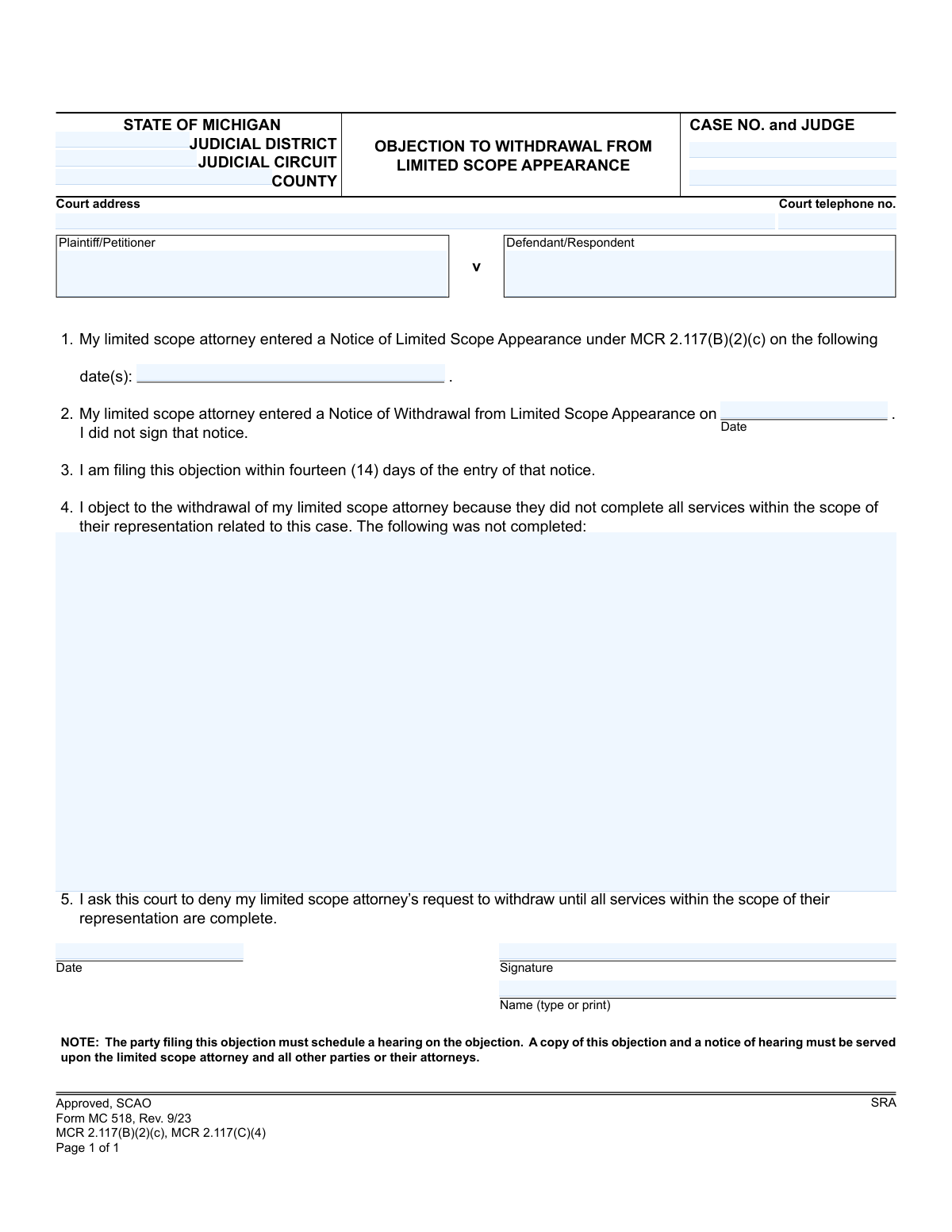
Yes! You can use AI to fill out Form MC 518, Objection to Withdrawal From Limited Scope Appearance

Form MC 518 is a legal document used in Michigan courts by a client to object to their limited scope attorney's request to withdraw from their case. It is filed when the client believes the attorney has not completed all the services agreed upon within the scope of their representation. This form is crucial for ensuring that legal agreements are fulfilled before an attorney is released from their duties. Today, this form can be filled out quickly and accurately using AI-powered services like Instafill.ai, which can also convert non-fillable PDF versions into interactive fillable forms.
MC 518 is part of the Michigan court forms category on Instafill.
Our AI automatically handles information lookup, data retrieval, formatting, and form filling.
It takes less than a minute to fill out MC 518 using our AI form filling.
Securely upload your data. Information is encrypted in transit and deleted immediately after the form is filled out.

Form specifications

Form name: Form MC 518, Objection to Withdrawal From Limited Scope Appearance
Number of fields: 15
Number of pages: 1
Language: English
main-image

Instafill Demo: How to fill out PDF forms in seconds with AI

How to Fill Out MC 518 Online for Free in 2026

Are you looking to fill out a MC 518 form online quickly and accurately? Instafill.ai offers the #1 AI-powered PDF filling software of 2026, allowing you to complete your MC 518 form in just 37 seconds or less.
Follow these steps to fill out your MC 518 form online using Instafill.ai:
  1. 1 Navigate to Instafill.ai and upload or select Form MC 518, Objection to Withdrawal From Limited Scope Appearance.
  2. 2 Provide the case information, including the court, county, case number, judge, and the names of the plaintiff and defendant.
  3. 3 Enter the date your limited scope attorney filed their Notice of Limited Scope Appearance and the date they filed their Notice of Withdrawal.
  4. 4 Clearly state the specific services that your attorney did not complete as part of your limited scope agreement.
  5. 5 Review all the information populated by the AI to ensure it is accurate and complete.
  6. 6 Electronically sign and date the form before downloading the final document.
  7. 7 File the completed objection with the court and serve copies to your attorney and all other parties involved in the case, along with a notice of hearing.

Our AI-powered system ensures each field is filled out correctly, reducing errors and saving you time.

Why Choose Instafill.ai for Your Fillable MC 518 Form?

Speed

Complete your MC 518 in as little as 37 seconds.

Up-to-Date

Always use the latest 2026 MC 518 form version.

Cost-effective

No need to hire expensive lawyers.

Accuracy

Our AI performs 10 compliance checks to ensure your form is error-free.

Security

Your personal information is protected with bank-level encryption.

Frequently Asked Questions About Form MC 518

This form is used to officially object to your limited scope attorney's withdrawal from your case. You would file it if you believe they have not completed all the legal services they agreed to provide as part of their limited representation.

You should fill out this form if you are a client in a Michigan court case, your attorney is representing you for only specific tasks (limited scope), and they have filed to withdraw before completing those tasks without your consent.

Yes, this is very important. You must file this objection with the court within fourteen (14) days of the date your attorney filed their 'Notice of Withdrawal from Limited Scope Appearance'.

After completing the form, you must file it with the court, schedule a hearing for your objection, and serve a copy of the objection and the notice of hearing on your attorney and all other parties in the case.

A limited scope appearance means you hired an attorney to handle only specific, defined parts of your case, rather than the entire case from start to finish. The specific tasks should have been outlined when they first appeared in your case.

You will need your case details (court, case number, judge), the date your attorney filed their original 'Notice of Limited Scope Appearance,' and the date they filed the 'Notice of Withdrawal' that you are objecting to.

In this section, you must clearly and specifically list the tasks or services your attorney agreed to perform but has not yet finished. Refer to your original agreement with the attorney if possible.

If you do not file this objection within the 14-day timeframe, your attorney's withdrawal will likely become effective automatically. You would then be considered self-represented for those parts of your case.

If you agree that your attorney has completed all their work or you consent to their withdrawal, you do not need to do anything. This form is only for when you disagree with the withdrawal.

While you are not required to have another lawyer help you, legal matters can be complex. This form is a legal document, and you may want to seek advice if you are unsure how to proceed.

Yes, services like Instafill.ai use AI to help you accurately populate form fields, which saves time and helps avoid errors. The AI can use your case information to auto-fill details like the court address and party names.

You can upload the MC 518 PDF to the Instafill.ai platform. The service will make the document interactive, allowing you to easily type your information into the correct fields and generate a completed form.

Instafill.ai can solve this problem. Its technology can convert flat, non-fillable PDFs into interactive forms that you can complete and download, saving you the trouble of printing and filling it out by hand.

Compliance MC 518
Validation Checks by Instafill.ai

1
Validates Case Number Format and Presence
Checks that the 'case no' field is not empty and conforms to the standard Michigan case number format. This is crucial for associating the document with the correct legal file in the court's system. Failure to provide a valid number will result in filing rejection or significant processing delays.
2
Ensures Court Identifier is Provided
Validates that at least one of the 'judicial district', 'judicial circuit', or 'county' fields is completed. This information is essential for routing the document to the correct jurisdiction and courthouse. If all are missing, the system cannot determine where to file the objection.
3
Confirms Both Plaintiff and Defendant are Named
Verifies that both the 'plaintiff/petitioner' and 'defendant/respondent' fields contain names. A legal case requires opposing parties, and this information is fundamental to identifying the case to which this objection applies. An incomplete submission could lead to misfiling or rejection.
4
Verifies Appearance Date is Entered
Ensures that at least one date is provided in the 'notice entered date(s)' field. This date establishes the beginning of the attorney's limited scope representation and is a required element for the objection to be valid. The form cannot be processed without this key date.
5
Validates Withdrawal Date is After Appearance Date
Performs a logical check to ensure the 'Notice of Withdrawal' date is on or after the 'Notice of Limited Scope Appearance' date(s). An attorney cannot file to withdraw from a case before they have officially appeared in it. This check prevents logically impossible submissions and maintains the integrity of the case timeline.
6
Verifies Objection is Filed Within 14-Day Window
This validation compares the signature 'Date' with the 'Notice of Withdrawal' date to confirm the objection is being filed within the 14-day period as required by MCR 2.117(C)(4). Filing after this deadline may render the objection invalid and allow the attorney's withdrawal to proceed automatically. The system should flag submissions outside this window.
7
Ensures Reason for Objection is Provided
Checks that the text area for 'The following was not completed' is not empty. This field contains the substantive reason for the objection and is the basis for the court's review. An objection without a stated reason is incomplete and will be denied.
8
Confirms Signature is Provided
Validates that the 'signature' field has been completed, either through a digital signature, a typed name in a designated signature field, or a scanned image. An unsigned legal document is not considered valid or legally binding. Failure to sign will result in the immediate rejection of the form.
9
Ensures Printed Name Accompanies Signature
Verifies that the 'Name (type or print)' field is filled out. This is necessary to clearly identify the signer, especially when a signature may be difficult to read. It ensures proper attribution and record-keeping for the person filing the objection.
10
Validates Filing Date Presence and Format
Checks that the 'Date' field next to the signature is filled in with a valid date (e.g., MM/DD/YYYY). This date documents when the objection was signed and is critical for verifying timeliness and for the official court record. An invalid or missing date can cause processing delays or rejection.
11
Validates Judge's Name is Included
Ensures the 'judge' field is not empty. Identifying the assigned judge is critical for routing the objection to the correct chambers and for scheduling a hearing. Omitting this information can cause significant delays in the processing of the objection.
12
Standardizes and Validates All Date Formats
This check applies to all date fields on the form, ensuring each entry is a valid, parseable date in a consistent format (e.g., MM/DD/YYYY). This prevents data entry errors and ensures chronological checks can be performed accurately. An invalid date format would halt processing until corrected.

Common Mistakes in Completing MC 518

Incorrect Case Caption Information

Users often incorrectly fill out the case caption, such as reversing the Plaintiff and Defendant names or entering an improperly formatted case number. This happens due to haste or confusion about their role in the case. An incorrect caption can lead to filing delays or rejection by the court clerk, as the document cannot be matched to the correct case file. To avoid this, meticulously copy the case number and party names exactly as they appear on previous court documents for the same case.

Confusing Judicial District and Circuit Courts

The form requires specifying the correct court level, either District or Circuit, but filers may not know the difference or which court is handling their specific case type. Entering the wrong court will cause the document to be misrouted, leading to significant delays and potentially causing the filer to miss the strict 14-day objection deadline. Always verify the correct court by checking prior case documents or the court's official website before filling out this section.

Omitting or Misidentifying the Judge

The 'CASE NO. and JUDGE' field explicitly requires both pieces of information, but people frequently omit the judge's name. This oversight requires court clerks to manually look up the information, slowing down the processing of the objection. In a busy court, this delay could be critical. Ensure the assigned judge's full name is included alongside the case number for prompt and accurate routing.

Using Incorrect Dates for Legal Notices

This form requires two key dates: when the attorney's limited appearance was entered (Item 1) and when their withdrawal notice was filed (Item 2). Filers often confuse these dates or use the date they signed a contract. Using the wrong date for the withdrawal notice can make it appear as if the objection was filed outside the 14-day window, leading to its automatic denial. Carefully locate these specific dates on the actual court-filed notices to ensure accuracy.

Failing to File Within the 14-Day Deadline

Item 3 is a declaration that the objection is being filed within 14 days of the attorney's withdrawal notice. Many people fail to appreciate that this is a strict, non-negotiable deadline. Filing on the 15th day or later will almost certainly result in the objection being dismissed without consideration, allowing the attorney's withdrawal to proceed. A party must act immediately upon receiving a notice of withdrawal to preserve their right to object.

Providing a Vague Description of Uncompleted Services

In section 4, filers must specify what services were not completed. A common mistake is to write vague, emotional, or general complaints instead of a clear, factual list of tasks that were part of the original limited scope agreement. A weak or unclear justification gives the judge no basis to sustain the objection, making it likely they will grant the attorney's withdrawal. To be effective, list the specific, unfulfilled tasks, referencing the representation agreement if possible.

Failure to Schedule and Serve a Hearing Notice

This is the most critical and common procedural error. The note at the bottom of the form states that the filer *must* schedule a hearing and serve the objection and a notice of hearing on all parties. Many people mistakenly believe that simply filing the form is enough. Failing to schedule and serve a hearing renders the objection invalid and it will have no legal effect, allowing the attorney to withdraw by default.

Incomplete or Incorrect Signature Section

Basic errors in the signature block, such as forgetting to sign, using a future date, or printing an illegible name, can invalidate the document. An unsigned form is not legally binding and will be rejected by the court. These mistakes often happen when rushing to complete the paperwork. Always double-check that you have physically signed the form, entered the correct current date, and clearly printed your name.

Using a Generic or Incorrect Court Address

People sometimes look up a general address for the county courthouse rather than the specific address of the judicial circuit or district court handling their case. This can cause the filing to be sent to the wrong building or department, resulting in delays or the document being returned. To prevent this, use the precise court address listed on other official documents from your case. AI-powered form filling tools like Instafill.ai can help prevent these data entry errors by automatically populating and validating addresses and other case information.

Misunderstanding the Form's Limited Purpose

Some individuals use this form to air general grievances about their attorney's performance, communication style, or fees, rather than its intended purpose. This form is exclusively for objecting to a withdrawal on the grounds that specific, agreed-upon limited scope services were not finished. Using it for other complaints is ineffective and will likely result in the objection being denied. Other legal avenues, such as a fee dispute resolution or a grievance commission, exist for different types of complaints.
Saved over 80 hours a year

“I was never sure if my IRS forms like W-9 were filled correctly. Now, I can complete the forms accurately without any external help.”

Kevin Martin Green

Your data stays secure with advanced protection from Instafill and our subprocessors

Robust compliance program

Transparent business model

You’re not the product. You always know where your data is and what it is processed for.

ISO 27001, HIPAA, and GDPR

Our subprocesses adhere to multiple compliance standards, including but not limited to ISO 27001, HIPAA, and GDPR.

Security & privacy by design

We consider security and privacy from the initial design phase of any new service or functionality. It’s not an afterthought, it’s built-in, including support for two-factor authentication (2FA) to further protect your account.

Fill out MC 518 with Instafill.ai

Worried about filling PDFs wrong? Instafill securely fills form-mc-518-objection-to-withdrawal-from-limited-scope-appearance forms, ensuring each field is accurate.