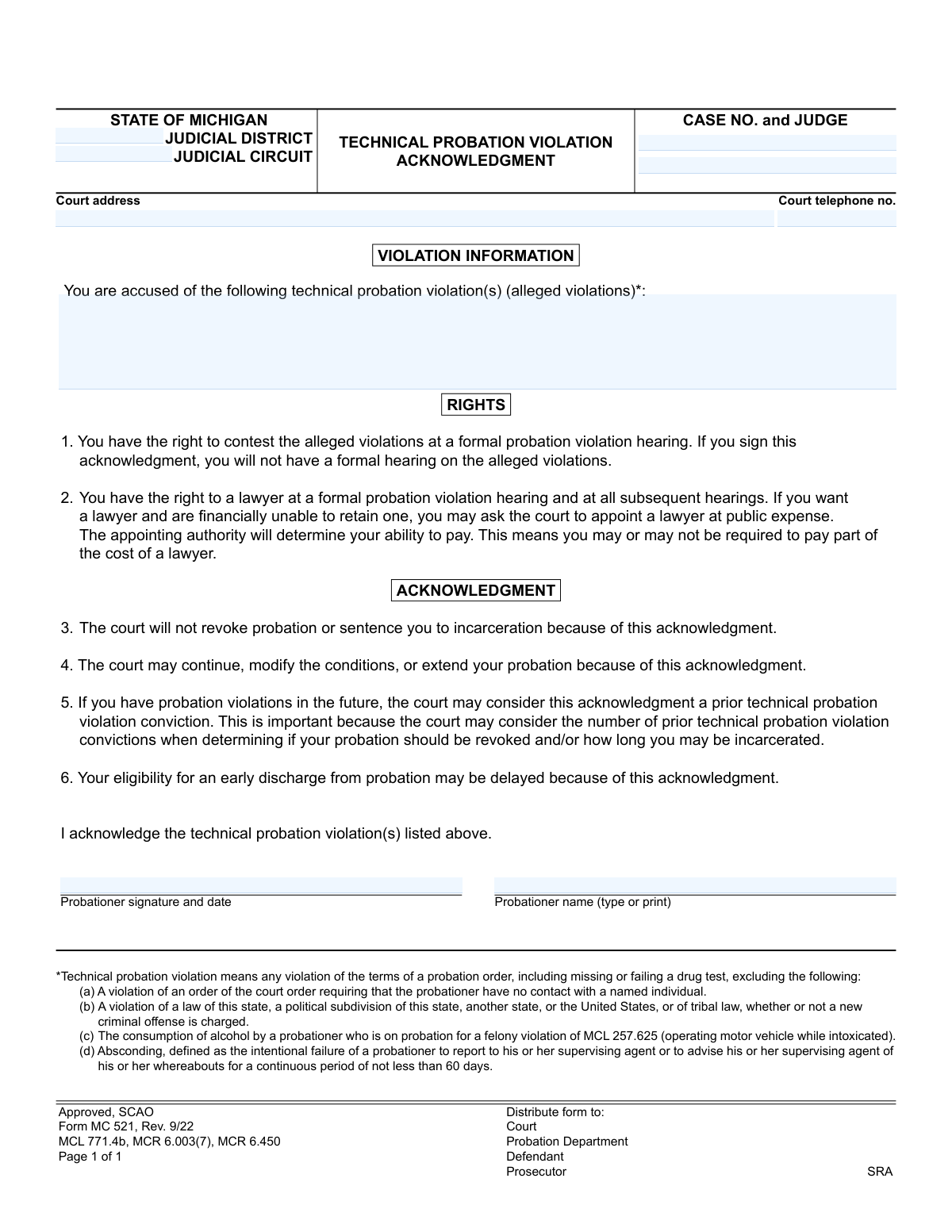
Yes! You can use AI to fill out Form MC 521, Technical Probation Violation Acknowledgment
Form MC 521 is a legal document used in the Michigan court system for a probationer to acknowledge they have committed a technical violation of their probation. By signing this form, the individual waives their right to a formal hearing on the alleged violations, understanding the potential consequences such as modified probation conditions. Today, this form can be filled out quickly and accurately using AI-powered services like Instafill.ai, which can also convert non-fillable PDF versions into interactive fillable forms.
MC 521 is part of the
Michigan court forms category on Instafill.
Our AI automatically handles information lookup, data retrieval, formatting, and form filling.
It takes less than a minute to fill out MC 521 using our AI form filling.
Securely upload your data. Information is encrypted in transit and deleted immediately after the form is filled out.
Form specifications
| Form name: | Form MC 521, Technical Probation Violation Acknowledgment |
| Number of fields: | 9 |
| Number of pages: | 1 |
| Language: | English |
More forms in Michigan court forms
Instafill Demo: How to fill out PDF forms in seconds with AI
How to Fill Out MC 521 Online for Free in 2026
Are you looking to fill out a MC 521 form online quickly and accurately? Instafill.ai offers the #1 AI-powered PDF filling software of 2026, allowing you to complete your MC 521 form in just 37 seconds or less.
Follow these steps to fill out your MC 521 form online using Instafill.ai:
- 1 Navigate to Instafill.ai and upload or select the Form MC 521, Technical Probation Violation Acknowledgment.
- 2 Use the AI tool to automatically fill in court details such as the Judicial District, Judicial Circuit, Case Number, Judge, and court contact information.
- 3 Clearly describe the specific technical probation violations you are acknowledging in the designated section.
- 4 Carefully review the 'Rights' and 'Acknowledgment' sections to fully understand the implications of signing the form.
- 5 Provide your legal name and apply your digital signature and the date in the probationer signature fields.
- 6 Review the entire completed form for accuracy, ensuring all case details and personal information are correct.
- 7 Download, print, or securely submit the finalized document as required by the court or your probation officer.
Our AI-powered system ensures each field is filled out correctly, reducing errors and saving you time.
Why Choose Instafill.ai for Your Fillable MC 521 Form?
Speed
Complete your MC 521 in as little as 37 seconds.
Up-to-Date
Always use the latest 2026 MC 521 form version.
Cost-effective
No need to hire expensive lawyers.
Accuracy
Our AI performs 10 compliance checks to ensure your form is error-free.
Security
Your personal information is protected with bank-level encryption.
Frequently Asked Questions About Form MC 521
This form is used to officially acknowledge that you have committed a technical violation of your probation. By signing it, you agree to the violation(s) listed and waive your right to a formal court hearing on the matter.
A person on probation who is accused of a technical violation and chooses to admit to it without a formal hearing must sign this form. It is typically presented by a probation officer as an alternative to a court hearing.
The form states that the court will not revoke your probation or sentence you to jail solely for signing this acknowledgment. However, the court can still modify your probation conditions, which could include other sanctions.
By signing, you are giving up your right to a formal probation violation hearing where you could contest the allegations. You also waive the right to have a lawyer represent you at that specific hearing, as the hearing will not take place.
A technical violation is a breach of your probation rules, such as missing a meeting, failing a drug test, or not completing required classes. It does not include committing a new crime, violating a no-contact order, or absconding.
No, you are not required to sign this form. You have the right to contest the alleged violations at a formal hearing in front of a judge.
If you choose not to sign, a formal probation violation hearing will be scheduled. At the hearing, you will have the opportunity to challenge the allegations, and you have the right to be represented by a lawyer.
This acknowledgment will be recorded as a prior violation, which could lead to more severe consequences for any future violations. It may also delay your eligibility for an early discharge from probation.
Yes, the form explicitly states that the court may continue, modify the conditions of, or extend the length of your probation as a result of your acknowledgment.
You will need your case number, the judge's name, and the court's judicial district, circuit, address, and phone number. This information is usually on your other court documents or can be provided by your probation officer.
The form notes that you have the right to a lawyer, and if you are financially unable to hire one, you can ask the court to appoint one for you. The court will assess your ability to pay, and you may be required to contribute to the cost.
Yes, services like Instafill.ai use AI to accurately auto-fill form fields with your case and personal information, which saves time and helps prevent errors. However, the decision to sign the form is a legal one you should consider carefully.
You can upload the MC 521 form to the Instafill.ai platform. The AI will identify the fields, allowing you to quickly enter your case details, review the acknowledgments, and prepare the document for signature.
You can use a service like Instafill.ai, which can convert flat, non-fillable PDFs into interactive, fillable forms. Simply upload your document, and the platform will make the fields editable for you online.
Compliance MC 521
Validation Checks by Instafill.ai
1
Case Number Format Validation
This check verifies that the 'Case No.' field follows the standard format for Michigan court cases, which typically includes year, case type, and a sequence number (e.g., YY-######-XX). This is crucial for ensuring the document can be correctly filed and associated with the right record in the court's system. If the format is incorrect, the system should reject the submission and prompt the user to enter a valid case number to prevent filing errors.
2
Probation Violations List Completeness
This validation ensures that the 'alleged violations' section is not empty. The entire purpose of this form is to acknowledge specific violations, so this field is mandatory for the form to have any legal meaning. If this section is left blank, the submission should be blocked, and the user must be instructed to list the specific technical violations they are acknowledging.
3
Probationer Signature Presence
This check confirms that the 'Probationer signature' field has been completed, either through a digital signature capture or a wet-ink signature on a scanned document. A signature is a legal requirement to indicate the probationer's voluntary acknowledgment of the violations and their rights. A form submitted without a signature is invalid and must be rejected until it is properly signed.
4
Acknowledgment Date Validity
This validation ensures the 'date' next to the probationer's signature is a valid, non-future date in a recognized format (e.g., MM/DD/YYYY). The date is critical for establishing the timeline of legal proceedings and confirming when the acknowledgment was made. The system should prevent the entry of future dates or improperly formatted dates to maintain the document's legal integrity.
5
Probationer Printed Name Completeness
This check verifies that the 'Probationer name (type or print)' field is filled out. This printed name serves as a clear, legible identifier for the individual signing the form, complementing the often-illegible signature. An empty name field would make it difficult to confirm the identity of the probationer, so the form should not be accepted until the name is provided.
6
Court Telephone Number Format
This validation checks if the 'Court telephone no.' is in a valid 10-digit US phone number format. Providing a correctly formatted number ensures that all parties (defendant, prosecutor, etc.) have accurate contact information for the court. If the number is malformed, the system should flag it and request correction to prevent communication issues.
7
Required Court Identifier Presence
This check ensures that either the 'Judicial District' or 'Judicial Circuit' field is completed. These fields are essential for routing the document to the correct jurisdiction and court system within the State of Michigan. A submission lacking this information is ambiguous and cannot be processed, so it should be returned to the user for completion.
8
Judge Name Provided
This validation confirms that the 'Judge' field contains a name. The assigned judge's name is a critical piece of information for case management and ensures the acknowledgment is reviewed by the correct judicial officer. Submissions with a missing judge's name should be flagged for review or returned to the user to prevent administrative delays.
9
Court Address Completeness
This check ensures the 'Court address' field is not left empty. The full court address is required for official records, mailing, and to provide clarity for all parties involved in the case. A form without a court address is incomplete and could lead to misfiling, so the system should require this information before accepting the submission.
10
Logical Consistency of Name and Case Number
This advanced validation cross-references the entered 'Probationer name' with the defendant's name associated with the 'Case No.' in the court's database. This check prevents clerical errors, such as entering the correct case number for the wrong person, which could have serious legal consequences. If a mismatch is detected, the system should raise an alert to have the information manually verified before the form is officially filed.
11
Acknowledgment Date Recency
This validation checks that the acknowledgment date is not excessively old, for example, more than 30 days in the past. An old date might indicate a stale document or a data entry error, which could affect its legal standing and relevance to the current proceedings. If the date is outside the acceptable range, the system should prompt the user to confirm the date is correct.
12
Probationer Name Format
This check ensures the 'Probationer name (type or print)' field contains primarily alphabetic characters and is formatted like a name, not random numbers or symbols. This basic sanity check helps maintain data quality and ensures the name field contains plausible information. If the entry fails this check, it should be flagged for review to correct potential data entry errors.
Common Mistakes in Completing MC 521
Probationers often transpose digits or omit crucial prefixes and suffixes when entering their case number, usually from memory or a poor-quality copy. An incorrect case number is a critical error that can cause the acknowledgment to be rejected, misfiled, or applied to the wrong record, leading to significant legal delays. To avoid this, meticulously copy the number from official court documents. AI-powered tools like Instafill.ai can help by validating number formats and saving correct information for future use.
Individuals with cases in multiple jurisdictions may confuse the Judicial District and Judicial Circuit, entering information for the wrong court. This common mistake leads to the form being sent to the incorrect courthouse, causing processing delays and potentially resulting in a missed deadline for acknowledgment. Always verify the correct judicial district and circuit from your most recent court paperwork before filling out the form.
When printing their name, individuals sometimes write illegibly, use a nickname, or omit a middle initial, creating a mismatch with official court records. This can cause identity verification issues, potentially delaying the acceptance of the form or requiring a corrected submission. To prevent this, print your full legal name clearly in block letters exactly as it appears on court documents to ensure it can be processed correctly.
The date next to the signature legally establishes when the acknowledgment was made, but it is frequently forgotten or entered incorrectly. An undated or improperly dated signature can call the document's validity into question, leading to procedural challenges or rejection by the court. Always sign and date the form on the same day, and double-check that the month, day, and year are correct.
This form involves waiving significant rights, including the right to a formal hearing. Individuals may sign it quickly without fully reading the 'RIGHTS' and 'ACKNOWLEDGMENT' sections, not realizing they are creating a 'prior technical probation violation conviction' that can be used against them in the future. Before signing, it is critical to read every section carefully and consult with a lawyer to understand the long-term legal implications.
Forgetting to sign the document is a simple but severe error that completely invalidates the acknowledgment. This often happens when people are in a hurry and focus only on filling the informational fields. An unsigned form will be immediately rejected by the court or probation department, causing delays and potential non-compliance issues. Always perform a final review of the form, specifically checking for a signature in the 'Probationer signature' field.
The 'violation(s)' section is for listing the specific technical violations as alleged by the probation department, not for writing a defense or explanation. A probationer might inaccurately summarize the violation or omit key details, which could be misinterpreted later. It is crucial to copy the violation description exactly as it is provided by the probation officer or on the violation notice to ensure the acknowledgment is precise and legally sound.
This form is often distributed as a flat, non-fillable PDF, forcing individuals to fill it out by hand, which frequently results in illegible entries. Poor handwriting can cause data entry errors by court staff, leading to processing delays or rejection of the form. To ensure clarity, use a tool like Instafill.ai that can convert non-fillable PDFs into interactive, fillable forms, allowing you to type information clearly and accurately.
Court cases can be reassigned, and individuals may mistakenly list the original judge instead of the one currently presiding over the case. This can cause administrative confusion and delays in routing the document to the correct judicial chambers for review. To avoid this, check recent court notices or contact the court clerk to confirm the name of the currently assigned judge.
Many courthouses are large complexes, and simply writing 'County Courthouse' is often insufficient; the form may require a specific street address, building, and room number. An incomplete address can cause the document to be lost or delayed in internal mail, risking a missed deadline. Always use the full, specific address found on official correspondence from the court or probation department.
Saved over 80 hours a year
“I was never sure if my IRS forms like W-9 were filled correctly. Now, I can complete the forms accurately without any external help.”
Kevin Martin Green
Your data stays secure with advanced protection from Instafill and our subprocessors
Robust compliance program
Transparent business model
You’re not the product. You always know where your data is and what it is processed for.
ISO 27001, HIPAA, and GDPR
Our subprocesses adhere to multiple compliance standards, including but not limited to ISO 27001, HIPAA, and GDPR.
Security & privacy by design
We consider security and privacy from the initial design phase of any new service or functionality. It’s not an afterthought, it’s built-in, including support for two-factor authentication (2FA) to further protect your account.
Fill out MC 521 with Instafill.ai
Worried about filling PDFs wrong? Instafill securely fills form-mc-521-technical-probation-violation-acknowledgment forms, ensuring each field is accurate.