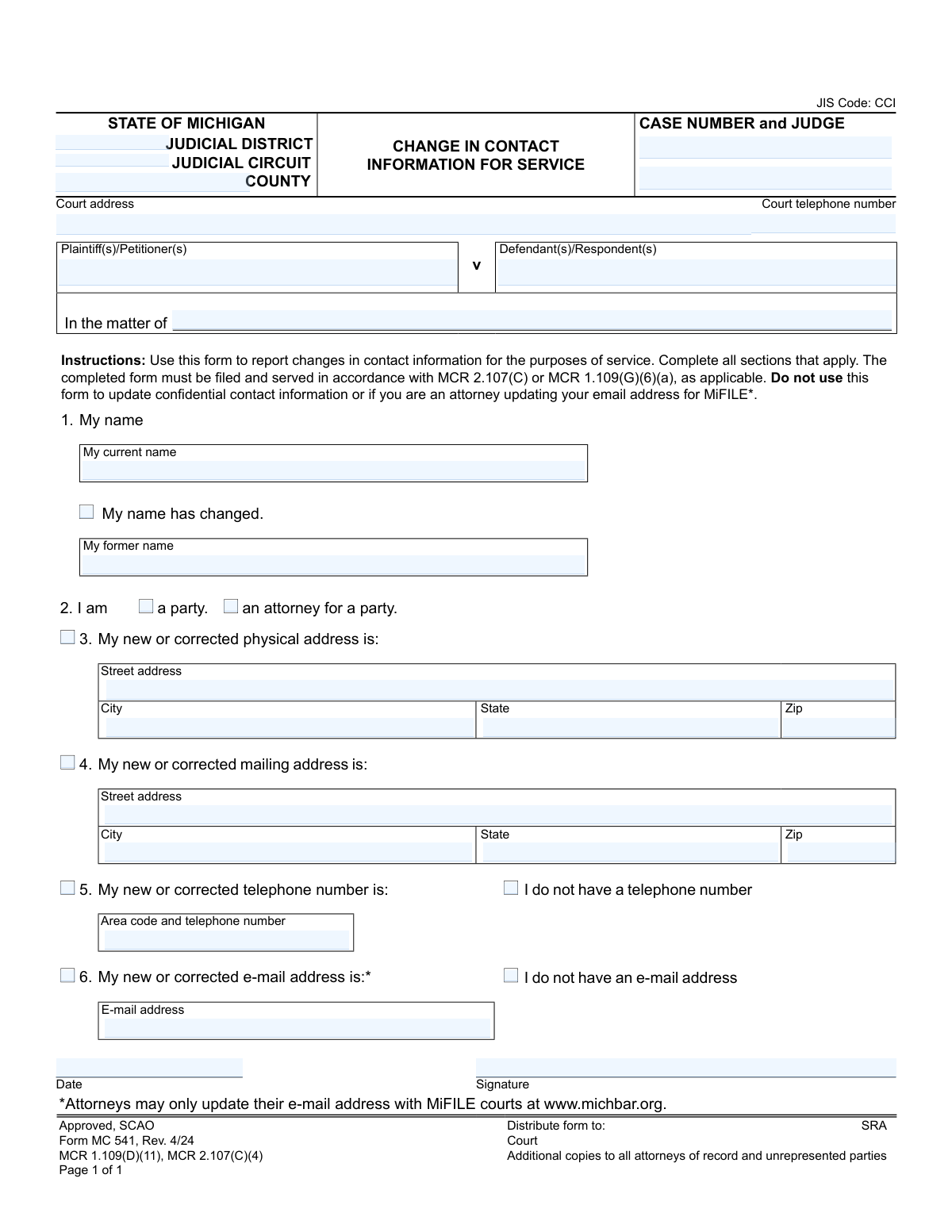
Yes! You can use AI to fill out Form MC 541, Change in Contact Information for Service
Form MC 541, Change in Contact Information for Service, is a legal document used in the state of Michigan to officially notify the court and all involved parties of a change in your physical address, mailing address, telephone number, or email address. This ensures that you continue to receive important legal notices and documents related to your case. Today, this form can be filled out quickly and accurately using AI-powered services like Instafill.ai, which can also convert non-fillable PDF versions into interactive fillable forms.
MC 541 is part of the
Michigan court forms category on Instafill.
Our AI automatically handles information lookup, data retrieval, formatting, and form filling.
It takes less than a minute to fill out MC 541 using our AI form filling.
Securely upload your data. Information is encrypted in transit and deleted immediately after the form is filled out.
Form specifications
| Form name: | Form MC 541, Change in Contact Information for Service |
| Number of fields: | 33 |
| Number of pages: | 1 |
| Language: | English |
More forms in Michigan court forms
Instafill Demo: How to fill out PDF forms in seconds with AI
How to Fill Out MC 541 Online for Free in 2026
Are you looking to fill out a MC 541 form online quickly and accurately? Instafill.ai offers the #1 AI-powered PDF filling software of 2026, allowing you to complete your MC 541 form in just 37 seconds or less.
Follow these steps to fill out your MC 541 form online using Instafill.ai:
- 1 Navigate to Instafill.ai and upload or select the Michigan Form MC 541.
- 2 Enter the court and case information at the top of the form, including the judicial circuit/district, county, case number, and judge's name.
- 3 Identify yourself as either a party or an attorney for a party and provide your current name. If your name has changed, check the box and enter your former name.
- 4 Check the box corresponding to the contact information you are updating (physical address, mailing address, phone number, or email) and fill in the new details in the appropriate fields.
- 5 Carefully review all the information you have entered to ensure its accuracy before finalizing the document.
- 6 Sign and date the form in the designated signature area.
- 7 Download the completed form to file with the court and serve copies to all other attorneys and unrepresented parties involved in the case.
Our AI-powered system ensures each field is filled out correctly, reducing errors and saving you time.
Why Choose Instafill.ai for Your Fillable MC 541 Form?
Speed
Complete your MC 541 in as little as 37 seconds.
Up-to-Date
Always use the latest 2026 MC 541 form version.
Cost-effective
No need to hire expensive lawyers.
Accuracy
Our AI performs 10 compliance checks to ensure your form is error-free.
Security
Your personal information is protected with bank-level encryption.
Frequently Asked Questions About Form MC 541
This form is used to officially notify the court and all other parties in a Michigan court case that your contact information for service has changed. This includes changes to your name, physical or mailing address, telephone number, or email address.
Any party to a case (like a plaintiff or defendant) or an attorney representing a party must file this form if their contact information changes during the case.
No, you only need to complete the top case information section and the specific sections for the information that has changed. For example, if only your phone number changed, you only need to fill out section 5.
You must file the signed form with the court handling your case and also send a copy to all other attorneys of record and any parties who are not represented by an attorney.
No. The form specifies that attorneys must update their email address for MiFILE courts directly with the State Bar of Michigan at www.michbar.org, not by using Form MC 541.
You should not use this form to update confidential contact information. Contact the court clerk for information on the proper procedure for submitting confidential information.
Your physical address is where you reside, while your mailing address is where you wish to receive official court mail, which could be a P.O. Box. If they are the same, you only need to update your physical address.
This information is printed on all previous documents you have received from the court regarding your case, such as the initial complaint or other court orders.
The form provides checkboxes for 'I do not have a telephone number' and 'I do not have an e-mail address.' Simply check the box that applies to you in the relevant section.
Yes, services like Instafill.ai use AI to auto-fill form fields accurately and save time. This can help you complete the form quickly and reduce the chance of errors.
You can use a service like Instafill.ai to upload the form and fill it out on your computer. The platform allows you to type directly into the fields, add a digital signature, and download the completed PDF for filing.
If you have a non-fillable or 'flat' PDF, you can use a service like Instafill.ai. It can convert the document into an interactive, fillable form that you can easily complete online.
Yes, if your name is listed incorrectly in the court record, you should use the name change section to provide the correct spelling as your 'current name' and the incorrect version as your 'former name'.
Compliance MC 541
Validation Checks by Instafill.ai
1
Case Identifier Presence
Validates that either the 'Case Number' is provided, or the 'Plaintiff(s)/Petitioner(s)' and 'Defendant(s)/Respondent(s)' fields are completed. This is critical for the court to associate the form with the correct legal case. Without this information, the filing cannot be processed and will be rejected by the court clerk.
2
Filer Role Selection Required
Ensures that the filer selects one of the checkboxes for 'I am a party' or 'I am an attorney for a party.' This information is necessary to understand the filer's relationship to the case and apply the correct procedural rules. Failure to select a role will result in the form being considered incomplete and returned for correction.
3
At Least One Contact Change Required
Verifies that at least one of the checkboxes indicating a change ('My name has changed,' 'My new or corrected physical address is,' etc.) is selected. A form submitted without indicating any changes serves no purpose and creates unnecessary work for court staff. The system should prevent submission to avoid processing a null-change document.
4
Conditional Name Change Fields
Checks that if the 'My name has changed' checkbox is selected, both the 'My current name' and 'My former name' fields are populated. This is a logical requirement to properly record the name change in the case file. If the box is checked but the names are missing, the form is incomplete and the change cannot be processed.
5
Conditional Physical Address Completeness
Validates that if the 'My new or corrected physical address is' checkbox is selected, the corresponding 'Street address,' 'City,' 'State,' and 'Zip' fields are all completed. An incomplete address is unusable for service of legal documents, defeating the purpose of the form. The submission should be blocked until a full, valid address is provided.
6
Conditional Mailing Address Completeness
Ensures that when the 'My new or corrected mailing address is' checkbox is checked, the associated 'Street address,' 'City,' 'State,' and 'Zip' fields are all filled in. This is crucial for ensuring that if a separate mailing address is provided, it is complete and can be used for official correspondence. An incomplete mailing address could lead to missed notices and legal jeopardy.
7
Conditional Telephone Number Logic
Verifies that if the 'My new or corrected telephone number is' checkbox is selected, the 'Area code and telephone number' field is populated. This prevents a user from indicating a change but providing no new information. The system should flag an error if the user indicates a change but leaves the number field blank.
8
Conditional Email Address Logic
Checks that if the 'My new or corrected e-mail address is' checkbox is selected, the 'E-mail address' field is filled out. This maintains logical consistency on the form and ensures a change is accompanied by the new data. An error should be shown if the user checks the box to update their email but leaves the field blank.
9
Mutually Exclusive Telephone Options
Prevents the user from selecting both the checkbox to provide a new telephone number and the 'I do not have a telephone number' checkbox. These two options are logically contradictory. The system should force the user to choose only one path to ensure the information provided is clear and unambiguous.
10
Mutually Exclusive Email Options
Ensures the user cannot simultaneously check the box to update their email address and the 'I do not have an e-mail address' box. This validation prevents contradictory and confusing data entry. If both are selected, the form should be considered invalid until the user corrects the conflicting selections.
11
Telephone Number Format
Checks that the value entered in the 'Area code and telephone number' field is a valid 10-digit phone number, allowing for common formats like (XXX) XXX-XXXX or XXX-XXX-XXXX. This validation ensures the data is clean and the phone number is usable for contact purposes. An invalid format could prevent court staff or other parties from being able to reach the filer.
12
Email Address Format
Validates that the text entered into the 'E-mail address' field conforms to the standard email format (e.g., [email protected]). This is crucial because email is a primary method for service and notifications. An incorrectly formatted email address will result in failed delivery, potentially causing the filer to miss critical legal information.
13
State Abbreviation Validation
Validates that the entry in any 'State' field is a valid two-letter U.S. state or territory abbreviation. This helps standardize address data and ensures compatibility with postal service systems for accurate mail delivery. An invalid state entry could cause mail to be returned as undeliverable.
14
Zip Code Format Validation
Checks that the 'Zip' code fields contain either a 5-digit or 9-digit (e.g., 12345 or 12345-6789) numerical value. Correct ZIP codes are essential for the timely and accurate delivery of legal documents via postal mail. Incorrect formats can lead to delivery delays or failures.
15
Date Field Validity
Ensures the 'Date' field contains a valid date in a recognized format (e.g., MM/DD/YYYY) and is not a date far in the future or past. This is important for establishing the timeline of the filing and when the new contact information becomes effective. An invalid or nonsensical date can cause confusion and may lead to the document being rejected.
16
Signature Presence Check
Verifies that the 'Signature' field is not empty, indicating the filer has signed the document. A signature is a legal requirement that attests to the authenticity of the information provided and the filer's intent. A form without a signature is legally invalid and will be rejected by the court.
Common Mistakes in Completing MC 541
Filers often enter an incomplete case number, omitting the year or judge's code, or they transpose digits. This typically happens when filling from memory instead of referencing an official court document. An incorrect case number can cause the form to be rejected or filed in the wrong case, leading to missed notices and significant delays. To avoid this, always copy the full case number exactly as it appears on a previous court order or filing.
The form requires users to check a box next to each section they are updating (e.g., 'My new or corrected physical address is:'). Many people fill in the new information but forget to check the corresponding box. This ambiguity can lead court clerks to ignore the change, assuming it was an error, thus defeating the purpose of the filing. Always check the box for every piece of information you are changing to make your intent clear.
In Section 2, it is mandatory to check either 'a party' or 'an attorney for a party.' This simple checkbox is easily overlooked but is critical for the court to understand the filer's standing in the case. Omitting this information can cause processing delays as the clerk may need to seek clarification before accepting the form. Always double-check that one of these two boxes is selected.
An unsigned or undated form is legally invalid and will be rejected by the court. This mistake often occurs when filers are in a hurry and overlook the final fields at the bottom of the page. A rejection requires resubmitting the form, which delays the contact information update and could cause crucial legal documents to be sent to the old, incorrect address. Always perform a final review to ensure the form is signed and dated.
The form explicitly warns attorneys not to use it for updating their email address for MiFILE courts, directing them to the State Bar of Michigan website instead. Attorneys who miss this instruction and use the form will fail to update their official e-service address in the statewide system. This can lead to missed electronic filings and critical case notices. Attorneys must always follow the specific procedures for their professional information.
The form provides separate sections for physical (Section 3) and mailing (Section 4) addresses, but people often fill in only one or use them incorrectly. This is a problem if you use a P.O. Box for mail but are required to have a physical address on file for service. This can result in returned mail and missed legal notices. Carefully enter the correct address in each section, even if it means entering the same information twice if they are identical.
Filers frequently omit essential address components like an apartment number, suite, or the correct ZIP code, leading to undeliverable mail. In a legal context, undeliverable mail means missed deadlines and potentially negative rulings. AI-powered form filling tools like Instafill.ai can help prevent this by validating addresses against postal service databases and ensuring all necessary components are included for a complete, deliverable address.
Filing the form with the court is only half the process; a copy must also be served on all other parties in the case. The instructions at the top of the form mention this, but it's an external action that is easily forgotten. Failure to serve means other parties will continue using your old contact information, potentially leading to disputes over whether you were properly notified of subsequent actions in the case.
A single mistyped character in an email address (e.g., '[email protected]' instead of 'gmail.com') will cause all electronic communications to fail. This is a very common data entry error with serious consequences, as you will not receive important e-service documents. To prevent this, proofread your email address character by character. Using a tool like Instafill.ai can reduce this risk by auto-populating previously validated contact information.
The instructions explicitly warn not to use this form for confidential contact information, as it becomes part of the public record. A party in a sensitive case, such as one involving domestic violence, might mistakenly use this form and publicly expose their new address. This creates a significant safety risk and should be avoided by using the court's separate, designated process for updating confidential information.
Saved over 80 hours a year
“I was never sure if my IRS forms like W-9 were filled correctly. Now, I can complete the forms accurately without any external help.”
Kevin Martin Green
Your data stays secure with advanced protection from Instafill and our subprocessors
Robust compliance program
Transparent business model
You’re not the product. You always know where your data is and what it is processed for.
ISO 27001, HIPAA, and GDPR
Our subprocesses adhere to multiple compliance standards, including but not limited to ISO 27001, HIPAA, and GDPR.
Security & privacy by design
We consider security and privacy from the initial design phase of any new service or functionality. It’s not an afterthought, it’s built-in, including support for two-factor authentication (2FA) to further protect your account.
Fill out MC 541 with Instafill.ai
Worried about filling PDFs wrong? Instafill securely fills form-mc-541-change-in-contact-information-for-service forms, ensuring each field is accurate.