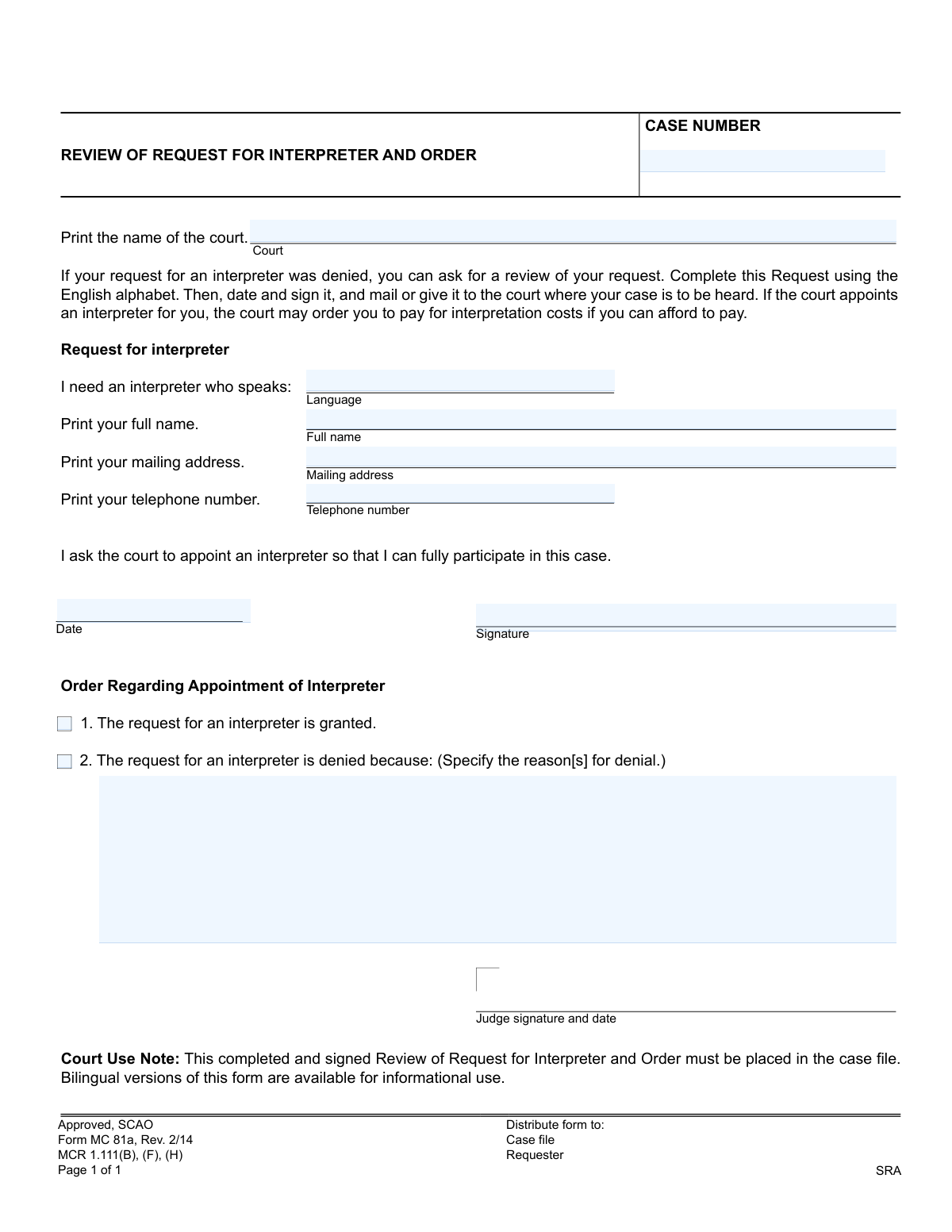
Yes! You can use AI to fill out Form MC 81a, Review of Request for Interpreter and Order
Form MC 81a, Review of Request for Interpreter and Order, is a Michigan court form used when an initial request for a court-appointed interpreter has been denied. Filing this form asks a judge to review and reconsider that denial, which is a critical step for ensuring individuals with limited English proficiency can understand and participate in their court case. Today, this form can be filled out quickly and accurately using AI-powered services like Instafill.ai, which can also convert non-fillable PDF versions into interactive fillable forms.
MC 81a is part of the
Michigan court forms category on Instafill.
Our AI automatically handles information lookup, data retrieval, formatting, and form filling.
It takes less than a minute to fill out MC 81a using our AI form filling.
Securely upload your data. Information is encrypted in transit and deleted immediately after the form is filled out.
Form specifications
| Form name: | Form MC 81a, Review of Request for Interpreter and Order |
| Number of fields: | 11 |
| Number of pages: | 1 |
| Language: | English |
More forms in Michigan court forms
Instafill Demo: How to fill out PDF forms in seconds with AI
How to Fill Out MC 81a Online for Free in 2026
Are you looking to fill out a MC 81A form online quickly and accurately? Instafill.ai offers the #1 AI-powered PDF filling software of 2026, allowing you to complete your MC 81A form in just 37 seconds or less.
Follow these steps to fill out your MC 81A form online using Instafill.ai:
- 1 Navigate to Instafill.ai and upload or select Form MC 81a.
- 2 Allow the AI to scan the document and identify all the necessary fields, such as case number, court, and personal information.
- 3 Provide your personal details, including your full name, mailing address, and telephone number, by answering simple, guided questions.
- 4 Specify the language for which you require an interpreter in the designated field.
- 5 Carefully review all the information auto-filled by the AI to ensure it is accurate and complete.
- 6 Electronically sign and date the form in the signature block to certify your request.
- 7 Download the completed form and submit it to the court where your case is being heard.
Our AI-powered system ensures each field is filled out correctly, reducing errors and saving you time.
Why Choose Instafill.ai for Your Fillable MC 81a Form?
Speed
Complete your MC 81a in as little as 37 seconds.
Up-to-Date
Always use the latest 2026 MC 81a form version.
Cost-effective
No need to hire expensive lawyers.
Accuracy
Our AI performs 10 compliance checks to ensure your form is error-free.
Security
Your personal information is protected with bank-level encryption.
Frequently Asked Questions About Form MC 81a
This form, MC 81a, is used to ask a judge to review and reconsider a decision if your initial request for a court-appointed interpreter was denied.
You should fill out this form if you need an interpreter to participate in your court case, you already requested one, and that request was denied.
Possibly. The form notes that the court may order you to pay for the interpretation costs if it determines you have the ability to afford it.
You will need your court case number, the name of the court, the specific language you need an interpreter for, and your personal contact information.
Your case number is a unique identifier for your legal matter and can be found on any official court documents you have received for your case.
No, you must complete the form using the English alphabet. The bilingual versions available are for informational use only to help you understand the request.
After completing and signing the form, you must mail it or deliver it in person to the court where your case is being heard.
A judge will review your request and either grant or deny it. The decision will be recorded on the 'Order' section of the form and placed in your official case file.
This section is for the judge to complete. They will indicate whether your request is granted or denied and provide a reason for any denial.
Yes, services like Instafill.ai use AI to accurately auto-fill form fields, which can save you time and help prevent common errors.
You can upload the form to a platform like Instafill.ai. It will make the document fillable online, allowing you to type your information directly into the fields before printing.
If you have a non-fillable PDF, you can use a service like Instafill.ai to convert it into an interactive, fillable form that you can complete on your computer.
In the 'Language' field, you should clearly print the specific language or dialect you need an interpreter to speak so you can fully participate in the case.
Compliance MC 81a
Validation Checks by Instafill.ai
1
Case Number Completeness
This check verifies that the 'Case Number' field is not empty. The case number is a critical identifier that links this request to a specific legal proceeding. If this field is left blank, the form cannot be processed as it cannot be associated with the correct case file, leading to an immediate rejection of the submission.
2
Case Number Format Adherence
This validation ensures the entered 'Case Number' conforms to the specific format required by the court system (e.g., YY-######-XX). Proper formatting is essential for automated processing and correct filing within the court's database. An incorrectly formatted number could cause the request to be lost or misfiled, delaying the legal process.
3
Court Name Completeness
This check ensures that the 'Court' field has been filled in. Specifying the court is necessary to route the request to the correct jurisdiction and location for review. A submission without a court name is un-routable and will be rejected, as there is no way to determine which judicial body should handle it.
4
Language Specification and Validity
This validation confirms that a language has been specified in the 'Language' field and checks it against a list of recognized languages. This is the most critical piece of information on the request, as it determines which type of interpreter is needed. An empty or unrecognized language entry would make it impossible to fulfill the request and would require clarification from the requester.
5
Requester Full Name Presence
This check verifies that the 'Full name' field is not empty and contains a name. The requester's name is required for identification and to associate the request with a party in the case. A missing name makes the request anonymous and invalid, preventing the court from processing it.
6
Mailing Address Completeness
This validation ensures that the 'Mailing address' field is filled out. The court uses this address to mail the official order and any other correspondence regarding the interpreter request. If the address is missing, the requester will not receive the court's decision, potentially causing them to miss important case updates.
7
Telephone Number Format
This check validates that the 'Telephone number' field contains a number in a standard, recognizable format (e.g., (XXX) XXX-XXXX). A valid phone number allows the court clerk to contact the requester for clarifications or urgent information. An invalid or improperly formatted number can lead to communication failures and delays.
8
Requester Signature Presence
This validation confirms that the requester's signature field has been completed. The signature legally certifies the request and confirms the requester's understanding that they may be charged for the service. A missing signature renders the document invalid and legally non-binding, and the request will be denied until it is properly signed.
9
Requester Date Logic
This check ensures the 'Date' provided by the requester is a valid calendar date and is not set in the future. This date establishes the official timeline of when the request was made. An invalid or future date would call the document's authenticity into question and would need to be corrected before processing.
10
Order Decision Exclusivity
This validation applies to the court-use section and ensures that the order cannot be marked as both 'granted' and 'denied' simultaneously. These options are mutually exclusive, and selecting both creates a logical contradiction that makes the order void. The system should only allow one of these two options to be selected to ensure a clear and unambiguous decision.
11
Conditional Requirement for Denial Reason
This check ensures that if the 'denied' option is selected, the 'Reasons for denial' text field is mandatory and must be filled out. Procedural fairness requires that a reason be provided for any denial of a request. If the request is denied without a reason, the order is incomplete and fails to meet legal standards.
12
Judge's Date Chronology
This validation checks that the date of the judge's signature is on or after the date of the requester's signature. This maintains the logical sequence of events, where the request is made first and the order is issued later. A judge's signature date that precedes the request date would be a logical error, indicating a data entry mistake that must be corrected.
Common Mistakes in Completing MC 81a
People often mis-type the case number or omit parts of it, such as year indicators or case type codes. This happens due to transcription errors from other documents or not knowing where to find the complete number. An incorrect case number will prevent the court clerk from locating the case file, leading to significant processing delays or the request being rejected entirely.
A common error is writing a generic court name like "County Court" instead of the specific, official name (e.g., "17th Judicial Circuit Court of Kent County"). This occurs when the filer is unsure of the court's full designation. Submitting the form to the wrong court or with a vague name can cause it to be lost or misrouted, delaying the review process until after the hearing date has passed.
Filers may request a broad language category, such as "Chinese" or "Arabic," without specifying the necessary dialect (e.g., Mandarin, Cantonese, or Egyptian Arabic, Levantine Arabic). This happens because they assume the general language is sufficient. The consequence is that the court may appoint an interpreter who speaks a different dialect, making communication impossible and defeating the purpose of the request.
Individuals sometimes fill in their common nickname or a shortened version of their name instead of their full legal name as it appears on the case file. This is usually done out of habit. Using a different name can cause a mismatch, leading to confusion, processing delays, and difficulty in associating the request with the correct person in the case. Always enter your full name exactly as it is written on other official court documents.
Forgetting to include an apartment or unit number, or providing an old address, is a frequent mistake, often made when filling out the form in a hurry. An incomplete or incorrect address means you will not receive the court's written decision on your request or other critical notices about your case. To prevent this, carefully enter your full, current mailing address, including any unit numbers and the correct ZIP code. AI form-filling tools like Instafill.ai can help validate addresses to ensure they are complete and mailable.
Overlooking the signature line is one of the most common and critical errors, often because the filer is focused on filling out the other fields. An unsigned legal document, including this request, is invalid and will be immediately rejected by the court. This means your request will not be processed, and you will have to resubmit it, causing significant delays.
The form explicitly states to "Complete this Request using the English alphabet," but some filers may miss this instruction and use their native script. This confusion can be compounded by the fact that bilingual versions are available for informational use. A form filled out with non-English characters cannot be processed by the court clerk and will be rejected, forcing the applicant to start over.
Filers may mistakenly use this form (MC 81a, "Review of Request") to make their first-time request for an interpreter, overlooking the "Review" aspect in the title. The form's instructions clarify it is for use "If your request for an interpreter was denied." Using the wrong form for an initial request will result in its rejection, wasting time and requiring the filer to find and submit the correct initial request form.
When a form is only available as a non-fillable PDF, people must print and complete it by hand, which can result in illegible handwriting. Court clerks may misinterpret or be unable to read crucial information like the case number or name, leading to data entry errors or rejection of the form. To avoid this, use a tool like Instafill.ai, which can convert flat PDFs into fillable versions, allowing you to type your information clearly before printing for signature.
Filers may use a non-standard date format (e.g., DD/MM/YYYY) or simply forget to fill in the date next to their signature. This happens due to differing regional conventions or simple oversight. An undated or ambiguously dated form can create legal and administrative problems, potentially leading the court to deem it incomplete. Always use the standard U.S. format (MM/DD/YYYY) and ensure the form is dated on the day it is signed. AI-powered tools like Instafill.ai can help by auto-filling the current date in the correct format.
Saved over 80 hours a year
“I was never sure if my IRS forms like W-9 were filled correctly. Now, I can complete the forms accurately without any external help.”
Kevin Martin Green
Your data stays secure with advanced protection from Instafill and our subprocessors
Robust compliance program
Transparent business model
You’re not the product. You always know where your data is and what it is processed for.
ISO 27001, HIPAA, and GDPR
Our subprocesses adhere to multiple compliance standards, including but not limited to ISO 27001, HIPAA, and GDPR.
Security & privacy by design
We consider security and privacy from the initial design phase of any new service or functionality. It’s not an afterthought, it’s built-in, including support for two-factor authentication (2FA) to further protect your account.
Fill out MC 81a with Instafill.ai
Worried about filling PDFs wrong? Instafill securely fills form-mc-81a-review-of-request-for-interpreter-and-order forms, ensuring each field is accurate.