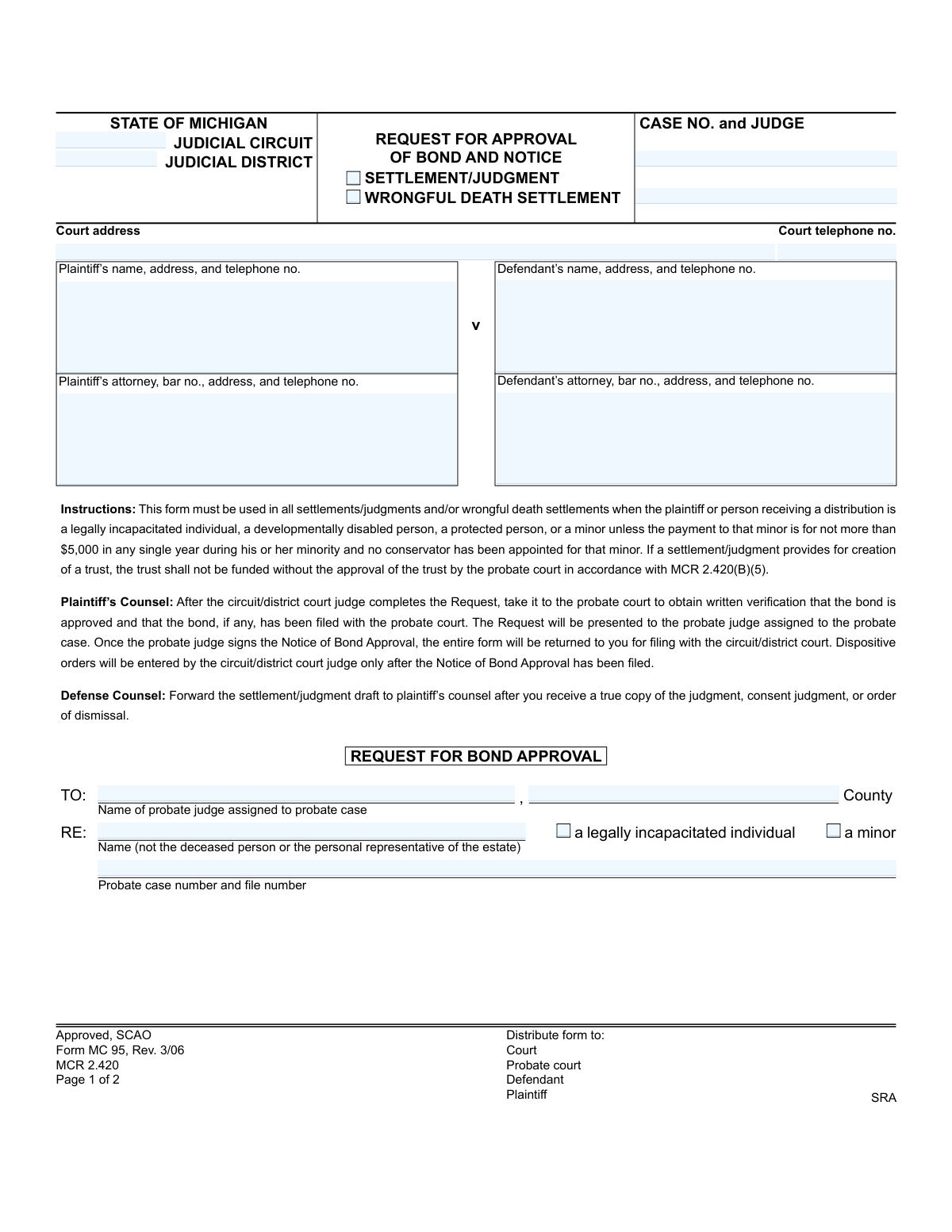
Yes! You can use AI to fill out Form MC 95, Request for Approval of Bond and Notice (Settlement/Judgment/Wrongful Death Settlement)
Form MC 95, Request for Approval of Bond and Notice, is a legal document used in Michigan's judicial system. It is required when a settlement, judgment, or wrongful death settlement involves a minor, a legally incapacitated individual, or a protected person to ensure their funds are properly managed. The form facilitates communication between the circuit/district court and the probate court to approve the necessary bond or restricted account for the distributed funds. Today, this form can be filled out quickly and accurately using AI-powered services like Instafill.ai, which can also convert non-fillable PDF versions into interactive fillable forms.
MC 95 is part of the
Michigan court forms category on Instafill.
Our AI automatically handles information lookup, data retrieval, formatting, and form filling.
It takes less than a minute to fill out MC 95 using our AI form filling.
Securely upload your data. Information is encrypted in transit and deleted immediately after the form is filled out.
Form specifications
| Form name: | Form MC 95, Request for Approval of Bond and Notice (Settlement/Judgment/Wrongful Death Settlement) |
| Number of fields: | 34 |
| Number of pages: | 1 |
| Language: | English |
More forms in Michigan court forms
Instafill Demo: How to fill out PDF forms in seconds with AI
How to Fill Out MC 95 Online for Free in 2026
Are you looking to fill out a MC 95 form online quickly and accurately? Instafill.ai offers the #1 AI-powered PDF filling software of 2026, allowing you to complete your MC 95 form in just 37 seconds or less.
Follow these steps to fill out your MC 95 form online using Instafill.ai:
- 1 Navigate to Instafill.ai and upload the MC 95 form or select it from the template library.
- 2 Provide the case information, including the judicial circuit/district, case number, judge, and court address.
- 3 Enter the full details for the plaintiff, defendant, and their respective attorneys as prompted by the AI assistant.
- 4 Specify the details of the settlement or judgment, including the total amount and the type of hearing conducted (wrongful death or settlement approval).
- 5 Identify the fiduciary (guardian or conservator), the amount they will receive for the estate, and whether a trust will be created.
- 6 The AI will populate the request for the circuit/district judge's signature and the notice section for the probate judge's signature.
- 7 Review all entered information for accuracy, then download the completed form to be presented to the appropriate courts as per the form's instructions.
Our AI-powered system ensures each field is filled out correctly, reducing errors and saving you time.
Why Choose Instafill.ai for Your Fillable MC 95 Form?
Speed
Complete your MC 95 in as little as 37 seconds.
Up-to-Date
Always use the latest 2026 MC 95 form version.
Cost-effective
No need to hire expensive lawyers.
Accuracy
Our AI performs 10 compliance checks to ensure your form is error-free.
Security
Your personal information is protected with bank-level encryption.
Frequently Asked Questions About Form MC 95
This form, MC 95, is used to get probate court approval for the financial arrangements (a bond or restricted account) made to protect settlement or judgment funds awarded to a minor or a legally incapacitated person.
This form is required for any settlement or judgment where the recipient is a minor, a legally incapacitated individual, or a protected person, unless the payment to the minor is $5,000 or less per year and no conservator is appointed.
The circuit/district judge completes the 'Request' section, then plaintiff's counsel takes it to the probate court for approval and signature. The fully signed form is then returned to the circuit/district court for final orders to be entered.
A fiduciary is the person legally appointed to manage the funds, such as a guardian or conservator for the minor or incapacitated individual. This form documents the amount of money the fiduciary will be responsible for.
If a trust is being created with the settlement funds, you must check the appropriate box on the form. The trust itself must be separately approved by the probate court before any money can be placed into it.
This means that instead of requiring the fiduciary to purchase a costly insurance bond, the court has ordered the funds to be placed in a special bank account. No money can be withdrawn from this restricted account without a specific court order.
The circuit or district court judge will only enter the final dispositive orders after this fully completed and signed Request for Approval of Bond and Notice has been filed with the court clerk.
The instructions state that after the defendant's counsel receives a true copy of the final judgment or order, they should forward the settlement payment to the plaintiff's counsel.
No, this form is not required if the payment to a minor is for not more than $5,000 in any single year, provided no conservator has been appointed for that minor.
Yes, services like Instafill.ai use AI to auto-fill form fields with your case information accurately and efficiently, which can save time and help prevent errors.
You can use a service like Instafill.ai to upload the form and fill it out directly in your web browser. The platform allows you to easily type information into the fields and then download the completed document for printing and filing.
Tools like Instafill.ai can convert flat, non-fillable PDFs into interactive forms. Simply upload your document, and the service will automatically make the fields editable for you to complete online.
The circuit or district court judge who presided over the settlement hearing signs the 'Request for Bond Approval' section before it is taken to the probate court.
Once the probate judge signs the 'Notice of Bond Approval,' the entire completed form is returned to the plaintiff's counsel, who must then file it with the original circuit or district court.
Compliance MC 95
Validation Checks by Instafill.ai
1
Validates Case Number Format
Checks that the 'Case No.' and 'Probate case number' fields adhere to the standard Michigan court case numbering format, which often includes the year and a unique identifier (e.g., YY-######-CZ). This ensures the case can be correctly identified and filed within the judicial system. An invalid format could lead to misfiling, delays, or rejection of the document.
2
Ensures Attorney Bar Number Validity
Verifies that the bar numbers for both the plaintiff's and defendant's attorneys are in the correct format for the State of Michigan, which typically starts with a 'P' followed by a series of digits. This is crucial for confirming the attorneys are licensed and in good standing, a requirement for legal representation. A missing or invalid bar number would halt processing until corrected.
3
Mutually Exclusive Settlement Approval Type
This validation ensures that only one of the 'full' or 'partial' settlement approval checkboxes can be selected at a time. A user cannot select both. This prevents ambiguity in the court's order regarding the nature of the approved settlement, and if both were selected, the form would be logically inconsistent.
4
Conditional Requirement for Settlement Amount
If either the 'full' or 'partial' settlement approval checkbox is selected, this check mandates that the corresponding 'approval amount' field must contain a valid, positive monetary value. This ensures that an approved settlement has a clearly defined financial value. The validation fails if the amount is zero, negative, or left blank when an approval type is indicated.
5
Mutually Exclusive Fiduciary Funding Status
This check enforces that the user can only select one option regarding the fiduciary's receipt of funds: either 'is receiving no funds, individually' or 'is receiving $____'. Selecting both would be contradictory. This rule is essential for clearly documenting the financial distributions to the fiduciary from the settlement.
6
Conditional Requirement for Fiduciary Amount
If the checkbox 'is receiving $' is selected for the fiduciary, this validation requires the corresponding amount field to be filled with a positive monetary value. Conversely, if 'is receiving no funds' is selected, the amount field must be zero or empty. This prevents incomplete or contradictory information about funds being distributed to the fiduciary.
7
Logical Consistency of Distribution Amounts
This validation verifies that the sum of all specified distributions does not exceed the total settlement amount. It checks that the 'fiduciary amount receiving' plus the 'estate amount' is less than or equal to the total 'approval amount'. This is a critical check to prevent errors in financial accounting and ensure the proposed distribution is mathematically possible.
8
Mutually Exclusive Trust Creation Status
Ensures that only one of the 'is to be created' or 'is not to be created' checkboxes can be selected in the trust section. This removes any ambiguity about whether a trust is a component of the settlement agreement. The form must clearly state the plan for a trust to be legally sound.
9
Mandatory Selection of Protected Person Status
The form is used for specific individuals, so this check requires that either the 'a legally incapacitated individual' or 'a minor' checkbox must be selected in the 'RE:' section. This is fundamental to establishing the legal context and jurisdiction for the approval request. Failure to specify the status of the individual would render the purpose of the form unclear.
10
Completeness of Estate Information
This validation ensures that if the 'estate amount' field contains a value greater than zero, the 'Name of legally incapacitated individual or minor' field (the estate beneficiary) must also be filled. It is illogical to specify an amount for an estate without identifying the beneficiary. This prevents incomplete submissions where funds are allocated to an unnamed party.
11
Standard Phone Number Formatting
This check validates that all telephone number fields conform to a standard format, such as (XXX) XXX-XXXX or XXX-XXX-XXXX. Proper formatting ensures data consistency and usability, making it easy for court personnel or other parties to make contact without having to decipher an incorrectly entered number. An invalid format would trigger an error, prompting the user to correct the entry.
12
Mandatory Selection of Hearing Type
This validation requires that one of the hearing type checkboxes in section 1, either 'a. ...wrongful death action' or 'b. ...proposed settlement,' must be selected. This is a crucial piece of information that specifies the legal basis for the hearing conducted by the judge. Failure to select one would make the judge's attestation incomplete and the form invalid.
13
Mandatory Selection of Settlement Type
At the top of the form, either the 'SETTLEMENT/JUDGMENT' or 'WRONGFUL DEATH SETTLEMENT' checkbox must be selected to classify the case type. This primary classification is essential for routing and processing the form correctly. The validation ensures this fundamental information is not omitted, preventing ambiguity from the very start.
14
Completeness of Party Information
This check verifies that the primary parties to the case, specifically the 'Plaintiff’s name' and 'Defendant’s name', are not left blank. Identifying the plaintiff and defendant is the most basic requirement for any legal filing. A submission without this information is fundamentally incomplete and cannot be processed.
Common Mistakes in Completing MC 95
In the 'RE:' section, filers often mistakenly enter the name of the deceased person in a wrongful death case, instead of the legally incapacitated individual or minor who is the actual beneficiary of the funds. This leads to confusion and rejection by the probate court, as the bond and protections are for the living beneficiary. To avoid this, carefully read the instruction '(not the deceased person or the personal representative of the estate)' and enter the name of the minor or protected person receiving the distribution.
The form requires the specific probate case number and the name of the assigned probate judge. Filers often leave this blank or guess, not realizing a probate file must be opened first. This causes the form to be rejected by the probate court, halting the entire settlement approval process. Before filling out this form, ensure a probate case has been established and you have the correct case number and judge's name.
The total settlement amount in Box 2 must logically account for the amounts listed in Boxes 3 and 4, plus attorney fees and costs. People frequently make calculation errors or transpose numbers, leading to a mismatch. A court will not approve a settlement with inconsistent financial data, causing delays until a corrected form is submitted. Double-check all figures to ensure the total settlement amount is correctly distributed among all parties.
The form explicitly asks for the bar number for both the plaintiff's and defendant's attorneys, yet this is one of the most commonly missed fields. Court clerks often return forms with missing bar numbers, as they are essential for identifying and verifying the attorneys of record. This simple oversight can delay the filing and approval process. AI-powered form filling tools like Instafill.ai can help prevent this by flagging mandatory fields and auto-populating information from a user's profile.
Users may incorrectly check the box for a standard 'Settlement/Judgment' when the case is a 'Wrongful Death Settlement,' or vice versa. This is a critical error as it dictates which hearing type is required (MCR 2.420 vs. MCL 600.2922) and affects the legal basis for the fund distribution. This mistake can lead to the need for new hearings and amended orders, causing significant delays. Always confirm the exact legal nature of the action before selecting an option.
Filers often list a parent or family member as the 'fiduciary' in Box 3 without understanding the legal definition. The fiduciary must be a court-appointed guardian or conservator, not just a relative. Submitting the form with an unappointed person's name will result in rejection by the probate court, as that individual has no legal authority to manage the funds. Ensure the person named has been formally appointed by the probate court before completing this section.
The instructions outline a multi-step process: circuit court judge signs the Request, then the probate court judge signs the Notice, and only then is the completed form filed with the circuit court. A common mistake is filing the form with the circuit court clerk before obtaining the probate judge's signature. This disrupts the required workflow and will prevent the entry of dispositive orders until the process is followed correctly.
Leaving fields like 'Judicial Circuit,' 'Judicial District,' or the specific 'Judge' name blank, or entering them incorrectly, is a frequent error. This can lead to the document being misrouted or rejected by the clerk's office. It is crucial to accurately identify the exact court and judge handling the case to ensure the form is processed efficiently. Since this form is often a non-fillable PDF, tools like Instafill.ai can convert it into an interactive version, making it easier to fill every required field accurately.
In Box 5, the filer must make a definitive choice whether a trust 'is to be created' or 'is not to be created.' Leaving both boxes unchecked or checking both creates ambiguity that the court cannot resolve. This prevents the approval of the settlement, as the handling of the funds is unclear. A clear decision must be indicated based on the terms of the settlement agreement.
Box 1 requires the judge to certify whether a hearing was conducted for a wrongful death action (1a) or a proposed settlement (1b). Submitting the form to the judge without ensuring one of these boxes is checked results in an incomplete request. This oversight means the legal basis for the approval is not documented, and the form will be returned, delaying the process until the judge can review and complete it properly.
Saved over 80 hours a year
“I was never sure if my IRS forms like W-9 were filled correctly. Now, I can complete the forms accurately without any external help.”
Kevin Martin Green
Your data stays secure with advanced protection from Instafill and our subprocessors
Robust compliance program
Transparent business model
You’re not the product. You always know where your data is and what it is processed for.
ISO 27001, HIPAA, and GDPR
Our subprocesses adhere to multiple compliance standards, including but not limited to ISO 27001, HIPAA, and GDPR.
Security & privacy by design
We consider security and privacy from the initial design phase of any new service or functionality. It’s not an afterthought, it’s built-in, including support for two-factor authentication (2FA) to further protect your account.
Fill out MC 95 with Instafill.ai
Worried about filling PDFs wrong? Instafill securely fills form-mc-95-request-for-approval-of-bond-and-notice-settlementjudgmentwrongful-death-settlement forms, ensuring each field is accurate.