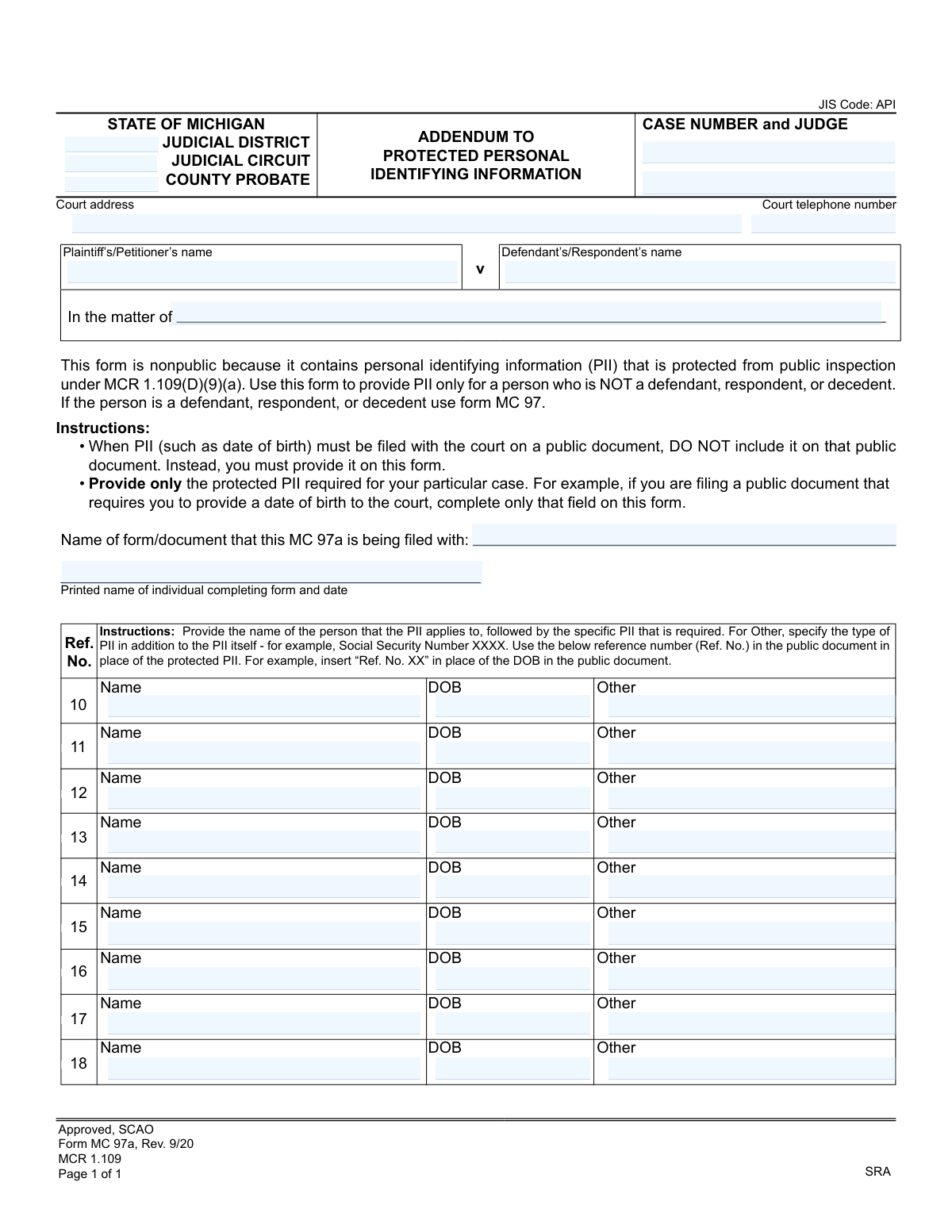
Yes! You can use AI to fill out Form MC 97a, Addendum to Protected Personal Identifying Information

The Michigan Form MC 97a, Addendum to Protected Personal Identifying Information, is a legal document used to provide sensitive personal data (like dates of birth) to the court without making it part of the public record. It is specifically for individuals who are not a defendant, respondent, or decedent in a case, ensuring their privacy is maintained as per MCR 1.109. Today, this form can be filled out quickly and accurately using AI-powered services like Instafill.ai, which can also convert non-fillable PDF versions into interactive fillable forms.
MC 97a is part of the Michigan court forms category on Instafill.
Our AI automatically handles information lookup, data retrieval, formatting, and form filling.
It takes less than a minute to fill out MC 97a using our AI form filling.
Securely upload your data. Information is encrypted in transit and deleted immediately after the form is filled out.

Form specifications

Form name: Form MC 97a, Addendum to Protected Personal Identifying Information
Number of fields: 39
Number of pages: 1
Language: English
main-image

Instafill Demo: How to fill out PDF forms in seconds with AI

How to Fill Out MC 97a Online for Free in 2026

Are you looking to fill out a MC 97A form online quickly and accurately? Instafill.ai offers the #1 AI-powered PDF filling software of 2026, allowing you to complete your MC 97A form in just 37 seconds or less.
Follow these steps to fill out your MC 97A form online using Instafill.ai:
  1. 1 Navigate to Instafill.ai and upload or select the MC 97a form.
  2. 2 Use the AI assistant to input the court and case details, including the judicial district/circuit, case number, and judge's name.
  3. 3 Enter the names of the plaintiff/petitioner and defendant/respondent in the designated fields.
  4. 4 Specify the name of the public document that this addendum is being filed with.
  5. 5 For each individual, provide their name and the specific protected PII required (e.g., Date of Birth), which will be linked to a reference number for use in the public document.
  6. 6 Enter your printed name and the current date to certify the information provided.
  7. 7 Review all AI-populated fields for accuracy, then download the completed form for filing with the court.

Our AI-powered system ensures each field is filled out correctly, reducing errors and saving you time.

Why Choose Instafill.ai for Your Fillable MC 97a Form?

Speed

Complete your MC 97a in as little as 37 seconds.

Up-to-Date

Always use the latest 2026 MC 97a form version.

Cost-effective

No need to hire expensive lawyers.

Accuracy

Our AI performs 10 compliance checks to ensure your form is error-free.

Security

Your personal information is protected with bank-level encryption.

Frequently Asked Questions About Form MC 97a

Form MC 97a is used to confidentially provide the court with personal identifying information (PII), like a date of birth, for individuals involved in a case who are not a defendant, respondent, or decedent. This keeps sensitive data off public court documents.

You must use this form if you are filing a public document that requires you to provide personal information for someone other than a defendant, respondent, or decedent. It is filed along with the main document.

Use Form MC 97a to provide PII for any person who is NOT a defendant, respondent, or decedent. For defendants, respondents, or decedents, you must use the separate Form MC 97.

After listing a person's private information on this form, you will use its corresponding reference number (e.g., 'Ref. No. 10') on the public court document in place of the actual sensitive data. This links the public document to the confidential information without exposing it.

No, this form is nonpublic and protected from public inspection under Michigan Court Rule 1.109(D)(9)(a). Its purpose is to keep sensitive information confidential while still providing it to the court.

Use the 'Other' column for any required PII that is not a date of birth, such as a Social Security Number or driver's license number. Be sure to specify the type of information you are providing (e.g., 'SSN: XXX-XX-XXXX').

This form must be filed with the court at the same time as the public document it refers to. You must also write the name of that public document in the designated field on this form.

No, you only need to provide the specific PII that is required by the court for your particular case. For example, if only a date of birth is needed, you can leave the 'Other' field blank for that person.

Yes, the form is designed for you to list PII for multiple individuals. Each person will have their own row and a unique reference number to be used on the public document.

The case information, including the case number, court, and party names, is crucial for the court clerk to correctly file this confidential addendum with the proper case file.

Yes, services like Instafill.ai use AI to auto-fill form fields accurately, which can save you time and help reduce errors when completing this and other official forms.

You can use a service like Instafill.ai to fill out the form online. Simply upload the document, and the platform's AI will make the fields interactive so you can type in your information easily.

If you have a non-fillable PDF, you can use Instafill.ai to convert it into an interactive, fillable form. This allows you to type your information directly onto the document from your computer.

Compliance MC 97a
Validation Checks by Instafill.ai

1
Case Number Format and Presence
Verifies that the 'Case Number' field is not empty and conforms to the expected format for the specified court jurisdiction. The case number is the primary identifier for the legal matter, and its accuracy is critical for associating this addendum with the correct file. A missing or improperly formatted case number will cause the submission to be rejected or misfiled.
2
Court Jurisdiction Identification
Ensures that at least one of the court identification fields ('Judicial District', 'Judicial Circuit', or 'County Probate') is completed. This information is necessary to route the document to the correct courthouse and legal system. If no jurisdiction is specified, the system cannot determine where to file the document, leading to an immediate rejection.
3
Linked Document Name Requirement
Validates that the 'Name of form/document that this MC 97a is being filed with' field is completed. This addendum is supplementary and has no context without being linked to a primary public document. Failure to specify the parent document makes the PII submission meaningless and will result in rejection.
4
Filer Name and Date Completion
Checks that the 'Printed name of individual completing form and date' field contains both a name and a valid, non-future date. This information is required for accountability and to establish a legally recognized filing date. An incomplete or invalid entry may render the submission void or require manual correction, delaying the process.
5
PII Row Name Requirement
Validates that for any PII row (Ref. No. 10-18) where data like a 'DOB' or 'Other' is entered, the corresponding 'Name' field is also filled. Submitting PII without identifying the person it belongs to is ambiguous and unusable by the court. The system should flag any row with PII but no name as an incomplete entry requiring correction.
6
PII Data Existence Check
Ensures that for every 'Name' entered in the PII section, at least one corresponding PII field ('DOB' or 'Other') is also filled. The purpose of the form is to provide protected PII. An entry with just a name does not fulfill this purpose and is considered an incomplete record, which should be flagged to the user.
7
Date of Birth Format and Validity
Checks that all entered 'Date of Birth' (DOB) values are in a valid date format (e.g., MM/DD/YYYY) and represent a date in the past. This maintains data integrity and prevents processing errors caused by typos or invalid entries. An incorrectly formatted or future date will be rejected by the system.
8
Plausible Date of Birth Range
Verifies that any entered Date of Birth is within a reasonable range, such as not being more than 120 years in the past. This logical check helps catch significant data entry errors that a simple format validation would miss. An implausible date should trigger a warning, asking the user to confirm the entry is correct before proceeding.
9
'Other' PII Field Content Validation
Verifies that when the 'Other' field is used, it contains both a label for the PII type and the corresponding value, as instructed by the form (e.g., 'Social Security Number XXXX'). This ensures the data is understandable and correctly categorized by court personnel. An entry with just a value but no label will be flagged as ambiguous and require correction.
10
Non-Defendant/Respondent Name Check
Compares the names listed in the PII section against the 'Defendant’s/Respondent’s name' field. The form explicitly states it is for individuals who are NOT defendants or respondents. A match should trigger a strong warning or block, instructing the user to use the correct form (MC 97) to prevent incorrect filing.
11
Minimum PII Entry Requirement
Checks that at least one of the PII rows (from Reference number 10 to 18) contains data. The sole purpose of this form is to submit PII. A submission with no PII entries is an empty filing and serves no purpose, so the system should prevent submission of a completely blank PII section.
12
Case Party Identification
Ensures that either the 'Plaintiff/Petitioner' and 'Defendant/Respondent' names are provided, or the 'In the matter of' field is completed. This is required to associate the addendum with the correct legal matter. If neither is provided, the case cannot be identified, and the submission will be rejected for being incomplete.
13
Case Type Exclusivity
Validates that information is entered in either the 'Plaintiff/Defendant' fields or the 'In the matter of' field, but not both simultaneously. These options typically represent different types of cases (e.g., adversarial vs. non-adversarial), and filling both is logically inconsistent. A submission with both filled should trigger a warning for the user to clarify the case type.

Common Mistakes in Completing MC 97a

Using the Wrong Form for a Defendant or Decedent

This form, MC 97a, is exclusively for providing PII for individuals who are NOT a defendant, respondent, or decedent. A common mistake is using it for one of those parties, which requires Form MC 97. This error leads to incorrect filing, potential rejection by the court clerk, and delays as the filer will be required to resubmit the information on the correct form. Always double-check the role of the person whose PII is being submitted before selecting the form.

Including PII on the Public Document

The primary purpose of this form is to keep PII off public records. A critical error is filling out this addendum and then also including the same sensitive information (like a date of birth) on the main public document. This action completely defeats the form's privacy protection purpose and can lead to the public disclosure of confidential data. The correct procedure is to use the 'Ref. No.' from this form on the public document in place of the actual PII.

Failing to Use the 'Ref. No.' on the Associated Public Document

This form generates a unique reference number (e.g., 'Ref. No. 10') for each piece of PII. Filers often forget to insert this reference number into the corresponding field on the public document they are filing. Instead of the PII, the public form should state 'Ref. No. XX'. Omitting this link makes it impossible for the court to connect the public document to the protected information, causing confusion and likely requiring an amendment to the filing.

Omitting or Entering Incorrect Case Information

The header of the form requires crucial details like the Case Number, Judge, and Court. People often rush and leave this section blank or enter incorrect information. Since this addendum is filed as a separate document, missing or inaccurate case information can prevent the court clerk from associating it with the correct case file. This can lead to the document being misplaced or unfiled, causing significant delays in the legal process.

Failing to Specify the Associated Public Document

The form includes a specific line to enter the 'Name of form/document that this MC 97a is being filed with.' Many filers overlook this field. Without this information, the court clerk may not know which public filing this nonpublic addendum is supposed to supplement, especially in complex cases with multiple documents. This omission can cause processing delays while the court seeks clarification.

Improperly Describing Information in the 'Other' Field

The 'Other' field is for PII besides a date of birth, but the instructions require specifying the *type* of PII (e.g., 'Social Security Number XXXX'). A frequent mistake is to enter only the data, like a number, without any context. This ambiguity makes the information difficult to interpret and may require the court to request a corrected form. Always label the data clearly to ensure it is processed correctly.

Submitting Excessive or Unrequired PII

The instructions state to provide 'only the protected PII required for your particular case.' However, some people fill in all the information they have, even if the public document only requires one specific item, like a date of birth. Submitting unnecessary PII clutters the court record and increases the amount of sensitive data being stored. Filers should carefully review the public document's requirements and provide only the exact PII that is mandated.

Using an Ambiguous Date of Birth Format

When entering a date of birth, using a non-standard or ambiguous format (e.g., '1-2-23' or '05.04.1980') can lead to confusion and data entry errors by court staff. This could result in an incorrect date being entered into the official record. To prevent this, always use the clear and unambiguous MM/DD/YYYY format. AI-powered tools like Instafill.ai can help by automatically formatting dates correctly to meet court standards.

Submitting a Form with Illegible Handwriting

If the form is printed and completed by hand, illegible handwriting can render names, dates, and case numbers unreadable. This frequently leads to the court clerk being unable to process the form, resulting in its rejection and requiring the filer to resubmit. To avoid this, it is best to type the information. If the original form is a non-fillable PDF, tools like Instafill.ai can convert it into a fillable version, ensuring all entries are clear and legible.

Omitting the Filer's Name and Date

The form requires the 'Printed name of individual completing form and date' at the bottom. This information is essential for accountability and creating a clear record of who filed the document and when. Forgetting to fill in this section is a common oversight that can lead to the form being considered incomplete, potentially causing the clerk to reject the filing until it is properly completed and resubmitted.
Saved over 80 hours a year

“I was never sure if my IRS forms like W-9 were filled correctly. Now, I can complete the forms accurately without any external help.”

Kevin Martin Green

Your data stays secure with advanced protection from Instafill and our subprocessors

Robust compliance program

Transparent business model

You’re not the product. You always know where your data is and what it is processed for.

ISO 27001, HIPAA, and GDPR

Our subprocesses adhere to multiple compliance standards, including but not limited to ISO 27001, HIPAA, and GDPR.

Security & privacy by design

We consider security and privacy from the initial design phase of any new service or functionality. It’s not an afterthought, it’s built-in, including support for two-factor authentication (2FA) to further protect your account.

Fill out MC 97a with Instafill.ai

Worried about filling PDFs wrong? Instafill securely fills form-mc-97a-addendum-to-protected-personal-identifying-information forms, ensuring each field is accurate.