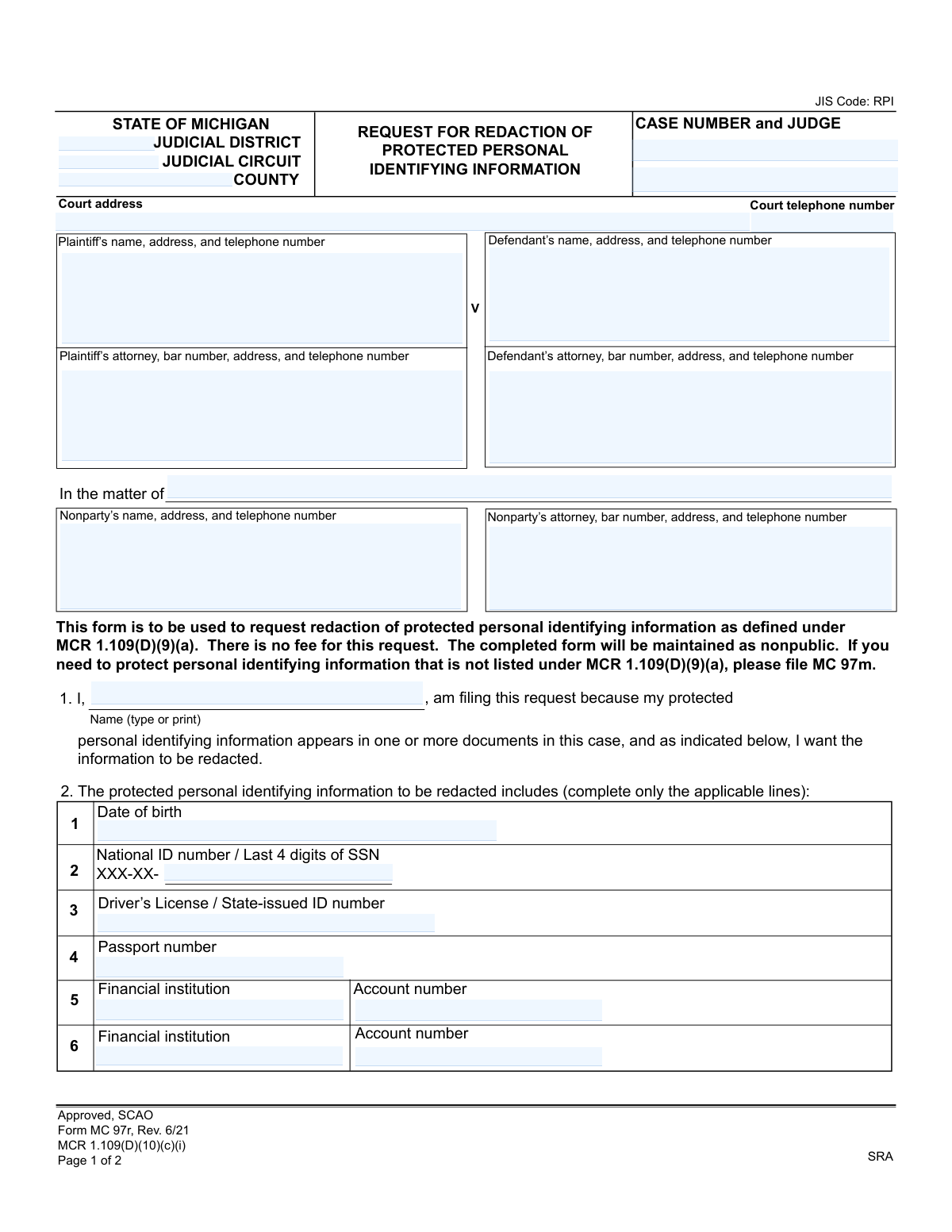
Yes! You can use AI to fill out Form MC 97r, Request for Redaction of Protected Personal Identifying Information

This form, officially titled 'Request for Redaction of Protected Personal Identifying Information,' is used within the Michigan court system to ask a court to conceal sensitive data like birth dates, social security numbers, or financial account numbers from public court documents. Filing this request is a crucial step in protecting one's privacy and preventing identity theft related to information submitted in a legal case. Today, this form can be filled out quickly and accurately using AI-powered services like Instafill.ai, which can also convert non-fillable PDF versions into interactive fillable forms.
MC 97r is part of the Michigan court forms category on Instafill.
Our AI automatically handles information lookup, data retrieval, formatting, and form filling.
It takes less than a minute to fill out MC 97r using our AI form filling.
Securely upload your data. Information is encrypted in transit and deleted immediately after the form is filled out.

Form specifications

Form name: Form MC 97r, Request for Redaction of Protected Personal Identifying Information
Number of fields: 54
Number of pages: 1
Language: English
main-image

Instafill Demo: How to fill out PDF forms in seconds with AI

How to Fill Out MC 97r Online for Free in 2026

Are you looking to fill out a MC 97R form online quickly and accurately? Instafill.ai offers the #1 AI-powered PDF filling software of 2026, allowing you to complete your MC 97R form in just 37 seconds or less.
Follow these steps to fill out your MC 97R form online using Instafill.ai:
  1. 1 Navigate to Instafill.ai and upload or select the Michigan Form MC 97r.
  2. 2 Provide the case details, including the court, case number, judge, and the names of the parties involved.
  3. 3 Enter your name as the requestor and identify the specific types of protected personal information you want redacted by checking the appropriate boxes.
  4. 4 List each document that contains the sensitive information, specifying the document name, filing date, and the exact location (paragraph or line number) of the data to be redacted.
  5. 5 Review all the information you've entered on the form for accuracy and completeness with the help of the AI assistant.
  6. 6 Electronically sign and date the form, then download the completed document to be filed with the appropriate court.

Our AI-powered system ensures each field is filled out correctly, reducing errors and saving you time.

Why Choose Instafill.ai for Your Fillable MC 97r Form?

Speed

Complete your MC 97r in as little as 37 seconds.

Up-to-Date

Always use the latest 2026 MC 97r form version.

Cost-effective

No need to hire expensive lawyers.

Accuracy

Our AI performs 10 compliance checks to ensure your form is error-free.

Security

Your personal information is protected with bank-level encryption.

Frequently Asked Questions About Form MC 97r

This form is used to officially ask a Michigan court to hide (redact) specific types of your personal information, like a Social Security Number or date of birth, from public court documents.

Any individual, whether they are a plaintiff, defendant, or non-party, whose protected personal identifying information appears in a document filed in a court case should use this form to request its removal.

No, the form clearly states that there is no fee required to file a request for the redaction of protected personal identifying information.

You can request the redaction of your date of birth, National ID number (like an SSN), driver's license or state ID number, passport number, and financial institution account numbers.

This form is only for the specific information listed in Section 2. To protect other types of personal information, you must file a different form, MC 97m.

In Section 3, you must list each document containing your information by its title, the date it was filed, and the specific paragraph number where the data appears. You will likely need to review the court's case file to find this information.

The 'PII line number' refers to the numbered list in Section 2. For example, if you are requesting to redact your date of birth (line 1 in Section 2), you would enter '1' in this column.

You should file the completed and signed form with the court clerk at the court address listed on the form where the original case was filed.

No, the form states that your completed request will be maintained as a nonpublic document to protect your privacy.

While you can hire an attorney, you are not required to have one to fill out and file this form on your own behalf.

Yes, services like Instafill.ai use AI to help you accurately auto-fill form fields with your saved information, which can speed up the process and reduce potential errors.

Upload the MC 97r PDF to the Instafill.ai platform. The service will make the form interactive, allowing you to click and fill the fields with your saved profile data or type in the information directly.

If you have a non-fillable or 'flat' PDF, you can use a tool like Instafill.ai. It can convert the document into an interactive, fillable form that you can complete and save on your computer.

Compliance MC 97r
Validation Checks by Instafill.ai

1
Case Number and County Presence
This check ensures that both the 'Case Number' and 'County' fields are filled out. This information is the absolute minimum required for court clerks to locate the correct case file within the Michigan judicial system. A failure to provide this information makes the request unprocessable, as the relevant documents cannot be found, leading to an automatic rejection of the form.
2
Requestor Name Completeness
This validation verifies that the 'Name (type or print)' field in section 1 is not empty. The form is a legal request made by a specific individual, and their name is required to establish their standing to make the request. An anonymous or unnamed request is legally insufficient and will be rejected by the court.
3
At Least One PII Type Specified for Redaction
This check confirms that the requestor has provided information in at least one of the PII fields in section 2 (e.g., Date of birth, Last 4 digits of SSN). The purpose of the form is to redact specific information; if no information to be redacted is identified, the request is empty and has no purpose. The form would be returned as incomplete and requiring clarification.
4
At Least One Document Identified for Redaction
This validation ensures that at least one complete document entry (including Document Name, Date filed, and PII line number) is provided in section 3. The court needs to know exactly which document(s) contain the PII to perform the redaction. Without this, the request is unactionable and will be rejected for being incomplete.
5
PII Line Number Logical Consistency
This check verifies that for each document listed in section 3, the 'PII line number' (1-6) corresponds to a PII field in section 2 that actually contains data. For example, if 'PII line number' is '1', the 'Date of birth' field must be filled. This validation prevents ambiguity and ensures the clerk knows precisely which piece of information to redact from the specified document, avoiding errors.
6
Valid Date Format for All Date Fields
This check ensures that all date fields ('Date of birth', 'Date filed', and the signature 'Date') are entered in a valid, unambiguous format (e.g., MM/DD/YYYY). Incorrectly formatted dates can prevent the system from locating the correct version of a document or can invalidate the legal standing of the request. Submissions with invalid date formats would be rejected for correction.
7
Social Security Number Last 4 Digits Format
This validation confirms that if the 'Last 4 digits of SSN' field is used, it contains exactly four numeric digits. The form explicitly requests only the last four digits for security reasons. This check prevents the accidental submission of a full SSN and ensures the data conforms to the expected input for accurate processing.
8
Requestor Signature and Date Presence
This check verifies that the 'Requestor's Signature' field is signed (or digitally acknowledged) and the adjacent 'Date' field is completed. A signature and date are required to attest to the authenticity and timeliness of the request, making it a legally valid document. An unsigned or undated form is considered incomplete and will be rejected by the court.
9
Financial Account and Institution Paired Completeness
This validation ensures that if an 'Account number' is provided in section 2, the corresponding 'Financial institution' field is also filled out. An account number alone is insufficient for identifying the information to be redacted. This check guarantees that any financial PII provided is complete and actionable for the court clerk.
10
Standard Phone Number Formatting
This check validates that all telephone number fields on the form adhere to a standard US phone number format (e.g., 10 digits, possibly with parentheses, spaces, or hyphens). Proper formatting ensures data integrity and allows court staff to easily contact parties or attorneys if clarification is needed. An invalid number could impede communication and delay the request.
11
'Date Filed' Is Not a Future Date
This check verifies that the 'Date filed' for any document listed in section 3 is not a date in the future. A document cannot be filed on a future date, so this validation catches logical errors and significant typos. A request containing a future file date would be considered invalid and returned for correction.
12
Attorney Bar Number Format
This validation checks that if an attorney's name is entered, the corresponding 'bar number' field is also filled and follows the expected format for a Michigan State Bar number (P-number). The bar number uniquely identifies the attorney and confirms their authority to act. An incorrect or missing bar number can cause delays while representation is verified.
13
PII Line Number Valid Range
This check ensures that any value entered in a 'PII line number' field is an integer between 1 and 6. These numbers directly map to the six specific PII types listed in section 2. Any number outside this range is invalid and would make it impossible for the clerk to know what information to redact, causing the request to be rejected.
14
Date of Birth Plausibility
This validation checks that the 'Date of birth' is a plausible date. It must be in the past and not unreasonably old (e.g., more than 120 years ago). This simple logical check helps catch significant data entry errors that could otherwise lead to a failure to match the PII with the information present in the court records.

Common Mistakes in Completing MC 97r

Entering an Incorrect or Incomplete Case Number

Users often mistype the case number or omit parts of it, such as the two-letter case type code (e.g., 'SM', 'DC'). Because the case number is the primary identifier for the entire court file, even a small error will prevent the court clerk from locating the case and processing the redaction request. To avoid this, double-check the case number against official court documents and enter it exactly as it appears, including all letters, numbers, and hyphens.

Providing Vague Document Descriptions in Section 3

In Section 3, people frequently write generic descriptions like 'motion' or 'complaint' instead of the full, official document title as it appears on the court record (e.g., 'Plaintiff's First Amended Complaint for Damages'). This ambiguity forces the court clerk to guess which document to review, leading to delays or outright rejection of the request. Always use the complete and exact title of the document and the precise date it was filed with the court.

Omitting Specific Location Information (Paragraph/Line Number)

This is one of the most critical errors. Requestors often fail to provide the paragraph number where the sensitive information is located within the specified document. Court clerks will not read through entire documents to find the information. A request without a specific location is considered incomplete and will be denied, forcing the user to refile. To prevent this, you must have a copy of the document and pinpoint the exact paragraph(s) containing the PII.

Requesting Redaction of Non-Protected Information

This form is strictly for redacting PII as defined in MCR 1.109(D)(9)(a), such as birth dates, SSNs, and financial account numbers. A common mistake is to use this form to request the redaction of other personal data like home addresses or phone numbers. Such requests will be rejected, as a different form (MC 97m) and legal standard applies. Carefully review the list in Section 2 and ensure the information you want redacted is covered by this specific form.

Incorrectly Cross-Referencing PII Line Numbers

Section 3 requires the user to enter the 'PII line number' from Section 2 to specify which piece of information needs redacting from a document. People often get this wrong, for example, putting '1' for a Social Security Number when '1' corresponds to 'Date of birth'. This mismatch creates confusion and can lead to the wrong information being redacted or the request being returned. Carefully match the PII in the document to the corresponding line number in Section 2 before filling out Section 3.

Entering Incomplete PII in Section 2

When listing the PII to be redacted in Section 2, some individuals may only provide partial information (e.g., only the last 4 digits of an account number that is fully visible in the court document). This can be problematic if the clerk needs the full number to perform a search and confirm its location for redaction. You should enter the protected information exactly as it appears in the court document you want redacted to ensure it can be found and removed correctly.

Forgetting to Sign and Date the Request

Like any official court filing, an unsigned or undated form is legally invalid. It's a simple oversight that occurs frequently when people are focused on the complex details of the form's main sections. An unsigned request will be immediately rejected by the court clerk, causing unnecessary delays. Always perform a final review of the entire form before submission, paying special attention to the signature and date fields at the bottom.

Using the Wrong Date in the 'Date Filed' Column

In Section 3, requestors must list the date the document was officially filed with the court. A common error is to use the date the document was created, signed, or mailed. This incorrect date will make it difficult or impossible for the clerk to find the document in the official case management system. The correct date is the one stamped by the court clerk upon receipt, which should be visible on your copy of the filed document.

Missing or Incorrect Court Information

The top section of the form requires specific court details, including the Judicial District and Circuit. Many people are unsure of this information and may leave it blank or guess incorrectly. This can lead to the form being misrouted or delayed. This information is critical for ensuring the request is handled by the correct court and can be found on previous notices or filings related to the case. AI-powered tools like Instafill.ai can help by auto-populating correct court information based on the case number or county.

Confusing Party Roles (Plaintiff vs. Defendant)

Individuals filling out the form for themselves may get confused about the proper legal terminology and list their name and address in the wrong party box (e.g., putting the defendant's information in the plaintiff's field). While it may seem like a small error, it creates confusion in the official record and can slow down processing as the clerk verifies the parties. It is essential to accurately identify your role in the case as either plaintiff, defendant, or nonparty and fill in the corresponding section. If the form is a non-fillable PDF, a tool like Instafill.ai can convert it to a fillable version, making it easier to enter information in the correct fields.
Saved over 80 hours a year

“I was never sure if my IRS forms like W-9 were filled correctly. Now, I can complete the forms accurately without any external help.”

Kevin Martin Green

Your data stays secure with advanced protection from Instafill and our subprocessors

Robust compliance program

Transparent business model

You’re not the product. You always know where your data is and what it is processed for.

ISO 27001, HIPAA, and GDPR

Our subprocesses adhere to multiple compliance standards, including but not limited to ISO 27001, HIPAA, and GDPR.

Security & privacy by design

We consider security and privacy from the initial design phase of any new service or functionality. It’s not an afterthought, it’s built-in, including support for two-factor authentication (2FA) to further protect your account.

Fill out MC 97r with Instafill.ai

Worried about filling PDFs wrong? Instafill securely fills form-mc-97r-request-for-redaction-of-protected-personal-identifying-information forms, ensuring each field is accurate.