Yes! You can use AI to fill out MC 34, Case Evaluator Application
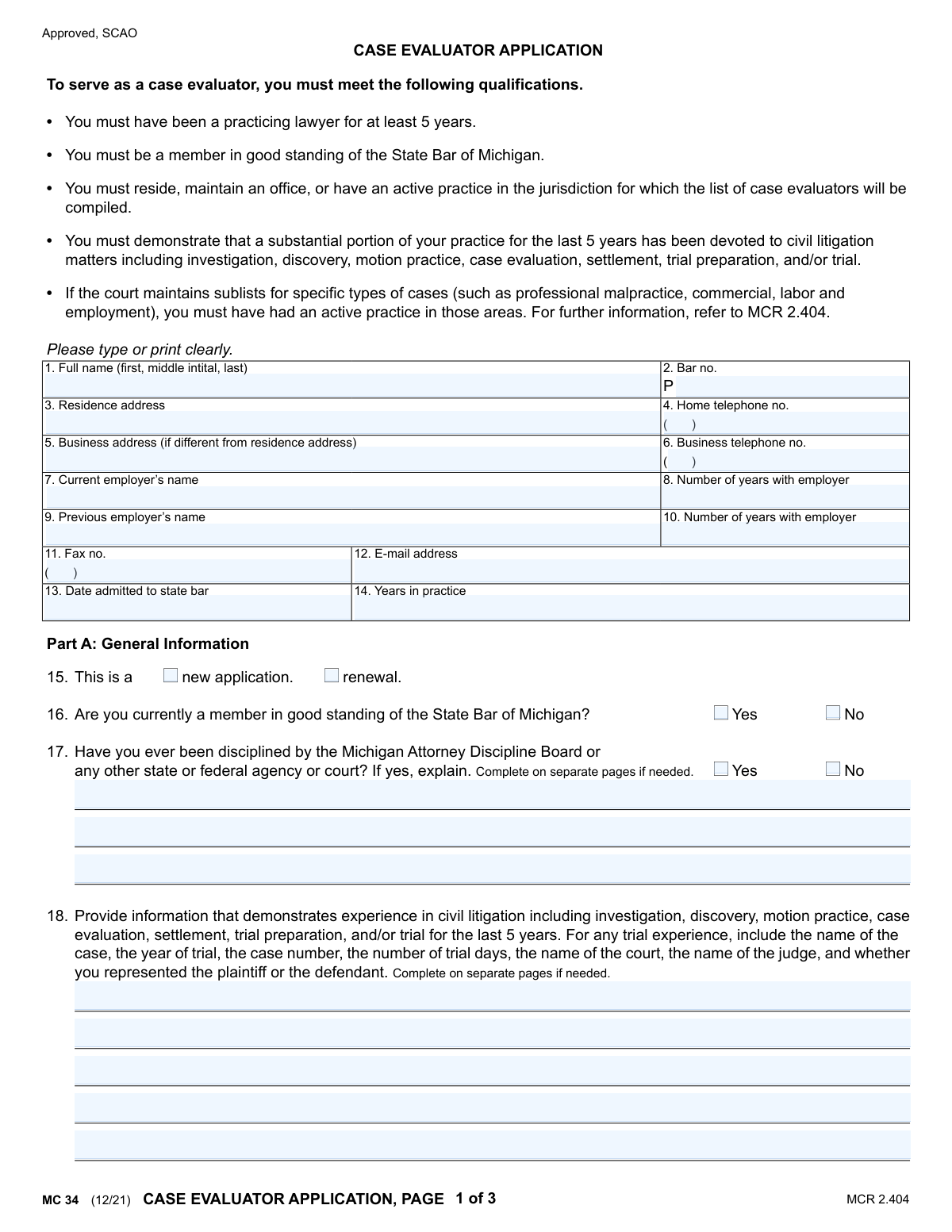
The MC 34, Case Evaluator Application, is a form used by practicing lawyers in Michigan to apply for a position as a case evaluator. It gathers essential information about an attorney's qualifications, experience in civil litigation, and practice areas to ensure they meet the requirements set by the State Bar of Michigan. Today, this form can be filled out quickly and accurately using AI-powered services like Instafill.ai, which can also convert non-fillable PDF versions into interactive fillable forms.
MC 34 is part of the
Michigan court forms category on Instafill.
Our AI automatically handles information lookup, data retrieval, formatting, and form filling.
It takes less than a minute to fill out MC 34 using our AI form filling.
Securely upload your data. Information is encrypted in transit and deleted immediately after the form is filled out.
Form specifications
| Form name: | MC 34, Case Evaluator Application |
| Number of fields: | 89 |
| Number of pages: | 1 |
| Language: | English |
More forms in Michigan court forms
Instafill Demo: How to fill out PDF forms in seconds with AI
How to Fill Out MC 34 Online for Free in 2026
Are you looking to fill out a MC 34 form online quickly and accurately? Instafill.ai offers the #1 AI-powered PDF filling software of 2026, allowing you to complete your MC 34 form in just 37 seconds or less.
Follow these steps to fill out your MC 34 form online using Instafill.ai:
- 1 Navigate to Instafill.ai and upload or select the MC 34 Case Evaluator Application.
- 2 Use the AI assistant to fill in Part A with your personal information, bar number, employment history, and contact details.
- 3 Provide detailed information about your civil litigation experience and the percentage breakdown of your practice as requested in Part A.
- 4 If applying for specialized lists, complete Part B by indicating your primary representation and specific areas of law you practice.
- 5 Add any other relevant qualifications, such as teaching experience, in Part C to strengthen your application.
- 6 Carefully review all the auto-filled information for accuracy, then electronically sign and date the certification.
- 7 Optionally, complete the separate Gender and Race Information in Part D before submitting the application.
Our AI-powered system ensures each field is filled out correctly, reducing errors and saving you time.
Why Choose Instafill.ai for Your Fillable MC 34 Form?
Speed
Complete your MC 34 in as little as 37 seconds.
Up-to-Date
Always use the latest 2026 MC 34 form version.
Cost-effective
No need to hire expensive lawyers.
Accuracy
Our AI performs 10 compliance checks to ensure your form is error-free.
Security
Your personal information is protected with bank-level encryption.
Frequently Asked Questions About Form MC 34
This form is used by practicing lawyers in Michigan to apply to serve as a case evaluator in civil litigation cases. Case evaluators help parties reach settlements by providing an evaluation of the case value.
To be eligible, you must be a practicing lawyer for at least 5 years, a member in good standing of the State Bar of Michigan, and have a substantial portion of your practice devoted to civil litigation. You must also reside, maintain an office, or have an active practice in the jurisdiction where you are applying.
You need to provide information that demonstrates your experience in areas like discovery, motion practice, and trial preparation over the last 5 years. For any trial experience, you must include specific details like the case name, year, case number, court, judge, and whether you represented the plaintiff or defendant.
Yes, you can still apply, but you must disclose the disciplinary action in question 17. You are required to provide a full explanation of the circumstances, using separate pages if necessary.
You should only complete Part B if the court you are applying to maintains sublists for specific case types, such as professional malpractice or commercial law. You must also have had an active practice in those specific areas for at least the last 3 years.
No, providing the gender and race information in Part D is optional. The form states this information is requested in accordance with MCR 2.404(B)(1) and will be maintained separately from your main application.
The form must be submitted to the specific jurisdiction for which the list of case evaluators will be compiled. You should check with the local trial court or its alternative dispute resolution (ADR) clerk for specific submission instructions.
When using separate pages, be sure to clearly label which question number your information corresponds to. It is also good practice to include your full name and bar number on each additional page you submit.
Estimate the percentage of your time over the past 5 years that you have dedicated to civil litigation for plaintiffs versus defendants. Then, for your current trial practice, break down the percentages for each specific area of law listed.
Select 'new application' if you have never been approved as a case evaluator in this jurisdiction before. Select 'renewal' if you are currently or have previously been on the approved list and are applying to continue your service.
Yes, AI-powered services like Instafill.ai can help you fill out this form. These tools can accurately auto-fill your personal and professional information, saving you time and reducing the chance of errors.
Simply upload the MC 34 form to the Instafill.ai platform. The AI will identify the fields, and you can then have it automatically populate your information or fill it out interactively online before downloading the completed document.
If you have a non-fillable or 'flat' PDF, you can use a service like Instafill.ai to make it interactive. Upload the file, and the platform will convert it into a fillable form that you can complete on your computer.
Compliance MC 34
Validation Checks by Instafill.ai
1
Verifies Minimum Years in Practice
This check ensures that the value entered in 'Years in practice' (Field 14) is 5 or greater. This is a mandatory qualification listed at the top of the application. If the number is less than 5, the application should be flagged for immediate rejection as the candidate does not meet the minimum requirements to serve as a case evaluator.
2
Ensures State Bar Membership is in Good Standing
This validation confirms that the applicant has checked 'Yes' for the question 'Are you currently a member in good standing of the State Bar of Michigan?' (Field 16). A 'No' answer makes the applicant ineligible. This check is critical for compliance, and a 'No' response should prevent the form from being submitted or automatically categorize it as rejected.
3
Validates Consistency of Practice Years and Admission Date
This check cross-references the 'Date admitted to state bar' (Field 13) with the 'Years in practice' (Field 14). The system will calculate the difference between the current date and the admission date, and flag any significant discrepancy with the number of years entered by the applicant. This prevents data entry errors and ensures the claimed experience is plausible.
4
Validates Bar Number Format
This check ensures the 'Bar no.' (Field 2) follows the specified format, which appears to be the letter 'P' followed by a series of numbers. It verifies that the field is not empty, starts with 'P', and contains only numeric characters afterward. This is important for accurate identification and lookup within the State Bar's database.
5
Requires Explanation for Disciplinary Action
This is a conditional validation for Field 17. If the applicant answers 'Yes' to having ever been disciplined, this check ensures the corresponding explanation text box is not empty. This is crucial for the review committee to assess the nature and severity of the discipline, and an empty explanation would render the application incomplete.
6
Validates Civil Litigation Percentage Sum
For Field 19, this check verifies that the sum of the '% plaintiff' and '% defense' for general civil litigation matters equals 100%. This ensures the applicant has provided a complete and logical breakdown of their practice. If the sum is not 100, an error message should prompt the user to correct the values.
7
Validates Trial Practice Sub-Area Percentage Sum
This check validates the percentages provided for the specific trial practice areas in Field 19. It ensures that the sum of all 'plaintiff' and 'defense' percentages across all listed areas (Personal injury, Commercial, etc.) equals 100%. This confirms a complete and accurate distribution of their trial practice, preventing logical impossibilities like a total over 100%.
8
Ensures Civil Litigation Experience is Described
This validation checks that the free-text area for describing civil litigation experience (Field 18) is not left blank. This narrative is a core component of the application, used to demonstrate qualification. An empty field would make it impossible to evaluate the applicant's experience, so the submission should be blocked until this information is provided.
9
Validates Email Address Format
This check verifies that the entry in the 'E-mail address' field (Field 12) conforms to a standard email format (e.g., [email protected]). This is essential for ensuring reliable communication with the applicant regarding their application status and potential assignments. An invalid format would prevent contact and should be corrected before submission.
10
Validates Date Admitted to State Bar
This check ensures the 'Date admitted to state bar' (Field 13) is a valid, properly formatted date (e.g., MM/DD/YYYY). It also verifies that the date is in the past and not a future date. This is a critical data point for calculating years in practice and verifying eligibility.
11
Checks for Required Address Information
This validation ensures that the 'Residence address' field (Field 3) is not empty. The form requires the applicant to reside, maintain an office, or have an active practice in the jurisdiction. Having a primary residence address is a fundamental piece of contact and verification information that must be present.
12
Verifies Application Type Selection
This check ensures that one of the two options, 'new application' or 'renewal', has been selected in Field 15. This information is necessary for internal processing to determine whether to create a new profile or update an existing one. The form should not be submitted without this selection being made.
13
Validates Phone Number Format
This check ensures that the values entered for 'Home telephone no.' (Field 4) and 'Business telephone no.' (Field 6) follow a standard 10-digit phone number format. While not strictly required, enforcing a consistent format (e.g., (XXX) XXX-XXXX) improves data quality and usability. An invalid format should trigger a warning to the user.
14
Logical Check on Employment History Duration
This validation performs a logical check by comparing the sum of 'Number of years with employer' (Fields 8 and 10) against the total 'Years in practice' (Field 14). The total years with employers should not exceed the total years in practice. This helps catch potential data entry errors or inconsistencies in the applicant's reported history.
Common Mistakes in Completing MC 34
Applicants often miscalculate the 'Years in practice' (field 14) based on their 'Date admitted to state bar' (field 13). This can happen due to manual calculation errors, rounding incorrectly, or not accounting for periods of non-practice. An inconsistency between these two fields raises questions about the applicant's attention to detail and eligibility, as 5 years of practice is a minimum requirement. To avoid this, carefully calculate the time elapsed since admission, or use a tool that can flag logical inconsistencies between date and duration fields.
Question 18 requires highly specific details for trial experience, including case names, numbers, judges, and trial duration. A common error is providing a general narrative summary instead of the requested itemized data points. This forces reviewers to guess at qualifications and may lead to the conclusion that the applicant does not meet the 'substantial portion' of practice requirement. It is crucial to provide all requested details for each case, using separate pages as needed.
Question 19, which asks for percentage breakdowns of an applicant's practice, is a frequent source of errors. Applicants may provide plaintiff vs. defense percentages that do not total 100%, or the sum of the specialized areas may be mathematically inconsistent. These errors make it difficult for the review committee to assess the applicant's practice focus. AI-powered form fillers like Instafill.ai can help prevent this by including validation rules that flag when percentage fields do not add up correctly.
In response to question 17, some applicants fail to disclose minor sanctions or actions from other jurisdictions, believing they are not relevant. The question is intentionally broad, and failure to fully disclose can be discovered during background checks, leading to automatic rejection and potential professional consequences. The best practice is to be overly inclusive and provide a full explanation for any and all disciplinary matters, no matter how minor they seem.
The form allows for supplemental pages for questions 17, 18, and 22. A critical mistake is failing to attach these pages or not clearly labeling them with the applicant's name, bar number, and the corresponding question number. Unlabeled or missing attachments render the detailed answers useless and can result in the application being deemed incomplete. Always double-check that all necessary attachments are included and clearly referenced.
Applicants may accidentally transpose digits or forget the 'P' prefix for their State Bar number (field 2). While a minor typo, an incorrect bar number can delay the verification of an applicant's standing with the State Bar of Michigan, slowing the entire review process. Using a tool like Instafill.ai can help by saving and accurately auto-filling recurring information like a bar number, reducing the risk of manual entry errors.
Qualified applicants sometimes overlook Part B, assuming their experience in Part A is sufficient to be considered for specialized sublists. This section is required to be considered for specific lists like professional malpractice or commercial law. This mistake causes an applicant to miss out on being evaluated for cases within their primary area of expertise, so it is essential to complete Part B if you have at least 3 years of active practice in a specialized area.
Forgetting to physically sign and date the application is one of the most common and critical mistakes. An unsigned application is invalid and cannot be processed, leading to an automatic rejection and requiring resubmission. Since this form is a non-fillable PDF, it requires printing and manual signing. While a tool like Instafill.ai can convert the PDF to a fillable version and complete the fields, the applicant must remember the final manual step of signing and dating before submission.
The fields for current and previous employers (7-10) can be confusing for attorneys with non-traditional career paths, such as solo practitioners. Applicants may leave the 'Previous employer' field blank or not clearly state 'Self-Employed,' making it difficult to verify the 5-year practice requirement. It's important to provide a clear and continuous 5-year employment history, even if it means adding a note to explain a complex situation.
In question 19, the form provides a line to specify 'Other' practice areas. A frequent mistake is to enter percentages on the 'Other' line but neglect to write in what the specific area of law is. This leaves the reviewers unable to assess the applicant's qualifications in that area, effectively wasting the information provided. Always ensure that any 'Other' category is clearly and specifically defined to give a full picture of your expertise.
Saved over 80 hours a year
“I was never sure if my IRS forms like W-9 were filled correctly. Now, I can complete the forms accurately without any external help.”
Kevin Martin Green
Your data stays secure with advanced protection from Instafill and our subprocessors
Robust compliance program
Transparent business model
You’re not the product. You always know where your data is and what it is processed for.
ISO 27001, HIPAA, and GDPR
Our subprocesses adhere to multiple compliance standards, including but not limited to ISO 27001, HIPAA, and GDPR.
Security & privacy by design
We consider security and privacy from the initial design phase of any new service or functionality. It’s not an afterthought, it’s built-in, including support for two-factor authentication (2FA) to further protect your account.
Fill out MC 34 with Instafill.ai
Worried about filling PDFs wrong? Instafill securely fills mc-34-case-evaluator-application forms, ensuring each field is accurate.