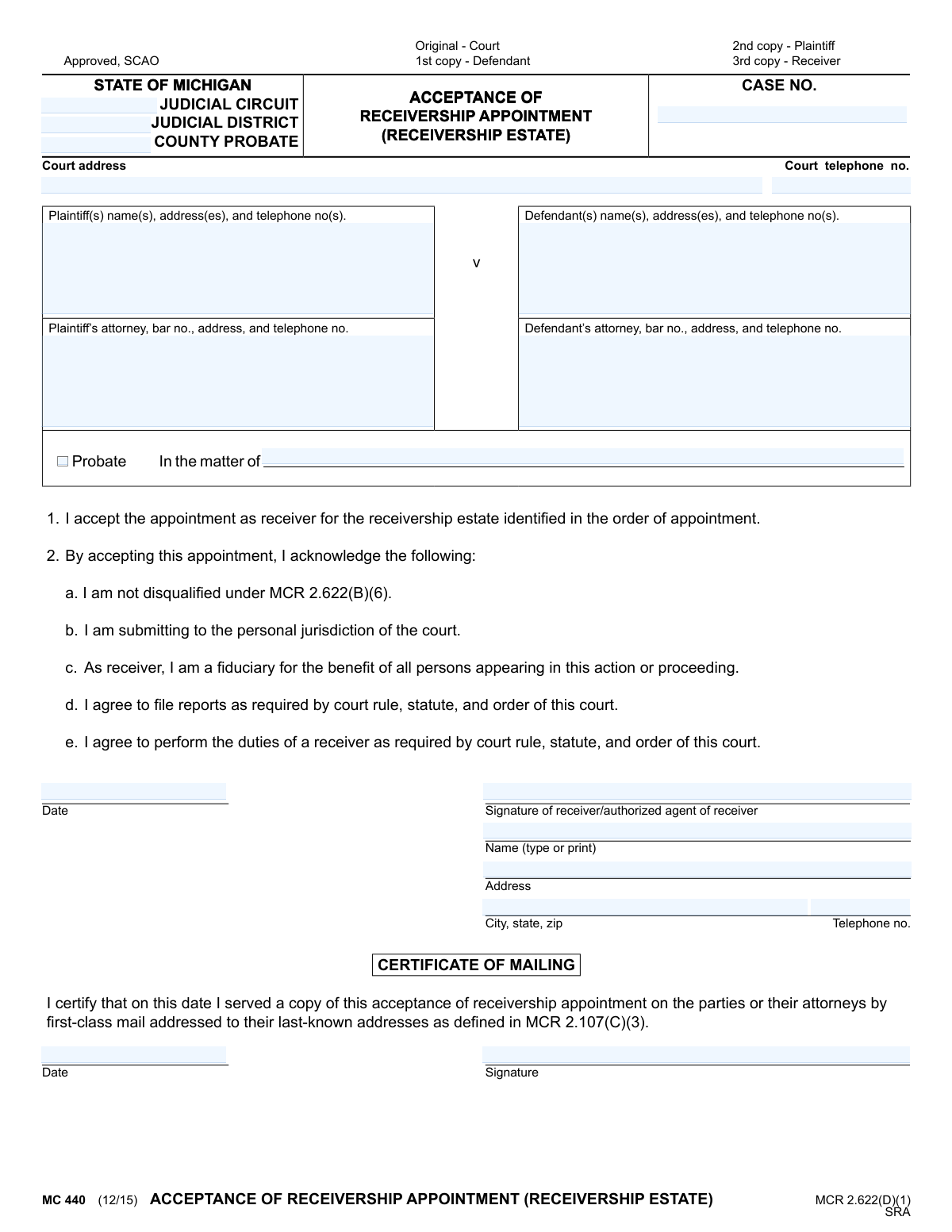
Yes! You can use AI to fill out MC 440, Acceptance of Receivership Appointment (Receivership Estate)

Form MC 440, Acceptance of Receivership Appointment, is a legal document filed in a Michigan court to formalize a receiver's acceptance of their role. By signing, the receiver confirms they are not disqualified, submit to the court's jurisdiction, and agree to act as a fiduciary and fulfill all required duties. Today, this form can be filled out quickly and accurately using AI-powered services like Instafill.ai, which can also convert non-fillable PDF versions into interactive fillable forms.
MC 440 is part of the Michigan court forms category on Instafill.
Our AI automatically handles information lookup, data retrieval, formatting, and form filling.
It takes less than a minute to fill out MC 440 using our AI form filling.
Securely upload your data. Information is encrypted in transit and deleted immediately after the form is filled out.

Form specifications

Form name: MC 440, Acceptance of Receivership Appointment (Receivership Estate)
Number of fields: 20
Number of pages: 1
Language: English
main-image

Instafill Demo: How to fill out PDF forms in seconds with AI

How to Fill Out MC 440 Online for Free in 2026

Are you looking to fill out a MC 440 form online quickly and accurately? Instafill.ai offers the #1 AI-powered PDF filling software of 2026, allowing you to complete your MC 440 form in just 37 seconds or less.
Follow these steps to fill out your MC 440 form online using Instafill.ai:
  1. 1 Navigate to Instafill.ai and upload the MC 440 form or select it from their template library.
  2. 2 Provide the case details, including the court name, case number, and the names and addresses of the plaintiff(s) and defendant(s).
  3. 3 Enter your personal information as the receiver, including your full name, address, and telephone number.
  4. 4 Review the pre-written statements confirming your acceptance, acknowledgment of fiduciary duties, and submission to the court's jurisdiction.
  5. 5 Digitally sign and date the form in the designated signature block to formally accept the appointment.
  6. 6 If required, complete the Certificate of Mailing section to certify that copies have been sent to all relevant parties.
  7. 7 Download the completed form to print and file with the court, ensuring copies are distributed as indicated on the form (e.g., to plaintiff, defendant, and for your records).

Our AI-powered system ensures each field is filled out correctly, reducing errors and saving you time.

Why Choose Instafill.ai for Your Fillable MC 440 Form?

Speed

Complete your MC 440 in as little as 37 seconds.

Up-to-Date

Always use the latest 2026 MC 440 form version.

Cost-effective

No need to hire expensive lawyers.

Accuracy

Our AI performs 10 compliance checks to ensure your form is error-free.

Security

Your personal information is protected with bank-level encryption.

Frequently Asked Questions About Form MC 440

This form is used by a person or entity appointed by a Michigan court to formally accept the role of a receiver. By signing, you acknowledge your duties and submit to the court's jurisdiction for a specific case.

The individual or authorized agent of an entity who has been appointed by a court order to act as a receiver for a receivership estate must complete and file this form.

A receiver is a neutral third party appointed by the court to take control of, manage, and preserve property or assets that are the subject of a lawsuit. As a receiver, you act as a fiduciary for the benefit of all parties involved.

The case number, judicial circuit, and other court details can be found on the official court order that appointed you as the receiver. This information is essential for correctly identifying the case.

This is your declaration that you do not have a conflict of interest as defined by Michigan Court Rule 2.622(B)(6). This typically means you are not related to a party or judge, and do not have a personal financial interest in the case's outcome.

You must file the original signed form with the court, serve copies to the plaintiff and defendant (or their attorneys), and keep a copy for your own records. Be sure to complete the 'Certificate of Mailing' section.

Yes, according to MCR 2.622(D)(1), you must file this acceptance within 7 days of your appointment. Always check the specific order appointing you as receiver for any different deadlines set by the judge.

If you do not wish to serve as the receiver, do not sign this form. You should promptly notify the court in writing that you are declining the appointment.

This section is your sworn statement certifying that you have mailed a copy of the completed acceptance form to all parties or their legal representatives. You must sign and date it on the day you mail the copies.

As a receiver, you are required to file reports detailing your management of the estate's assets. The frequency and content of these reports are determined by court rules, statutes, and the specific orders issued by the court in your case.

Yes, services like Instafill.ai use AI to help you accurately auto-fill form fields with your case and personal information. This can save time and reduce the chance of errors.

Simply upload the MC 440 form to the Instafill.ai platform. The service will make the form fillable online, and you can either type in the information or use the AI to auto-fill details from your saved profile.

You can use a service like Instafill.ai, which can convert flat, non-fillable PDFs into interactive forms. This allows you to easily type your information into the correct fields before printing the completed document for signature and filing.

Compliance MC 440
Validation Checks by Instafill.ai

1
Case Number Format Validation
This check verifies that the 'CASE NO.' field conforms to the standard Michigan court case number format. Correct formatting is essential for the court's electronic and manual filing systems to properly route and associate the document with the correct legal action. An invalid case number will result in immediate rejection of the filing, causing significant delays.
2
Court Jurisdiction Completeness
Ensures that the form specifies the correct court by validating that the 'Court address' is provided and at least one of the jurisdictional fields ('Judicial Circuit', 'Judicial District', or 'County Probate') is filled. This is a fundamental requirement for any court filing, as it determines where the document is legally submitted. A filing without clear jurisdiction is invalid and will be returned.
3
Plaintiff and Defendant Identification
Validates that the name and address fields for both the 'Plaintiff(s)' and 'Defendant(s)' are fully completed. Legal proceedings require the unambiguous identification of all primary parties involved in the action. Omitting this information would render the document legally insufficient and could halt the receivership process until corrected.
4
Receiver Signature Presence
Confirms that the 'Signature of receiver/authorized agent of receiver' field contains a valid signature, whether digital or a placeholder for a wet signature. The receiver's signature is the legal act of accepting the appointment and its associated fiduciary duties. Without a signature, the acceptance is not legally binding and the entire document is void.
5
Receiver Printed Name and Address Completeness
Verifies that the receiver's printed 'Name', 'Address', and 'City, state, zip' fields are all filled out. This information is required to clearly identify the person signing and to establish their official contact address for all future correspondence related to the case. An unidentifiable signature or missing address can lead to the document being challenged or rejected.
6
Acceptance Date Validation
Checks that the 'Date' of the receiver's acceptance is a valid, properly formatted date that is not in the future. This date is legally significant as it marks the official point of acceptance of the receivership duties. An invalid, future, or missing date creates ambiguity and can invalidate the acceptance.
7
Attorney Bar Number Format
If an attorney is listed for the plaintiff or defendant, this check ensures the corresponding 'bar no.' field is present and follows the Michigan State Bar number format (e.g., P-#####). The bar number is a unique identifier that confirms the attorney is in good standing and authorized to practice. Filings from attorneys with missing or incorrect bar numbers are typically rejected by the court clerk.
8
Certificate of Mailing Date Logic
Ensures the date in the 'CERTIFICATE OF MAILING' section is a valid date that occurs on or after the receiver's acceptance signature date. This chronological check is crucial for proving proper procedure was followed, as the document cannot be certified as mailed before it was officially signed. A logical inconsistency here could invalidate the proof of service.
9
Certificate of Mailing Signature Presence
Validates that a signature is present in the 'CERTIFICATE OF MAILING' section. This signature serves as a sworn statement that copies of the acceptance were served to all relevant parties as required by court rules. Failure to include this signature negates the proof of service, a critical procedural step that could lead to legal challenges.
10
Standard Phone Number Format
Validates that all telephone number fields ('Court telephone no.', party telephone numbers, and receiver's 'Telephone no.') adhere to a standard 10-digit format. This ensures the contact information is accurate and usable for communication by the court and other parties. Incorrectly formatted numbers can cause communication failures and delay proceedings.
11
Form Version Identifier Check
Verifies that the form identifier, 'MC 440 (12/15)', is present and matches the version currently accepted by the court. Courts periodically update their forms, and submitting an outdated version can lead to automatic rejection because it may lack required fields or language. This check ensures compliance with current administrative rules.
12
Logical Party Representation
Checks that if an attorney's information is provided for a party (plaintiff or defendant), the corresponding party's name and address are also filled out. An attorney cannot be listed in a vacuum; they must be representing a specified party in the case. This validation prevents incomplete or nonsensical filings where representation is unclear.

Common Mistakes in Completing MC 440

Incorrect Court or Case Number

Filers often enter the wrong Judicial Circuit/District or mistype the case number. This happens due to carelessness or confusion between different legal matters. An incorrect case number is a critical error that can cause the document to be rejected or filed in the wrong case, leading to significant delays and potential legal complications.

Incomplete Party or Attorney Information

This mistake involves omitting full names, addresses, phone numbers, or attorney bar numbers for the plaintiff, defendant, or their counsel. This information is crucial for official communication and service of documents. Missing details can halt the legal process, as the court and other parties cannot properly issue notices, leading to filing rejections and delays until the information is corrected.

Using the Wrong Case Caption Style

The form provides options for both a standard 'Plaintiff v. Defendant' caption and a probate 'In the matter of' caption. A common error is filling out the wrong section or both, indicating a misunderstanding of the case type. This can lead to confusion and may require the filer to submit a corrected form, delaying the receiver's official appointment.

Illegible Printed Name Below Signature

While a signature can be stylized, the printed or typed name below it must be perfectly clear for identification purposes. Filers often scribble their name in this box, making it unreadable. A court clerk may reject the form if they cannot verify the identity of the person signing, invalidating the acceptance.

Improper Signature for a Corporate Receiver

When the appointed receiver is a company, an authorized individual must sign on its behalf; simply stamping the company name is not sufficient. People make this mistake by not understanding that a legal entity cannot sign for itself. The form must be signed by a human agent with the authority to bind the company, and failure to do so can invalidate the appointment.

Forgetting to Complete the Certificate of Mailing

This form contains two separate sections requiring a date and signature: the acceptance itself and the Certificate of Mailing. It is very common for filers to overlook the second section, which certifies that all parties have been served a copy. An incomplete Certificate of Mailing invalidates the proof of service, which can stop the entire proceeding until proper service is certified.

Using an Outdated Form Version

The form is designated 'MC 440 (12/15)', indicating its version date. Courts periodically update forms to comply with new rules or statutes, and submitting an obsolete version is a frequent cause for rejection. Always ensure you are using the most current version available from the court to avoid having your filing returned.

Failure to Properly Distribute Copies

The bottom of the form explicitly states where each copy should go: Original to the court, and copies to the plaintiff, defendant, and receiver. A frequent oversight is only filing the original with the court and failing to serve the other parties as required. This violates procedural rules and can lead to legal challenges from parties who were not properly notified.

Inconsistent Dates

The date on the main acceptance signature should logically align with the date on the Certificate of Mailing. Significant or illogical discrepancies, such as a mailing date that is before the signature date, can raise procedural questions and may cause a clerk to scrutinize or reject the filing. This often happens due to haste or filling out sections on different days.

Entering a PO Box for the Receiver's Address

Filers sometimes enter a Post Office Box as their address for convenience or privacy. However, legal proceedings often require a physical street address for the official service of process. Submitting a P.O. Box may be deemed insufficient by the court, leading to rejection of the form or future complications if service on the receiver is challenged. AI-powered tools like Instafill.ai can help prevent these errors by validating address formats and ensuring all required fields are completed correctly. For non-fillable PDFs, Instafill.ai can also convert the document into an interactive, fillable form to streamline the process.
Saved over 80 hours a year

“I was never sure if my IRS forms like W-9 were filled correctly. Now, I can complete the forms accurately without any external help.”

Kevin Martin Green

Your data stays secure with advanced protection from Instafill and our subprocessors

Robust compliance program

Transparent business model

You’re not the product. You always know where your data is and what it is processed for.

ISO 27001, HIPAA, and GDPR

Our subprocesses adhere to multiple compliance standards, including but not limited to ISO 27001, HIPAA, and GDPR.

Security & privacy by design

We consider security and privacy from the initial design phase of any new service or functionality. It’s not an afterthought, it’s built-in, including support for two-factor authentication (2FA) to further protect your account.

Fill out MC 440 with Instafill.ai

Worried about filling PDFs wrong? Instafill securely fills mc-440-acceptance-of-receivership-appointment-receivership-estate forms, ensuring each field is accurate.