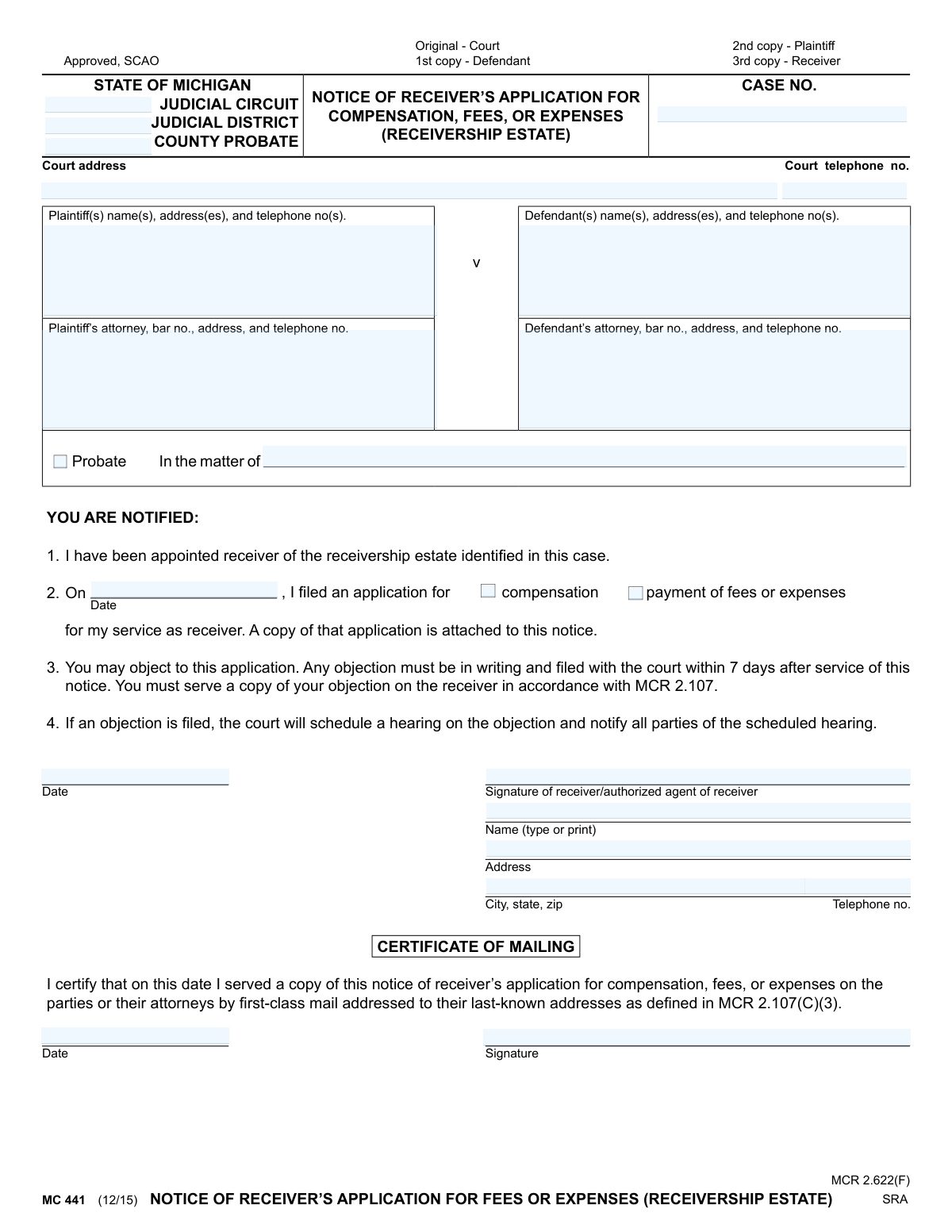
Yes! You can use AI to fill out MC 441, Notice of Receiver’s Application for Compensation, Fees or Expenses (Receivership Estate)
Form MC 441 is a legal document used in Michigan courts by a receiver to formally notify all parties in a case that they are seeking payment for services or reimbursement for expenses from the assets they are managing. This notice is crucial as it provides parties with a legal opportunity to object to the requested amounts within a specific timeframe. Today, this form can be filled out quickly and accurately using AI-powered services like Instafill.ai, which can also convert non-fillable PDF versions into interactive fillable forms.
MC 441 is part of the
Michigan court forms category on Instafill.
Our AI automatically handles information lookup, data retrieval, formatting, and form filling.
It takes less than a minute to fill out MC 441 using our AI form filling.
Securely upload your data. Information is encrypted in transit and deleted immediately after the form is filled out.
Form specifications
| Form name: | MC 441, Notice of Receiver’s Application for Compensation, Fees or Expenses (Receivership Estate) |
| Number of fields: | 23 |
| Number of pages: | 1 |
| Language: | English |
More forms in Michigan court forms
Instafill Demo: How to fill out PDF forms in seconds with AI
How to Fill Out MC 441 Online for Free in 2026
Are you looking to fill out a MC 441 form online quickly and accurately? Instafill.ai offers the #1 AI-powered PDF filling software of 2026, allowing you to complete your MC 441 form in just 37 seconds or less.
Follow these steps to fill out your MC 441 form online using Instafill.ai:
- 1 Navigate to Instafill.ai and upload the MC 441 form or select it from the template library.
- 2 Use the AI assistant to accurately enter the court details, including the judicial circuit, district, and case number.
- 3 Input the full names, addresses, and attorney information for both the plaintiff(s) and defendant(s) as prompted by the tool.
- 4 Specify the date the application was filed and check the box indicating whether it's for 'compensation' or 'payment of fees or expenses'.
- 5 Enter the receiver's name, address, and contact information, then apply a legally valid digital or electronic signature.
- 6 Complete the Certificate of Mailing section to confirm that all parties have been served with the notice.
- 7 Review all auto-filled information for accuracy, then download, print, or electronically file the completed MC 441 form as required by the court.
Our AI-powered system ensures each field is filled out correctly, reducing errors and saving you time.
Why Choose Instafill.ai for Your Fillable MC 441 Form?
Speed
Complete your MC 441 in as little as 37 seconds.
Up-to-Date
Always use the latest 2026 MC 441 form version.
Cost-effective
No need to hire expensive lawyers.
Accuracy
Our AI performs 10 compliance checks to ensure your form is error-free.
Security
Your personal information is protected with bank-level encryption.
Frequently Asked Questions About Form MC 441
This form, the Notice of Receiver’s Application for Compensation, Fees, or Expenses, is used by a court-appointed receiver to officially notify all parties in a case that they have asked the court for payment for their services.
The court-appointed receiver or their authorized agent is responsible for completing this notice and serving it to the plaintiff and defendant.
Receiving this form means the receiver in your case is seeking payment from the receivership estate. You have the right to review their application and object if you disagree with the amount or charges.
You must file a written objection with the court within 7 days of being served this notice. You also need to send a copy of your objection directly to the receiver.
If a timely objection is filed, the court will schedule a hearing to address the issue. All parties will be notified of the hearing date and time.
If no objections are filed within the 7-day period, the court will likely approve the receiver's application for payment without holding a hearing.
You will need the case number, court address, and the names and addresses of the plaintiff, defendant, and their attorneys. This information can be found on previous court documents related to the case.
Immediately contact the receiver who sent the notice to request a copy of the application. You need this document to understand the details of their payment request before you can decide whether to object.
This section is the receiver's sworn statement, signed and dated, certifying that they have mailed a copy of the notice to all required parties in the case.
The original is filed with the court, and copies are provided to the plaintiff, the defendant, and the receiver for their records, as indicated at the top of the form.
Yes, services like Instafill.ai use AI to accurately auto-fill form fields with case and party information, which can save significant time and help prevent errors.
You can upload the MC 441 form to the Instafill.ai platform. Its AI will identify the fields, allowing you to quickly and easily fill in all the required information online.
If you have a flat, non-fillable PDF, you can use a service like Instafill.ai. It can convert the document into an interactive, fillable form that you can complete and save digitally.
Compliance MC 441
Validation Checks by Instafill.ai
1
Case Number Presence and Format
This check ensures the 'Case No.' field is not empty and conforms to the court's specific formatting rules. The case number is the primary identifier for the legal proceeding, and its absence or incorrect format would prevent the document from being filed correctly. If validation fails, the system should reject the submission and prompt the user to enter a valid case number.
2
Party Identification Completeness
This validation verifies that the form identifies the parties involved in the case. It checks that either the 'Plaintiff(s)' and 'Defendant(s)' fields are populated for a civil case, or the 'In the matter of' field is filled for a probate case. Without proper party identification, the notice is legally insufficient, so a failure would require the user to complete this information before proceeding.
3
Application Purpose Selection
This check confirms that at least one of the checkboxes for 'compensation' or 'payment of fees or expenses' has been selected. This is critical as it specifies the reason for the receiver's application and informs the parties what is being requested. If neither is selected, the form is ambiguous and should be returned to the user for clarification.
4
Application Filing Date Validity
This validation ensures the date entered in section 2 ('On [Date] I filed an application...') is a valid, non-future date. This date establishes the timeline of events and is crucial for determining the deadline for objections. An invalid or future date would make the notice defective and could invalidate the entire application process.
5
Attorney Bar Number Validation
This check verifies that if an attorney's name is listed for either the plaintiff or defendant, the corresponding 'bar no.' field is also filled. The bar number is a unique identifier that confirms the attorney's credentials and authority to practice. A submission lacking a required bar number should be flagged for correction, as it may indicate an unauthorized representative.
6
Receiver Information Completeness
This validation ensures that the receiver's full name, address (street, city, state, zip), and telephone number are all provided. This information is essential for all parties to contact the receiver and to serve any objections as required by the notice. Incomplete contact information would hinder communication and could be grounds for rejecting the application.
7
Certificate of Mailing Date Presence
This check ensures that the date on the 'Certificate of Mailing' is filled out. This date serves as legal proof of when the notice was served to all parties, which starts the 7-day clock for filing objections. A missing date invalidates the certificate of service, making the notice legally ineffective.
8
Date Chronology Logic
This validation compares the dates on the form to ensure they are in a logical sequence. Specifically, it checks that the 'Certificate of Mailing' date is on or after the application filing date listed in section 2. An illogical sequence, such as mailing a notice before the application is filed, would invalidate the legal process and requires correction.
9
Receiver Signature Presence
This check confirms that the 'Signature of receiver/authorized agent of receiver' field has been signed (digitally or physically). The signature is a legal attestation that the information in the application is true and accurate. A form without a signature is not legally binding and must be rejected.
10
Court Identification Completeness
This validation ensures that the court's location is clearly identified by filling in the 'Judicial Circuit', 'Judicial District', or 'County Probate' fields. This information is necessary to route the document to the correct courthouse and clerk for filing. Failure to specify the court would result in the document being rejected or lost.
11
Telephone Number Formatting
This check validates that all telephone number fields (Court, Plaintiff, Defendant, Attorney, Receiver) follow a standard format, such as a 10-digit number. Consistent formatting ensures that the numbers are valid and usable for communication between the court and the parties. An improperly formatted number should trigger a warning to the user to review and correct it.
12
Complete Address Validation
This check verifies that all address fields on the form contain a street address, city, state, and zip code. Complete and accurate addresses are legally required for proper service of notice and other court documents. An incomplete address could lead to failed mail delivery, violating a party's right to due process, and should block submission until corrected.
Common Mistakes in Completing MC 441
Users frequently enter the Case Number with typos, missing characters, or incorrect formatting. This happens due to manual data entry errors or confusion about the required format. An incorrect case number can lead to the notice being rejected by the court clerk or filed in the wrong case, causing significant delays and procedural complications. Always double-check the case number against official court documents for accuracy, including all letters, numbers, and hyphens.
People often fill in the wrong 'Judicial Circuit,' 'Judicial District,' or 'County Probate' information. This mistake arises from not knowing the specific court handling the case or grabbing generic information. Filing a notice with the wrong court jurisdiction renders it invalid and means it will not be seen by the correct judge, halting the application process. It is crucial to verify the exact court details from the original case filings.
The receiver or their staff may forget to include the bar number for the plaintiff's or defendant's attorney, or even their own if they are an attorney. This information is critical for the court to verify the identity and standing of legal counsel. Leaving the bar number blank can result in the form being considered incomplete and returned for correction, delaying the approval of fees and expenses. Always ensure the attorney's name is accompanied by their official, correct bar number.
In section 2, the form requires the date the application for compensation was *filed*, not the date the notice is being filled out. Users often mistakenly enter the current date. This discrepancy can create legal challenges regarding the timeliness and validity of the notice. The correct date must match the court's official file stamp on the application itself to ensure the 7-day objection period is calculated correctly.
The notice explicitly states, 'A copy of that application is attached to this notice.' A surprisingly common and critical error is failing to include the actual application for compensation with the notice when serving it to the parties. Without the attachment, the parties cannot review the request, making the notice meaningless and legally defective. This will almost certainly lead to valid objections and require the receiver to re-serve the entire package, wasting time and money.
The form provides checkboxes to indicate whether the application is for 'compensation' or 'payment of fees or expenses.' Receivers sometimes forget to check either box, leaving the purpose of the application ambiguous. This ambiguity can lead to confusion or objections from the parties and may require clarification with the court, delaying the payment process. It is essential to clearly select the appropriate box to define the nature of the funds being requested.
The form requires two separate signatures: one for the notice itself and one for the Certificate of Mailing. Forgetting either signature will invalidate that portion of the document, and potentially the entire filing. A missing signature on the Certificate of Mailing, for example, invalidates the proof of service. Ensure both sections are signed and dated correctly on the day of the action (signing the notice and mailing it).
The date on the Certificate of Mailing must be the actual date the notice was served (mailed) to the parties. A common mistake is to post-date, back-date, or leave the date blank. An incorrect date can be grounds for an objection, as it directly impacts the 7-day window parties have to respond. This date must be on or after the signature date of the main notice and must reflect the true date of mailing.
The notice requires the full names, addresses, and telephone numbers for all plaintiffs and defendants. This information is often copied incorrectly, is outdated, or is incomplete, especially in cases with multiple parties. Serving a notice to an old address can invalidate the service and violate due process, leading to legal challenges. AI-powered tools like Instafill.ai can help prevent this by storing and auto-filling correct, validated party information across related documents.
The form includes a checkbox for 'Probate' and a field for 'In the matter of'. Users may get this wrong, either by incorrectly checking 'Probate' for a standard civil case or by failing to properly identify the estate in the 'In the matter of' field for a probate case. This error can cause filing confusion and demonstrates a lack of attention to detail. It's crucial to accurately classify the case type as it dictates specific legal procedures. Since this form is a non-fillable PDF, a tool like Instafill.ai could convert it into a fillable version, making it easier to manage fields and avoid such errors.
Saved over 80 hours a year
“I was never sure if my IRS forms like W-9 were filled correctly. Now, I can complete the forms accurately without any external help.”
Kevin Martin Green
Your data stays secure with advanced protection from Instafill and our subprocessors
Robust compliance program
Transparent business model
You’re not the product. You always know where your data is and what it is processed for.
ISO 27001, HIPAA, and GDPR
Our subprocesses adhere to multiple compliance standards, including but not limited to ISO 27001, HIPAA, and GDPR.
Security & privacy by design
We consider security and privacy from the initial design phase of any new service or functionality. It’s not an afterthought, it’s built-in, including support for two-factor authentication (2FA) to further protect your account.
Fill out MC 441 with Instafill.ai
Worried about filling PDFs wrong? Instafill securely fills mc-441-notice-of-receivers-application-for-compensation-fees-or-expenses-receivership-estate forms, ensuring each field is accurate.