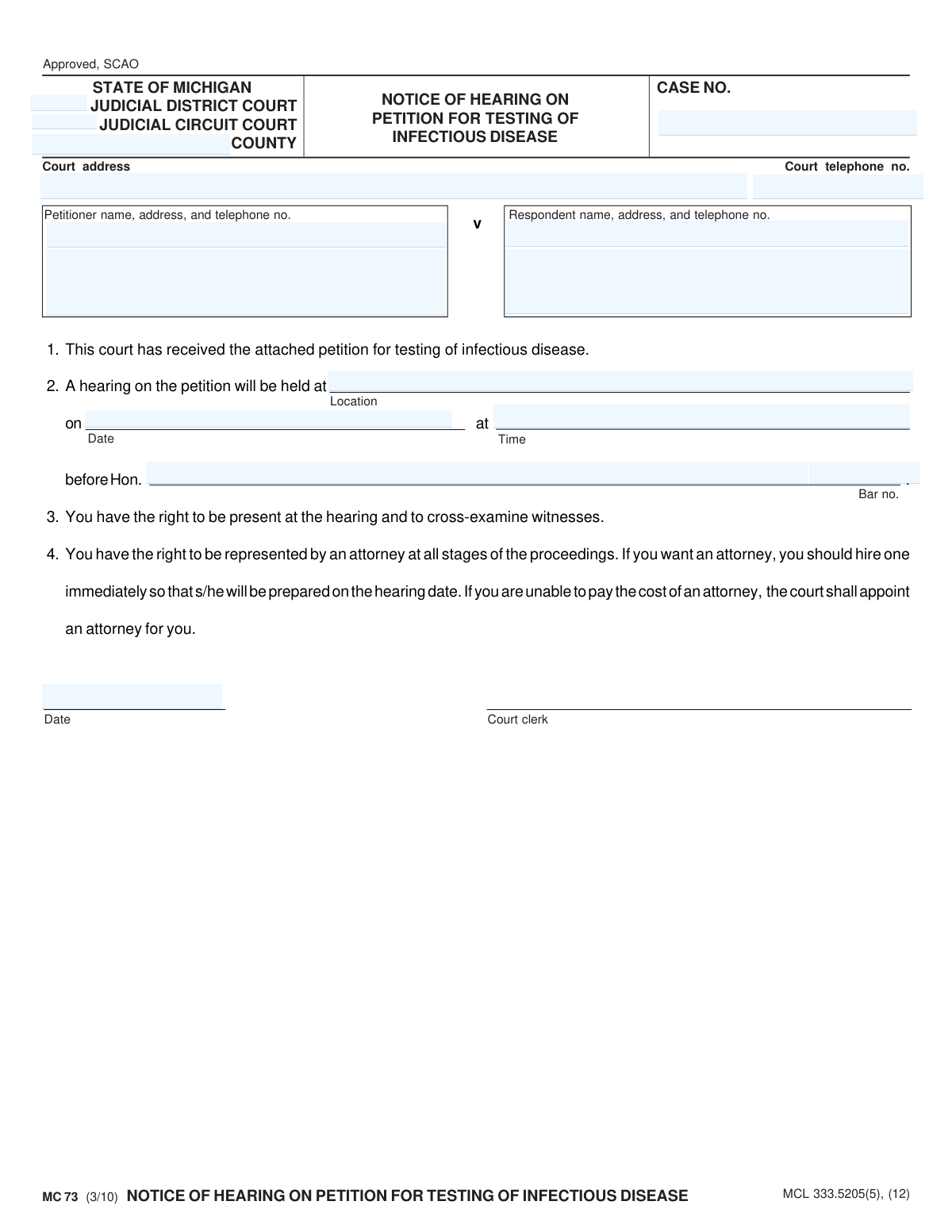
Yes! You can use AI to fill out MC 73, Notice of Hearing on Petition for Testing of Infectious Disease

Form MC 73 is a legal document issued by the Michigan courts to inform an individual that a petition has been filed requesting they undergo testing for an infectious disease. It officially schedules a court hearing and notifies the respondent of the date, time, location, and their right to legal representation. Today, this form can be filled out quickly and accurately using AI-powered services like Instafill.ai, which can also convert non-fillable PDF versions into interactive fillable forms.
MC 73 is part of the Michigan court forms category on Instafill.
Our AI automatically handles information lookup, data retrieval, formatting, and form filling.
It takes less than a minute to fill out MC 73 using our AI form filling.
Securely upload your data. Information is encrypted in transit and deleted immediately after the form is filled out.

Form specifications

Form name: MC 73, Notice of Hearing on Petition for Testing of Infectious Disease
Number of fields: 16
Number of pages: 1
Language: English
main-image

Instafill Demo: How to fill out PDF forms in seconds with AI

How to Fill Out MC 73 Online for Free in 2026

Are you looking to fill out a MC 73 form online quickly and accurately? Instafill.ai offers the #1 AI-powered PDF filling software of 2026, allowing you to complete your MC 73 form in just 37 seconds or less.
Follow these steps to fill out your MC 73 form online using Instafill.ai:
  1. 1 Navigate to Instafill.ai and upload or select the MC 73 form.
  2. 2 Provide the case number, court information (judicial district/circuit and county), and the full names and addresses for both the petitioner and respondent.
  3. 3 Enter the specific details for the hearing, including the location, date, time, and the name of the presiding judge.
  4. 4 Use the AI tool to accurately place the court's address and telephone number in the appropriate fields.
  5. 5 Review all the auto-filled information for accuracy, paying close attention to the case number, hearing schedule, and party details.
  6. 6 Date the notice and have the court clerk sign it, then download the completed form for official service to the respondent and for court records.

Our AI-powered system ensures each field is filled out correctly, reducing errors and saving you time.

Why Choose Instafill.ai for Your Fillable MC 73 Form?

Speed

Complete your MC 73 in as little as 37 seconds.

Up-to-Date

Always use the latest 2026 MC 73 form version.

Cost-effective

No need to hire expensive lawyers.

Accuracy

Our AI performs 10 compliance checks to ensure your form is error-free.

Security

Your personal information is protected with bank-level encryption.

Frequently Asked Questions About Form MC 73

This form is a legal notice from the court informing you that a petition has been filed to request a judge to order you to be tested for an infectious disease. It specifies the date, time, and location of the court hearing on this matter.

You received this notice because you have been named as the 'Respondent' in a legal petition. This means someone (the 'Petitioner') is asking the court to compel you to undergo testing for an infectious disease.

No, the person receiving this notice (the Respondent) does not fill it out. The form is completed by the court clerk to officially notify you of the hearing.

You are expected to appear at the court hearing at the location, date, and time specified in section 2 of the form. It is strongly recommended that you hire an attorney to represent you.

The notice states you have the right to be present at the hearing, cross-examine witnesses, and be represented by an attorney. If you cannot afford an attorney, the court will appoint one for you.

If you are unable to pay for an attorney, you must inform the court. The court is required to appoint an attorney to represent you at no cost.

If you do not appear at the hearing, the judge may proceed without you. A default order could be issued, compelling you to undergo the infectious disease testing requested in the petition.

All the hearing details, including the location, date, time, and the name of the presiding judge, are listed in section 2 of the notice.

The 'Petitioner' is the person or entity who filed the court case asking for the testing order. The 'Respondent' is you, the person who is the subject of the petition.

No, this notice pertains to a civil court proceeding, not a criminal charge. However, it is a serious legal matter that requires your attention and response.

While you don't fill out this specific notice, AI-powered services like Instafill.ai can help you accurately complete other related court forms you might need to prepare for your hearing, saving you time and reducing errors.

You can upload your court form to Instafill.ai, and its AI will automatically identify the fields. You can then type your information directly into the fields and download the completed document, ready for filing.

Services like Instafill.ai can solve this problem. You can upload the flat, non-fillable PDF, and the platform will convert it into an interactive, fillable form that you can complete easily online.

Compliance MC 73
Validation Checks by Instafill.ai

1
Validates Michigan Case Number Format
Checks if the `caseno` field adheres to the standard Michigan court case number format, which typically includes the year, a unique identifier, and case type codes (e.g., YY-######-XX). This is critical for uniquely identifying the case within the judicial system and ensuring proper filing and retrieval. A failure means the document cannot be correctly associated with its legal case file, leading to processing delays or rejection.
2
Ensures Hearing Date is After Notice Date
This validation compares the `hdate` (Hearing Date) with the `ndate` (Notice Date) to ensure the hearing is scheduled for a future date. This is a fundamental legal requirement to provide adequate notice to the respondent. If the hearing date is on or before the notice date, the notice is legally invalid and must be corrected before submission.
3
Verifies Completeness of Hearing Information
This check confirms that the hearing location (`hplace`), date (`hdate`), and time (`htime`) are all populated. Missing any of this information makes the notice useless, as the parties would not know where or when to appear. A failure would require the user to complete all hearing details before the form can be processed.
4
Confirms Judge Name and Bar Number are Provided
Validates that both the presiding judge's name (`judge`) and their bar number (`barno`) are present. The bar number serves as a unique identifier for the judge, confirming their authority and credentials to preside over the case. Omitting this information could call the legitimacy of the hearing notice into question and lead to its rejection by the court clerk.
5
Validates Michigan Bar Number Format
This check ensures the `barno` field follows the specific format for Michigan attorneys and judges, which is a 'P' followed by a sequence of digits (e.g., P12345). Using the correct format is essential for positive identification within the State Bar of Michigan's records. An invalid format would prevent automated verification and could lead to rejection.
6
Ensures Petitioner Information is Complete
Verifies that the petitioner's name (`pname`) and address (`paddress`) fields are not empty. This information is legally required to identify the party filing the petition and is necessary for all official correspondence. An incomplete petitioner profile would render the legal notice deficient and unacceptable for filing.
7
Ensures Respondent Information is Complete
This validation confirms that the respondent's name (`rname`) and address (`raddress`) are provided. This is arguably the most critical information on the notice, as it identifies the person who must appear and ensures they can be properly served. A missing respondent name or address makes the notice undeliverable and legally void.
8
Validates Court Telephone Number Format
Checks that the `telno` field contains a valid 10-digit US telephone number, potentially with expected formatting like (XXX) XXX-XXXX. A valid phone number is important for parties seeking information or clarification from the court clerk. An invalid number hinders communication and reflects poorly on the accuracy of the official notice.
9
Verifies a Valid Michigan County
This check validates the `county` field against a predefined list of all 83 official counties in Michigan. This ensures the case is being filed in a legitimate jurisdiction and prevents typos or invalid entries. An incorrect county could lead to the case being filed in the wrong court system, causing significant legal and administrative problems.
10
Ensures Exclusive Selection of District or Circuit Court
This logical check verifies that a case is designated as either a District Court case (by filling `disno`) or a Circuit Court case (by filling `cirno`), but not both. Cases belong to one jurisdiction or the other, and selecting both would indicate a data entry error. This validation prevents ambiguity about the court of record.
11
Validates Notice Date is a Plausible Date
This check ensures the `ndate` is a valid calendar date and falls within a reasonable range, not in the distant past or future. This prevents data entry errors like 'February 30' or a year of '1924'. A valid notice date is the starting point for legal timelines, so its accuracy is paramount.
12
Validates Hearing Time Format
This validation ensures the `htime` field is entered in a recognizable time format, such as HH:MM AM/PM or 24-hour time. This prevents ambiguity about when the hearing is scheduled to occur. An improperly formatted time like 'noon' or 'morning' is not specific enough for a legal notice and would cause confusion.
13
Ensures Case Number is Provided
This is a fundamental completeness check to ensure the `caseno` field is not empty. The case number is the primary key for the entire legal action, and without it, the notice is just a generic form with no connection to a specific case. A failure here must block all further processing until a case number is supplied.
14
Ensures Hearing Date is in the Future
This check compares the `hdate` against the current system date to ensure the hearing is not being scheduled for a past date. This prevents simple but critical data entry errors that would make the hearing impossible to attend. If the date is in the past, the form submission should be rejected with a clear error message.

Common Mistakes in Completing MC 73

Incorrectly Designating the Court Jurisdiction

Users often check both "Judicial District Court" and "Judicial Circuit Court" boxes or leave both blank, not understanding which court has jurisdiction over the case. This error can lead to the notice being rejected by the clerk or routed to the wrong court, causing significant delays in scheduling the hearing. To avoid this, verify the correct court based on the underlying case type; this information is usually found on previous court documents related to the case.

Entering an Incomplete or Inaccurate Case Number

The case number is the single most important identifier for a court filing. Common mistakes include transposing digits, omitting year designators or case type codes, or simply writing the number illegibly. An incorrect case number will cause the document to be rejected or misfiled, which can lead to missed deadlines and procedural complications. Always double-check the case number against official court records before submission.

Reversing Petitioner and Respondent Information

Individuals unfamiliar with legal terminology may accidentally switch the information for the Petitioner (the party filing the petition) and the Respondent (the party the petition is against). This creates significant confusion for the court and can invalidate the notice, requiring a corrected version to be re-filed and re-served. Carefully read the field labels to ensure the correct party's information is entered in each section.

Providing an Ambiguous Hearing Location

Filling the location field with a generic term like "Courthouse" instead of the specific courtroom number (e.g., "Courtroom 4B, 36th District Court") is a frequent error. This ambiguity can cause the respondent or their attorney to be late or miss the hearing entirely, potentially leading to a default judgment or the need to reschedule. Always provide the most specific location details available, including the full address and courtroom number.

Using Incorrect or Ambiguous Date and Time Formats

The hearing date and time must be completely unambiguous. Common mistakes include using non-standard date formats (e.g., DD/MM/YY) or, most critically, forgetting to specify AM or PM for the time. This can easily lead to parties appearing on the wrong day or at the wrong time, resulting in a missed hearing and wasted time. Always use a clear format like MM/DD/YYYY and explicitly state AM or PM.

Submitting a Form with Illegible Handwriting

Since this form is a non-fillable PDF, it is often printed and completed by hand, where poor handwriting can make critical information like names, case numbers, and dates unreadable. Illegibility is a common reason for a court clerk to reject a document, forcing the filer to start over and risk missing deadlines. To prevent this, use an AI-powered tool like Instafill.ai, which can convert the non-fillable PDF into a fillable version, allowing you to type information clearly and professionally before printing.

Providing Incomplete or Outdated Party Contact Information

The address and telephone number fields for both the petitioner and respondent are often filled with old or incomplete information. This is a critical error, as these details are used for official correspondence and legal service of documents. Using an incorrect address can lead to a failure to properly serve the other party, which can be grounds for dismissing the petition or delaying the case.

Entering an Invalid or Missing Attorney Bar Number

If an attorney is filing the petition, their Michigan Bar Number (`barno`) is required for identification and verification. Attorneys sometimes enter it incorrectly, or a self-represented litigant might mistakenly fill the field or leave it blank when it's required. An incorrect or missing bar number can cause filing rejections by the court's e-filing system or clerk's office, delaying the entire process.

Confusing the Notice Date with the Hearing Date

The date field at the top of the form next to the clerk's signature line is for the date the notice is prepared and issued, not the date of the scheduled hearing. Using the hearing date by mistake creates confusion about when the document was officially created and when legal timelines for service begin. The notice date should accurately reflect the day it was completed and signed.
Saved over 80 hours a year

“I was never sure if my IRS forms like W-9 were filled correctly. Now, I can complete the forms accurately without any external help.”

Kevin Martin Green

Your data stays secure with advanced protection from Instafill and our subprocessors

Robust compliance program

Transparent business model

You’re not the product. You always know where your data is and what it is processed for.

ISO 27001, HIPAA, and GDPR

Our subprocesses adhere to multiple compliance standards, including but not limited to ISO 27001, HIPAA, and GDPR.

Security & privacy by design

We consider security and privacy from the initial design phase of any new service or functionality. It’s not an afterthought, it’s built-in, including support for two-factor authentication (2FA) to further protect your account.

Fill out MC 73 with Instafill.ai

Worried about filling PDFs wrong? Instafill securely fills mc-73-notice-of-hearing-on-petition-for-testing-of-infectious-disease forms, ensuring each field is accurate.