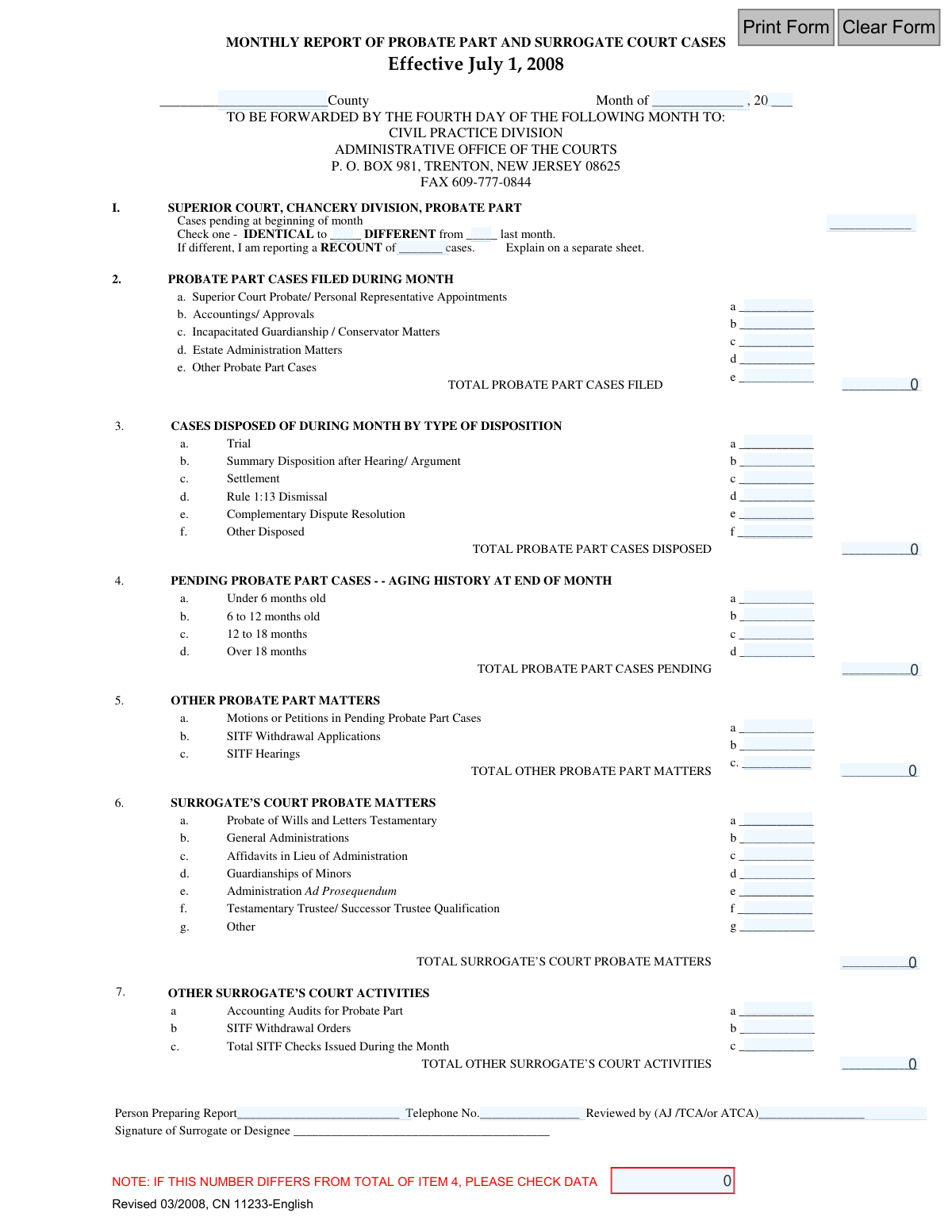
Yes! You can use AI to fill out Monthly Report of Probate Part and Surrogate Court Cases - Effective July 1, 2008

This form is a statistical report submitted monthly to the Administrative Office of the Courts in New Jersey. It documents the number of cases pending, filed, and disposed of within the Superior Court's Chancery Division, Probate Part, and the Surrogate's Court. The report helps the judiciary monitor caseloads, aging of cases, and various court activities to ensure efficient administration of justice. Today, this form can be filled out quickly and accurately using AI-powered services like Instafill.ai, which can also convert non-fillable PDF versions into interactive fillable forms.
CN 11233 is part of the New Jersey forms and surrogate court forms categories on Instafill.
Our AI automatically handles information lookup, data retrieval, formatting, and form filling.
It takes less than a minute to fill out CN 11233 using our AI form filling.
Securely upload your data. Information is encrypted in transit and deleted immediately after the form is filled out.

Form specifications

Form name: Monthly Report of Probate Part and Surrogate Court Cases - Effective July 1, 2008
Number of fields: 47
Number of pages: 1
Language: English
main-image

Instafill Demo: How to fill out PDF forms in seconds with AI

How to Fill Out CN 11233 Online for Free in 2026

Are you looking to fill out a CN 11233 form online quickly and accurately? Instafill.ai offers the #1 AI-powered PDF filling software of 2026, allowing you to complete your CN 11233 form in just 37 seconds or less.
Follow these steps to fill out your CN 11233 form online using Instafill.ai:
  1. 1 Navigate to Instafill.ai and upload or select the Monthly Report of Probate Part and Surrogate Court Cases form.
  2. 2 Use the AI assistant to enter the specific county, month, and year for the report at the top of the form.
  3. 3 Input the case statistics for the Superior Court, Chancery Division, Probate Part, including pending cases, new filings by type, dispositions, and the aging history of pending cases.
  4. 4 Fill in the data for 'Other Probate Part Matters' and the detailed breakdown of 'Surrogate’s Court Probate Matters'.
  5. 5 Complete the section on 'Other Surrogate’s Court Activities', such as accounting audits and SITF orders.
  6. 6 Enter the name and telephone number of the person preparing the report, and indicate who reviewed it, before adding the required signature.
  7. 7 Leverage Instafill.ai's AI review feature to double-check all calculations and data entries for accuracy before downloading the completed report for submission.

Our AI-powered system ensures each field is filled out correctly, reducing errors and saving you time.

Why Choose Instafill.ai for Your Fillable CN 11233 Form?

Speed

Complete your CN 11233 in as little as 37 seconds.

Up-to-Date

Always use the latest 2026 CN 11233 form version.

Cost-effective

No need to hire expensive lawyers.

Accuracy

Our AI performs 10 compliance checks to ensure your form is error-free.

Security

Your personal information is protected with bank-level encryption.

Frequently Asked Questions About Form CN 11233

This form is used by County Probate Part and Surrogate's Courts in New Jersey to report monthly case statistics to the Administrative Office of the Courts. It tracks case filings, dispositions, and pending caseloads for oversight purposes.

Court personnel within the County's Surrogate's Office or Superior Court, Chancery Division, Probate Part are responsible for preparing this report. It must be reviewed and signed by the Surrogate or a designated court administrator.

The report must be forwarded by the fourth day of the month following the reporting period. It should be sent to the Civil Practice Division, Administrative Office of the Courts, in Trenton, New Jersey, or faxed to the number provided on the form.

A recount is necessary if your starting number of pending cases for the month is different from the ending number you reported for the previous month. You must provide an explanation for this discrepancy on a separate sheet.

The total pending cases is calculated by taking the cases pending at the start of the month, adding the total cases filed (Section 2), and subtracting the total cases disposed of (Section 3). This calculated total should match the sum of the aging history in Section 4.

The form includes a note to check your data if these numbers differ. You must reconcile your figures for cases pending at the start, new filings, and dispositions to ensure the final pending count is accurate before submitting.

Section I pertains to cases handled in the Superior Court, Chancery Division, Probate Part, which often involve more complex or contested matters. Section VI covers more routine probate matters handled directly by the Surrogate's Court, such as probating wills and general administration.

SITF stands for the Surrogate's Intermingled Trust Fund. These sections are for reporting activities related to applications, hearings, and withdrawals from this specific fund.

The report must be signed by the Surrogate or their designee. It also requires the name of the person who prepared it and the name of the reviewing official (AJ, TCA, or ATCA).

Yes, services like Instafill.ai use AI to accurately auto-fill form fields, which can save time and reduce errors when completing repetitive monthly reports.

You can use a service like Instafill.ai to upload the PDF. It will convert the document into an interactive, fillable form that you can complete, save, and print online.

If you have a non-fillable or 'flat' PDF, tools like Instafill.ai can convert it into an interactive, fillable form. This allows you to type your information directly into the fields instead of printing and filling it out by hand.

A Rule 1:13 Dismissal refers to the dismissal of a case for lack of prosecution under New Jersey Court Rule 1:13-7. This typically happens when no action has been taken in a case for a specified period.

Compliance CN 11233
Validation Checks by Instafill.ai

1
Report Period Completeness
Validates that the 'Month' and 'Year' fields are both filled in to specify the reporting period. This is essential for chronological filing, historical data analysis, and comparing performance over time. A report without a specified period is ambiguous and cannot be correctly processed or archived.
2
County Name Presence
Ensures the 'County' field is not left blank. The county is the primary identifier for the reporting entity, and this information is critical for the Administrative Office of the Courts to aggregate data correctly by jurisdiction. A submission without a county name is unusable and would be rejected.
3
Core Caseload Consistency Check
Performs a critical logical validation to ensure the case flow numbers are consistent: (Cases pending at beginning) + (Total cases filed) - (Total cases disposed) must equal (Total cases pending at end). This check, highlighted on the form itself, is the most important for verifying the overall accuracy of the caseload data. A failure indicates a fundamental error in counting that must be investigated and corrected.
4
Total Filed Cases Summation
Verifies that the 'TOTAL PROBATE PART CASES FILED' field is the correct sum of the individual case types listed in items 2a through 2e. This check maintains the mathematical integrity of the report and prevents simple addition errors from skewing statistics on new filings. If the total is incorrect, the report is considered inaccurate and must be corrected.
5
Total Disposed Cases Summation
Validates that the 'TOTAL PROBATE PART CASES DISPOSED' field equals the sum of disposition types in items 3a through 3f. This ensures the data on case closures is arithmetically correct, which is vital for tracking court efficiency and workload. An incorrect total would lead to flawed analysis of judicial performance.
6
Total Pending Cases Summation
Confirms that the 'TOTAL PROBATE PART CASES PENDING' at the end of the month (Item 4) is the correct sum of the aging history sub-items (4a-4d). This check ensures the breakdown of pending cases by age is consistent with the reported total. Discrepancies here would indicate a miscalculation in case aging, impacting resource allocation decisions.
7
Beginning Pending Cases Recount Logic
Checks that if the 'DIFFERENT from last month' box is checked for beginning pending cases, then the 'RECOUNT' field must contain a number and an explanation must be provided. This rule ensures that any adjustments to the baseline pending count are explicitly declared and justified, maintaining a clear audit trail. Failure to provide a recount value and explanation would halt processing.
8
Non-Negative Integer Format for Case Counts
Ensures that all fields for reporting case numbers contain only non-negative integers. This prevents the entry of text, decimals, or negative values which are invalid for case counts and would cause calculation errors. This basic format validation is essential for data quality and the correct functioning of all subsequent summation and consistency checks.
9
Preparer Contact Information Completeness
Validates that both the 'Person Preparing Report' and 'Telephone No.' fields are filled out. This information is crucial for the Administrative Office of the Courts to contact the preparer directly if any questions or discrepancies arise during the review process. An incomplete submission would delay processing and require follow-up.
10
Telephone Number Format
Checks that the value entered in the 'Telephone No.' field conforms to a standard North American phone number format (e.g., 10 digits, with optional parentheses, spaces, or dashes). This ensures the provided number is valid and usable for communication. An improperly formatted number could prevent timely contact with the preparer to resolve issues.
11
Reviewer Identification Completeness
Ensures the 'Reviewed by (AJ /TCA/or ATCA)' field is completed. This confirms that a supervising authority has reviewed and approved the report, adding a layer of accountability and verifying its official status. A missing reviewer signature would render the report incomplete and unofficial.
12
Total Surrogate's Court Matters Summation
Verifies that the 'TOTAL SURROGATE’S COURT PROBATE MATTERS' field is the correct sum of the individual matter types listed in items 6a through 6g. This check maintains the mathematical integrity of the surrogate's court section of the report. An incorrect total would provide a flawed view of the surrogate's court workload.

Common Mistakes in Completing CN 11233

Calculation Mismatch in Pending Cases

This error occurs when the 'TOTAL PROBATE PART CASES PENDING' in Item 4 does not equal the starting pending cases (Item 1) plus new cases filed (Item 2 Total) minus cases disposed (Item 3 Total). This is a critical reconciliation failure that invalidates the report's integrity and often requires a full resubmission. To avoid this, double-check all calculations before submission; AI-powered tools like Instafill.ai can automatically perform these calculations and flag discrepancies to ensure accuracy.

Inconsistent Starting Case Count

Filers often report a number for 'Cases pending at beginning of month' (Item 1) that does not match the 'TOTAL PROBATE PART CASES PENDING' from the previous month's report. This happens due to manual data entry errors or failing to reference the prior report, breaking the month-over-month continuity. Always verify this number against the last submitted report to maintain accurate longitudinal data.

Incomplete Recount Justification

When the starting case count differs from the previous month's ending count, users check 'DIFFERENT' in Item 1 but forget to provide the 'RECOUNT' number and the required explanation on a separate sheet. This omission leaves a critical data discrepancy unexplained, leading to inquiries from the Administrative Office. To prevent this, ensure that any recount is fully documented with the new number and a detailed explanation attached to the submission.

Arithmetic Errors in Section Totals

Simple addition mistakes are common when calculating the 'TOTAL' for case filings (Item 2), dispositions (Item 3), aging history (Item 4), and other matters. These errors can happen due to manual calculation or rushing, and they undermine the reliability of the entire report. Using a calculator or a spreadsheet is a good practice, and advanced form-filling software can eliminate this risk by auto-summing the fields.

Misclassifying Case Types

Users frequently place cases into the wrong category, most often putting a specific case type like 'Incapacitated Guardianship' into the generic 'Other Probate Part Cases' line. This misclassification skews the detailed statistics needed for resource allocation and judicial planning. To avoid this, carefully review the definitions for each category (a, b, c, etc.) before entering numbers, ensuring each case is correctly categorized.

Missing Header Information

Submissions are often received without the 'County' and the specific 'Month' and 'Year' filled in at the top of the form. This basic omission makes the report anonymous and impossible to process, causing delays as the receiving office must contact the sender for clarification. Always complete the header section first to ensure the report is properly identified and logged.

Incomplete Authorization Section

The report is frequently submitted without the signature of the 'Surrogate or Designee' or the initials of the reviewer ('AJ /TCA/or ATCA'). This oversight renders the document unofficial and invalid for record-keeping purposes. Before sending, always ensure all required signature and review fields in the footer are completed to certify the report's authenticity.

Using Blanks Instead of Zeros

For categories with no activity during the month, filers may leave the line blank instead of entering a '0'. This creates ambiguity, as a blank field could mean the data is missing or that the count is zero. This forces the recipient to seek clarification, slowing down processing. The correct procedure is to explicitly enter '0' for any category with no cases to report.

Illegible Handwriting or Misaligned Text

Because this form is a non-fillable PDF, it is often printed and filled out by hand, resulting in illegible numbers that lead to data entry errors by the court office. Alternatively, using basic PDF editors can cause text to be misaligned with the input lines. To solve this, tools like Instafill.ai can convert flat PDFs into interactive, fillable forms, ensuring all entries are typed, legible, and perfectly aligned.

Incorrect Case Aging Calculation

In Item 4, cases are often placed in the wrong aging bracket due to miscalculation, especially for cases on the cusp (e.g., a case that is exactly 12 months old). This skews the data on case backlogs and processing times, which is critical for court management. To avoid this, use a precise method to calculate the age of each pending case from its filing date to the end of the reporting month.
Saved over 80 hours a year

“I was never sure if my IRS forms like W-9 were filled correctly. Now, I can complete the forms accurately without any external help.”

Kevin Martin Green

Your data stays secure with advanced protection from Instafill and our subprocessors

Robust compliance program

Transparent business model

You’re not the product. You always know where your data is and what it is processed for.

ISO 27001, HIPAA, and GDPR

Our subprocesses adhere to multiple compliance standards, including but not limited to ISO 27001, HIPAA, and GDPR.

Security & privacy by design

We consider security and privacy from the initial design phase of any new service or functionality. It’s not an afterthought, it’s built-in, including support for two-factor authentication (2FA) to further protect your account.

Fill out CN 11233 with Instafill.ai

Worried about filling PDFs wrong? Instafill securely fills monthly-report-of-probate-part-and-surrogate-court-cases-effective-july-1-2008 forms, ensuring each field is accurate.

Related forms by category

New Jersey forms State of New Jersey Alternate Benefit Program Withdrawal Request Acknowledgement Receipt, Horizon Blue Cross Blue Shield of New Jersey Applied Behavior Analysis Supplemental Information Form, State of New Jersey Application for Employment (Form DPF-663), New Jersey Judiciary Plea Form (Plea 01), Supplemental Plea Form for Certain Sexual Offenses: Megan’s Law/Parole Supervision for Life/Community Supervision for Life (Plea 05), Financial Questionnaire to Establish Indigency, New Jersey Judiciary Resource Family Information Form, Foreclosure Case Information Statement (FCIS) - Appendix XII-B2, New Jersey Judiciary Records Request Form, Superior Court of New Jersey, Application for Appeal and Order, FL Certification of Requested Background Checks for Kinship Legal Guardianship, Certification of Caregiver as to Knowledge of Identity and/or Location of Parents, FL Order Judgment for Kinship Legal Guardianship, New Jersey Judiciary Certification of Repair and Plea of Guilty, Uniform Summary Support Order (USSO), New Jersey Judiciary Volunteer Application (CN 10293), Application to Take the New Jersey Court Interpreter Oral Examination, New Jersey Judiciary Attorney Fee Arbitration Request, Order to Show Cause with Temporary Restraints Pursuant to Rule 4:52, Tax Court of New Jersey, State Tax Complaint · + 158 more →
surrogate court forms Petition for Letters of Administration (New York Surrogate's Court), Surrogates' Judiciary Records Request Form