Yes! You can use AI to fill out Motion and Order for Discharge From Probation

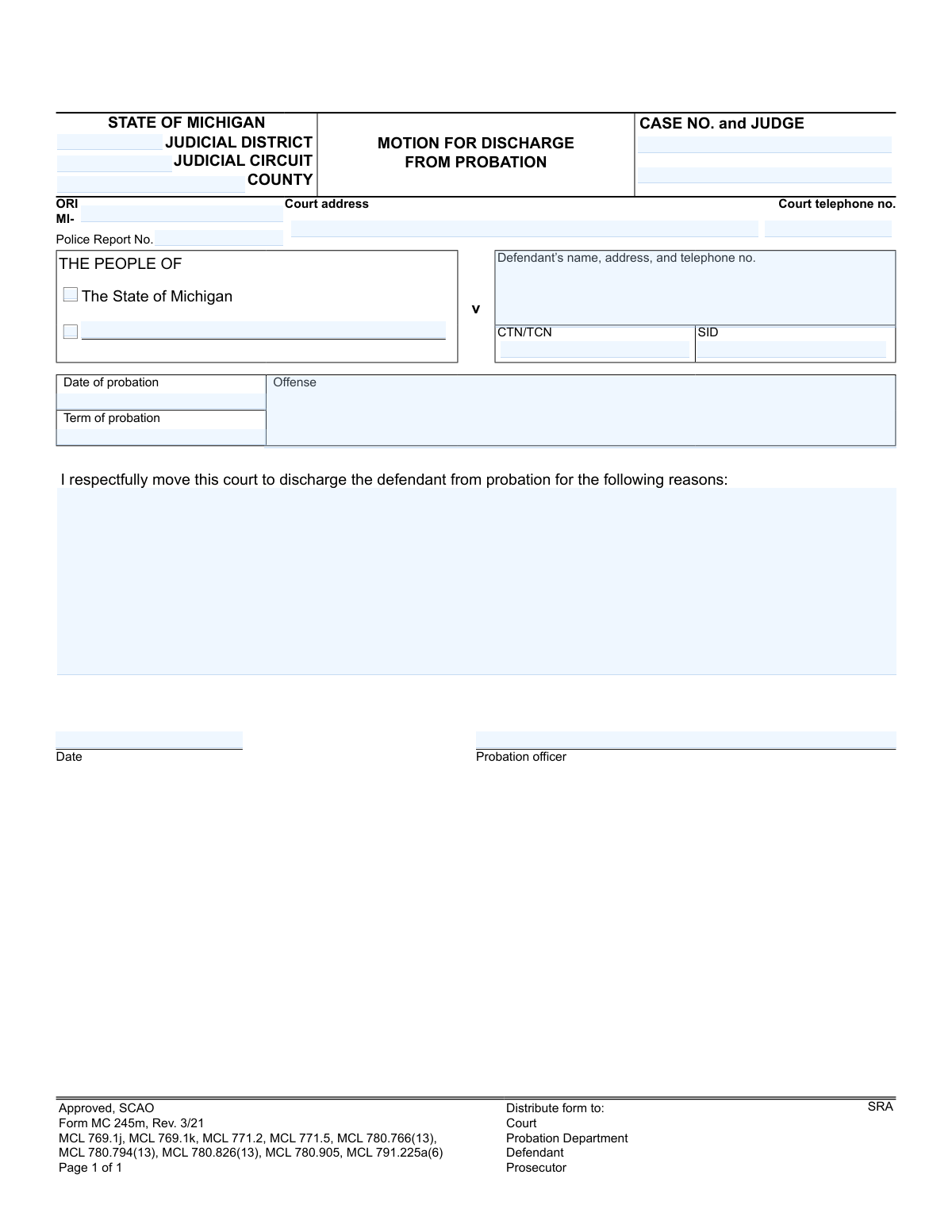
The Michigan Motion and Order for Discharge From Probation (Forms MC 245m and MC 245o) is a legal document used to formally request the end of a defendant's probationary period. The 'Motion' part is filed to argue for the discharge, while the 'Order' part is the judge's official decision, making it crucial for formally closing a probation case. Today, this form can be filled out quickly and accurately using AI-powered services like Instafill.ai, which can also convert non-fillable PDF versions into interactive fillable forms.
MC 245m / MC 245o is part of the Michigan court forms category on Instafill.
Our AI automatically handles information lookup, data retrieval, formatting, and form filling.
It takes less than a minute to fill out MC 245m / MC 245o using our AI form filling.
Securely upload your data. Information is encrypted in transit and deleted immediately after the form is filled out.

Form specifications

Form name: Motion and Order for Discharge From Probation
Number of fields: 62
Number of pages: 1
Language: English
main-image

Instafill Demo: How to fill out PDF forms in seconds with AI

How to Fill Out MC 245m / MC 245o Online for Free in 2026

Are you looking to fill out a MC 245M / MC 245O form online quickly and accurately? Instafill.ai offers the #1 AI-powered PDF filling software of 2026, allowing you to complete your MC 245M / MC 245O form in just 37 seconds or less.
Follow these steps to fill out your MC 245M / MC 245O form online using Instafill.ai:
  1. 1 Navigate to Instafill.ai and upload or select the MC 245m / MC 245o form.
  2. 2 Use the AI assistant to accurately input court and case details, including the judicial district, county, case number, and judge's name.
  3. 3 Provide the defendant's full name and contact information, along with details about the original offense and the probation term.
  4. 4 In the 'Motion' section, clearly state the reasons for requesting the discharge, such as the successful completion of all probation conditions or exemplary behavior.
  5. 5 Indicate if the defendant participated in specific programs like drug treatment court or veterans treatment court and whether they completed them successfully.
  6. 6 Carefully review all the information you've entered with the AI's help to ensure accuracy and completeness before finalizing the motion.
  7. 7 Download the completed motion, print it, and follow the court's procedures for filing it with the clerk and serving it to the prosecutor.

Our AI-powered system ensures each field is filled out correctly, reducing errors and saving you time.

Why Choose Instafill.ai for Your Fillable MC 245m / MC 245o Form?

Speed

Complete your MC 245m / MC 245o in as little as 37 seconds.

Up-to-Date

Always use the latest 2026 MC 245m / MC 245o form version.

Cost-effective

No need to hire expensive lawyers.

Accuracy

Our AI performs 10 compliance checks to ensure your form is error-free.

Security

Your personal information is protected with bank-level encryption.

Frequently Asked Questions About Form MC 245m / MC 245o

This form is used in Michigan to formally request (the 'Motion') and legally grant (the 'Order') the termination of a defendant's probation. It officially ends the supervision period and details the final status of the case.

Typically, the probation officer initiates and fills out the 'Motion' section to recommend a discharge. A judge then reviews the motion and completes and signs the 'Order' section, making the final decision.

Yes, the form has a provision for early discharge if the defendant's behavior warrants it. This recommendation is usually made by the probation officer and requires the judge's approval on the order.

You can be discharged from probation supervision even with outstanding financial obligations. The form specifies that any unfulfilled financial conditions can still be pursued and collected according to law.

The 'Motion' (MC 245m) is the formal request submitted to the court, usually by a probation officer, to end probation. The 'Order' (MC 245o) is the judge's binding decision that legally grants the discharge and closes the probationary period.

This means the court nullifies the original plea or finding of guilt, and the case is closed without a public criminal conviction. The court is required to maintain a nonpublic record of the matter.

The form requires key case details, including the court, county, case number, judge's name, and the defendant's name and address. It also needs specifics of the probation, such as the start date, term, and original offense.

HYTA is a Michigan law that allows eligible young offenders to have their criminal proceedings deferred and eventually dismissed upon successful completion of their sentence, including probation. This prevents a public criminal conviction.

Once the order is signed by the judge, copies are distributed to the Court, the Probation Department, the Defendant, the Prosecutor, and the SRA (State Repository Agency).

These are specialized court programs. The order will document whether you were ordered to attend one and if you successfully completed the program, which is a critical factor in the judge's decision to grant the discharge.

Yes, services like Instafill.ai use AI to accurately auto-fill form fields with your case and personal information. This can help save time and ensure the information is entered correctly.

You can upload the PDF of the form to the Instafill.ai platform. The service will identify all the fillable fields, allowing you to input your information quickly and then download the completed document.

You can use a tool like Instafill.ai, which is designed to convert flat, non-fillable PDFs into interactive forms. This allows you to easily type your information directly into the correct fields on the document.

Compliance MC 245m / MC 245o
Validation Checks by Instafill.ai

1
Case Number Presence and Format
This check ensures the 'CASE NO.' field is not empty and follows the expected format for the jurisdiction. The case number is a primary identifier for the legal proceeding, and its absence or incorrect format would make it impossible to file or retrieve the document. If this validation fails, the user should be prompted to enter a valid case number before submission.
2
Valid Date Format for All Date Fields
Verifies that all date fields, including 'Date of probation' (pdate), the motion 'Date' (date), and the order 'Date' (pdismiss), are entered in a valid format (e.g., MM/DD/YYYY) and represent real calendar dates. This is crucial for establishing an accurate timeline of events. A failed validation would prevent the user from proceeding until the date is corrected to a recognizable format.
3
Logical Date Sequence for Probation and Motion
This validation checks that the 'Date' of the motion is on or after the 'Date of probation'. A motion to discharge from probation cannot logically be dated before the probation period itself began. This check prevents chronological errors in the legal record, and a failure would require the user to correct one or both dates.
4
Mutually Exclusive Probation Completion Status
Ensures that only one of the checkboxes for 'were successfully completed' (sucesscheck) or 'were not successfully completed' (nosuccesscheck) can be selected. These two options are mutually exclusive and selecting both would create a logical contradiction in the court's findings. If a user tries to select both, the system should either prevent the second selection or display an error message.
5
Mutually Exclusive Treatment Court Outcome
For each treatment court program (Drug, Veterans, Mental Health), this check ensures that only one of the 'did successfully complete' or 'did not successfully complete' options is checked. For example, 'drugtctdidcheck' and 'dtctdidnotcheck' cannot both be selected. This prevents contradictory information about the defendant's program completion status, and a failure would require the user to select only one outcome.
6
Conditional Requirement for Treatment Court Outcome
If a specific treatment court program is indicated (e.g., 'Drug treatment court' is checked), this validation mandates that one of the corresponding outcome boxes ('did' or 'did not' complete) must also be checked. This ensures that if a program is mentioned, its outcome is also recorded, preventing incomplete or ambiguous information. A failure would prompt the user to specify the completion status for the selected program.
7
Defendant Information Completeness
Validates that the 'Defendant’s name, address, and telephone no.' field contains sufficient information, specifically checking for the presence of a name, a plausible address, and a phone number. This contact information is critical for all parties and for official notifications. If the field appears incomplete, the system should flag it for review or require more complete data.
8
ORI Field Format
This check verifies that the 'ORI' (Originating Agency Identifier) field begins with the 'MI-' prefix and is followed by the correct number and type of characters as per state guidelines. The ORI is a unique identifier for the law enforcement agency, and an incorrect format can lead to misrouting or rejection of the form. A validation failure would require the user to correct the ORI to match the standard format.
9
Court Telephone Number Format
Ensures the 'Court telephone no.' field is a valid 10-digit phone number, potentially with parentheses, spaces, or hyphens. This guarantees that the contact number for the court is usable and correctly formatted for official records. If the entry does not match a standard phone number pattern, the system will prompt for correction.
10
Logical Date Sequence for Motion and Order
This validation confirms that the judge's signature 'Date' on the order is on or after the 'Date' the motion was filed. A judge cannot order a discharge before the motion requesting it has been made. This check maintains the logical and legal sequence of events, and a failure would indicate a data entry error that must be corrected.
11
Required Motion Fields
Verifies that the 'Date' of the motion and the 'Probation officer' name are both filled in on the Motion for Discharge section. These fields are essential for identifying when the motion was made and by whom. An omission would render the motion incomplete, so the system should prevent submission until these required fields are populated.
12
Early Discharge Justification
This is a logical consistency check that verifies if the 'behavior warrants an early discharge' box is checked, the date of the motion is actually before the probation term would have naturally concluded. This requires calculating the end date from the 'Date of probation' and 'Term of probation'. This check ensures that the 'early discharge' claim is chronologically valid and not used erroneously.
13
Judge's Name Presence
Ensures the 'JUDGE' field is not empty. The judge's name is a critical piece of information for identifying the judicial officer presiding over the case and signing the order. Without this information, the document's authority and routing are compromised. A failure would block submission until a judge's name is entered.
14
CTN/TCN/SID Format Validation
Checks that the 'CTN/TCN/SID' fields adhere to the specific alphanumeric format and length defined by the state of Michigan. These unique identifiers are crucial for linking the court case to the defendant's criminal history record. An invalid format could cause the disposition to be rejected by the state's criminal justice information system, so correction is mandatory.

Common Mistakes in Completing MC 245m / MC 245o

Entering an Incorrect Case Number

Users frequently transpose digits or omit parts of the official case number. This is a critical error because the case number is the primary identifier used by the court to file the document. An incorrect number can lead to the motion being filed in the wrong case, lost, or rejected outright, causing significant delays in the discharge process. To avoid this, double-check the case number against official court documents from the original sentencing.

Providing Outdated Defendant Contact Information

The form requires the defendant's current name, address, and telephone number. People often fill this with old information out of habit or if they are filling it out on behalf of the defendant without confirming details. If the court cannot contact the defendant due to an old address or phone number, they could miss important notices, hearings, or the final order, potentially jeopardizing the discharge. Always verify the defendant's current contact details before submission.

Omitting Specific Court Identifiers

Fields such as 'JUDICIAL DISTRICT,' 'JUDICIAL CIRCUIT,' and 'COUNTY' are often left blank or filled incorrectly. These identifiers are essential for routing the form to the correct court and judge. Leaving them blank forces court clerks to manually look up the information, which slows down processing. Ensure you identify the specific court that has jurisdiction over the case and fill in all location-related fields accurately.

Confusing or Omitting Identification Numbers (CTN/SID)

The 'CTN/TCN' (Complaint Tracking Number/Tracking Control Number) and 'SID' (State Identification Number) fields are often misunderstood and left empty. These numbers link the court case to state and national criminal justice databases. Omitting them creates extra work for court staff and can delay the process of updating a person's official criminal record upon discharge. These numbers can be found on previous court documents or obtained from the court clerk's office.

Inaccurate Probation Dates or Term Length

Mistakes in the 'Date of probation' or 'Term of probation' fields are common. A filer might misremember the date or miscalculate the term, leading to a discrepancy with the court's official record. If the submitted dates suggest the motion is premature or don't align with the judgment, the motion will likely be denied, requiring a refiling at a later time. Always reference the original Judgment of Sentence to ensure these details are exact.

Prematurely Completing the 'Order' Section

This form contains both a 'Motion' (the request) and an 'Order' (the judge's decision). A very common mistake is for the filer to check boxes or fill in information in the 'IT IS ORDERED' section. This section is exclusively for the judge or magistrate to complete. Submitting a form with the 'Order' section pre-filled will result in its rejection, as it gives the appearance of attempting to dictate the court's decision.

Failing to Specify Reasons for the Motion

The motion section includes the phrase 'I respectfully move this court to discharge the defendant from probation for the following reasons:'. Filers sometimes leave this area blank, assuming the reason is self-evident. However, a justification is required, especially for an early discharge. Failing to provide a clear, concise reason (e.g., 'successful completion of all terms,' 'exemplary conduct') can lead to the motion being denied for insufficiency.

Incorrectly Checking Treatment Court Completion Status

In the 'Order' section, there are specific checkboxes for treatment courts (Drug, Veterans, Mental Health) with options for 'did' or 'did not' successfully complete. While this section is for the judge, a probation officer filling out the motion might be tempted to check these boxes to provide information. If they do, they might check the wrong box or create confusion, leading the court to return the form. The proper place to note this information is in the 'reasons' section of the motion itself.

Using a Generic or Vague Offense Description

When filling in the 'Offense' field, users may write a general term like 'DUI' or 'Assault' instead of the specific statutory citation or formal charge name. Courts require the precise offense as stated in the original judgment to ensure the correct record is being addressed. Using a vague description forces the clerk to cross-reference the case file, slowing the process. AI-powered form filling tools like Instafill.ai can help prevent this by storing and auto-filling the precise, correct information from previous documents.

Submitting a Non-Fillable, Poorly Scanned Form

Often, the only version of a form available online is a flat, non-fillable PDF. Users may print, fill it out by hand, and then scan it, resulting in a low-quality, illegible document that is difficult for the court to process. This can lead to data entry errors on the court's end or outright rejection. To avoid this, tools like Instafill.ai can convert non-fillable PDFs into interactive, fillable forms, ensuring the final submission is clean, legible, and professional.
Saved over 80 hours a year

“I was never sure if my IRS forms like W-9 were filled correctly. Now, I can complete the forms accurately without any external help.”

Kevin Martin Green

Your data stays secure with advanced protection from Instafill and our subprocessors

Robust compliance program

Transparent business model

You’re not the product. You always know where your data is and what it is processed for.

ISO 27001, HIPAA, and GDPR

Our subprocesses adhere to multiple compliance standards, including but not limited to ISO 27001, HIPAA, and GDPR.

Security & privacy by design

We consider security and privacy from the initial design phase of any new service or functionality. It’s not an afterthought, it’s built-in, including support for two-factor authentication (2FA) to further protect your account.

Fill out MC 245m / MC 245o with Instafill.ai

Worried about filling PDFs wrong? Instafill securely fills motion-and-order-for-discharge-from-probation forms, ensuring each field is accurate.