Yes! You can use AI to fill out Motion and Order Reopening Case after Bankruptcy
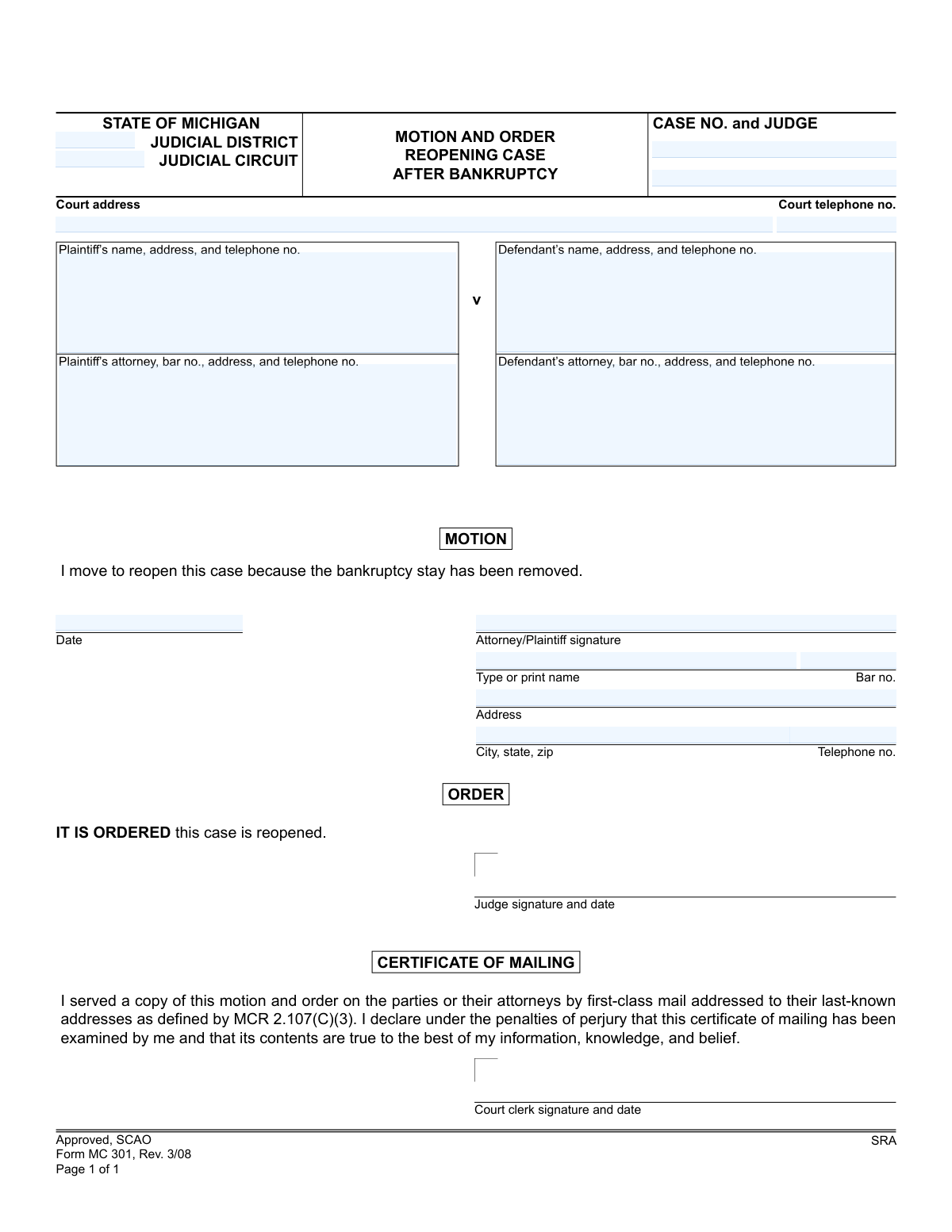
Form MC 301, the Motion and Order Reopening Case after Bankruptcy, is a legal document used in Michigan courts to resume legal proceedings that were previously halted due to a party filing for bankruptcy. This motion is crucial for plaintiffs to continue their case once the automatic bankruptcy stay is no longer in effect. Today, this form can be filled out quickly and accurately using AI-powered services like Instafill.ai, which can also convert non-fillable PDF versions into interactive fillable forms.
MC 301 is part of the
Michigan court forms category on Instafill.
Our AI automatically handles information lookup, data retrieval, formatting, and form filling.
It takes less than a minute to fill out MC 301 using our AI form filling.
Securely upload your data. Information is encrypted in transit and deleted immediately after the form is filled out.
Form specifications
| Form name: | Motion and Order Reopening Case after Bankruptcy |
| Number of fields: | 17 |
| Number of pages: | 1 |
| Language: | English |
More forms in Michigan court forms
Instafill Demo: How to fill out PDF forms in seconds with AI
How to Fill Out MC 301 Online for Free in 2026
Are you looking to fill out a MC 301 form online quickly and accurately? Instafill.ai offers the #1 AI-powered PDF filling software of 2026, allowing you to complete your MC 301 form in just 37 seconds or less.
Follow these steps to fill out your MC 301 form online using Instafill.ai:
- 1 Navigate to Instafill.ai and upload or select the MC 301 form.
- 2 Provide the court information, including the judicial district/circuit, case number, and judge's name.
- 3 Enter the full details for the plaintiff and their attorney, including names, addresses, and bar numbers.
- 4 Input the complete information for the defendant and their attorney.
- 5 Review the pre-filled motion statement and enter the date of the motion.
- 6 Sign the document electronically, type your name, and provide your contact details and bar number if applicable.
- 7 Download the completed form for filing with the court and serving on the other parties as required by court rules.
Our AI-powered system ensures each field is filled out correctly, reducing errors and saving you time.
Why Choose Instafill.ai for Your Fillable MC 301 Form?
Speed
Complete your MC 301 in as little as 37 seconds.
Up-to-Date
Always use the latest 2026 MC 301 form version.
Cost-effective
No need to hire expensive lawyers.
Accuracy
Our AI performs 10 compliance checks to ensure your form is error-free.
Security
Your personal information is protected with bank-level encryption.
Frequently Asked Questions About Form MC 301
This form is used to ask a Michigan court to reactivate a case that was previously paused (stayed) because one of the parties filed for bankruptcy. It is filed after the bankruptcy court has lifted the stay, allowing the original lawsuit to proceed.
The party who wants to continue the lawsuit, typically the plaintiff, or their attorney should complete and file this motion. You are essentially asking the court to pick the case back up where it left off.
You should file this form only after the automatic stay from the bankruptcy case has been lifted or terminated by the bankruptcy court. You will need proof of this, usually in the form of an order from the bankruptcy court.
You will need the original case number, the court's address, the judge's name, and the full names, addresses, and phone numbers for both the plaintiff and defendant. If attorneys are involved, their information and bar numbers are also required.
The reason for the motion is already pre-printed on the form. You simply need to enter the date, sign your name, and print your name and contact information in the designated spaces.
No, you should leave the 'ORDER' section completely blank. This section is reserved for the judge to sign, which officially grants your motion and reopens the case.
The court clerk completes and signs the 'CERTIFICATE OF MAILING' section. This is the court's official record that a copy of the signed order has been mailed to all parties in the case.
You must file the completed motion with the clerk of the court where the original case was filed. Ensure all case information, such as the case number and judge's name, is accurate to avoid delays.
After you file the motion, it will be reviewed by the judge. If approved, the judge will sign the order, the case will be officially reopened, and the court clerk will mail a copy of the signed order to all parties.
When someone files for bankruptcy, an 'automatic stay' legally pauses most lawsuits against them. This phrase means the bankruptcy court has granted permission for your specific lawsuit to continue, ending that temporary pause.
Yes, services like Instafill.ai use AI to help you accurately auto-fill form fields with your case and personal information. This can save time and help reduce the chance of making errors on the form.
To use Instafill.ai, you upload the MC 301 form to its platform. The AI will identify all the fillable fields, allowing you to enter your information once and have it placed correctly throughout the document for easy completion.
If you have a non-fillable or 'flat' PDF, you can use a tool like Instafill.ai. Simply upload the file, and the service will convert it into an interactive, fillable form that you can complete on your computer.
If you are representing yourself (pro se), you can leave the fields for 'Plaintiff’s attorney' blank. You will sign the motion as the 'Plaintiff' and provide your own contact information.
Compliance MC 301
Validation Checks by Instafill.ai
1
Case Number Format Validation
Verifies the 'case no' field follows the specific format required by Michigan courts, which typically includes the year, case type, and a sequence number. This is critical for linking the motion to the correct existing case file within the court's system. An incorrectly formatted case number will cause the filing to be rejected or misrouted, leading to significant delays.
2
Attorney Bar Number Format
Ensures that all attorney bar number fields begin with a 'P' followed by a sequence of digits, consistent with the Michigan State Bar format. This validation confirms that the attorney is identifiable and officially licensed to practice in the state. An invalid bar number suggests a data entry error or an unauthorized filer, which would invalidate the submission.
3
Motion Date Logical Check
Validates that the 'motion date' is a valid calendar date and is not set in the future. The date must be on or before the date of submission. This check ensures the document's timeline is logical and accurately reflects when it was signed, which is a fundamental requirement for legal documents.
4
Plaintiff and Defendant Identification Completeness
Confirms that the name and address for both the plaintiff and the defendant are fully provided. These fields are essential for identifying the primary parties of the case and ensuring proper notification. A motion lacking complete information for either party is considered incomplete and cannot be processed by the court.
5
Mover's Signature Presence
Checks that the 'attorney/plaintiff signature' field is not empty, verifying that a digital signature, image, or typed name conforming to e-filing rules is present. A signature is a legal requirement that attests to the filer's intent and the truthfulness of the motion's contents. An unsigned motion is legally void and will be rejected immediately.
6
Signature Name and Role Consistency
Cross-references the typed or printed name in the signature block with the names listed for the plaintiff and the plaintiff's attorney in the header. The signer must be one of these authorized individuals. This check prevents unauthorized filings and ensures the person signing the motion has the legal standing to do so.
7
Attorney Signature Bar Number Consistency
If the signer is an attorney, this check verifies that the bar number in the signature block matches the bar number listed for the plaintiff's attorney at the top of the form. This confirms the identity of the signing attorney and maintains consistency throughout the document. A mismatch could indicate a clerical error or a fraudulent signature, requiring correction.
8
Standard Phone Number Format
Validates that all telephone number fields on the form adhere to a standard 10-digit format, such as (XXX) XXX-XXXX or XXX-XXX-XXXX. Proper formatting ensures data integrity and allows court staff or other parties to make contact without issue. An invalid phone number can hinder communication and delay case proceedings.
9
Valid Michigan Judicial District and Circuit
Checks the 'judicial district' and 'judicial circuit' fields against an authoritative list of courts in Michigan. This ensures the motion is directed to the correct jurisdiction for the specified case number. Filing in the wrong court results in automatic rejection and forces the filer to start the process over.
10
Filer's Contact Information Completeness
Ensures that if a signature is present, the corresponding address, city/state/zip, and telephone number fields in the signature block are also filled out. This contact information is mandatory for the court and other parties to send official correspondence regarding the motion. Missing contact details will cause the filing to be deemed incomplete.
11
ZIP Code Format Validation
Verifies that the ZIP code within any address field is a valid 5-digit or 9-digit (ZIP+4) number. An accurate ZIP code is essential for the timely and successful delivery of mailed notices and documents. An incorrect format can lead to returned mail, missed deadlines, and negative consequences for the case.
12
Case Number and Judge Name Presence
Verifies that both the 'case no' and the 'judge' name fields are completed on the form. A motion cannot be processed without being linked to a specific case and the judge presiding over it. Omitting either of these critical identifiers will result in the document being returned to the filer for correction.
13
Attorney Representation Logic
Checks that if an attorney's name is provided for either the plaintiff or defendant, the corresponding bar number field is also filled. The bar number is the official identifier for a licensed attorney and is not optional if one is representing a party. This rule ensures the representation status is clear and verifiable.
Common Mistakes in Completing MC 301
The filer must provide the original case number that was stayed due to the bankruptcy filing. This mistake often happens when filers have multiple cases or have lost the original paperwork, leading them to guess or leave it blank. An incorrect case number will cause the motion to be rejected or misfiled, delaying the reopening of the case significantly. Using an AI-powered tool like Instafill.ai can help by storing and recalling correct case numbers from previous documents, preventing manual entry errors.
Michigan has District, Circuit, and Probate courts, each with different jurisdictions. Filers often enter the wrong court type, for example, listing a District Court for a case that was originally in Circuit Court. This error guarantees the motion will be filed in the wrong venue, leading to immediate rejection and lost time. It's crucial to verify the original court, and tools like Instafill.ai can help ensure consistency by autopopulating correct court details based on the case number.
Since the case was stayed for a bankruptcy proceeding, parties may have moved or changed contact details. Filers often use old information from the original complaint, which is no longer valid, leading to improper service and potential legal challenges. Always verify current addresses before filing. AI form fillers like Instafill.ai can maintain an updated contact database, ensuring the most recent and complete party information is used every time.
The State Bar of Michigan (SBM) number is a required, unique identifier for every practicing attorney that is often forgotten during manual data entry. A missing bar number can lead to the court clerk rejecting the filing for being incomplete, as it's essential for identifying the attorney of record. Instafill.ai can automatically populate the attorney's name, address, and correct bar number, eliminating the risk of this common omission.
Individuals representing themselves (pro se) are often confused by fields designated for attorneys, such as 'Plaintiff’s attorney, bar no.' and the signature block's 'Bar no.'. They might leave these sections blank or fill them out incorrectly, causing processing delays. While pro se filers should leave attorney-specific fields blank, using a tool like Instafill.ai can help by converting the non-fillable PDF into an interactive form and providing field-specific guidance.
A signature is a legal requirement that certifies the truthfulness of the motion, but filers frequently overlook the signature or date fields in their haste. An unsigned or undated motion is legally invalid and will be immediately rejected by the court clerk, halting the process. While digital signatures are not always accepted on these forms, AI tools like Instafill.ai can highlight mandatory signature and date fields as a final checklist item before printing.
Many people print this form and fill it out by hand, but illegible handwriting can render it unprocessable, leading to rejection. If the court clerk cannot decipher the case number, party names, or addresses, the filing will be rejected. Since this is a flat PDF, a tool like Instafill.ai can convert it into a fillable version, allowing you to type all information for perfect clarity.
The signature block at the bottom of the motion requires the filer's signature, printed name, address, and other details. People often assume this is redundant if they've already listed their information above and leave it partially blank. AI form-filling software like Instafill.ai can prevent this by automatically populating these repetitive fields with the correct, consistent information, ensuring the section is never left incomplete.
The form contains both a 'Motion' and an 'Order' section, and inexperienced filers sometimes mistakenly sign or write in the 'ORDER' section reserved for the judge. Writing in this area will invalidate the document and require a new, clean form to be submitted. Using an AI tool like Instafill.ai can help prevent this by clearly delineating user-fillable fields from sections that should be left blank.
Saved over 80 hours a year
“I was never sure if my IRS forms like W-9 were filled correctly. Now, I can complete the forms accurately without any external help.”
Kevin Martin Green
Your data stays secure with advanced protection from Instafill and our subprocessors
Robust compliance program
Transparent business model
You’re not the product. You always know where your data is and what it is processed for.
ISO 27001, HIPAA, and GDPR
Our subprocesses adhere to multiple compliance standards, including but not limited to ISO 27001, HIPAA, and GDPR.
Security & privacy by design
We consider security and privacy from the initial design phase of any new service or functionality. It’s not an afterthought, it’s built-in, including support for two-factor authentication (2FA) to further protect your account.
Fill out MC 301 with Instafill.ai
Worried about filling PDFs wrong? Instafill securely fills motion-and-order-reopening-case-after-bankruptcy forms, ensuring each field is accurate.