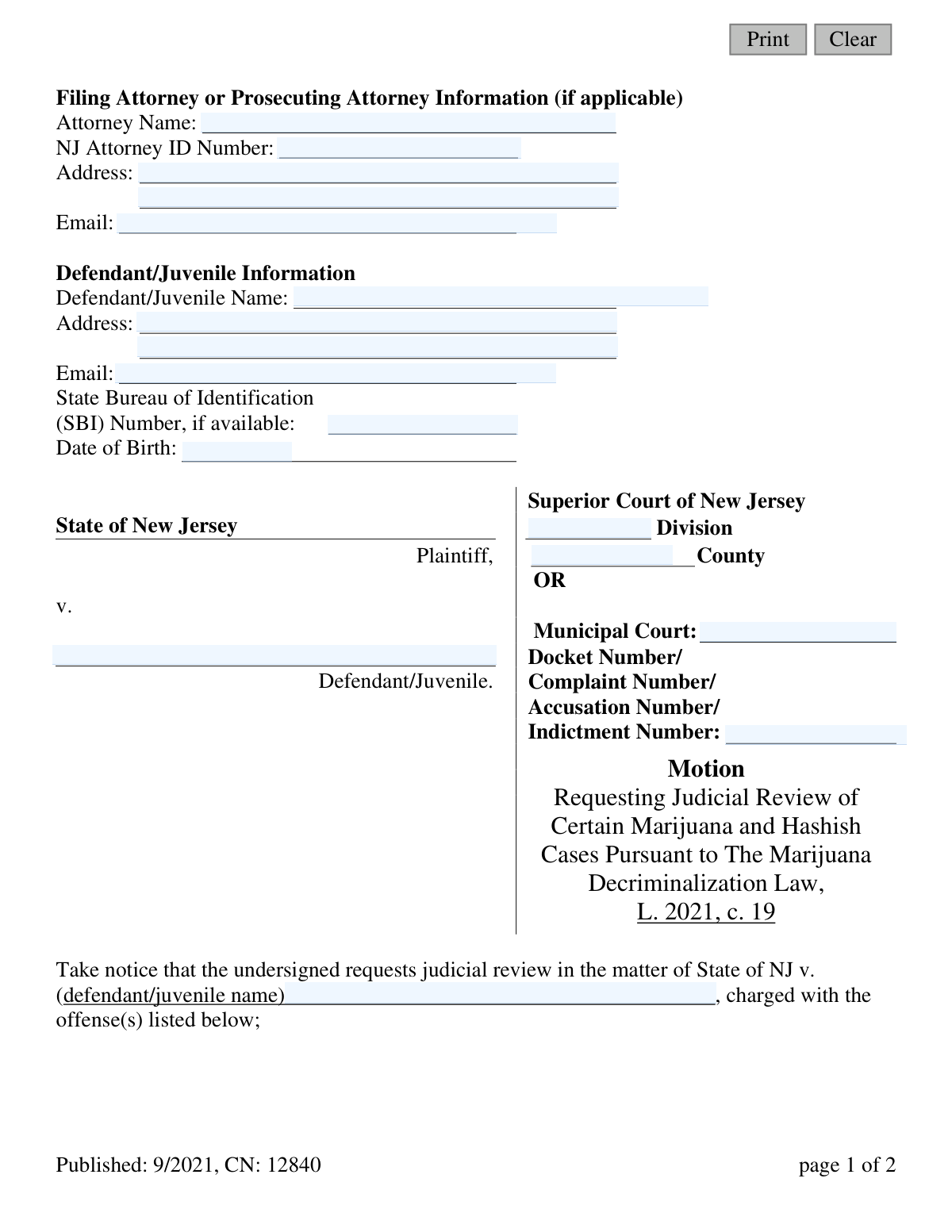
Yes! You can use AI to fill out Motion - Requesting Judicial Review of Certain Marijuana and Hashish Cases Pursuant to The Marijuana Decriminalization Law, L. 2021, c. 19
This form, CN 12840, is a legal motion filed in New Jersey to request a judicial review of specific marijuana and hashish cases in light of the Marijuana Decriminalization Law (L. 2021, c. 19). It allows individuals or their attorneys to ask the court to re-examine a case for potential dismissal, vacation, or other actions based on the new legislation. Today, this form can be filled out quickly and accurately using AI-powered services like Instafill.ai, which can also convert non-fillable PDF versions into interactive fillable forms.
Our AI automatically handles information lookup, data retrieval, formatting, and form filling.
It takes less than a minute to fill out CN 12840 using our AI form filling.
Securely upload your data. Information is encrypted in transit and deleted immediately after the form is filled out.
Form specifications
| Form name: | Motion - Requesting Judicial Review of Certain Marijuana and Hashish Cases Pursuant to The Marijuana Decriminalization Law, L. 2021, c. 19 |
| Number of fields: | 44 |
| Number of pages: | 1 |
| Language: | English |
Instafill Demo: How to fill out PDF forms in seconds with AI
How to Fill Out CN 12840 Online for Free in 2026
Are you looking to fill out a CN 12840 form online quickly and accurately? Instafill.ai offers the #1 AI-powered PDF filling software of 2026, allowing you to complete your CN 12840 form in just 37 seconds or less.
Follow these steps to fill out your CN 12840 form online using Instafill.ai:
- 1 Navigate to Instafill.ai and upload or select the 'Motion for Judicial Review of Marijuana Cases' form.
- 2 Use the AI assistant to fill in the Filing Attorney or Prosecuting Attorney information, if applicable.
- 3 Enter the Defendant/Juvenile's personal information, including name, address, date of birth, and State Bureau of Identification (SBI) number.
- 4 Specify the court details, including the Superior or Municipal Court, county, division, and the relevant docket or complaint number.
- 5 List the details of the offense(s) being reviewed, such as the date of offense, N.J.S.A. statute number, and disposition information.
- 6 Check the box that corresponds to the reason for your request (e.g., dismissal) and provide a detailed explanation if required.
- 7 Review all the auto-filled information for accuracy, then digitally sign and date the motion before downloading it for filing with the appropriate court.
Our AI-powered system ensures each field is filled out correctly, reducing errors and saving you time.
Why Choose Instafill.ai for Your Fillable CN 12840 Form?
Speed
Complete your CN 12840 in as little as 37 seconds.
Up-to-Date
Always use the latest 2026 CN 12840 form version.
Cost-effective
No need to hire expensive lawyers.
Accuracy
Our AI performs 10 compliance checks to ensure your form is error-free.
Security
Your personal information is protected with bank-level encryption.
Frequently Asked Questions About Form CN 12840
This form is used to request a judicial review of a past marijuana or hashish case based on New Jersey's Marijuana Decriminalization Law of 2021. It allows you to ask the court to dismiss, vacate, or otherwise review a prior charge or conviction.
This form should be completed by a defendant seeking to have their past marijuana or hashish case dismissed, or by a prosecuting attorney who believes a case should not have been dismissed under the new law.
You will need your personal information, the court and case number (Docket, Complaint, or Indictment Number), and details of the offense, including the date, statute number, and the case's final outcome (disposition).
An SBI (State Bureau of Identification) number is a unique ID for individuals with a record in New Jersey. The form requests this number 'if available,' so you can still submit the form if you do not know it.
You can contact the clerk of the court where your case was handled (either the Municipal or Superior Court) to request this information. Providing your full name and date of birth can help them locate your case file.
If you are the defendant seeking to clear your record, check the first box for dismissal or vacating the charge. Prosecutors would check the second box to argue a case should not be dismissed. Use 'Other' only for unique circumstances not covered by the first two options.
You must file the completed motion with the clerk of the court where your original case was heard. This will either be the specific Municipal Court or the Superior Court in the county where the offense occurred.
After filing, a judge will review your request in light of the new law. The court will then issue a decision, which could result in the dismissal or vacating of your case.
Disposition refers to the final outcome or resolution of your case. Common examples include 'Guilty,' 'Dismissed,' or 'Conditional Discharge.'
Yes, services like Instafill.ai use AI to help you accurately auto-fill form fields with your saved information. This can save time and help prevent common errors when completing the form.
You can use a service like Instafill.ai to upload the PDF and fill it out directly in your web browser. This allows you to easily type in your information, save your progress, and download the completed document for filing.
If you have a non-fillable or 'flat' PDF, you can use a tool like Instafill.ai to convert it into an interactive, fillable form. This makes it easy to type your information directly onto the form fields without having to print and write by hand.
Compliance CN 12840
Validation Checks by Instafill.ai
1
Defendant Name is Required
This check ensures the 'Defendant/Juvenile Name' field ('defName') is not empty. The defendant's name is the primary identifier for the individual whose case is under review, and the motion is invalid without it. Failure to provide this name will result in a validation error preventing form submission.
2
Case Identifier is Required
Validates that the 'Docket Number/Complaint Number/Accusation Number/Indictment Number' field ('caseIdNum') is populated. This number is essential for the court to locate the specific case file being referenced in the motion. The form cannot be processed without this critical identifier.
3
Reason for Review Selection
Ensures that at least one checkbox under the 'reason for your request' section ('reason') is selected. The court must know the legal basis for the review, whether it's for dismissal, to contest a dismissal, or for another reason. If no reason is selected, the request is ambiguous and cannot be acted upon.
4
Conditional 'Other' Reason Detail
This check verifies that if the 'Other' checkbox is selected as the reason for review, the corresponding 'reasonOtherDetail' text area is not empty. This is crucial because 'Other' implies a non-standard request that requires a detailed explanation for the judge to consider. An empty detail field would make the 'Other' selection meaningless.
5
Valid Date of Birth
Validates that the 'Date of Birth' field ('defBirthDt') contains a complete and logical date, such as in MM/DD/YYYY format. The check also ensures the date is in the past and not a future date. This prevents data entry errors and helps confirm the identity of the defendant.
6
Logical Offense and Disposition Dates
This validation compares the 'Date of Offense' ('offDt') and 'Date of Disposition' ('dispDt') for each listed offense. It ensures that the Date of Disposition is on or after the Date of Offense. A case disposition cannot logically occur before the offense was committed, and this check prevents erroneous data entry.
7
NJ Attorney ID Format
Checks that the 'NJ Attorney ID Number' ('attyIdNum'), if provided, conforms to the specific format issued by the New Jersey state bar. This ensures the attorney is correctly identified and their credentials can be verified. An incorrectly formatted ID could lead to processing delays or rejection.
8
Valid Email Address Format
Verifies that any value entered into the 'Email' fields ('attyEmail', 'defEmail') follows the standard email address format (e.g., '[email protected]'). This is important for ensuring that any electronic communication or case notifications are sent to a valid destination. An invalid format will trigger an error.
9
At Least One Offense is Listed
Ensures that the filer has provided details for at least one offense, including the 'Date of Offense' ('offDt') and 'N.J.S.A. Statute Number' ('statutedNum1'). A motion requesting review of offenses must specify which offenses are being contested. A submission with no listed offenses is incomplete and cannot be processed.
10
Court Jurisdiction Specified
This check ensures that the filer has identified the correct court by providing either the Superior Court information ('typeCounty' and 'div') or the 'Municipal Court' name ('muni'). Without this information, the motion cannot be routed to the correct jurisdiction for review. The form should require one or the other, but not neither.
11
Statute Number Format
Validates that the 'N.J.S.A. Statute Number' field entries match the expected format for New Jersey statutes (e.g., 2C:35-23.1). This ensures accuracy in legal filings, as referencing an incorrect or improperly formatted statute could invalidate the motion or cause it to be reviewed under the wrong legal standard.
12
Disposition Date Requires Disposition
This logical check ensures that if a 'Date of Disposition' ('dispDt1', 'dispDt2', etc.) is entered for an offense, the corresponding 'Disposition' text field ('disp1', 'disp2', etc.) is also filled out. A date of disposition is meaningless without knowing what the actual disposition was. This check prevents incomplete or ambiguous records.
Common Mistakes in Completing CN 12840
Users often enter the wrong docket, complaint, or indictment number, or leave it partially blank. This happens due to misreading old documents or confusing different case identifiers. An incorrect case number is a critical error that will prevent the court from locating the case file, leading to immediate rejection or significant delays in processing the motion. To avoid this, double-check all original court documents for the exact number and format.
The form requests the SBI number 'if available,' leading many to skip it even when it could be found on prior legal documents. This number is a unique identifier crucial for correctly identifying the defendant and their records, especially when common names are involved. Failing to provide it can slow down the review process as court staff must manually search for the correct person, potentially causing delays or confusion. Always locate this number on prior legal documents to ensure a smooth review.
Applicants frequently misstate or provide an incomplete New Jersey Statutes Annotated (N.J.S.A.) number for the offense they want reviewed. This statute number is the legal foundation of the motion, and an error here can lead the court to review the wrong charge or dismiss the motion for being legally insufficient. It is crucial to copy the statute number exactly as it appears on the original complaint or judgment of conviction to ensure accuracy.
The form requires the filer to specify whether the case was in Superior Court OR a specific Municipal Court, but not both. A common error is to fill out both sections, fill out the wrong one, or leave both blank. This creates ambiguity and forces court clerks to guess where to route the motion, causing delays or misfiling. To prevent this, review the original case documents to confirm the exact court where the case was adjudicated and only fill in the corresponding section.
The table for offense details requires the date of offense, statute, disposition, and date of disposition. Filers often leave columns blank, especially the 'Disposition' and 'Date of Disposition' fields, even when the information is available. This incomplete data makes it impossible for the court to understand the case's history and determine if it's eligible for review, potentially leading to a denial. It is essential to fill out every applicable column for each offense listed to provide a complete picture for the judicial review.
The form provides checkboxes and a text area to explain the reason for the request. A frequent mistake is simply checking a box, like 'Should be dismissed' or 'Other,' without providing any supporting facts or arguments in the text area below. The court needs context to understand why the request is being made, and a blank explanation for 'Other' is grounds for rejection. Always provide a clear, concise explanation in the 'Please provide reason(s)' section to support your selection and strengthen your motion.
It is a simple but surprisingly common and fatal oversight for filers to submit the motion without a signature or date. An unsigned legal document is invalid and has no legal effect, so the court will reject it outright without reviewing the contents. This forces the filer to resubmit the entire motion, causing unnecessary and significant delays. Always perform a final check to ensure the signature and current date are present before filing.
The defendant's name on the motion might not exactly match the name used in the original court records, especially if there are maiden names, aliases, or simple misspellings involved. This discrepancy can cause significant problems for court clerks trying to locate the case file. The name used on the motion must be identical to the one on the original complaint or indictment to ensure the correct record is pulled for review. AI-powered form fillers like Instafill.ai can help maintain consistency by saving and auto-filling personal data.
Fields like 'Date of Birth,' 'Date of Offense,' and 'Date of Disposition' can cause confusion, leading to inconsistent or invalid formats like DD-MM-YYYY instead of MM/DD/YYYY. This can cause data entry issues on the court's end or lead to misinterpretation of key dates, which are critical for determining eligibility. Since this form is a non-fillable PDF, an AI tool like Instafill.ai can convert it into a fillable version with fields that enforce correct date formatting, preventing such errors.
Saved over 80 hours a year
“I was never sure if my IRS forms like W-9 were filled correctly. Now, I can complete the forms accurately without any external help.”
Kevin Martin Green
Your data stays secure with advanced protection from Instafill and our subprocessors

Robust compliance program
Transparent business model
You’re not the product. You always know where your data is and what it is processed for.
ISO 27001, HIPAA, and GDPR
Our subprocesses adhere to multiple compliance standards, including but not limited to ISO 27001, HIPAA, and GDPR.
Security & privacy by design
We consider security and privacy from the initial design phase of any new service or functionality. It’s not an afterthought, it’s built-in, including support for two-factor authentication (2FA) to further protect your account.
Fill out CN 12840 with Instafill.ai
Worried about filling PDFs wrong? Instafill securely fills motion-requesting-judicial-review-of-certain-marijuana-and-hashish-cases-pursuant-to-the-marijuana-decriminalization forms, ensuring each field is accurate.