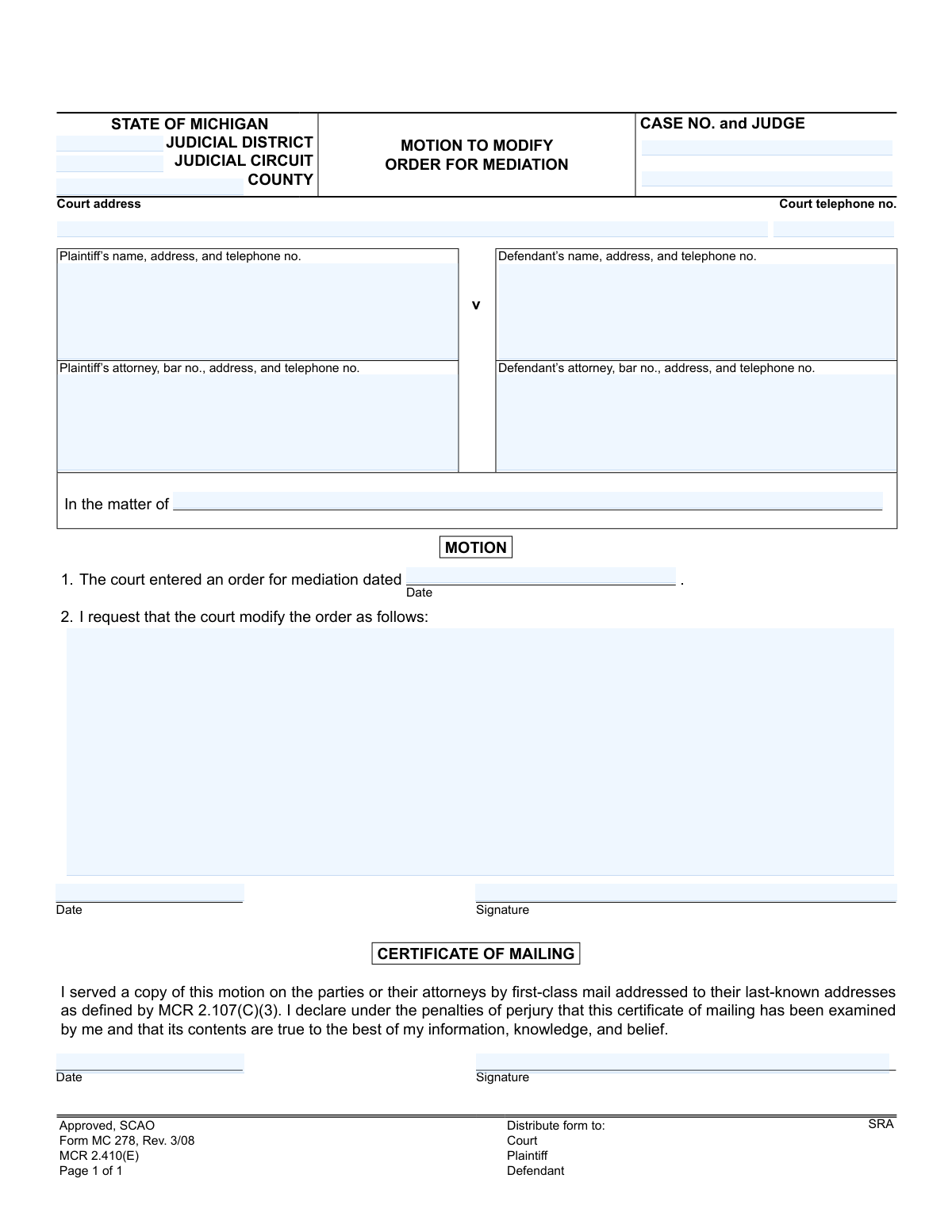
Yes! You can use AI to fill out State of Michigan, Form MC 278, Motion to Modify Order for Mediation
The Motion to Modify Order for Mediation, Form MC 278, is a formal request submitted to a Michigan court to alter the terms of a previously established mediation order. Parties in a case use this form to propose changes to the mediator, timeline, or other specifics of the mediation process. Completing this form accurately is crucial for ensuring the court considers the requested modifications. Today, this form can be filled out quickly and accurately using AI-powered services like Instafill.ai, which can also convert non-fillable PDF versions into interactive fillable forms.
MC 278 is part of the
Michigan court forms category on Instafill.
Our AI automatically handles information lookup, data retrieval, formatting, and form filling.
It takes less than a minute to fill out MC 278 using our AI form filling.
Securely upload your data. Information is encrypted in transit and deleted immediately after the form is filled out.
Form specifications
| Form name: | State of Michigan, Form MC 278, Motion to Modify Order for Mediation |
| Number of fields: | 18 |
| Number of pages: | 1 |
| Language: | English |
More forms in Michigan court forms
Instafill Demo: How to fill out PDF forms in seconds with AI
How to Fill Out MC 278 Online for Free in 2026
Are you looking to fill out a MC 278 form online quickly and accurately? Instafill.ai offers the #1 AI-powered PDF filling software of 2026, allowing you to complete your MC 278 form in just 37 seconds or less.
Follow these steps to fill out your MC 278 form online using Instafill.ai:
- 1 Navigate to Instafill.ai and upload or select the MC 278, Motion to Modify Order for Mediation form.
- 2 Provide the court and case information, including the judicial district, circuit, county, case number, and judge's name.
- 3 Enter the full names, addresses, and contact information for the plaintiff, defendant, and their respective attorneys.
- 4 Specify the date of the original court order for mediation that you are requesting to modify.
- 5 Clearly write out the specific changes you are requesting the court to make to the mediation order.
- 6 Review all entered information for accuracy, then digitally sign and date the motion and the Certificate of Mailing.
- 7 Download the completed form to file with the court and serve copies to the other parties as required.
Our AI-powered system ensures each field is filled out correctly, reducing errors and saving you time.
Why Choose Instafill.ai for Your Fillable MC 278 Form?
Speed
Complete your MC 278 in as little as 37 seconds.
Up-to-Date
Always use the latest 2026 MC 278 form version.
Cost-effective
No need to hire expensive lawyers.
Accuracy
Our AI performs 10 compliance checks to ensure your form is error-free.
Security
Your personal information is protected with bank-level encryption.
Frequently Asked Questions About Form MC 278
This form is used to formally request that a Michigan court change the terms of a previously issued order for mediation. This could include asking for a new mediator, a different deadline, or other adjustments.
Either the plaintiff or the defendant in a legal case can complete and file this form if they believe a change to the court-ordered mediation is necessary.
You will need your court case number, the judge's name, the date of the original mediation order, and the names and addresses of all parties and their attorneys.
In the section asking how you want to modify the order, you can request changes like extending the mediation deadline, appointing a different mediator, or changing the location of the mediation. Be specific about the modification you are seeking.
Yes, this section is required. By signing it, you are declaring under penalty of perjury that you have sent a copy of the completed motion to the other party or their attorney.
You must file the original motion with the court clerk at the address listed on the form. You also need to mail a copy to the opposing party or their attorney as stated in the Certificate of Mailing.
Processing times vary depending on the court's schedule. The judge will review the motion and may issue a new order or schedule a hearing to discuss the request.
While you can file this motion yourself (pro se), legal procedures can be complicated. Consulting with an attorney is often recommended to ensure your request is properly presented.
The other party has the right to file a response with the court objecting to your motion. The judge will then consider both arguments before making a final decision.
Yes, services like Instafill.ai use AI to help you accurately auto-fill form fields with your case and personal information, which saves time and helps prevent errors.
Simply upload the MC 278 form to the Instafill.ai platform. The AI will make the form interactive, allowing you to easily type in your information, save your progress, and download the completed PDF.
Instafill.ai can convert flat, non-fillable PDFs into interactive forms. Just upload your version of the form, and the platform will make it possible for you to type directly into the fields.
This field is often used for specific case types like probate or family law matters involving minors. If your case is a standard civil lawsuit, you can typically leave this field blank unless instructed otherwise by the court.
Compliance MC 278
Validation Checks by Instafill.ai
1
Case Number Presence and Format
This check ensures the 'caseno' field is not empty and follows the expected format for the specified judicial circuit. The case number is critical for associating the motion with the correct legal case file. If the case number is missing or incorrectly formatted, the motion cannot be filed or processed, leading to rejection by the court clerk.
2
Required Party Information
Validates that both the Plaintiff's name ('pname') and the Defendant's name ('dname') are provided. These fields are essential for identifying the primary parties involved in the case. A motion submitted without clear identification of both plaintiff and defendant is incomplete and will be rejected as it's unclear to which case it applies.
3
Original Mediation Order Date Format
Ensures the 'meddate' field contains a valid, parseable date. This date establishes the context for the motion to modify. An invalid or missing date makes it impossible to verify which mediation order is being referenced, causing processing delays or rejection of the motion.
4
Reason for Modification Completeness
This check verifies that the 'modifyreason' field is not empty and contains text. This field is the core of the motion, explaining the justification for the requested change. A blank or missing reason renders the motion meaningless and will result in an automatic denial or rejection for being incomplete.
5
Motion Signature Date Presence
Validates that the 'sigdate' field is populated with a valid date. The signature date legally marks when the motion was affirmed by the filer. Failure to provide a signature date invalidates the signature and the motion itself, as it lacks a key element for legal authenticity.
6
Certificate of Mailing Date Presence
Ensures the 'certdate' field contains a valid date, confirming when the document was mailed to the opposing party. This date is crucial for legal notification requirements and calculating response deadlines. An absent mailing date can lead to legal challenges regarding proper service and may invalidate the filing.
7
Logical Date Sequence: Mediation vs. Motion
This check compares the 'meddate' (mediation order date) with the 'sigdate' (motion signature date) to ensure the signature date is on or after the mediation order date. It is logically impossible to sign a motion to modify an order before that order exists. A failure indicates a data entry error that must be corrected for the document to be legally coherent.
8
Logical Date Sequence: Motion vs. Mailing
Verifies that the 'certdate' (certificate of mailing date) is on or after the 'sigdate' (motion signature date). A party cannot certify that they have mailed a document before they have officially signed it. This check prevents logical inconsistencies and potential legal challenges regarding the timing of service.
9
Signature Presence
Checks that the 'sig' and 'certsig' fields, representing the filer's signature and the certificate of mailing signature, are not empty. In a digital system, this confirms an action like checking a box or typing a name was taken. Unsigned legal documents are invalid and have no legal effect, so this check is critical for the motion's validity.
10
Court Telephone Number Format
Validates that the 'cttelno' field, if provided, matches a standard telephone number format (e.g., (XXX) XXX-XXXX). This ensures the court's contact information is usable and correctly recorded. Incorrectly formatted numbers can cause communication failures if the court or other parties need to contact the filing court.
11
Required Court Jurisdictional Information
Ensures that the 'district', 'circuit', and 'County' fields are all filled out. This information is fundamental for routing the document to the correct court and jurisdiction. Submitting a form without this information will result in immediate rejection as the filing location cannot be determined.
12
Attorney Information Consistency
This check ensures that if an attorney's name ('pattyname' or 'dattyname') is provided, the corresponding party's name ('pname' or 'dname') is also present. An attorney must be associated with a specific party in the case. This prevents orphaned data and ensures clear representation, avoiding confusion for the court and opposing counsel.
Common Mistakes in Completing MC 278
Filers often mistype the case number or misspell the judge's name due to carelessness or relying on memory. An incorrect case number can lead to the motion being rejected or filed in the wrong case file, causing significant delays and potential legal complications. To avoid this, carefully double-check the case number and judge's name against official court documents from the same case.
This form has two separate signature lines: one for the motion and a second for the Certificate of Mailing. Many people sign the first and completely overlook the second. An unsigned certificate invalidates your proof of service, which can be a basis for the opposing party to object or for the court to deny the motion for procedural failure.
In the section detailing the requested modification, filers often write ambiguous statements like "need more time" or "change the mediator." The court cannot act on an unclear request, which will result in denial or a request for clarification, wasting time and resources. Be explicit: state exactly what part of the order you want to change and what you want it changed to, such as "Extend the mediation completion deadline from May 1, 2024, to June 15, 2024."
The form requires the exact date of the original mediation order that is being modified. Filers may forget this date, leave it blank, or guess, which undermines the motion's entire basis. An incorrect date can lead the court clerk to reject the filing or the judge to question the motion's validity, so always refer to the original court order to find the exact date it was entered.
It is surprisingly common for filers, especially those representing themselves, to mix up the Plaintiff and Defendant fields. This creates confusion for the court clerk and judge, and can lead to the motion being rejected for correction, delaying the legal process. Always verify who initiated the lawsuit (the Plaintiff) and who is responding (the Defendant) by looking at previous court filings.
When listing attorney details, filers often forget to include the state bar number (bar no.), which is a unique identifier required by the court for official correspondence. Omitting the bar number, full address, or phone number can delay communication and processing of the motion. Ensure all information for both your attorney and the opposing party's attorney is complete and accurate as it appears on official court records.
Since this is a standard court form, it is often a non-fillable PDF that people print and complete by hand. Poor or rushed handwriting can make names, dates, and case numbers impossible for the court clerk to read accurately. This can lead to rejection of the filing or critical data entry errors in the court's system. To prevent this, use a tool like Instafill.ai that can convert the non-fillable PDF into a typed, fillable version for a clean and legible result.
Filers sometimes assume the court knows its own location and leave the Judicial District, Circuit, and County fields empty. However, these fields are essential for routing the document correctly within the court system, especially in larger counties with multiple courts. Leaving them blank can cause the document to be misfiled or returned, leading to unnecessary delays.
Signing the Certificate of Mailing is a sworn statement that you have sent copies to the other parties; however, some filers forget to perform the actual mailing. This violates procedural rules and the other party's right to due process. Failure to serve can lead to the motion being dismissed, as the other party must be given a chance to be notified and respond.
The 'In the matter of' field is part of the official case caption and can be confusing. While it often contains the Plaintiff vs. Defendant names, in some case types like family law, it has a specific format (e.g., 'In the matter of the marriage of...'). Using the wrong caption can cause filing confusion or rejection. It's best to copy the exact case caption from a previous order in the same case. AI-powered tools like Instafill.ai can help by remembering and correctly populating case caption details across related documents.
Saved over 80 hours a year
“I was never sure if my IRS forms like W-9 were filled correctly. Now, I can complete the forms accurately without any external help.”
Kevin Martin Green
Your data stays secure with advanced protection from Instafill and our subprocessors
Robust compliance program
Transparent business model
You’re not the product. You always know where your data is and what it is processed for.
ISO 27001, HIPAA, and GDPR
Our subprocesses adhere to multiple compliance standards, including but not limited to ISO 27001, HIPAA, and GDPR.
Security & privacy by design
We consider security and privacy from the initial design phase of any new service or functionality. It’s not an afterthought, it’s built-in, including support for two-factor authentication (2FA) to further protect your account.
Fill out MC 278 with Instafill.ai
Worried about filling PDFs wrong? Instafill securely fills state-of-michigan-form-mc-278-motion-to-modify-order-for-mediation forms, ensuring each field is accurate.