
Instafill.ai
7 days free
AI form filling · 36 fields · 1 page · done in seconds

Yes! You can use AI to fill out State of Michigan, Form MC 325, Request for Hearing on a Motion

Don't type 36 fields by hand. Tell our AI about yourself, or upload a document you already have, and it fills every field in seconds. You check it, then download, print or sign.
7 days free, then $19.99/month · Cancel anytime
AI fills it, no typingEncrypted, never used to train AICancel in two clicks
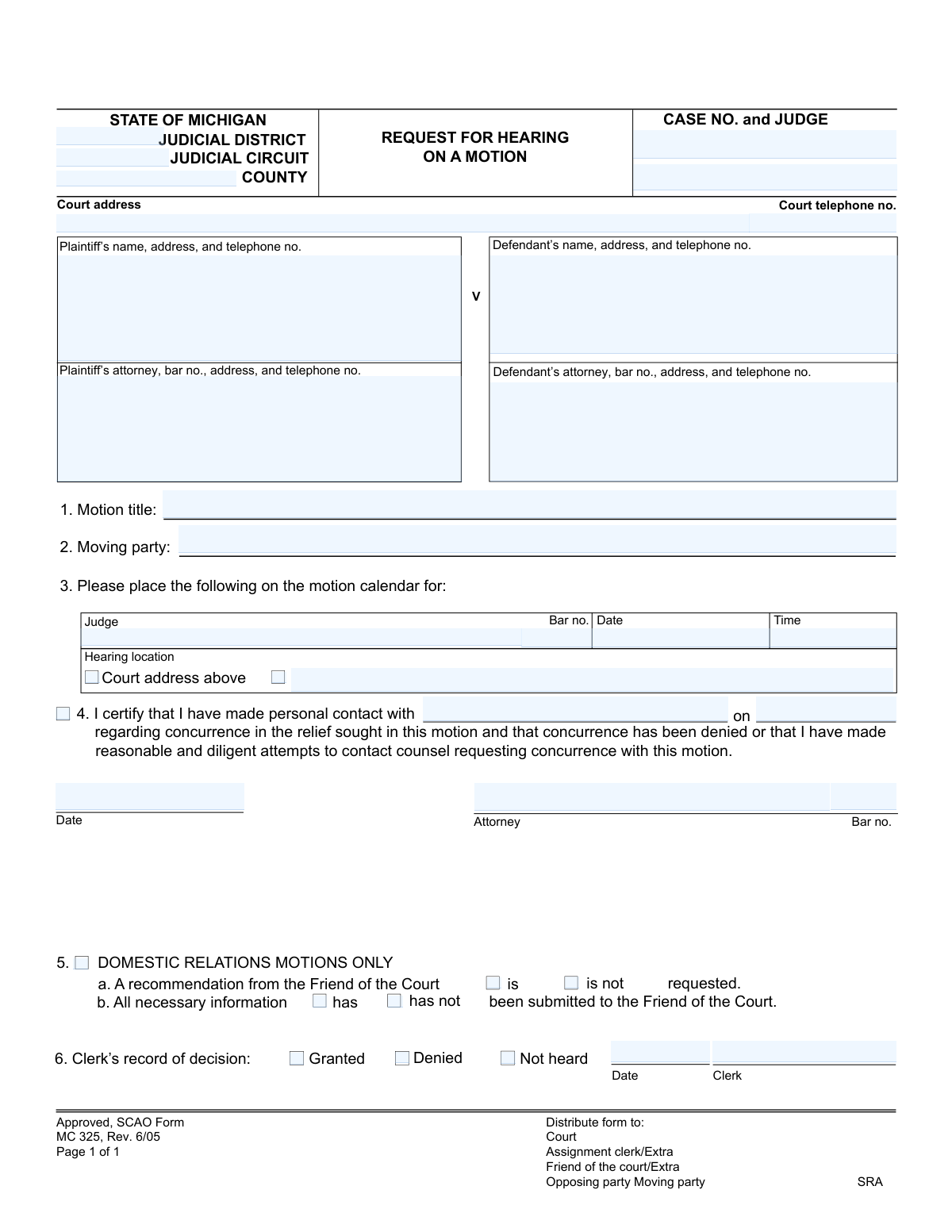
State of Michigan, Form MC 325, Request for Hearing on a Motion, page 1
Basic · 35/100Form Complexity Index

The AI does the filling. You just check it.

No typing into boxes, nothing to install.

Tell the AI about youAnswer a few questions in plain words, or upload a document you already have. That is all the typing there is.
AI fills every field in secondsIt puts each answer in the right box on every page, checkboxes included.
Check it and downloadReview every field, change anything, then download, print or sign the PDF.

What this form asks for

The AI fills all of it, from your answers or your documents.

The MC 325 form is a legal document used in the State of Michigan's judicial system to formally request a court hearing for a previously filed motion. It ensures that all parties are properly notified and allows the court to schedule time for arguments to be heard by a judge. Today, this form can be filled out quickly and accurately using AI-powered services like Instafill.ai, which can also convert non-fillable PDF versions into interactive fillable forms.
Fillable fields36
Pages1
Form Complexity IndexBasic, 35/100

The AI checks your answers before you download

13 checks built for this form, so a wrong date or a missing answer is caught before anyone else sees it.

Case Number Format and Presence

This check ensures the 'CASE NO.' field is not empty and conforms to the standard Michigan case number format. The case number is the primary identifier linking this motion to the correct court file. If the number is missing or incorrect, the document cannot be filed, leading to processing delays and potential rejection by the court clerk.

Required Motion Title

Validates that the 'Motion title' field is filled in. This title is critical as it briefly explains the nature of the motion to the judge, opposing counsel, and court staff. A missing title would make the form ambiguous and likely cause it to be returned to the filer for correction.

Moving Party Identification

This check verifies that the 'Moving party' field is completed and, if possible, cross-references the name against the plaintiff and defendant fields. It is essential to know which party is requesting the hearing for proper case management and notification. Failure to identify the moving party makes the request invalid.

Attorney Bar Number Validity

Ensures that if an attorney's name is provided, the corresponding 'Bar no.' field is also filled and follows the state's specific format (e.g., a 'P' prefix followed by numbers). This is crucial for verifying the attorney's credentials and authority to practice before the court. An invalid or missing bar number can lead to the rejection of the filing.

Future Hearing Date

This validation confirms that the 'Date' for the hearing in section 3 is a valid date set in the future. A hearing cannot be scheduled for a past date, and this check prevents simple data entry errors that would make the request impossible to fulfill. If the date is in the past, the user must be prompted to select a future date.

Valid Hearing Time Format

Checks that the 'Time' field for the hearing in section 3 is entered in a recognizable time format (e.g., HH:MM AM/PM). Proper formatting is necessary for the court's scheduling system to correctly docket the hearing. An invalid format could lead to scheduling errors or the hearing not being set at all.

And 7 more checks
  • Certification of Concurrence Attempt
  • Logical Date Sequence in Certification
  • Consistent Attorney Information
  • Conditional Completion of Domestic Relations Section
  • At Least One Party Must Be Identified
  • Valid Phone Number Format
  • Hearing Location Selection

Let AI fill out your MC 325

No typing. Every field filled in seconds, checked, ready to sign.

7 days free, then $19.99/month · Cancel anytime

How to Fill Out MC 325 Online for Free in 2026

What the AI walks you through.

  1. Navigate to Instafill.ai and upload or select the MC 325, Request for Hearing on a Motion form.
  2. Use the AI assistant to input the court, case number, and judge's information.
  3. Provide the names, addresses, and attorney details for both the plaintiff and the defendant.
  4. Specify the title of the motion, identify the moving party, and propose a date and time for the hearing.
  5. Complete the certification section, confirming contact with the opposing party regarding the motion.
  6. For domestic relations cases, indicate whether a Friend of the Court recommendation is requested.
  7. Review all the auto-filled information for accuracy, then download the completed form for filing with the court.

Common Mistakes in Completing MC 325

The ones the AI is built to catch.

Incorrect or Incomplete Case Number
Filers often enter the case number in an incorrect format or omit parts of it. This happens due to unfamiliarity with the court's specific numbering convention. An incorrect case number can lead to the motion being filed in the wrong case, rejected by the clerk, or significantly delayed. Always double-check the case number against previous court documents and ensure it matches the required format exactly.
Vague Identification of the Moving Party
In Section 2, 'Moving party,' individuals sometimes write ambiguous terms like 'the undersigned' instead of clearly stating 'Plaintiff' or 'Defendant.' This ambiguity forces court staff to cross-reference other information, slowing down the process. A clear identification is necessary for the court and opposing counsel to immediately understand who is filing the motion, preventing potential delays or rejection. Always specify whether the Plaintiff or Defendant is the moving party.
Incomplete Certification of Concurrence
Section 4 requires the filer to certify they have contacted the opposing party to see if they agree to the motion. Many filers, especially those without legal representation, misunderstand or skip this step. Failure to properly complete this section, including the name of the person contacted and the date, can result in the court refusing to hear the motion. Always attempt to contact the opposing party and meticulously document the attempt on the form.
Mishandling the Domestic Relations Section
Filers frequently make errors in Section 5, which applies only to domestic relations cases like divorce or custody. They may either fill it out for a non-domestic case or, more critically, forget to complete it for a relevant case. Omitting this section in a domestic relations matter can delay the required involvement of the Friend of the Court, stalling case progress. Carefully read the section header and only complete it if your case is a domestic relations matter.
Missing Attorney Bar Number
Attorneys or their staff often forget to include their bar number in the party information sections and next to their signature. The bar number is a unique identifier essential for the court to verify an attorney's standing and for proper record-keeping. Its absence can cause processing delays as the clerk's office must look it up, potentially delaying the hearing date. AI-powered form fillers like Instafill.ai can help prevent this by saving and auto-populating recurring information like bar numbers.
Submitting an Illegible Handwritten Form
This form is often distributed as a non-fillable PDF, leading many to fill it out by hand. Illegible handwriting can cause critical data entry errors by the court clerk, leading to misdirected notices, incorrect records, or outright rejection of the filing. To avoid this, it is best to use a tool like Instafill.ai, which can convert flat PDFs into fillable forms, ensuring all entries are typed, clear, and professional.
Incorrectly Completing the Clerk's Section
A common error by self-represented litigants is attempting to fill out Section 6, 'Clerk’s record of decision.' This section is strictly for internal court use by the clerk to record the outcome of the hearing. A filer who mistakenly checks 'Granted' or 'Denied' will have their form rejected and returned for correction, causing unnecessary delays. Filers should always leave this entire section blank.
Using a Vague or Non-Descriptive Motion Title
In Section 1, filers may use a generic title like 'Motion' or 'Request for Hearing.' This is insufficient as the title must inform the court and opposing party of the specific action being requested. A vague title causes confusion and requires court staff to read the entire motion to understand its purpose, delaying scheduling. Always use a clear and specific title, such as 'Defendant's Motion for Summary Disposition' or 'Plaintiff's Motion to Compel Discovery.'
Omitting the Assigned Judge's Name
The form requires the judge's name in the case caption at the top and potentially again in Section 3 for scheduling. Filers often forget to include the name of the judge assigned to their case. This omission forces the clerk to look up the information, which can delay the scheduling of the hearing or lead to it being scheduled with the wrong judicial officer. Always verify the assigned judge from prior case documents and enter the name in all required fields.
Missing Signature or Date
The signature and date below Section 4 are crucial as they certify the filer's statements, particularly the effort to seek concurrence. An unsigned or undated form is legally invalid and will be immediately rejected by the court clerk. This simple oversight can cause significant delays, requiring the entire form to be refiled. It is essential to perform a final review to ensure the form is signed and dated before submission.

Frequently Asked Questions About MC 325


Is it really free for 7 days?
Yes. You pay $0 today. Cancel before Nov 10 and you are never charged. Keep it, and it is $19.99 a month for 5 fills of your MC 325.
Can I fill other forms too?
This plan is for your MC 325: your own AI agent fills it as often as 5 times a month. To fill other forms and upload your own, choose a Professional plan from your account.
How do I cancel?
From your account, in two clicks, any time. No email, no call.
How does the AI fill out MC 325?
You answer a few questions in plain words, or upload a document you already have. The AI reads what you give it and puts each answer into the right field of MC 325, on every page, in seconds. It checks the answers against the form's own rules, and you review and change anything before you download, print or sign.
What happens to my information?
It is encrypted in transit and at rest, and it is never used to train AI.
How complex is MC 325 to fill out?
MC 325 has a Form Complexity Index of 35 out of 100, in the basic tier: 36 fillable fields across 1 page. Instafill.ai's AI fills it in under a minute, with every field there for you to review before you download.
What is the purpose of the 'Request for Hearing on a Motion' form (MC 325)?
This form is used to officially ask the court to schedule a date and time for a judge to hear arguments and make a decision on a motion you have filed in a Michigan court case.
Who needs to fill out this form?
The party in a lawsuit (or their attorney) who has filed a motion and wants a judge to rule on it must fill out this form to get a hearing scheduled on the court's calendar.
What does it mean to seek 'concurrence' in Section 4?
It means you must contact the opposing party to ask if they agree with what you are asking for in your motion. This is a required step to see if the hearing can be avoided if both sides agree.
What if I can't reach the other party to ask for concurrence?
If you cannot reach them, you must certify that you have made 'reasonable and diligent attempts' to contact them. You should be prepared to explain these attempts to the court.
How do I choose a date and time for the hearing in Section 3?
You should contact the assigned judge's clerk or check the court's local rules to find out the specific days and times the judge hears motions. Do not simply pick a random date.
When do I need to fill out Section 5 for 'Domestic Relations Motions'?
You only complete this section if your case involves family law matters like divorce, custody, or child support. It is used to indicate whether a recommendation from the Friend of the Court is requested.
What information do I need to have ready to fill out this form?
You will need your court case number, the judge's name, the exact title of your motion, and the names and addresses for all plaintiffs, defendants, and their attorneys.
After I fill out the form, where does it go?
You must file the original with the court clerk and send copies to the opposing party and any other required persons, such as the Friend of the Court, as noted in the form's distribution list.
What if I am representing myself and don't have an attorney or a bar number?
You can still file this form. Simply enter your own name, address, and phone number in the attorney sections and leave the bar number field blank.
Can AI tools help me fill out this form?
Yes, services like Instafill.ai use AI to accurately auto-fill repetitive information like your case number, party names, and addresses, which saves time and helps prevent errors.
How can I use Instafill.ai to complete this form online?
Simply upload the MC 325 form to the Instafill.ai platform. The AI will identify the fields, allowing you to quickly enter your case details and download the completed, ready-to-file document.
The PDF version of this form I found isn't fillable. What can I do?
You can use a service like Instafill.ai, which can convert any flat, non-fillable PDF into an interactive form that you can easily fill out on your computer, save, and print.
Who is the 'moving party' mentioned in Section 2?
The 'moving party' is the person or party who filed the motion and is now requesting the hearing. This would be you, if you are the one filling out this form.
Encrypted in transit and at restNever used to train AIDelete your forms any time

Get your MC 325 filled out by AI

$0 today. Cancel before Nov 10 and you pay nothing.

7 days free, then $19.99/month · Cancel anytime