Yes! You can use AI to fill out State of Michigan, Form MC 442, Final Report and Accounting (Receivership Estate)

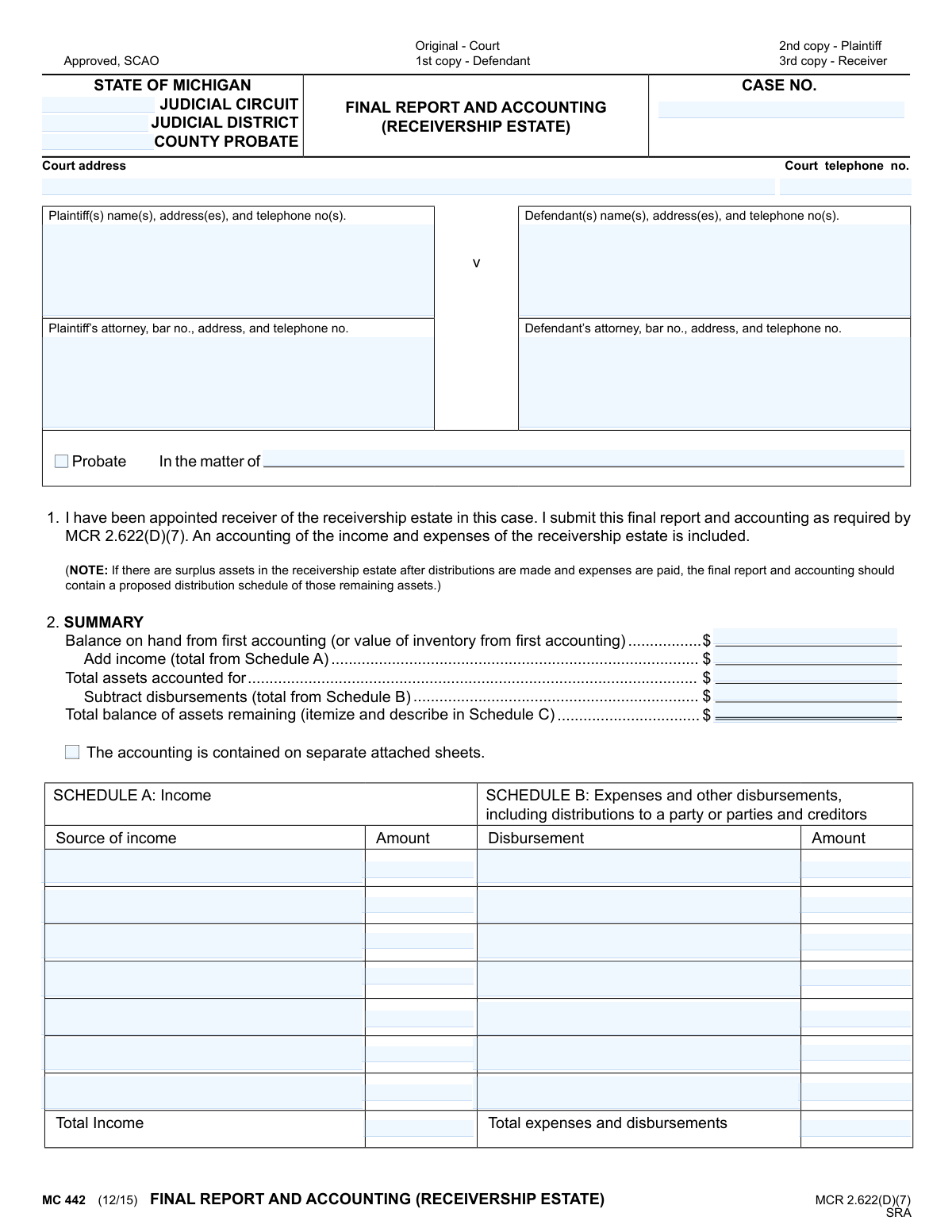
The MC 442, Final Report and Accounting (Receivership Estate), is a legal document required by Michigan courts under MCR 2.622(D)(7). It is used by a court-appointed receiver to provide a comprehensive summary of the estate's finances, including all income, expenses, and remaining assets at the conclusion of the receivership. This report is crucial for ensuring transparency and proper closure of the estate's financial matters. Today, this form can be filled out quickly and accurately using AI-powered services like Instafill.ai, which can also convert non-fillable PDF versions into interactive fillable forms.
MC 442 is part of the Michigan court forms category on Instafill.
Our AI automatically handles information lookup, data retrieval, formatting, and form filling.
It takes less than a minute to fill out MC 442 using our AI form filling.
Securely upload your data. Information is encrypted in transit and deleted immediately after the form is filled out.

Form specifications

Form name: State of Michigan, Form MC 442, Final Report and Accounting (Receivership Estate)
Number of fields: 78
Number of pages: 1
Language: English
main-image

Instafill Demo: How to fill out PDF forms in seconds with AI

How to Fill Out MC 442 Online for Free in 2026

Are you looking to fill out a MC 442 form online quickly and accurately? Instafill.ai offers the #1 AI-powered PDF filling software of 2026, allowing you to complete your MC 442 form in just 37 seconds or less.
Follow these steps to fill out your MC 442 form online using Instafill.ai:
  1. 1 Navigate to Instafill.ai and upload or select the MC 442, Final Report and Accounting (Receivership Estate) form.
  2. 2 Provide the court and case information, including the judicial circuit/district, case number, and the names and addresses of the plaintiff(s) and defendant(s).
  3. 3 Complete the summary section by entering the balance from the first accounting, total income from Schedule A, and total disbursements from Schedule B.
  4. 4 Use the AI-powered tools to accurately list all sources of income in Schedule A and all expenses, disbursements, and distributions in Schedule B.
  5. 5 Itemize all remaining assets and their corresponding values in Schedule C to determine the final balance of assets remaining.
  6. 6 Carefully review all entered information for accuracy, then have the receiver (or authorized agent) sign and date the report and the Certificate of Mailing.
  7. 7 Download the completed form to print and serve copies to the court, plaintiff, defendant, and receiver as indicated.

Our AI-powered system ensures each field is filled out correctly, reducing errors and saving you time.

Why Choose Instafill.ai for Your Fillable MC 442 Form?

Speed

Complete your MC 442 in as little as 37 seconds.

Up-to-Date

Always use the latest 2026 MC 442 form version.

Cost-effective

No need to hire expensive lawyers.

Accuracy

Our AI performs 10 compliance checks to ensure your form is error-free.

Security

Your personal information is protected with bank-level encryption.

Frequently Asked Questions About Form MC 442

This form, MC 442, is used by a court-appointed receiver to provide a final summary of all financial activities within a receivership estate. It details all income received, expenses paid, and any assets that remain at the conclusion of the receivership.

The court-appointed receiver for the estate, or their authorized agent, is responsible for completing, signing, and filing this final report with the court.

You will need complete records of all income, expenses, and distributions for the receivership estate. You also need the case number, court details, and contact information for all parties involved, including the plaintiff, defendant, and their attorneys.

Yes, you must attach separate sheets detailing the accounting of income (Schedule A), expenses (Schedule B), and remaining assets (Schedule C). Be sure to indicate the total number of attached pages on the form.

Start with the balance from your first accounting, add the total income from Schedule A, and then subtract the total disbursements from Schedule B. The result is the total balance of assets remaining, which must be itemized in Schedule C.

The form indicates that the detailed accounting is on separate sheets. You should create detailed lists for Schedule A (Income) and Schedule B (Expenses) on separate pages, attach them, and enter only the total amounts on the main form.

If there are surplus assets remaining after all expenses are paid, your final report must include a proposed schedule for distributing those assets to the appropriate parties as determined by the court.

The original signed form must be filed with the court. As indicated on the form, copies must be sent to the plaintiff and the defendant, and you should keep a copy for your own records as the receiver.

This section is your sworn statement certifying that you have sent a complete copy of the final report and all its attachments to the parties or their attorneys. You must sign and date this section to confirm you have properly served the documents.

Yes, services like Instafill.ai use AI to accurately auto-fill form fields from your saved data, which can save significant time and reduce errors. This is especially useful for repetitive information like case details and party information.

You can use a service like Instafill.ai to upload the PDF and fill it out electronically. The platform allows you to type directly into the fields, add signatures, and then download the completed form for printing and filing.

If you have a non-fillable or 'flat' PDF, you can upload it to a tool like Instafill.ai. It can convert the static form into an interactive, fillable version, allowing you to easily complete it on your computer.

Schedule A lists all sources of income to the estate, Schedule B lists all expenses and disbursements paid out from the estate, and Schedule C provides an itemized list of any assets that are left over after all transactions are complete.

Compliance MC 442
Validation Checks by Instafill.ai

Common Mistakes in Completing MC 442

Mathematical Errors in the Accounting Summary

The summary in Section 2 requires a precise calculation: (Balance from first accounting + Total Income) - Total Disbursements = Total balance of assets remaining. A common mistake is a simple arithmetic error, which immediately invalidates the entire report and calls the receiver's diligence into question. This leads to rejection and requires a corrected resubmission. To avoid this, meticulously double-check all calculations before finalizing the report, or use software that performs the calculations automatically.

Failing to Itemize Schedules A, B, and C

Receivers sometimes provide only total figures for income, expenses, and remaining assets without the required itemized breakdown in the schedules. The court needs a detailed trail of every transaction, not just a summary. An incomplete schedule will result in the report being returned for more detail, delaying the closing of the receivership. Always provide a full, descriptive list for every entry in Schedules A, B, and C, attaching additional sheets if necessary.

Incomplete or Confused Signatures

This form has two distinct signature sections: one for the receiver attesting to the report's accuracy and another for the Certificate of Mailing. A frequent error is signing only one section, or signing both with the same date when the actions occurred on different days. An unsigned Certificate of Mailing invalidates the proof of service, potentially forcing the process to start over. Ensure both sections are signed and dated appropriately based on when the report was finalized and when it was mailed.

Incorrect Case and Court Information

Entering the wrong Case Number, Judicial Circuit, or County Probate is a critical error that can cause the document to be misfiled or rejected outright. This often happens when transcribing information hastily from other documents. Such a mistake can lead to significant delays and missed deadlines. Always verify this information against official court notices or the case file itself; AI-powered form filling tools like Instafill.ai can help by storing and accurately auto-filling this recurring information across all case documents.

Omitting the Proposed Distribution Schedule

The instructional note under Section 1 explicitly requires a proposed distribution schedule if there are surplus assets remaining after expenses. Receivers often overlook this note and fail to include the required schedule. This omission makes the final report incomplete, preventing the court from approving the final distribution and closing the estate. If there is any balance remaining, you must attach a separate document detailing how you propose to distribute it.

Using Vague Descriptions for Income and Expenses

In Schedules A and B, entries like "Income" or "Miscellaneous Expense" are insufficient and will be flagged by the court. The purpose of the accounting is transparency, which requires specific details for every transaction. Vague entries suggest poor record-keeping and will lead to requests for clarification, delaying approval. Always use clear, specific descriptions, such as "January Rent from 123 Main St." or "Payment to ABC Utilities for electricity bill."

Missing Attachments and Supporting Documentation

The form is a summary, with the core details contained in attached sheets. A common mistake is forgetting to include these attachments or incorrectly stating the total number of attached pages. Without the supporting documentation, the report is unsubstantiated and will be considered incomplete by the court. Before submitting, create a checklist to ensure all schedules, statements, and other required documents are attached and that the page count on the form is correct.

Omitting Attorney Bar Numbers

The form specifically requests the bar number for both the plaintiff's and defendant's attorneys, yet this information is frequently left blank. The bar number is a unique identifier essential for the court's record-keeping and verification processes. Omitting it creates extra work for court clerks and can cause minor processing delays. This information should be gathered at the start of the case and can be saved in tools like Instafill.ai to automatically populate on all future forms.

Submitting an Illegible Handwritten Form

This legal document is often distributed as a non-fillable PDF, leading many to print it and fill it out by hand. This frequently results in illegible entries, cramped writing, and a generally unprofessional appearance, which can lead to data entry errors by court staff or outright rejection. To avoid this, use a tool to convert the document into a fillable format. For instance, Instafill.ai can take a flat PDF like this, make it digitally fillable, and ensure all entries are clear, properly formatted, and professional.

Mismatch Between Summary and Schedule Totals

A glaring error is when the total income listed in the Section 2 summary does not match the sum of all items in Schedule A, or when the summary's disbursement total doesn't match Schedule B. This inconsistency immediately signals a flawed report to the court reviewer. It often happens from last-minute changes to a schedule without updating the main summary. To prevent this, ensure that any change in the schedules is immediately reflected in the summary section, or use a spreadsheet to track totals before transferring them to the form.
Saved over 80 hours a year

“I was never sure if my IRS forms like W-9 were filled correctly. Now, I can complete the forms accurately without any external help.”

Kevin Martin Green

Your data stays secure with advanced protection from Instafill and our subprocessors

Robust compliance program

Transparent business model

You’re not the product. You always know where your data is and what it is processed for.

ISO 27001, HIPAA, and GDPR

Our subprocesses adhere to multiple compliance standards, including but not limited to ISO 27001, HIPAA, and GDPR.

Security & privacy by design

We consider security and privacy from the initial design phase of any new service or functionality. It’s not an afterthought, it’s built-in, including support for two-factor authentication (2FA) to further protect your account.

Fill out MC 442 with Instafill.ai

Worried about filling PDFs wrong? Instafill securely fills state-of-michigan-form-mc-442-final-report-and-accounting-receivership-estate forms, ensuring each field is accurate.