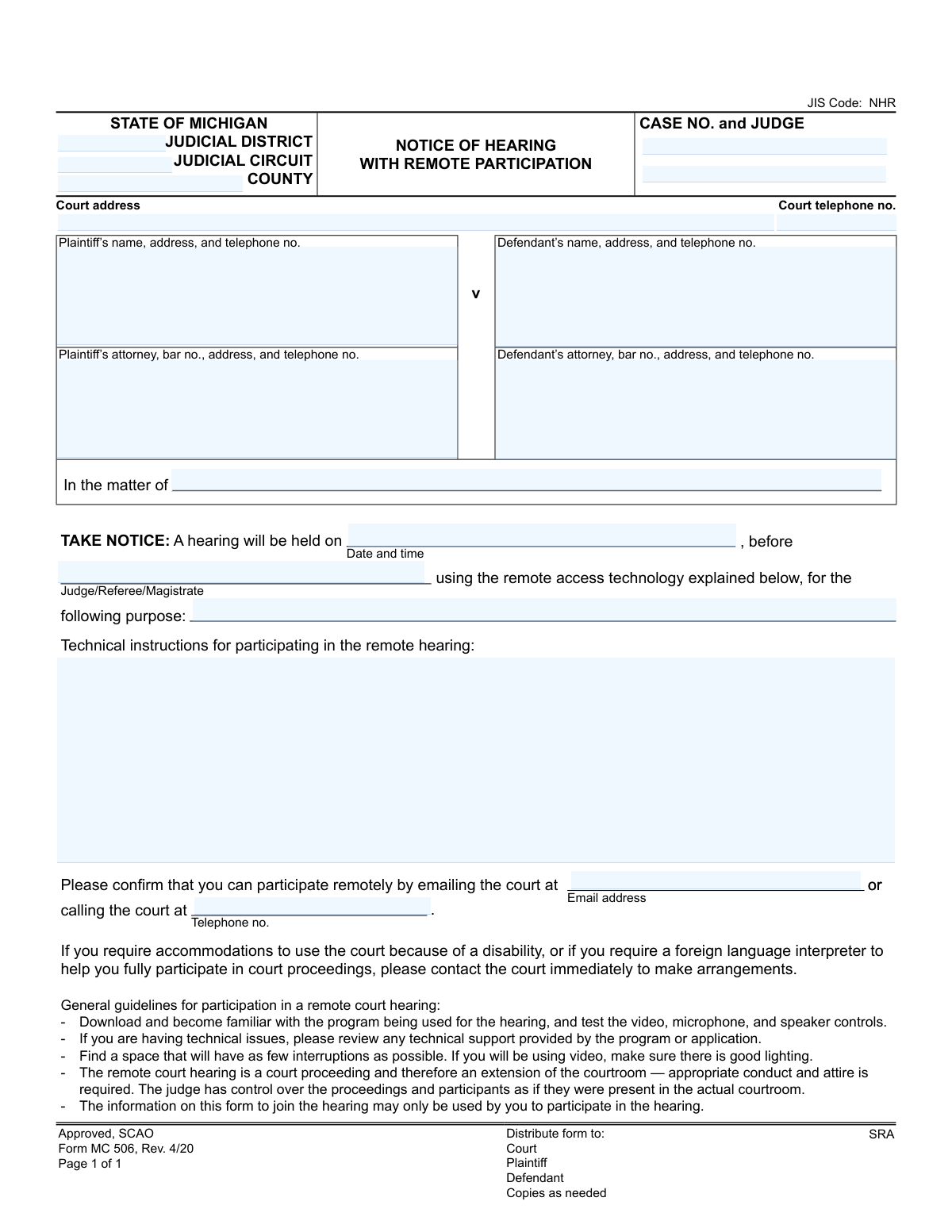
Yes! You can use AI to fill out State of Michigan, Form MC 506, Notice of Hearing with Remote Participation
Form MC 506 is a legal document issued by the State of Michigan courts to provide official notice of a hearing that will be conducted remotely. It details the date, time, presiding judge, and the specific technology and instructions required for participation, ensuring all parties are properly informed. This notice is critical for maintaining due process by giving plaintiffs, defendants, and their attorneys the necessary information to attend virtual court proceedings. Today, this form can be filled out quickly and accurately using AI-powered services like Instafill.ai, which can also convert non-fillable PDF versions into interactive fillable forms.
MC 506 is part of the
Michigan court forms category on Instafill.
Our AI automatically handles information lookup, data retrieval, formatting, and form filling.
It takes less than a minute to fill out MC 506 using our AI form filling.
Securely upload your data. Information is encrypted in transit and deleted immediately after the form is filled out.
Form specifications
| Form name: | State of Michigan, Form MC 506, Notice of Hearing with Remote Participation |
| Number of fields: | 18 |
| Number of pages: | 1 |
| Language: | English |
More forms in Michigan court forms
Instafill Demo: How to fill out PDF forms in seconds with AI
How to Fill Out MC 506 Online for Free in 2026
Are you looking to fill out a MC 506 form online quickly and accurately? Instafill.ai offers the #1 AI-powered PDF filling software of 2026, allowing you to complete your MC 506 form in just 37 seconds or less.
Follow these steps to fill out your MC 506 form online using Instafill.ai:
- 1 Navigate to Instafill.ai and upload or select Form MC 506, Notice of Hearing with Remote Participation.
- 2 Enter the court and case information, including the judicial district, circuit, county, case number, and judge's name.
- 3 Provide the full names, addresses, and contact information for the plaintiff, defendant, and their respective attorneys.
- 4 Specify the hearing details, including the date, time, presiding official, and the specific purpose of the hearing.
- 5 Input the technical instructions for remote participation, along with the court's email or phone number for assistance.
- 6 Review all entered information for accuracy with the AI assistant to ensure all details are correct.
- 7 Download the completed form to print and distribute to the court, plaintiff, defendant, and other necessary parties as required.
Our AI-powered system ensures each field is filled out correctly, reducing errors and saving you time.
Why Choose Instafill.ai for Your Fillable MC 506 Form?
Speed
Complete your MC 506 in as little as 37 seconds.
Up-to-Date
Always use the latest 2026 MC 506 form version.
Cost-effective
No need to hire expensive lawyers.
Accuracy
Our AI performs 10 compliance checks to ensure your form is error-free.
Security
Your personal information is protected with bank-level encryption.
Frequently Asked Questions About Form MC 506
This form officially notifies you that a court hearing you are involved in will be held remotely using technology like video conferencing, instead of in person. It provides the date, time, and instructions for joining the hearing.
This notice is sent to all parties involved in the case, including the plaintiff, the defendant, and their respective attorneys. It ensures everyone is aware of the upcoming remote hearing details.
You should immediately find the date and time of the hearing, the name of the presiding judge, and the 'Technical instructions' section, which explains how to join the remote session.
No, this is a notice, not a form for you to complete. However, you must follow the instructions to confirm your participation by emailing or calling the court as directed.
The specific link, meeting ID, or dial-in number will be in the section labeled 'Technical instructions for participating in the remote hearing.' If it's not there, contact the court immediately.
You must contact the court immediately using the phone number or email provided on the notice. Explain your situation, as they may be able to provide alternative arrangements.
The form advises you to contact the court immediately to make arrangements. The court is responsible for providing necessary accommodations to ensure you can fully participate.
Test your technology beforehand, find a quiet and well-lit space, and dress appropriately as you would for an in-person court appearance. Remember that a remote hearing is a formal court proceeding.
Your case number is located in the box at the top right of the form, listed next to 'CASE NO. and JUDGE'.
Yes, services like Instafill.ai can use AI to automatically read the notice and extract key information like the case number, hearing date, and contact details, helping you organize the information accurately.
You can upload the PDF of your notice to Instafill.ai to have it automatically read and extract all important details. This helps you quickly save the case number, hearing schedule, and court contacts without manual data entry.
You can use a service like Instafill.ai, which can convert flat, non-fillable PDFs into interactive forms. This allows its AI to read and extract the text, making the information accessible for you to copy or save.
The form includes a section that specifies the 'purpose' of the hearing. This field will contain a brief explanation of the matter being addressed in the court proceeding.
Compliance MC 506
Validation Checks by Instafill.ai
1
Case Number Format and Structure
This check verifies that the 'Case No.' field follows the standard court-mandated format, which typically includes year, a unique identifier, and case type codes. It is crucial for correctly identifying and retrieving the case file within the court's system. An incorrect format could lead to the notice being misfiled or rejected, delaying the legal process.
2
Future Hearing Date and Time
This validation ensures that the specified hearing 'Date and Time' is set for a future date and time, not in the past. Scheduling a hearing for a past date is a logical impossibility and would render the notice invalid. If the date is in the past, the system should flag it as an error, preventing the issuance of a nonsensical and unenforceable notice.
3
Completeness of Core Case Identifiers
This validation confirms that essential case identifiers, including 'Case No.', 'County', and 'Judicial District/Circuit', are all present. These fields are the primary keys for locating the case within the judicial system. Missing any of this information makes the notice ambiguous and could result in it being un-fileable, causing significant delays.
4
Standard Telephone Number Format
This check validates that all telephone number fields (for the court, plaintiff, defendant, and attorneys) adhere to a standard North American format, such as (XXX) XXX-XXXX or XXXXXXXXXX. Proper formatting is essential for ensuring that parties can successfully contact each other and the court. An invalid format could prevent a participant from calling in for the hearing or seeking assistance, potentially leading to a missed appearance.
5
Valid Email Address Format
This validation ensures that the court's 'Email address' provided for remote participation confirmation follows the standard [email protected] format. An invalid email address would prevent participants from confirming their attendance or receiving crucial updates about the hearing. The system should reject malformed email addresses to ensure communication channels are viable.
6
Presence of Opposing Parties
This validation ensures that both a 'Plaintiff's name' and a 'Defendant's name' are identified on the notice. A legal case requires at least two opposing parties to proceed. A notice lacking information for either the plaintiff or defendant is fundamentally incomplete and legally insufficient, and it should be flagged for correction before being issued.
7
Attorney Bar Number Validation
This check verifies that the 'Bar No.' for any listed attorney is present and follows the expected format for the state (e.g., 'P' followed by a series of digits). The bar number is a unique identifier for a licensed attorney, confirming their authority to represent a party. An invalid or missing bar number could indicate an error or that the individual is not a registered attorney, which would require immediate clarification.
8
Remote Participation Contact Method
This validation ensures that at least one method for confirming remote participation—either the court's 'Email address' or 'Telephone no.'—is provided on the form. Participants need a clear way to confirm they can attend remotely and to seek help if needed. If both fields are empty, the notice fails to provide essential information, and the system should prevent its finalization.
9
Hearing Purpose Specification
This check ensures that the 'Purpose' of the hearing field is not left blank. Due process requires that all parties be notified of the specific reason for the hearing (e.g., 'Motion for Summary Judgment,' 'Status Conference'). An empty purpose field makes the notice legally deficient, as it fails to inform the recipients what matters will be addressed.
10
Presence of Remote Hearing Technical Instructions
This validation ensures that the 'Technical instructions for participating in the remote hearing' field contains information. Since the hearing is remote, providing clear, actionable instructions on how to connect is absolutely critical for participation. A notice without these instructions fails in its primary purpose of enabling remote attendance and must be flagged as incomplete.
11
Judge and Hearing Judge Consistency
This check cross-references the 'Judge' listed in the case information section with the 'Hearing Judge/Referee/Magistrate' specified in the hearing details. While they may not always be identical, the system should flag potential discrepancies for review. This prevents confusion and ensures the notice correctly identifies the judicial officer presiding over the specific remote hearing.
12
Court Address Completeness
This check ensures the 'Court address' field is not empty. Although the hearing is remote, the court's physical address is a key identifier for the venue and is required for official correspondence, filings, and establishing jurisdiction. A missing address makes the notice incomplete and could cause confusion if any party needs to mail documents or identify the court's location.
13
Attorney-Party Association Logic
This validation confirms that if an attorney's information is provided (e.g., 'Plaintiff's attorney'), the corresponding party's name ('Plaintiff's name') is also present. An attorney must be associated with a specific party in the case. A record with an attorney but no party would be a logical error, indicating incomplete data entry that must be corrected.
Common Mistakes in Completing MC 506
Users often transpose digits or omit the judge's initials/code from the case number (e.g., entering '23-12345' instead of '23-12345-CZ'). This typically happens due to a simple transcription error or unfamiliarity with court-specific formatting. An incorrect case number can lead to the notice being rejected by the court clerk, misfiled, or ignored, causing significant delays in the legal proceedings. Always double-check the case number against official court documents for accuracy.
People unfamiliar with the Michigan court structure frequently enter the same information in multiple fields or place the county name in the circuit field. This confusion arises because these geographical and jurisdictional boundaries can overlap. Incorrectly identifying the court's jurisdiction can result in the document being filed in the wrong venue, requiring it to be withdrawn and refiled, wasting time and resources. It is crucial to verify the specific district and circuit numbers for the county in which the case is filed.
When filling out the attorney information sections, filers sometimes forget to include the attorney's state bar number (P-number in Michigan). The bar number is a unique identifier essential for the court to verify the attorney's credentials and good standing. Failure to include it can lead to the court rejecting the filing or delaying the hearing until the attorney's identity can be confirmed. This information should be readily available from the attorney's office.
This form provides fields for both 'Plaintiff v Defendant' and 'In the matter of,' which are mutually exclusive. A common mistake is to either fill out both sections or use the wrong one. 'In the matter of' is reserved for cases without traditional opposing parties, such as probate, estate, or certain family law matters. Using the wrong format creates confusion about the nature of the case and may require the notice to be amended and re-served.
Filers may enter a date and time without specifying AM/PM or, crucially for a remote hearing, the time zone (e.g., EST/EDT). This ambiguity can cause parties to miss the hearing entirely, especially if they are located in different time zones. A missed hearing results in unnecessary delays and may require a motion to set aside a default judgment. Always include AM/PM and the correct time zone to ensure all participants are clear on the schedule.
In the 'purpose' field, some users write generic phrases like 'Hearing' or 'Status.' This fails to provide adequate notice to the opposing party about the specific issues to be discussed. Proper legal procedure requires a clear statement of purpose, such as 'Plaintiff's Motion for Summary Disposition' or 'Pre-Trial Conference,' so all parties can prepare accordingly. Vague notices can be challenged as insufficient, leading to postponements.
The person preparing the notice may fail to provide complete and clear technical instructions for joining the remote hearing. This includes omitting the Zoom/Teams link, meeting ID, password, or dial-in phone number. Without this critical information, participants cannot attend the hearing, causing it to be canceled or rescheduled. All necessary details must be clearly listed to ensure a smooth and accessible remote proceeding.
The form includes blank spaces for a court email address or phone number where participants can confirm their ability to join remotely. A frequent oversight by the filer is leaving these fields empty. This leaves the recipient with no designated contact if they have questions, require accommodations, or need to report technical difficulties, increasing the likelihood of participation issues on the day of the hearing.
This form is often distributed as a non-fillable PDF, leading users to either handwrite information illegibly or struggle with basic PDF editors, causing text to be misaligned and hard to read. This can make critical data like names, case numbers, and contact information indecipherable to the court clerk and other parties, resulting in rejection or errors. To avoid this, use a tool like Instafill.ai that can convert flat PDFs into interactive, fillable forms, ensuring all entries are neat, aligned, and legible.
Parties often provide incomplete addresses, missing apartment numbers, or incorrect zip codes, and may transpose digits in phone numbers. These errors can prevent the proper service of the notice, meaning a party may not legally receive it, which can be grounds to invalidate the hearing. Using an AI-powered form filler like Instafill.ai can help prevent these mistakes by auto-completing addresses from a verified database and validating phone number formats, ensuring accuracy.
Saved over 80 hours a year
“I was never sure if my IRS forms like W-9 were filled correctly. Now, I can complete the forms accurately without any external help.”
Kevin Martin Green
Your data stays secure with advanced protection from Instafill and our subprocessors
Robust compliance program
Transparent business model
You’re not the product. You always know where your data is and what it is processed for.
ISO 27001, HIPAA, and GDPR
Our subprocesses adhere to multiple compliance standards, including but not limited to ISO 27001, HIPAA, and GDPR.
Security & privacy by design
We consider security and privacy from the initial design phase of any new service or functionality. It’s not an afterthought, it’s built-in, including support for two-factor authentication (2FA) to further protect your account.
Fill out MC 506 with Instafill.ai
Worried about filling PDFs wrong? Instafill securely fills state-of-michigan-form-mc-506-notice-of-hearing-with-remote-participation forms, ensuring each field is accurate.