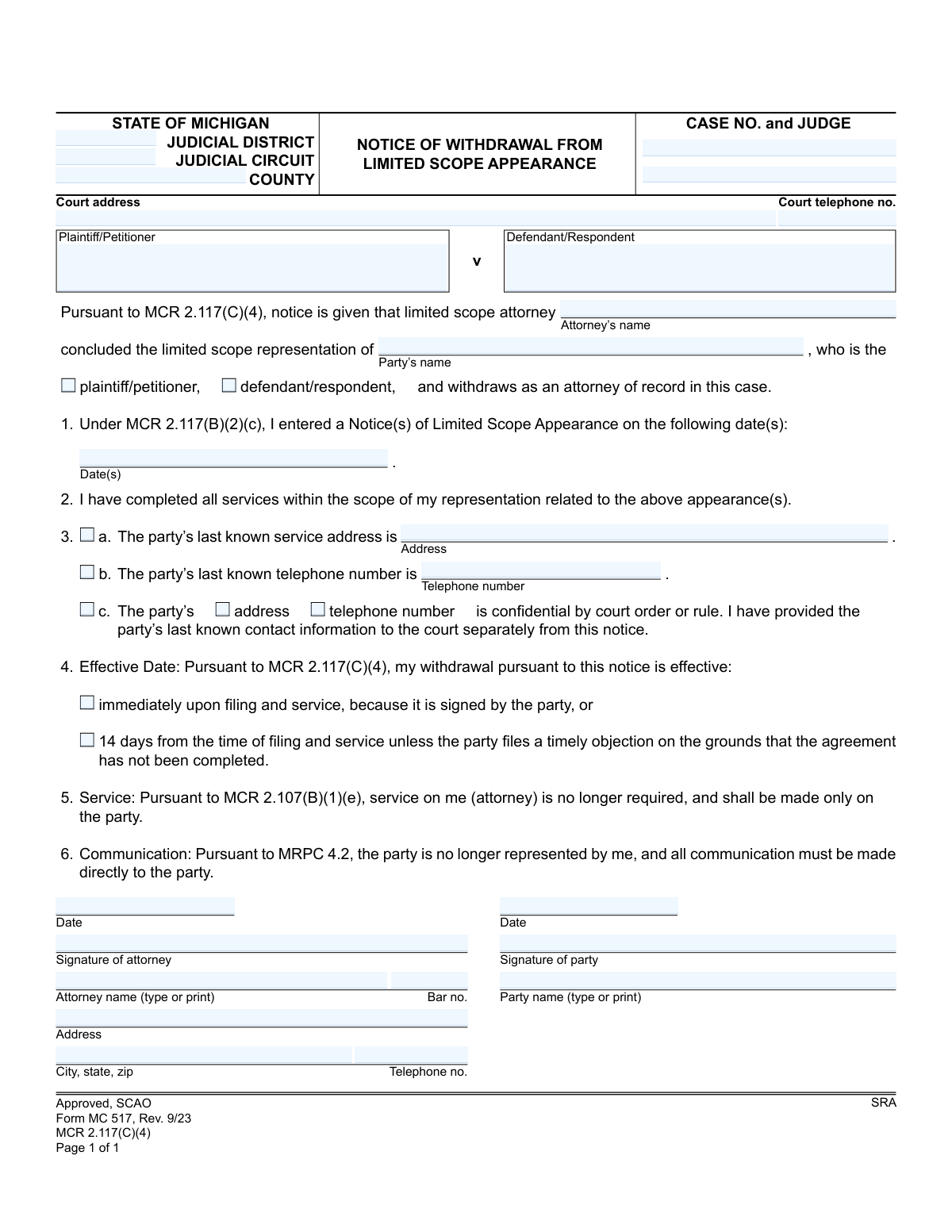
Yes! You can use AI to fill out State of Michigan, Form MC 517, Notice of Withdrawal From Limited Scope Appearance
Form MC 517 is a legal document filed in Michigan courts by an attorney who has provided limited scope representation to a client. It serves as an official notice to the court, the client, and opposing parties that the attorney has completed all agreed-upon services and is withdrawing as the attorney of record. This is crucial for clarifying legal representation and ensuring all future communications are directed to the party themselves. Today, this form can be filled out quickly and accurately using AI-powered services like Instafill.ai, which can also convert non-fillable PDF versions into interactive fillable forms.
MC 517 is part of the
Michigan court forms category on Instafill.
Our AI automatically handles information lookup, data retrieval, formatting, and form filling.
It takes less than a minute to fill out MC 517 using our AI form filling.
Securely upload your data. Information is encrypted in transit and deleted immediately after the form is filled out.
Form specifications
| Form name: | State of Michigan, Form MC 517, Notice of Withdrawal From Limited Scope Appearance |
| Number of fields: | 33 |
| Number of pages: | 1 |
| Language: | English |
More forms in Michigan court forms
Instafill Demo: How to fill out PDF forms in seconds with AI
How to Fill Out MC 517 Online for Free in 2026
Are you looking to fill out a MC 517 form online quickly and accurately? Instafill.ai offers the #1 AI-powered PDF filling software of 2026, allowing you to complete your MC 517 form in just 37 seconds or less.
Follow these steps to fill out your MC 517 form online using Instafill.ai:
- 1 Navigate to Instafill.ai and upload your MC 517 form or select it from the template library.
- 2 Provide the case information, including the court, county, case number, judge, and the names of the plaintiff and defendant.
- 3 Enter the attorney's name and bar number, and identify the party they represented.
- 4 Specify the date(s) of the original Notice of Limited Scope Appearance and confirm that all services have been completed.
- 5 Input the party's last known address and telephone number, or indicate if this information is confidential.
- 6 Select the effective date of the withdrawal and review all auto-filled information for accuracy.
- 7 Electronically sign the document as the attorney, obtain the party's signature if required, and download the completed form for filing and service.
Our AI-powered system ensures each field is filled out correctly, reducing errors and saving you time.
Why Choose Instafill.ai for Your Fillable MC 517 Form?
Speed
Complete your MC 517 in as little as 37 seconds.
Up-to-Date
Always use the latest 2026 MC 517 form version.
Cost-effective
No need to hire expensive lawyers.
Accuracy
Our AI performs 10 compliance checks to ensure your form is error-free.
Security
Your personal information is protected with bank-level encryption.
Frequently Asked Questions About Form MC 517
This form is used by an attorney in Michigan to officially notify the court that they have completed their agreed-upon services for a client and are withdrawing from the case under a limited scope representation agreement.
The attorney who provided the limited scope representation is responsible for completing, signing, and filing this form to formally end their involvement in the case.
Limited scope representation means an attorney represents a client for only specific, defined parts of their legal case, rather than handling the entire matter from start to finish.
No, the client's signature is not required for the form to be valid. However, if the client signs, the withdrawal is effective immediately; if not, it becomes effective after 14 days.
Choosing 'immediately upon filing' is for when the party has signed the form. The '14 days from the time of filing' option is used when the party has not signed, giving them a window to object if they believe the agreed-upon work is incomplete.
You will need the full case information (court, case number, judge), the dates of your original 'Notice(s) of Limited Scope Appearance', and the party's last known service address and telephone number.
You should check box 3c and provide the party's contact information to the court separately from this public notice. Do not write the confidential address or phone number directly on the form.
Once the withdrawal is effective, you are no longer the attorney of record. All future communications and legal documents must be sent directly to the party you previously represented.
If the party files a timely objection, it is usually on the grounds that the attorney has not completed the services they agreed to. The court may need to intervene to resolve the dispute before the withdrawal is finalized.
Yes, services like Instafill.ai use AI to accurately auto-fill form fields with case and client information, which can save you time and help prevent errors.
You can use a service like Instafill.ai to upload the form and fill it out electronically. The platform's AI can assist by populating fields like case numbers, party names, and addresses for you.
Services like Instafill.ai can convert flat, non-fillable PDFs into interactive forms. Simply upload your document, and the platform will make it possible for you to type directly into the fields.
You must enter the date or dates of your previously filed 'Notice(s) of Limited Scope Appearance' in the space provided in Section 1 of the form.
Compliance MC 517
Validation Checks by Instafill.ai
1
Case Number Presence and Format
Verifies that the 'Case No.' field is not empty and conforms to the standard format for the specified judicial circuit/district. This is critical for ensuring the notice is correctly filed and associated with the proper legal case in the court's records. A failure in this validation would lead to rejection of the filing or misfiling, causing significant delays.
2
Exclusive Party Role Selection
Ensures that exactly one of the party role checkboxes ('plaintiff/petitioner' or 'defendant/respondent') is selected for the party the attorney is withdrawing from. This check prevents ambiguity regarding the client's role in the case. If neither or both are selected, the form is considered incomplete and cannot be processed, as the identity of the client is unclear.
3
Historical Appearance Date Requirement
Validates that the 'Notice(s) of Limited Scope Appearance' date(s) field contains at least one valid date and that the date(s) are in the past. An attorney cannot withdraw from a representation that has not yet officially begun. This check maintains logical consistency and prevents premature or invalid withdrawal notices.
4
Attorney Bar Number Format
Checks that the attorney's bar number is provided and follows the specific format for the State of Michigan (e.g., a 'P' followed by a sequence of digits). The bar number is the unique identifier for an attorney's license to practice law. An incorrect or missing number would prevent the court from verifying the attorney's credentials and authority to file the notice.
5
Conditional Party Signature for Immediate Withdrawal
This validation enforces a rule based on the selected effective date. If the 'immediately upon filing' option is checked, the system must verify that the 'Signature of party' and 'Signature of party date' fields are both filled. As stated on the form, immediate withdrawal is only permissible with the party's signed consent; otherwise, the 14-day objection period applies.
6
Mutually Exclusive Party Contact Information
Validates the logic for providing the party's contact information. The system must confirm that either the party's service address and telephone number are provided (sections 3a and 3b), OR the checkbox indicating the information is confidential (section 3c) is selected. It prevents submissions where the court has no means of contacting the now self-represented party.
7
Exclusive Effective Date Selection
Verifies that exactly one of the two effective date options ('immediately upon filing' or '14 days from the time of filing') is selected. The withdrawal's effective date is a critical legal detail that determines when the attorney's responsibilities cease. An ambiguous selection would make the notice invalid and require clarification.
8
Signature Date Validity
Checks that any provided signature dates ('Signature of attorney date', 'Signature of party date') are valid dates that are not in the future. A signature legally attests to the document's contents on a specific day. A future date is logically impossible and would invalidate the signature's legal effect, making the document void.
9
Attorney Information Completeness
Ensures that all fields related to the withdrawing attorney's identity and contact information are filled, including printed name, bar number, address, and telephone number. This information is mandatory for court records and for service of documents by other parties. Incomplete information would render the notice deficient and subject to rejection by the court clerk.
10
Name Consistency Across Fields
Compares the attorney's name entered at the top of the form with the 'Attorney name (type or print)' field near the signature line, and does the same for the party's name. This check helps catch typographical errors and ensures consistency throughout the document. Mismatched names can create confusion and potential legal challenges regarding the identity of the individuals involved.
11
Court Identification Completeness
Validates that essential court identification fields, such as 'Case No.', 'Judge', and 'County', are all populated. This information is the primary routing data for the document within the court system. A submission lacking this information cannot be docketed and will be returned, delaying the withdrawal process.
12
Service Completion Declaration
Verifies that the checkbox for item 2, 'I have completed all services within the scope of my representation,' is checked. This declaration is the legal basis for the withdrawal under MCR 2.117. If this box is not checked, the attorney has not affirmed that the conditions for withdrawal have been met, invalidating the entire notice.
Common Mistakes in Completing MC 517
Attorneys or their staff often mistype the case number or misspell the judge's name due to haste or clerical error. This critical mistake can cause the clerk's office to reject the filing or, worse, file it under the wrong case, delaying the attorney's withdrawal. To prevent this, always cross-reference the case number and judge's name with an official court order or pleading from the case file before submission.
Failing to specify the correct Judicial District, Circuit, and County is a common oversight, especially for law firms that practice in multiple jurisdictions. This can lead to the form being sent to the wrong courthouse, causing significant delays and requiring refiling. Always verify the precise court where the case is being heard and ensure all header information is filled out completely and accurately.
The form requires the filer to check a box identifying their client as the 'plaintiff/petitioner' or 'defendant/respondent.' Forgetting to check a box, or checking the wrong one, creates ambiguity for the court and opposing counsel. This simple error can lead to confusion and may require an amended filing to clarify which party the attorney is withdrawing from representing.
Section 1 requires listing the filing date(s) of the original 'Notice of Limited Scope Appearance.' Attorneys frequently leave this blank because they don't have the information readily available. This omission is problematic as it prevents the court from verifying the timeline and scope of the representation, potentially leading to questions or rejection of the withdrawal notice.
The attorney must provide the party's last known service address and phone number in Section 3. Using outdated information is a critical error, as the party will now be self-represented and must receive all future court notices at this address. An incorrect address can lead to the party missing deadlines or even having a default judgment entered against them.
If a party's address is protected, filers may mistakenly write the confidential information on the public form instead of checking box 3c and submitting it separately to the court. Conversely, they might check the box but forget to provide the information to the court at all. The first error breaches confidentiality, while the second leaves the court with no way to contact the party.
A frequent and invalidating mistake is checking the 'immediately effective' option in Section 4 without obtaining the party's signature at the bottom of the form. This option is only valid with the party's signed consent. When the signature is missing, the withdrawal automatically defaults to the 14-day period, creating uncertainty and delaying the attorney's official withdrawal from the record.
An unsigned or undated form is invalid and will be rejected by the court clerk, halting the withdrawal process. A similarly common error is forgetting to include the correct attorney bar number, which is essential for official identification. These oversights, often made in haste, require a complete refiling of the document.
Filers sometimes use abbreviations, nicknames, or incomplete names for the plaintiff and defendant instead of their full legal names as listed on the case caption. This can cause indexing errors in the court's filing system and create confusion about the notice's applicability. To avoid this, copy the names exactly as they appear on the original complaint or other official court orders.
Many court forms are only available as flat, non-fillable PDFs, leading to illegible handwritten entries, misaligned text, and data entry errors. This can result in the form being rejected by the court clerk for being difficult to read or process. AI-powered tools like Instafill.ai can convert these non-fillable PDFs into interactive forms, ensuring all information is legible, properly formatted, and accurately placed.
Saved over 80 hours a year
“I was never sure if my IRS forms like W-9 were filled correctly. Now, I can complete the forms accurately without any external help.”
Kevin Martin Green
Your data stays secure with advanced protection from Instafill and our subprocessors
Robust compliance program
Transparent business model
You’re not the product. You always know where your data is and what it is processed for.
ISO 27001, HIPAA, and GDPR
Our subprocesses adhere to multiple compliance standards, including but not limited to ISO 27001, HIPAA, and GDPR.
Security & privacy by design
We consider security and privacy from the initial design phase of any new service or functionality. It’s not an afterthought, it’s built-in, including support for two-factor authentication (2FA) to further protect your account.
Fill out MC 517 with Instafill.ai
Worried about filling PDFs wrong? Instafill securely fills state-of-michigan-form-mc-517-notice-of-withdrawal-from-limited-scope-appearance forms, ensuring each field is accurate.