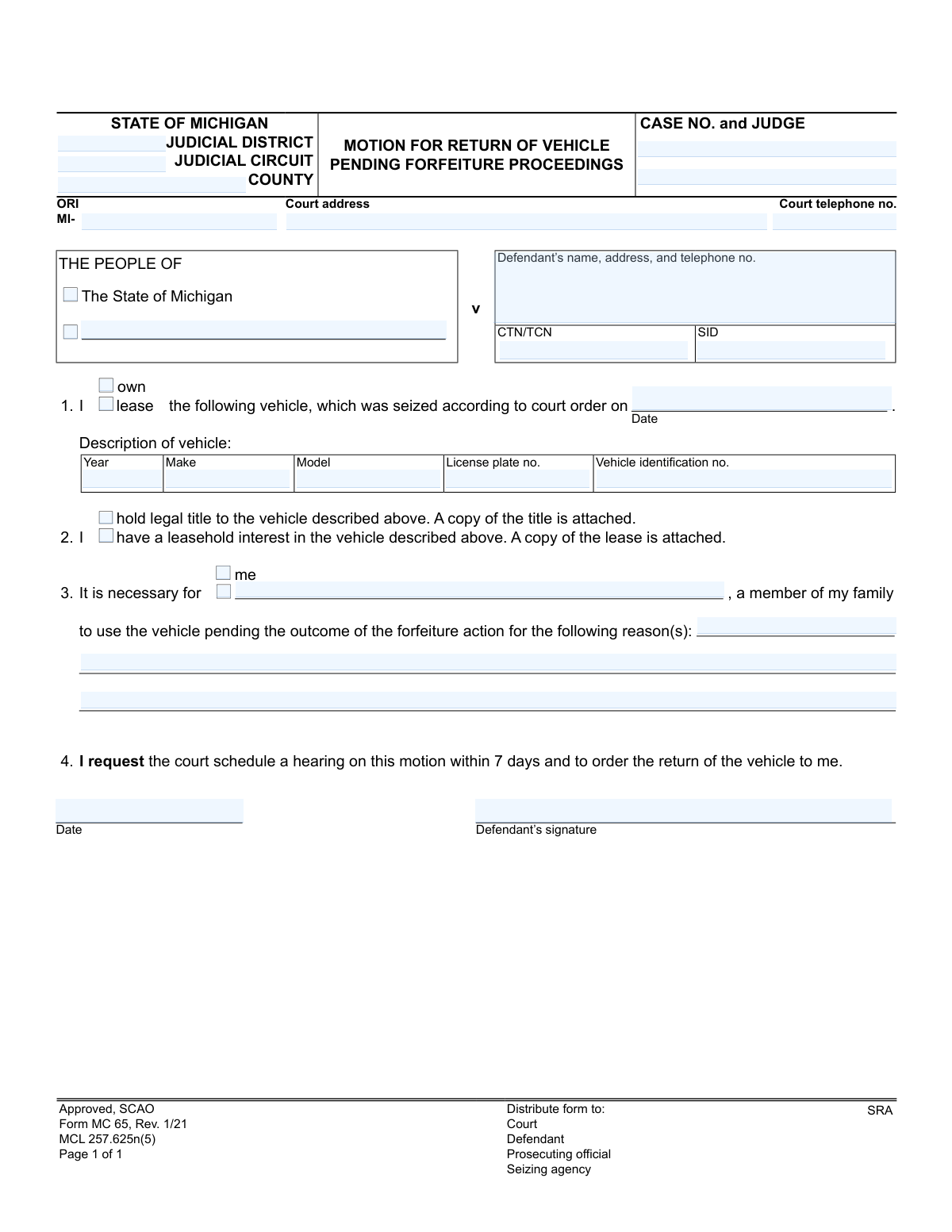
Yes! You can use AI to fill out State of Michigan, Motion for Return of Vehicle Pending Forfeiture Proceedings
Form MC 65, Motion for Return of Vehicle Pending Forfeiture Proceedings, is a legal document used in the state of Michigan. It allows a vehicle owner or lessee to petition the court for the temporary return of their vehicle while a forfeiture case against it is still pending. This is crucial for individuals who depend on their vehicle for work, family care, or other essential needs. Today, this form can be filled out quickly and accurately using AI-powered services like Instafill.ai, which can also convert non-fillable PDF versions into interactive fillable forms.
MC 65 is part of the
Michigan court forms category on Instafill.
Our AI automatically handles information lookup, data retrieval, formatting, and form filling.
It takes less than a minute to fill out MC 65 using our AI form filling.
Securely upload your data. Information is encrypted in transit and deleted immediately after the form is filled out.
Form specifications
| Form name: | State of Michigan, Motion for Return of Vehicle Pending Forfeiture Proceedings |
| Number of fields: | 32 |
| Number of pages: | 1 |
| Language: | English |
More forms in Michigan court forms
Instafill Demo: How to fill out PDF forms in seconds with AI
How to Fill Out MC 65 Online for Free in 2026
Are you looking to fill out a MC 65 form online quickly and accurately? Instafill.ai offers the #1 AI-powered PDF filling software of 2026, allowing you to complete your MC 65 form in just 37 seconds or less.
Follow these steps to fill out your MC 65 form online using Instafill.ai:
- 1 Navigate to Instafill.ai and upload the MC 65 form or select it from the template library.
- 2 Provide the court and case information, including the judicial district, circuit, county, case number, and judge's name.
- 3 Enter the defendant's name, address, and other identifying information like CTN/TCN or SID.
- 4 Detail the vehicle information, such as year, make, model, license plate number, and Vehicle Identification Number (VIN).
- 5 Indicate whether you own or lease the vehicle and confirm that you have attached a copy of the title or lease agreement.
- 6 Clearly state the reasons why the return of the vehicle is necessary for you or a family member while the forfeiture action is pending.
- 7 Review all entered information for accuracy, then digitally sign and date the motion before downloading it for filing with the court and distribution to other parties.
Our AI-powered system ensures each field is filled out correctly, reducing errors and saving you time.
Why Choose Instafill.ai for Your Fillable MC 65 Form?
Speed
Complete your MC 65 in as little as 37 seconds.
Up-to-Date
Always use the latest 2026 MC 65 form version.
Cost-effective
No need to hire expensive lawyers.
Accuracy
Our AI performs 10 compliance checks to ensure your form is error-free.
Security
Your personal information is protected with bank-level encryption.
Frequently Asked Questions About Form MC 65
This form, MC 65, is used to formally request that a Michigan court return your seized vehicle to you while the legal forfeiture case is still ongoing. It allows you to argue for the necessity of having your vehicle before a final decision is made.
You should file this form if you are the legal owner or lessee of a vehicle that has been seized in Michigan and you need it returned for essential use pending the outcome of the forfeiture proceedings.
You will need the court case information (Case No., Judge, County), your personal details, and specific information about the vehicle, including its year, make, model, license plate number, and Vehicle Identification Number (VIN).
You must attach proof of your claim to the vehicle. If you own it, attach a copy of the vehicle's title; if you are leasing it, attach a copy of your lease agreement.
In Section 3, you must clearly state the reasons why you or a family member need the vehicle. Be specific, mentioning needs like commuting to work, attending school, or going to medical appointments.
By filing this motion, you are requesting the court to schedule a hearing within 7 days to consider your request. You will need to attend this hearing to explain why the vehicle should be returned to you.
Yes, as the vehicle's owner or lessee, you can file this motion to reclaim your property even if you are not the defendant in the associated criminal case.
The Case Number and other court information are typically found on official notices or legal documents you have received regarding the case. If you cannot locate them, contact the clerk's office at the court handling the case.
The form indicates that copies must be distributed to the Court, the Defendant, the Prosecuting official, and the Seizing agency. This ensures all relevant parties are officially notified of your motion.
Yes, services like Instafill.ai use AI to accurately auto-fill form fields, which saves time and helps prevent common errors. This can be particularly useful for ensuring all case and vehicle details are entered correctly.
You can use a service like Instafill.ai to upload the MC 65 form and fill it out on your computer. The platform guides you through the fields, making it easier and faster than filling it out by hand.
If you have a non-fillable or 'flat' PDF, you can use a tool like Instafill.ai to convert it into an interactive, fillable form. This allows you to type your information directly into the document before printing and filing it.
The Vehicle Identification Number (VIN) is usually on the driver's side dashboard (visible through the windshield) or on a sticker in the driver's side doorjamb. You can also find it on your vehicle title, registration, and insurance documents.
Compliance MC 65
Validation Checks by Instafill.ai
1
Vehicle Identification Number (VIN) Structure
This check ensures the 'Vehicle identification no.' is exactly 17 characters long and contains only valid alphanumeric characters, excluding I, O, and Q. A valid VIN is essential for uniquely identifying the vehicle in question and linking it to official records. An invalid VIN will prevent the verification of vehicle ownership and could invalidate the entire motion.
2
Exclusive Ownership or Lease Selection
This validation confirms that the user has selected either 'own' or 'lease', but not both. These options are mutually exclusive and define the nature of the filer's relationship to the vehicle. Failure to make a single, clear selection creates ambiguity and may require manual clarification, delaying the process.
3
Logical Date Sequence
This check compares the 'Signature date' with the 'Court order date' (seizure date) to ensure the signature date is on or after the date the vehicle was seized. A signature dated before the seizure event is logically impossible and indicates a data entry error. Correcting this prevents the submission of a factually inconsistent and invalid document.
4
Case Number Format and Presence
Validates that the 'Case no.' field is not empty and conforms to the standard format for the specified judicial circuit and county. This is crucial for correctly routing and filing the motion with the court. An incorrect or missing case number will lead to processing delays or rejection of the form.
5
Justification for Return Requirement
This validation ensures that the 'reason(s)' text box for needing the vehicle is not left empty. The justification for the motion is a critical component that the court will evaluate. A submission without a stated reason is incomplete and will likely be denied without consideration.
6
Ownership/Lease Attachment Logic
Verifies that if 'own' is selected, the 'hold legal title' checkbox is also checked, and if 'lease' is selected, the 'have a leasehold interest' checkbox is checked. This ensures the filer acknowledges the requirement to attach supporting documentation like a title or lease agreement. This check prevents submissions where the claimed ownership type is not supported by the required documentation assertion.
7
Conditional Family Member Identification
This check is triggered if the 'a member of my family' option is selected for vehicle use. It validates that the corresponding field for the family member's name is filled out. This is necessary to identify all parties who would be using the vehicle, which is relevant to the court's decision.
8
Seizure Date Format and Plausibility
Ensures the 'Court order date' for the seizure is a valid calendar date and is not in the future. This date is the basis for the legal action and must be accurate. An invalid or future date would render the motion nonsensical and lead to immediate rejection.
9
Vehicle Year Format and Range
Validates that the 'Vehicle Year' is a four-digit number and falls within a reasonable range, such as 1900 to the current year plus one. This prevents typographical errors like entering a two-digit year or an impossible value. An accurate year is a key part of correctly identifying the vehicle.
10
Defendant Information Completeness
Verifies that the defendant's name, address, and telephone number fields are all populated. This information is essential for identifying the primary party in the case and for any necessary communication from the court or other agencies. Incomplete defendant information will halt the processing of the motion.
11
Signature and Date of Signature Presence
This validation confirms that both the 'Defendant's signature' and the 'Date' of signature fields are completed. A signature legally attests to the truthfulness of the motion's contents, and the date establishes when it was signed. A missing signature or date invalidates the document as a legal filing.
12
Vehicle Description Completeness
This check ensures that all fields describing the vehicle ('Year', 'Make', 'Model', 'License plate no.') are filled in addition to the VIN. A complete and unambiguous description is necessary to identify the specific asset being requested for return. Missing details could lead to rejection of the motion for being insufficiently specific.
13
ORI Number Format
Validates that the 'ORI' (Originating Agency Identifier) field, if entered, contains data that follows the expected format, which is typically a specific sequence of alphanumeric characters. The ORI is crucial for routing information to the correct law enforcement or seizing agency. An incorrect ORI can lead to the motion being sent to the wrong agency, causing significant delays.
14
Completeness of Case Identification Fields
Ensures that the 'Judicial District', 'County', and 'Case no.' fields are all populated. These fields are fundamental for identifying the correct jurisdiction and specific case to which this motion applies. Submissions with missing information in these fields cannot be processed and will be rejected.
Common Mistakes in Completing MC 65
Filers often miscopy the case number from other documents or leave it blank if they don't have it handy. An incorrect case number can cause the motion to be rejected by the clerk, misfiled, or significantly delayed, as it cannot be linked to the correct forfeiture proceeding. To avoid this, carefully double-check the case number against official court notices and ensure all court-related fields (Judicial District, Circuit, Judge) are filled in accurately.
The 17-character VIN is long and easy to mistype, often by transposing letters and numbers like 'O' and '0'. An incorrect VIN can render the motion legally ineffective, as it technically requests the return of a vehicle that doesn't match the one seized. Always cross-reference the VIN from the vehicle's title or registration document. AI-powered tools like Instafill.ai can help prevent this by validating the VIN format and length automatically.
The form explicitly requires a copy of the vehicle's title or lease agreement to be attached, but this is a frequently overlooked step. Without this documentation, the court has no evidence of your legal interest in the vehicle, and the motion is likely to be denied outright for lack of standing. Before filing, make a physical copy of your title or lease and securely attach it to the completed motion.
Many people simply write 'I need it for work,' which lacks the compelling detail a judge needs to grant the motion. The court needs to understand the specific hardship, such as the inability to get to a specific job, take children to school, or attend necessary medical appointments. To be successful, provide a detailed, specific, and truthful explanation of why the vehicle's return is essential pending the outcome of the case.
In the rush to complete the paperwork, it's common for individuals to forget to sign and date the form. An unsigned motion is legally invalid and will be rejected by the court, forcing you to start the process over and causing unnecessary delays. Always perform a final review of the entire form before filing, paying special attention to the signature line.
The form's instructions indicate that copies must be distributed to the Court, Prosecuting official, and the Seizing agency. Self-represented individuals often only file the motion with the court, failing to 'serve' the other parties as required by legal procedure. This failure can lead to your hearing being canceled or your motion being denied on procedural grounds.
The person filling out the form may be the primary driver but not the legal owner listed on the title (e.g., a student driving a parent's car). They might incorrectly check the 'I own' box when the title is in someone else's name, creating a discrepancy that undermines the motion's credibility. Ensure the information on the form accurately reflects the legal documents (title or lease), even if the owner is not the primary user.
The form requires the date the vehicle was seized, which establishes the timeline for the court. People may forget the exact date or leave it blank, which can complicate the court's review process. This date is critical as the motion requests a hearing within 7 days, and the seizure date is the starting point; refer to any paperwork provided by the seizing agency to find the exact date.
The defendant information box is sometimes filled out hastily, leading to missing phone numbers or incomplete addresses. This is a critical error because the court and other parties use this information to send official notices, including the date and time of the hearing. Incomplete or incorrect information can result in you missing your own hearing, which would almost certainly lead to the motion being denied.
Government forms are often provided as flat, non-fillable PDFs, making them difficult to fill out cleanly and impossible to save electronically without special software. This can lead to illegible handwriting, mistakes that are hard to correct, and difficulty attaching required documents for e-filing. AI-powered services like Instafill.ai can convert these static PDFs into interactive, fillable forms, making the entire process cleaner, more accurate, and easier to manage.
Saved over 80 hours a year
“I was never sure if my IRS forms like W-9 were filled correctly. Now, I can complete the forms accurately without any external help.”
Kevin Martin Green
Your data stays secure with advanced protection from Instafill and our subprocessors
Robust compliance program
Transparent business model
You’re not the product. You always know where your data is and what it is processed for.
ISO 27001, HIPAA, and GDPR
Our subprocesses adhere to multiple compliance standards, including but not limited to ISO 27001, HIPAA, and GDPR.
Security & privacy by design
We consider security and privacy from the initial design phase of any new service or functionality. It’s not an afterthought, it’s built-in, including support for two-factor authentication (2FA) to further protect your account.
Fill out MC 65 with Instafill.ai
Worried about filling PDFs wrong? Instafill securely fills state-of-michigan-motion-for-return-of-vehicle-pending-forfeiture-proceedings forms, ensuring each field is accurate.