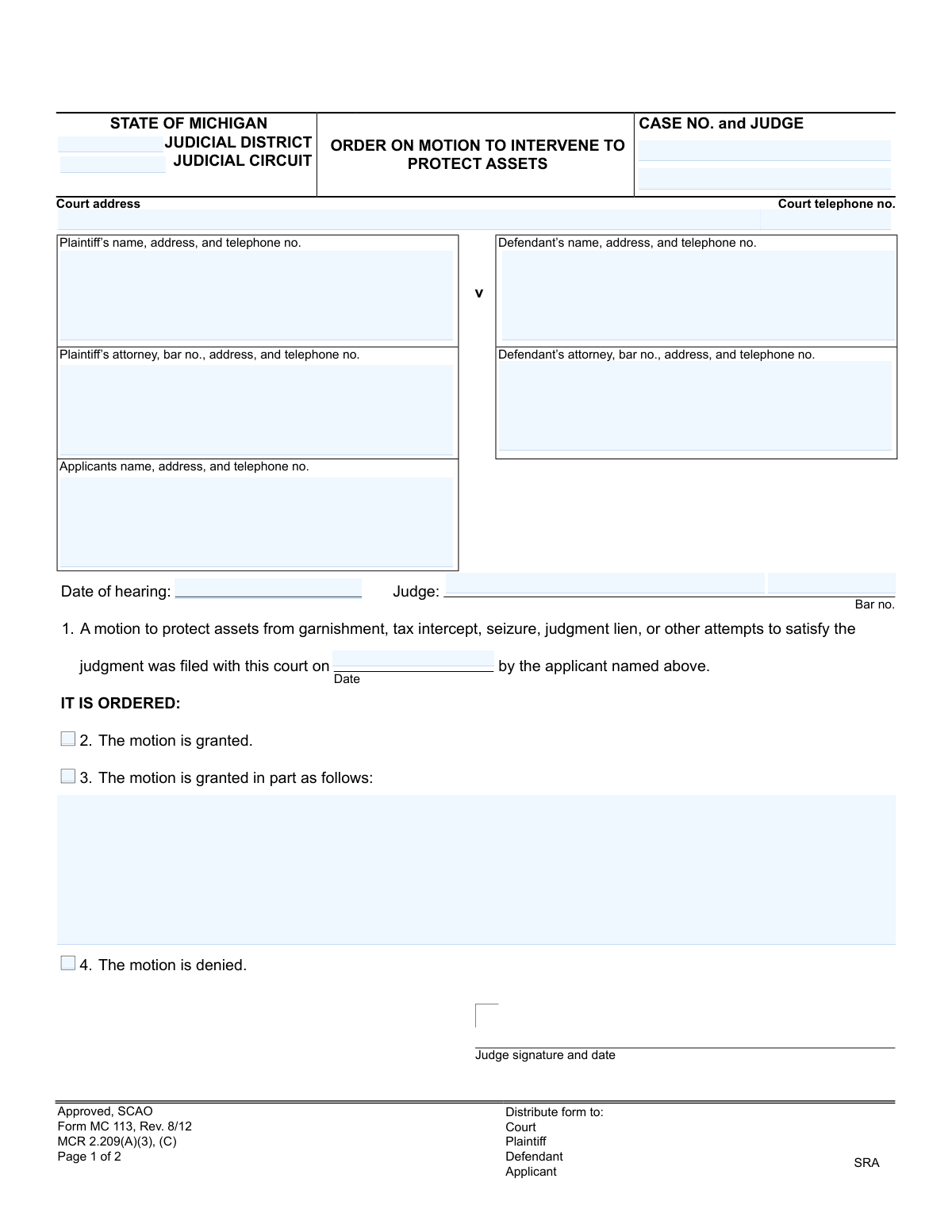
Yes! You can use AI to fill out State of Michigan Order on Motion to Intervene to Protect Assets

The MC 113, Order on Motion to Intervene to Protect Assets, is a legal document used in Michigan courts. It is the official ruling by a judge on a motion filed by an individual (the applicant) seeking to prevent their assets from being seized to satisfy a legal judgment. This order is crucial as it determines whether assets are protected from actions like garnishment or seizure. Today, this form can be filled out quickly and accurately using AI-powered services like Instafill.ai, which can also convert non-fillable PDF versions into interactive fillable forms.
MC 113 is part of the Michigan court forms category on Instafill.
Our AI automatically handles information lookup, data retrieval, formatting, and form filling.
It takes less than a minute to fill out MC 113 using our AI form filling.
Securely upload your data. Information is encrypted in transit and deleted immediately after the form is filled out.

Form specifications

Form name: State of Michigan Order on Motion to Intervene to Protect Assets
Number of fields: 22
Number of pages: 1
Language: English
main-image

Instafill Demo: How to fill out PDF forms in seconds with AI

How to Fill Out MC 113 Online for Free in 2026

Are you looking to fill out a MC 113 form online quickly and accurately? Instafill.ai offers the #1 AI-powered PDF filling software of 2026, allowing you to complete your MC 113 form in just 37 seconds or less.
Follow these steps to fill out your MC 113 form online using Instafill.ai:
  1. 1 Navigate to Instafill.ai and upload or select the Michigan MC 113 form.
  2. 2 Provide the court and case information, including the judicial district, circuit, case number, and judge's name.
  3. 3 Enter the full names, addresses, and contact details for the plaintiff, defendant, and their respective attorneys.
  4. 4 Input the applicant's name and contact information, along with the date the motion was filed and the hearing date.
  5. 5 Indicate the judge's decision by checking the appropriate box for whether the motion is granted, granted in part, or denied.
  6. 6 The judge will sign and date the order to make it legally binding.
  7. 7 Review all the AI-populated information for accuracy before finalizing and distributing the completed order to all required parties.

Our AI-powered system ensures each field is filled out correctly, reducing errors and saving you time.

Why Choose Instafill.ai for Your Fillable MC 113 Form?

Speed

Complete your MC 113 in as little as 37 seconds.

Up-to-Date

Always use the latest 2026 MC 113 form version.

Cost-effective

No need to hire expensive lawyers.

Accuracy

Our AI performs 10 compliance checks to ensure your form is error-free.

Security

Your personal information is protected with bank-level encryption.

Frequently Asked Questions About Form MC 113

This form is a court order issued by a judge in Michigan. It documents the judge's decision on a motion filed by someone seeking to protect their assets from being taken to satisfy a judgment in a case they were not originally a party to.

The judge or court staff fills out and signs this form to issue an official order. The applicant, plaintiff, or defendant do not fill out the order itself, but they are involved in the motion that leads to this order.

The applicant is the person or entity who filed the original 'Motion to Intervene to Protect Assets.' They are intervening in an existing case to claim that certain assets being targeted to pay a debt actually belong to them, not the defendant.

No, this is the court's final order that communicates the judge's decision. To ask the court to protect your assets, you would first need to file a 'Motion to Intervene to Protect Assets,' which is a separate document.

If the motion is 'granted in part,' it means the judge has agreed to protect some, but not all, of the assets the applicant requested. The specific details of the partial grant will be written in the space provided on the form.

The form requires case details like the case number and judge's name, contact information for the plaintiff, defendant, and applicant, and the date the original motion was filed. The judge then indicates their decision by checking the appropriate box.

After the judge signs the order, it becomes legally binding. The court clerk will then mail a copy to all parties involved, as documented in the 'Certificate of Mailing' section, to ensure everyone is officially notified of the decision.

The Certificate of Mailing is a sworn statement by the court clerk or another individual, confirming they have sent a copy of the signed order to all parties in the case. This serves as official proof of notification.

Yes, services like Instafill.ai use AI to accurately pre-fill form fields, which can help you organize the case and party information. This saves time and helps ensure all names, addresses, and case numbers are correct before the form is presented to the judge.

You can use Instafill.ai to easily manage the form online. Simply upload the MC 113 PDF, and the AI will automatically identify the fields for case number, party names, and addresses, allowing you to type the information directly into the form.

If you have a non-fillable or 'flat' PDF, you can upload it to Instafill.ai. The service can convert it into an interactive, fillable form in seconds, allowing you to easily add the required case and party information before printing.

This order is part of a case in the Michigan judicial system, specifically within the Judicial District or Circuit Court where the original lawsuit was filed. The completed and signed order is filed in the official case record at that court.

Compliance MC 113
Validation Checks by Instafill.ai

1
Case Number Presence and Consistency
This check verifies that the 'Case No.' field is populated on both page 1 and page 2 of the form and that the values are identical. The case number is the primary identifier for the legal proceeding, and any discrepancy or omission could lead to the order being misfiled or invalidated. Failure means the document cannot be correctly associated with its case file.
2
Exclusive Order Decision Selection
Validates that exactly one of the three order options ('granted', 'granted in part', 'denied') is selected. An order must have a single, unambiguous outcome. Selecting none, or more than one, makes the court's decision unclear and the order unenforceable. If this check fails, the form is returned for clarification of the judge's ruling.
3
Conditional 'Granted in Part' Description
This check ensures that if the 'motion is granted in part' option is selected, the subsequent text field explaining the specific terms of the partial grant is not empty. The details are legally necessary to define what parts of the motion were approved. An empty description for a partial grant makes the order vague and impossible to execute.
4
Chronological Date Integrity
Verifies that the dates on the form follow a logical sequence: the motion filing date must be on or before the hearing date, which must be on or before the judge's signature date. This ensures the timeline of events is legally coherent. An illogical date sequence could be grounds for challenging the validity of the order.
5
Judge's Signature and Date Presence
Confirms that the judge's signature and the date of signing are both present at the bottom of the order section. A judge's signature is what gives the order its legal authority. Without the signature and date, the document is merely a draft and has no legal effect.
6
Valid Date Format
Ensures that all date fields, including 'Date of hearing', the motion filing date, the judge's signature date, and the 'Certificate of Mailing' date, are entered in a valid and consistent format (e.g., MM/DD/YYYY). Incorrect or ambiguous date formats can lead to confusion about critical deadlines and timelines. This validation prevents data entry errors and ensures clarity.
7
State Bar Number Format
This validation checks that the bar numbers for the plaintiff's attorney, defendant's attorney, and the judge adhere to the specific format required by the state bar (e.g., 'P' followed by a set number of digits). A valid bar number is crucial for correctly identifying the legal professionals involved. An invalid format could indicate a data entry error or an unlicensed individual.
8
Required Party Identification
Verifies that the name fields for the Plaintiff, Defendant, and Applicant are all filled in. These parties are fundamental to the case, and their identification is necessary to define who is bound by the order. Missing party information would render the order legally deficient and unenforceable against the unnamed party.
9
Court Jurisdiction Completeness
This check ensures that both the 'Judicial District' and 'Judicial Circuit' fields are populated. These fields are essential for identifying the specific court that holds jurisdiction over the case and issued the order. Omitting this information can create ambiguity about the order's origin and authority.
10
Motion Filing Date Presence
Validates that the date the motion was filed, as referenced in section 1, is present. This date establishes the context and timing of the legal action being ruled upon. Without this date, the record is incomplete and it may be difficult to track the procedural history of the case.
11
Certificate of Mailing Completion
Ensures that if the Certificate of Mailing section is used, both the signature and the date of mailing are provided. This certificate serves as proof that all parties were formally notified of the order. Incomplete certification can lead to legal challenges regarding proper service of notice.
12
Attorney Requires Associated Party
This logical check verifies that if information for an attorney (e.g., 'Plaintiff's attorney') is provided, the corresponding party's information (e.g., 'Plaintiff's name') is also present. An attorney must represent a party in the case. Listing an attorney without a client is a logical inconsistency that indicates a data entry error.
13
Telephone Number Format Validation
Checks that all telephone number fields for the court, parties, and attorneys are in a standard, parseable format (e.g., (XXX) XXX-XXXX or XXX-XXX-XXXX). This ensures that contact information is accurate and usable for communication by the court and other parties. An invalid format can hinder necessary communication.

Common Mistakes in Completing MC 113

Entering an Incorrect or Inconsistent Case Number

The case number is the primary identifier for a legal proceeding. This mistake often happens due to a simple typo or by referencing an outdated document. An incorrect case number can lead to the order being filed in the wrong case, causing significant delays, confusion, and potentially requiring a new motion to correct the record. Always double-check the case number against the most recent court filing to ensure it is accurate and consistent on both pages of the form.

Inconsistent or Misspelled Party and Attorney Names

The names of the plaintiff, defendant, applicant, and their attorneys must be spelled exactly as they appear on all other official court documents. People often make this mistake by using abbreviations, nicknames, or making typos. These inconsistencies can cause problems with record-keeping and may lead the court clerk to reject the filing, delaying the legal process. It is crucial to verify the full legal names and spellings from the original complaint or a previous court order.

Omitting or Providing an Incorrect Attorney Bar Number

An attorney's bar number is a unique identifier required by the court to verify their credentials and good standing. This field is often left blank or filled incorrectly by individuals unfamiliar with legal forms or by administrative staff in a hurry. An incorrect or missing bar number can result in the document being rejected by the court, as it prevents verification of the attorney's authority to practice. Always confirm the bar number with the attorney or through the state bar association's official directory.

Contradictory Selections in the Order Section

This form requires the judge to select one outcome: granted, granted in part, or denied. A common error is accidentally checking multiple boxes, such as both 'granted' and 'denied'. This creates an ambiguous and unenforceable order, which will be rejected by the court clerk or invalidated upon review. Carefully review the form to ensure only one, and the correct, box is checked to reflect the court's decision.

Incomplete 'Granted in Part' Description

When a motion is 'granted in part,' the form requires a specific description of the terms. A frequent mistake is checking this box but failing to provide a clear, detailed explanation of what parts of the motion are granted. This ambiguity makes the order difficult to enforce and can lead to further disputes between the parties. The description must be precise and leave no room for interpretation regarding the scope of the court's order.

Missing Judge's Signature or Date

An order is not legally valid until it is signed and dated by the presiding judge. This critical step can be overlooked in a busy courtroom or during administrative processing. An unsigned or undated order is legally ineffective and has no power, meaning the protections or actions sought are not in place. It is essential to ensure the judge signs and dates the order before it is filed and distributed to the parties.

Failure to Complete the Certificate of Mailing

The Certificate of Mailing is a sworn statement that all parties have been formally notified of the court's order. Forgetting to sign and date this section is a serious procedural error. It can lead to legal challenges from other parties claiming they were not properly served, potentially invalidating the order or any subsequent actions taken based on it. The person responsible for mailing the order must sign and date the certificate to provide proof of service.

Using Incorrect Court Jurisdiction Information

The form requires the correct Judicial District and Circuit. Individuals, especially those representing themselves, may be unsure of the correct jurisdiction or may copy information from an unrelated case. Filing a document with incorrect jurisdictional information can lead to it being sent to the wrong courthouse, causing major delays or outright rejection. This information should be confirmed from the initial case filing documents.

Illegible Handwriting on a Printed Form

Since this form is a non-fillable PDF, it is often printed and completed by hand. Illegible handwriting can render critical information like names, addresses, and case numbers unreadable. This leads to data entry errors by court clerks, misdirected mail, and potential rejection of the form. To avoid this, it is best to print legibly in block letters. AI-powered tools like Instafill.ai can also convert non-fillable PDFs into fillable versions, allowing you to type information clearly and professionally.

Using Ambiguous or Incorrect Date Formats

The form requires several dates, including the hearing date and motion filing date. People often use ambiguous numerical formats (e.g., 01/02/24) which can be misinterpreted, or they may leave the date blank entirely. An incorrect or unclear date can create confusion about deadlines and the order's timeline, potentially leading to legal challenges. It is best to use a clear format like 'Month Day, Year' (e.g., 'August 15, 2024') to prevent any ambiguity. AI form-filling tools like Instafill.ai can help by automatically formatting dates correctly and ensuring these critical fields are not left empty.
Saved over 80 hours a year

“I was never sure if my IRS forms like W-9 were filled correctly. Now, I can complete the forms accurately without any external help.”

Kevin Martin Green

Your data stays secure with advanced protection from Instafill and our subprocessors

Robust compliance program

Transparent business model

You’re not the product. You always know where your data is and what it is processed for.

ISO 27001, HIPAA, and GDPR

Our subprocesses adhere to multiple compliance standards, including but not limited to ISO 27001, HIPAA, and GDPR.

Security & privacy by design

We consider security and privacy from the initial design phase of any new service or functionality. It’s not an afterthought, it’s built-in, including support for two-factor authentication (2FA) to further protect your account.

Fill out MC 113 with Instafill.ai

Worried about filling PDFs wrong? Instafill securely fills state-of-michigan-order-on-motion-to-intervene-to-protect-assets forms, ensuring each field is accurate.