
Yes! You can use AI to fill out Statement of Authority for School Transport Assistance
Don't type 41 fields by hand. Tell our AI about yourself, or upload a document you already have, and it fills every field in seconds. You check it, then download, print or sign.
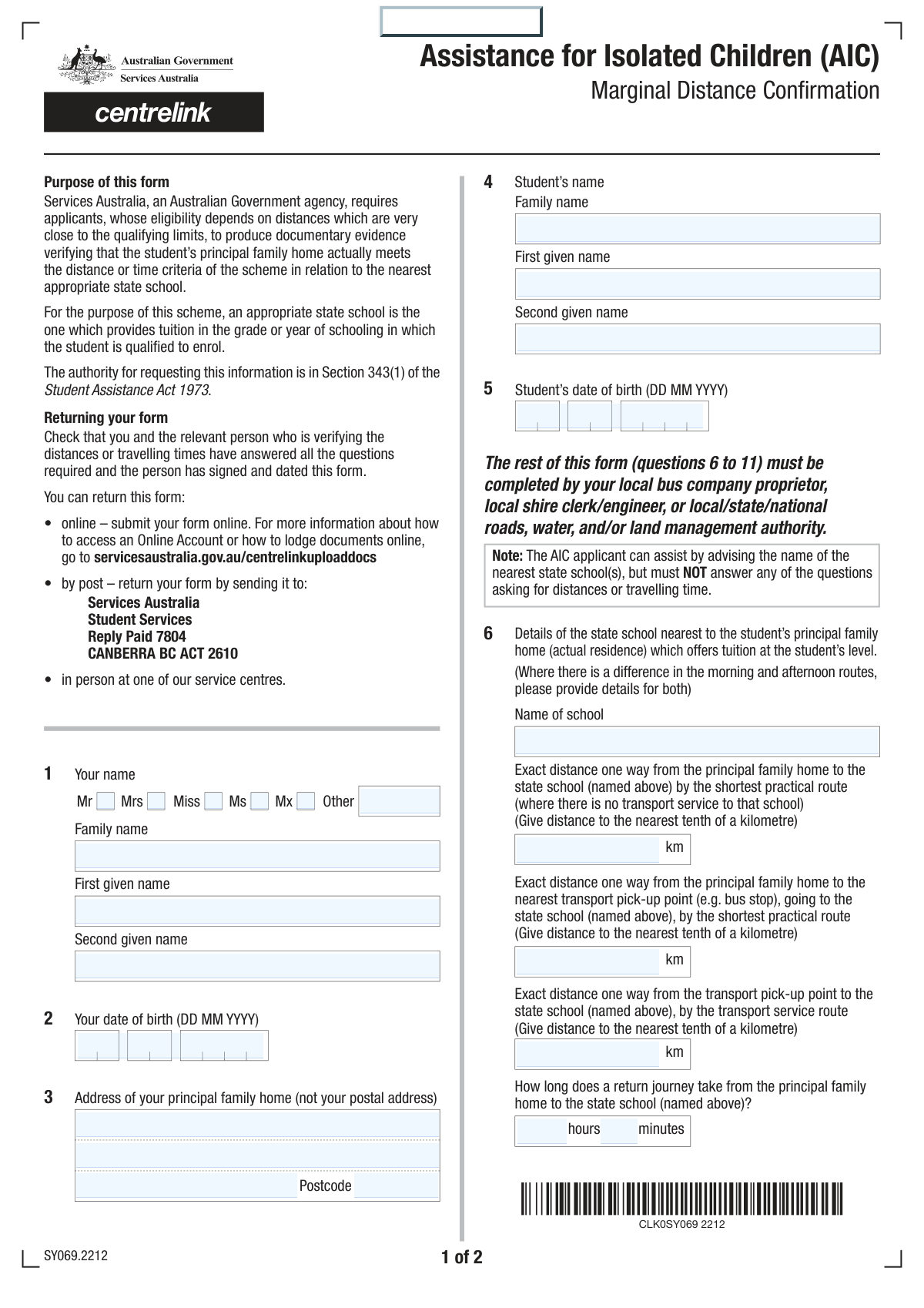
The AI does the filling. You just check it.
No typing into boxes, nothing to install.
What this form asks for
The AI fills all of it, from your answers or your documents.
The AI checks your answers before you download
14 checks built for this form, so a wrong date or a missing answer is caught before anyone else sees it.
This check ensures that a user selects only one title option. If a user fills in the 'Other Title' text field, it verifies that none of the 'Mr', 'Mrs', 'Miss', 'Ms', or 'Mx' checkboxes are selected. This prevents contradictory data entry and ensures data cleanliness. If validation fails, the user should be prompted to select only one option.
Validates that the 'Date of Birth' for the applicant is a real date in a valid format (e.g., DD/MM/YYYY) and is in the past. It also checks that the calculated age is reasonable for a parent or guardian (e.g., over 18). This is crucial for verifying the identity and eligibility of the person completing the form. A failure would trigger an error message asking for a valid past date.
This is a logical check that compares the applicant's date of birth with the student's date of birth. It ensures the student is younger than the applicant, which is logically expected in a parent/guardian-student relationship. This check prevents data entry errors that could complicate eligibility assessment. If the student's date of birth is earlier than the applicant's, an error should be displayed.
This validation confirms that the 'Family Name' and 'First Given Name' fields are completed for both the applicant and the student. These fields are fundamental for identification and processing the application. An incomplete name would make the form submission invalid and unusable, so a failure should prevent submission and highlight the required fields.
This check verifies that the 'Postcode' field contains a value that conforms to the expected format for the relevant country or region (e.g., a 4-digit number). Correctly formatted postcodes are essential for address validation, mail delivery, and determining geographic-based eligibility for services. An invalid format would prompt the user to correct the entry.
Ensures that 'Address Line 1' and 'Postcode' for the principal family home are not empty. This information is critical for calculating distances to schools and transport, which is the primary purpose of the form. Without a complete address, key calculations cannot be performed, so submission should be blocked until these fields are filled.
And 8 more checks
- Travel Distance Logic
- Journey Time Minutes Range
- Conditional Closer Pick-up Distance
- Conditional Alternate School Name
- Mandatory Distance Verification Selection
- Statement of Authority Date Validity
- Required Authority Identification
- Student Date of Birth Validity
Let AI fill out your School Transport Verification
No typing. Every field filled in seconds, checked, ready to sign.
How to Fill Out School Transport Verification Online for Free in 2026
What the AI walks you through.
- Navigate to Instafill.ai and upload or select the Statement of Authority for School Transport Assistance form.
- Enter the personal details for the parent/guardian and the student, including full names, dates of birth, and the principal home address.
- Input the verified travel information, such as the nearest school's name and the precise one-way distances for the student's journey.
- Answer the questions regarding return journey time, the availability of closer transport stops, and proximity to alternate schools.
- Fill out the 'Statement of Authority' section, providing your organization's details and confirming your role in verifying the travel measurements.
- Carefully review all the information for accuracy, then digitally sign and date the form to finalize the verification.
- Download the completed document to provide to the applicant or submit it as instructed by the relevant education authority.
Common Mistakes in Completing School Transport Verification
The ones the AI is built to catch.
Inaccurate Distance and Time Measurements
Applicant Completing the 'Statement of Authority' Section
Confusing Different Distance Scenarios
Mishandling Conditional Yes/No Questions
Providing a P.O. Box for a Physical Address
Incorrect Journey Time Calculation
Using Inconsistent or Incomplete Names
Entering an Abbreviated or Incorrect School Name
Illegible Handwriting on a Printed Form
Swapping Applicant and Student Dates of Birth
Frequently Asked Questions About School Transport Verification
Is it really free for 7 days?
Can I fill other forms too?
How do I cancel?
How does the AI fill out School Transport Verification?
What happens to my information?
How complex is School Transport Verification to fill out?
What is the purpose of this form?
Who needs to complete this form?
How do I measure the distances required in the 'School and Travel Details' section?
What is the difference between 'Distance Home to School (No Transport)' and the other distance fields?
Who is authorized to sign the 'Statement Of Authority'?
Do I have to provide a second given name?
How should I calculate the 'Return Journey Time'?
When do I need to fill out the section about an 'Alternate State School'?
Where do I submit this form after it is completed and signed?
What does the 'Distance Verification Confirmation' question mean?
Can I use an AI tool to help me fill out this form?
How can I fill out this form online using Instafill.ai?
What should I do if my PDF form is not fillable?
Get your School Transport Verification filled out by AI
$0 today. Cancel before Nov 10 and you pay nothing.
Other forms like this one
school forms: School Psychology Request for Assistance 2026, Medically Prescribed Treatment (Non-Medication) Form — Provider Treatment Order Form | Office of School Health | School Year 2025–2026, Admissions Application, School of Diagnostic Imaging, Mills-Peninsula Medical Center, 2026 High School Senior Scholarship Application Form, Addendum for Maryland Medical Assistance Program Application School Based Health Center
PA state forms: Form 1095-A, Health Insurance Marketplace Statement, Form W-2, Wage and Tax Statement, Form 593, Real Estate Withholding, Form 8938, Statement of Specified Foreign Financial Assets, Form CMS-2567, Statement of Deficiencies, Form 1098, Mortgage Interest Statement, Form 1098-T, Tuition Statement, Form 1099-S, Proceeds From Real Estate Transactions, Form 1098-E, Student Loan Interest Statement, Form DS-3053, Statement of Consent, Form DS-86, Statement of Non-Receipt of a U.S. Passport, Form DS-86, Statement of Non-Receipt of a U.S. Passport, Form 108, Statement of Intention, Form 107, Statement of Financial Affairs, Form 121, Statement About Your SSNs, Form 122A-1, Chapter 7 Statement of Current Monthly Income, Center for Infertility & Reproductive Surgery – New Patient Questionnaire and Patient/Guarantor Statement (Brigham and Women’s Hospital, Department of Obstetrics and Gynecology), Adult Travel Document Application for Stateless and Protected Persons in Canada (16 years of age or over) (PPTC 190), Form W-8IMY (Rev. October 2021), Certificate of Foreign Intermediary, Foreign Flow-Through Entity, or Certain U.S. Branches for United States Tax Withholding and Reporting, Form W-2, Wage and Tax Statement (2025)
NJ state forms: Form 1095-A, Health Insurance Marketplace Statement, Form W-2, Wage and Tax Statement, Form 593, Real Estate Withholding, Form 8938, Statement of Specified Foreign Financial Assets, Form CMS-2567, Statement of Deficiencies, Form 1098, Mortgage Interest Statement, Form 1098-T, Tuition Statement, Form 1099-S, Proceeds From Real Estate Transactions, Form 1098-E, Student Loan Interest Statement, Form DS-3053, Statement of Consent, Form DS-86, Statement of Non-Receipt of a U.S. Passport, Form DS-86, Statement of Non-Receipt of a U.S. Passport, Form 108, Statement of Intention, Form 107, Statement of Financial Affairs, Form 121, Statement About Your SSNs, Form 122A-1, Chapter 7 Statement of Current Monthly Income, Center for Infertility & Reproductive Surgery – New Patient Questionnaire and Patient/Guarantor Statement (Brigham and Women’s Hospital, Department of Obstetrics and Gynecology), Adult Travel Document Application for Stateless and Protected Persons in Canada (16 years of age or over) (PPTC 190), Form W-8IMY (Rev. October 2021), Certificate of Foreign Intermediary, Foreign Flow-Through Entity, or Certain U.S. Branches for United States Tax Withholding and Reporting, Form W-2, Wage and Tax Statement (2025)
state ID forms: Application for Renewal or Duplicate of Alabama Driver License or ID card, Form 1095-A, Health Insurance Marketplace Statement, Form W-2, Wage and Tax Statement, Form 593, Real Estate Withholding, Form 8938, Statement of Specified Foreign Financial Assets, Form CMS-2567, Statement of Deficiencies, Form 1098, Mortgage Interest Statement, Form 1098-T, Tuition Statement, Form 1099-S, Proceeds From Real Estate Transactions, Form 1098-E, Student Loan Interest Statement, Form DS-3053, Statement of Consent, Form DS-86, Statement of Non-Receipt of a U.S. Passport, Form 108, Statement of Intention, Form 107, Statement of Financial Affairs, Form 121, Statement About Your SSNs, Form 122A-1, Chapter 7 Statement of Current Monthly Income, Center for Infertility & Reproductive Surgery – New Patient Questionnaire and Patient/Guarantor Statement (Brigham and Women’s Hospital, Department of Obstetrics and Gynecology), Adult Travel Document Application for Stateless and Protected Persons in Canada (16 years of age or over) (PPTC 190), Form W-8IMY (Rev. October 2021), Certificate of Foreign Intermediary, Foreign Flow-Through Entity, or Certain U.S. Branches for United States Tax Withholding and Reporting, Form W-2, Wage and Tax Statement (2025)
Let AI fill out your School Transport Verification
Your trial starts once a card is added. You pay nothing before Nov 10.
Our AI already knows this form, all 41 fields of it. Skip the typing: tell it about yourself, or upload what you have, and it fills the whole form in seconds.
- AI fills every field on both pages, checkboxes included
- No typing into boxes: answer a few questions, or upload a document you already have, an old copy of this form, a photo of a document
- The AI checks the answers; you review and change anything before you download
- Download the finished PDF, print it, or sign it online
- Encrypted, and never used to train AI
Cancel before Nov 10 and you pay nothing.
A card is needed to start the trial. Cancel in two clicks from your account.
Terms · Privacy