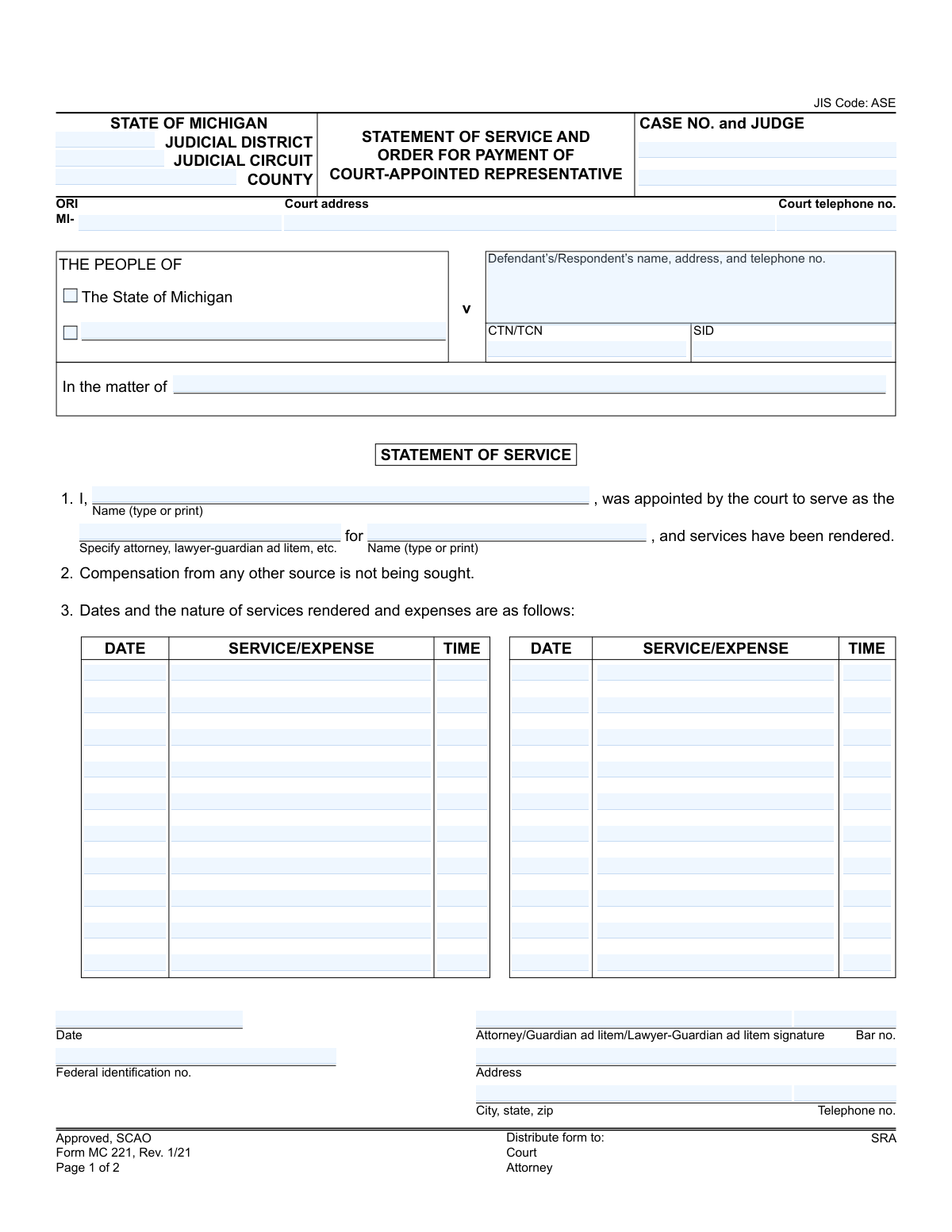
Yes! You can use AI to fill out Statement of Service and Order for Payment of Court-Appointed Representative
The Statement of Service and Order for Payment of Court-Appointed Representative, Form MC 221, is a legal document used in the State of Michigan. It allows attorneys, lawyer-guardians ad litem, and other court-appointed representatives to itemize their services and expenses for a specific case in order to receive compensation from the court. Today, this form can be filled out quickly and accurately using AI-powered services like Instafill.ai, which can also convert non-fillable PDF versions into interactive fillable forms.
MC 221 is part of the
Michigan court forms category on Instafill.
Our AI automatically handles information lookup, data retrieval, formatting, and form filling.
It takes less than a minute to fill out MC 221 using our AI form filling.
Securely upload your data. Information is encrypted in transit and deleted immediately after the form is filled out.
Form specifications
| Form name: | Statement of Service and Order for Payment of Court-Appointed Representative |
| Number of fields: | 93 |
| Number of pages: | 1 |
| Language: | English |
More forms in Michigan court forms
Instafill Demo: How to fill out PDF forms in seconds with AI
How to Fill Out MC 221 Online for Free in 2026
Are you looking to fill out a MC 221 form online quickly and accurately? Instafill.ai offers the #1 AI-powered PDF filling software of 2026, allowing you to complete your MC 221 form in just 37 seconds or less.
Follow these steps to fill out your MC 221 form online using Instafill.ai:
- 1 Navigate to a service like Instafill.ai and upload or select the MC 221 form.
- 2 Provide the case information, including the judicial district/circuit, county, case number, and judge's name, for the AI to populate.
- 3 Enter your name as the court-appointed representative and the name of the person you were appointed to represent.
- 4 Detail the services rendered by entering the date, description of the service or expense, and the time spent for each entry.
- 5 Input your professional information, such as your bar number, federal identification number, and contact details.
- 6 Review all the auto-filled information for accuracy, then digitally sign and date the Statement of Service section.
- 7 Download the completed form to submit to the court for the judge's review, signature, and issuance of the payment order.
Our AI-powered system ensures each field is filled out correctly, reducing errors and saving you time.
Why Choose Instafill.ai for Your Fillable MC 221 Form?
Speed
Complete your MC 221 in as little as 37 seconds.
Up-to-Date
Always use the latest 2026 MC 221 form version.
Cost-effective
No need to hire expensive lawyers.
Accuracy
Our AI performs 10 compliance checks to ensure your form is error-free.
Security
Your personal information is protected with bank-level encryption.
Frequently Asked Questions About Form MC 221
This form is used by court-appointed representatives, such as attorneys or guardians ad litem, to document their services and expenses in a case and request payment from the court or county.
The court-appointed representative (attorney, lawyer-guardian ad litem, etc.) fills out the 'Statement of Service' section on the first page. The judge completes and signs the 'Order for Payment' section on the second page.
You should provide a brief but specific description of the work performed, such as 'Client Interview,' 'Court Appearance,' or 'Review Discovery.' For expenses, list the specific cost, like 'Mileage' or 'Photocopying Fees.'
This is your tax identification number, which is typically an Employer Identification Number (EIN) for a firm or a Social Security Number (SSN) for a sole practitioner. It is required for the county to issue payment and for tax reporting purposes.
After completing and signing the 'Statement of Service,' you must submit the form to the court clerk. The form will then be given to the judge for review and approval of payment.
If you have more entries than the form allows, you can attach a separate, clearly itemized list. Make a note on the form, such as 'See attached sheet for additional services,' to direct the court.
Processing times can vary significantly by court and county. After the judge signs the order, it is sent to the disbursing officer for payment, which can take several weeks.
This is your certification that you are not attempting to receive payment from the client, their family, or any other party for the same services you are billing to the court.
The judge assigned to the case completes the 'Order for Payment' section. You should leave this section blank when you submit the form.
Yes, services like Instafill.ai use AI to auto-fill form fields accurately with your saved information, such as your name, bar number, and address, which saves time and helps prevent errors.
You can use a service like Instafill.ai to easily fill out this form online. Simply upload the PDF, and the platform will make it interactive so you can type your information, save your progress, and download the completed document.
If you have a non-fillable or 'flat' PDF, you can upload it to a service like Instafill.ai. The platform can convert the static document into an interactive, fillable form for you to complete on your computer.
The Case Number and Judge's name are located on official court documents related to your case, such as the order appointing you as a representative or other court notices.
Compliance MC 221
Validation Checks by Instafill.ai
1
Case Number Consistency Across Pages
Verifies that the 'CASE NO.' entered on page 1 is identical to the 'Case No.' on page 2. This is critical to ensure that the order for payment is associated with the correct legal case file. A mismatch could lead to incorrect billing or delays in payment processing.
2
Representative Name Consistency
Ensures the name of the court-appointed representative is consistent across the form: in the statement of service (item 1), next to the signature, and in the 'ORDER FOR PAYMENT' section. This validation prevents ambiguity about who rendered the services and who should be paid. If the names do not match, the form may be rejected for clarification.
3
Michigan Bar Number Format
Validates that the 'Bar no.' field follows the standard Michigan format, which typically starts with a 'P' followed by a sequence of digits (e.g., P12345). This check ensures the attorney is properly identified and registered with the State Bar of Michigan. An invalid format could indicate a data entry error or an invalid credential.
4
Federal Identification Number Format
Checks that the 'Federal identification no.' is in a valid format, either a 9-digit Employer Identification Number (EIN) (XX-XXXXXXX) or a Social Security Number (SSN) (XXX-XX-XXXX). This number is required for tax reporting purposes. Failure to provide a valid number will prevent payment processing.
5
Service Log Entry Completeness
For each row in the service log, this check ensures that if any one of the 'DATE', 'SERVICE/EXPENSE', or 'TIME' fields is filled, all three are filled. Incomplete entries are ambiguous and cannot be used to calculate compensation accurately. The system should flag any row with missing data to be completed or removed.
6
Chronological Date Validation
Verifies the logical sequence of dates on the form: all service dates must occur on or before the representative's signature date, which in turn must be on or before the judge's order date. This ensures that the representative is attesting to completed work and that the judge is authorizing a valid claim. Any date out of this logical order indicates a potential error and should halt processing.
7
Required Case Identifier Presence
Confirms that the 'CASE NO. and JUDGE' field is not empty. This information is the primary identifier for the legal proceeding and is absolutely essential for filing and record-keeping. A submission without a case number cannot be processed and will be immediately rejected.
8
Time Entry Format for Calculation
Validates that all 'TIME' entries in the service log are in a consistent, calculable format, such as decimal hours (e.g., 1.5) or hours and minutes (e.g., 01:30). This is crucial for the system to accurately sum the total hours worked and calculate the final payment amount. Inconsistent or non-numeric formats will cause calculation errors.
9
Required Representative Role
Ensures that the field specifying the representative's role ('Specify attorney, lawyer-guardian ad litem, etc.') is filled out. This information is necessary to confirm the appointee's capacity and may affect the rate of compensation. A missing role will require manual clarification before the payment can be approved.
10
Order Amount Presence
Checks that the payment 'amount' field in the 'ORDER FOR PAYMENT' section contains a numeric value greater than zero. A judge cannot authorize a payment order without a specified amount. This field should be populated, often by calculation from the service log, before being presented for judicial signature.
11
Payment Reconciliation
Validates that the 'check amount' entered in the final section matches the authorized 'amount' in the 'ORDER FOR PAYMENT' section. This is a critical final check to ensure the payment issued corresponds exactly to what the judge ordered. A discrepancy indicates a payment error that must be investigated and corrected.
12
Standard Date Format
Verifies that all date fields throughout the form (service dates, signature date, order date, check date) are entered in a valid and recognizable format, such as MM/DD/YYYY. This prevents data ambiguity and ensures that date-based logical checks can be performed correctly. Invalid date formats will cause the submission to fail.
13
Court Telephone Number Format
Checks that the 'Court telephone no.' field is a valid 10-digit phone number, allowing for common formats like (XXX) XXX-XXXX or XXX-XXX-XXXX. This ensures that the contact information for the court is accurate and usable if follow-up is needed. An invalid number could hinder communication regarding the case or payment.
Common Mistakes in Completing MC 221
Attorneys often enter generic descriptions like 'Case review' or 'Phone call' in the service log. This lack of specificity prevents the court from verifying that the time spent was necessary and reasonable, frequently leading to the form being returned for clarification. To avoid this, provide concrete details for each entry, such as 'Reviewed police report and discovery packet' or 'Phone conference with client regarding plea offer,' to justify the time billed and expedite payment.
The form requires time to be logged for each service, but filers may use inconsistent formats like '1 hr,' '30 mins,' or '1.25.' This inconsistency complicates the court's task of calculating the total hours for payment, increasing the chance of errors and delays. It is crucial to use a consistent decimal format (e.g., 0.25 for 15 minutes, 1.5 for 90 minutes) for all time entries to ensure accurate and prompt processing.
The Federal ID Number is required for the court to issue payment and report the income to the IRS. Forgetting to include this number is a common oversight that will bring the payment process to a complete halt until the information is provided. Always double-check that your FEIN or Social Security Number is correctly entered in the designated field to prevent significant payment delays.
The case number is the primary identifier used to link the payment request to the correct court file. Entering an incorrect, partial, or illegible case number can result in the form being misfiled or rejected, as court staff cannot process a payment without verifying the appointment. Carefully transcribe the full case number, including all letters and year designators, from official court documents to ensure your statement is processed correctly.
An unsigned Statement of Service is legally invalid and cannot be processed by the court. This simple oversight is surprisingly common, often happening when an attorney is rushing to complete paperwork. An unsigned or undated form will be immediately returned, delaying the entire payment cycle until a properly executed version is resubmitted.
Attorneys may combine several distinct tasks performed on the same day into one line item, such as 'Drafted motions and client correspondence.' Courts require a detailed breakdown of services to assess the reasonableness of the time billed for each specific task. Lumping services together obscures this detail and can lead to the court questioning the entry or reducing the approved time, ultimately delaying or lowering the payment.
The attorney's bar number is a unique identifier that confirms their identity and verifies they are in good standing with the State Bar. Forgetting to include the bar number forces court staff to look it up manually, which can delay the approval process. In some cases, if the name is common, it could lead to confusion or rejection, so it's essential to always include this critical piece of information.
Many court forms are still distributed as non-fillable PDFs and filled out by hand, where illegible handwriting is a frequent cause of errors. If a clerk cannot decipher the case number, service descriptions, or time entries, it can lead to incorrect data entry or rejection of the form. To prevent this, print clearly in block letters or use a tool like Instafill.ai, which can convert flat PDFs into fillable versions to eliminate handwriting issues.
The form requires the filer to specify their role, such as 'attorney' or 'lawyer-guardian ad litem.' Different roles may have different approved billing rates, so using the wrong designation can lead to payment being calculated incorrectly. This mistake often happens when filers are appointed in multiple capacities across different cases and forget to specify the correct role for the current case.
The top section of the form requires specific court identifiers like the Judicial District/Circuit, County, and Judge's name. These fields are sometimes left blank, especially if the attorney works across multiple jurisdictions. Missing information makes it difficult for the State's central payment office to correctly attribute costs, potentially causing delays. AI-powered form filling tools like Instafill.ai can help prevent this by saving and auto-populating recurring information for different courts.
Saved over 80 hours a year
“I was never sure if my IRS forms like W-9 were filled correctly. Now, I can complete the forms accurately without any external help.”
Kevin Martin Green
Your data stays secure with advanced protection from Instafill and our subprocessors
Robust compliance program
Transparent business model
You’re not the product. You always know where your data is and what it is processed for.
ISO 27001, HIPAA, and GDPR
Our subprocesses adhere to multiple compliance standards, including but not limited to ISO 27001, HIPAA, and GDPR.
Security & privacy by design
We consider security and privacy from the initial design phase of any new service or functionality. It’s not an afterthought, it’s built-in, including support for two-factor authentication (2FA) to further protect your account.
Fill out MC 221 with Instafill.ai
Worried about filling PDFs wrong? Instafill securely fills statement-of-service-and-order-for-payment-of-court-appointed-representative forms, ensuring each field is accurate.